

OpenClaw agents forget everything when a session ends, this instructions give it a memory that actually sticks. It wires up Mem0 + local Qdrant as a fully self-hosted (or via openrouter), privacy-first memory layer that persists across restarts, extracts atomic facts from your conversations, and recalls the right context exactly when needed. Your Markdown files stay untouched as the source of truth, while Mem0 handles semantic search on top, all running locally with zero cloud dependency once set up. A self-installing Mem0 + Qdrant persistent memory upgrade for OpenClaw.
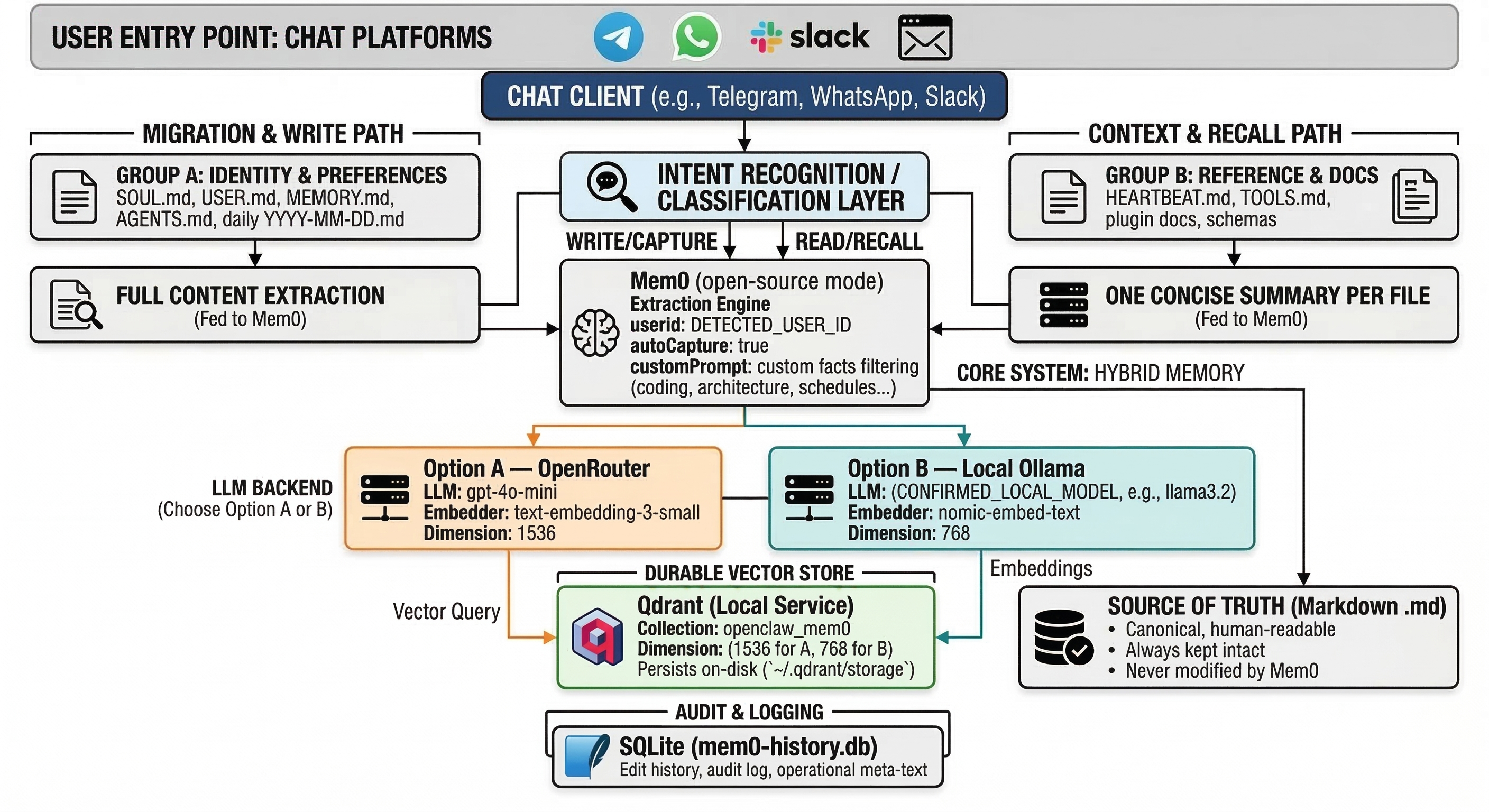
Attach the .md file to your OpenClaw chat, hit send, and it walks itself through the entire setup — detecting your OS, paths, and architecture automatically. No manual config hunting required.
The official Mem0 quickstart for OpenClaw works, but the default memory vector store is ephemeral. Restart your gateway and your memories are gone. SQLite handles audit history, not your vectors.
This guide fixes that with a proper self-hosted stack:
| Layer | What it does |
|---|---|
| Qdrant (local) | Durable vector store — persists across restarts |
| Mem0 OSS (open-source mode) | Semantic recall and fuzzy search layer |
| Markdown files | Source of truth — untouched, canonical, portable |
| OpenRouter or local Ollama | LLM + embeddings backend — your choice |
Scored across 15 real criteria (persistence, privacy, cost, debuggability, architecture, operations):
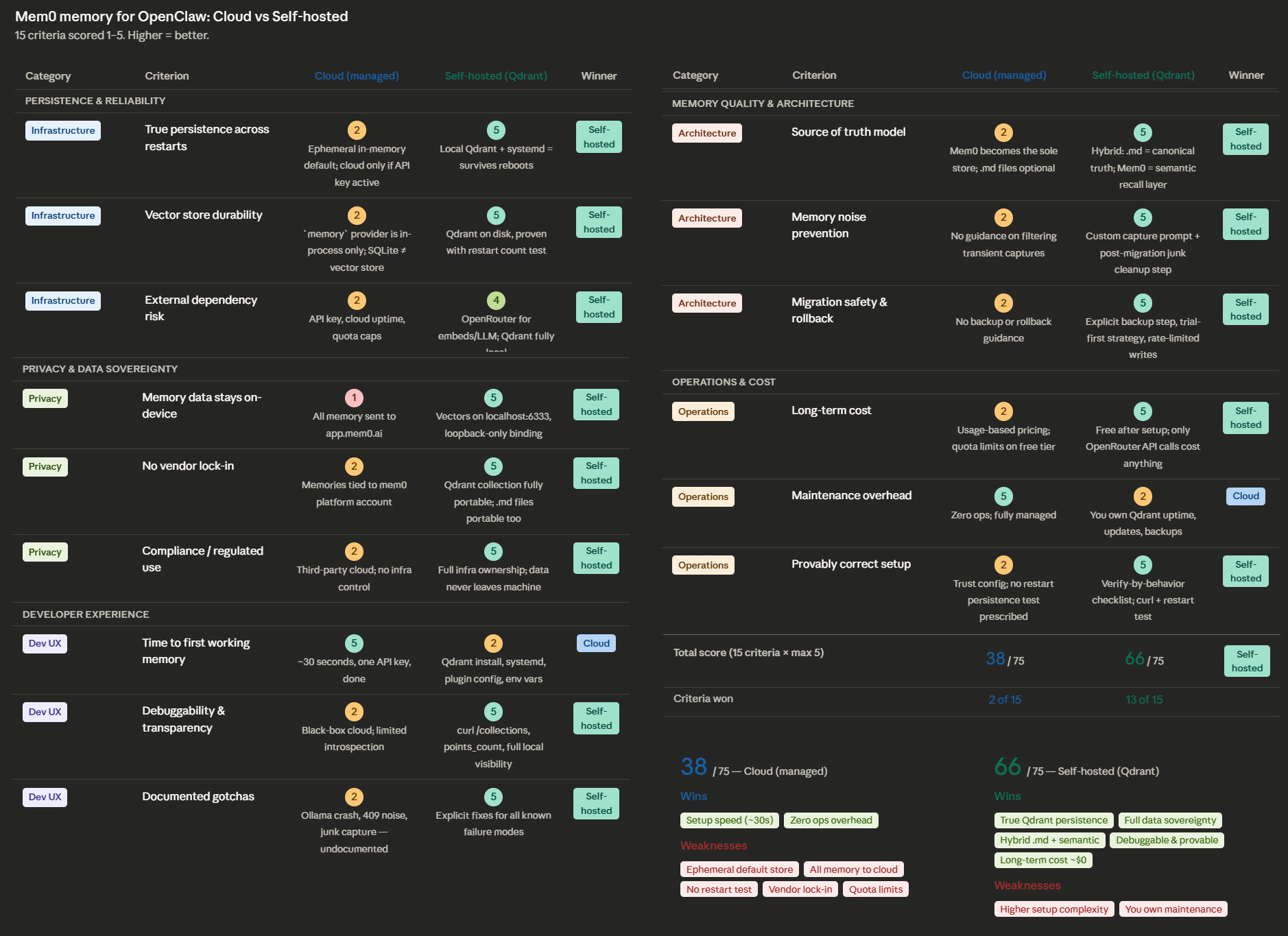
| Cloud (managed) | Self-hosted (this guide) | |
|---|---|---|
| Total score | 38 / 75 | 66 / 75 |
| Criteria won | 2 of 15 | 13 of 15 |
| Wins | Setup speed, zero ops | Persistence, privacy, cost, portability, transparency |
| Weaknesses | Ephemeral store, cloud lock-in, quota limits | Higher setup complexity, you own maintenance |
| File | Description |
|---|---|
| OPENCLAW-MEM0-SETUP.md | The self-installing guide — attach this to OpenClaw and send |
| OPENCLAW-MEM0-SETUP.pdf | Same guide in PDF — for reading before you run it |
- Download
OPENCLAW-MEM0-SETUP.md - Open your OpenClaw chat (Telegram, WhatsApp, Slack, web — wherever you talk to it)
- Attach the file and send it
- OpenClaw will read the guide and begin the installation
- Whenever it restarts the gateway, type
continueto resume — that's the only input needed during the process
You choose during setup:
- Option A — OpenRouter — works on any machine, small per-call cost, no GPU needed
- Option B — Local Ollama — fully offline, free after setup, GPU recommended for best speed
Tested on Linux (5 instances, zero issues). The guide uses environment detection and should work on macOS and broadly on other platforms, but has not been tested there. Windows users will need Docker for Qdrant — the guide covers this path.
Use at your own discretion. Best-effort, no guarantees.
During the install, OpenClaw will restart the gateway at least once. When that happens, it will pause and wait. Just type:
continue
Single word. That's it. It'll resume and finish the rest on its own.
This guide was produced from a real migration on a production OpenClaw instance. Every issue documented — the missing ollama npm dependency, the Qdrant version warnings, the 409 conflict noise, the junk memory cleanup — was encountered and resolved in practice.
The full comparison chart and both X posts that accompany this repo are linked in the original thread.
MIT — use it, share it, improve it.