
The Ultimate Automated Piano Player for Heartopia
🐍 Python Based • 🤖 Made with AI • 🎵 Studio Editor • 🎹 Visual Piano Roll
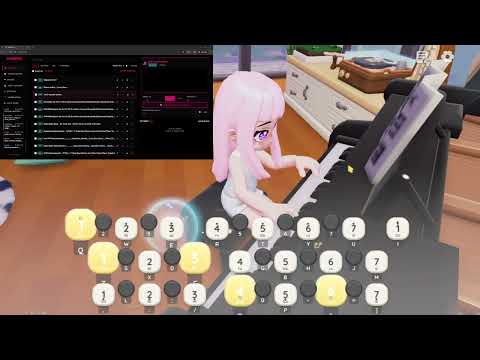
(Note: PianiPiaV6)
PianiPia V6 is a sophisticated Python-based application developed with the assistance of Generative AI. It represents the ultimate, streamlined evolution of the auto-player. It retains the powerful Studio Editor and Visual Piano Roll from previous versions but now features a gorgeous new Amoled Neon UI, lightning-fast performance, and a completely debloated core after removing the Game Assist features.
- 🎵 Auto-Player: Plays complex MIDI scripts perfectly using custom keyboard emulation.
- 📝 Studio Editor: Monaco-powered code editor to edit and sync 1,000,000+ line MIDI scripts.
- 🎹 Visual Piano Roll: Live visualizer tracking your code lines in real-time.
- ☁️ Community Cloud: Search, download, and upload scripts directly from the app.
- ✅ Storage & Performance Optimization: Completely removed the Game Assist tab and its heavy OpenCV dependencies. The app size has been reduced from 86MB down to just 24MB!
- ✅ Amoled Neon UI: The entire interface has been redesigned with a gorgeous Amoled Neon aesthetic.
- ✅ Console Log Stretch: Improved UI layout allows the console log to stretch and fit beautifully on your screen.
- ✅ Playlist Filters: Changed the default playlist filters to make organizing your songs easier.
- ✅ Expanded Information Tab: Added new resources and links for External Game Mods.
- ✅ Audio to MIDI Converter: Added a recommendation and link for the eldoraudio Piano Audio to MIDI Converter in the Info Tab (Note: this tool converts much better if the audio is a Piano Cover or Synthesia).
- ✅ 15K Smart Pitch Folding: Implemented intelligent note folding logic specifically for 15-key songs. Notes that fall outside the playable range now automatically wrap into the valid scale instead of being deleted.
- ✅ Zero Dropped Notes: Every single note from the source MIDI is now preserved and played. This ensures 15K songs match the rhythmic density and "fullness" of the 22K versions.
- ✅ 15K Sync Fix: Switched 15K conversion to a "Tap Mode" logic. This eliminates "ghost notes" and de-sync issues caused by conflicting sustain durations in the previous engine.
- ✅ Smart Quantization: "Black key" (accidental) notes now snap intelligently to their nearest valid physical key rather than being discarded.
- ✅ FileName Support: Removed strict naming restrictions on uploads that is causing for Upload Issues.
- ✅ Increased Upload Limit: Boosted the online upload limit from 200KB to 500KB to support larger, more complex song scripts.
- ✅ Smart Pagination: Added a custom "Per Page" selector (50/100/200/300) to the Online tab. Your preference is saved automatically to
config.json. - ✅ Batch Delete Fixed: Fixed a critical bug where checking multiple songs in the Playlist and clicking "Delete Selected" would fail due to filename formatting issues.
- ✅ Download Stability: Implemented
clean_filenamesanitization. Downloads with illegal OS characters or missing extensions are now automatically fixed, preventing "Add to Playlist" failures.
- NEW: Game Assist Tab: Added a dedicated tab for game automation tools.
- NEW: Auto Cooker: Added image recognition for automatic cooking on multiple stoves.
- NEW: Snow Puzzle Solver: Added an automated solver for the snow mini-game.
- Optimization: Unified the codebase for better stability and performance.
- 🚀 Monaco Engine Integration: Replaced the standard text box with the Monaco Editor (the engine powering VS Code).
- ⚡ Massive Performance Boost: The editor now supports 1,000,000+ lines of code with zero lag using virtual scrolling. Fixed issues where files larger than 100k lines would crash the UI.
- 🎯 Precision Sync Fix: Fixed an issue where the text highlighter would drift off-sync. It now tracks playback with millisecond precision.
- 🔍 Pinpoint Click-to-Find: Clicking a note in the visualizer now calculates the exact line number and centers it instantly.
- NEW: Studio Editor: Added a dedicated tab for editing
.txtscripts. Includes sync-scrolling and visual debugging tools. - NEW: Visualizer Engine: Added a high-performance Canvas-based Piano Roll to the Playlist and Editor tabs.
- NEW: WebSocket Architecture: Completely removed the 500ms polling lag. The app now communicates via WebSockets for instantaneous, high-framerate UI updates.
- NEW: Online Pagination: Fixed the issue where only the first 50 songs were visible in the Online tab. You can now browse the entire database.
- ✅ Expanded Keybinds: Fixed the settings menu to support all keyboard keys. You are no longer restricted to F1-F12.
- ✅ Playlist Multi-Select: Added checkboxes to the playlist for batch deletion.
- ✅ Activity Console: Added a live "Info Console" to the sidebar.
- ✅ Playback Speed Bug: Fixed speed resetting to 1.0x on restart.
- ✅ Sticky Keys: Fixed keys remaining held down when pausing.
- ✅ Alt-Tab Safety: Auto-stop when switching windows to prevent typing in other apps.
🐛 Encountered a new bug? If you have an issue not listed here, please Create an Issue in this repository.


Is this a virus? No.
If you download the .exe, your antivirus (Windows Defender, Avast, etc.) may flag it as a Trojan or Malware.
Why does this happen?
- Automation Behavior: This app uses libraries (
pydirectinput,pyautogui) designed to take control of your keyboard and mouse. Antivirus software often mistakes this for malicious behavior. - Unsigned Code: As an independent developer, I do not have a digital code-signing certificate.
- Safe Workaround - Exclusion Folder:
- Create a folder named
PianiPiaPlayer. - Open Windows Security > Virus & threat protection > Manage settings > Exclusions.
- Add the
PianiPiaPlayerfolder to exclusions. - Extract the app there. It will run without issues.
- Create a folder named
- Launch: Run the application. A browser window will open automatically.
- Get Songs:
- ☁️ Online Tab: Search for songs, use the Next/Prev buttons to browse pages, and download.
- 🎹 Add / Convert Tab: Drag and drop
.midfiles and click Convert.
- Play:
- Go to Playlist, add songs to Queue.
- Press Start (Default: F4) to begin playing.
- Press Stop (Default: F5) to halt.
Made with ❤️ by KaleidSkylark