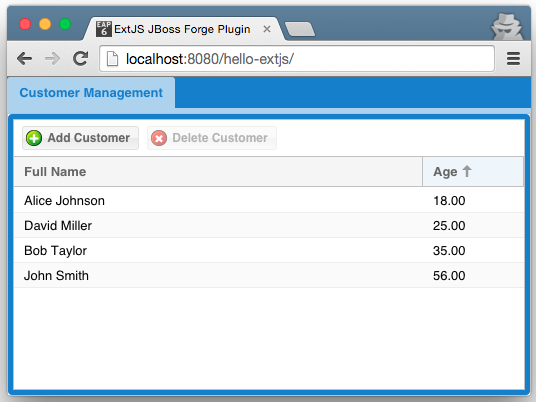
The extjs-addon enables developers to automate several tasks in the construction of applications that use ExtJS 5, in JBoss Forge. This addon is a fork of the angularjs-addon.
This Addon requires the following installation steps.
To use this addon, you must add it as a dependency in the pom.xml of your forge-addon classified artifact:
(Make sure the dependency is put all the way to the left, and uses 3 spaces for indentation of GAV)
<dependency>
   <groupId>org.jboss.forge.addon</groupId>
   <artifactId>extjs</artifactId>
   <classifier>forge-addon</classifier>
   <version>${version}</version>
</dependency>-
Scaffold web-apps from JPA entities. The generated scaffold uses a thick-client based on ExtJS 5, and a JAX-RS RESTful backend.
JBoss Tools with Forge 2.4.1, or JBoss Forge-CLI 2.4.1.
Java 7, it is currently impossible to build the addon using Java 8.
Assuming JBoss Tools with Forge, or Forge-CLI is installed:
(JBT)
Ctrl+5. Run the "Install the addon from Git" command, using these coordinates: https://github.com/LemonSoftware/extjs-addon.git
(Forge-CLI)
$ addon-install-from-git --url https://github.com/LemonSoftware/extjs-addon.git
(JBT)
Ctrl+5. Run the "Project: New" command. Create a new web application, named 'hello-extjs'.
(Forge-CLI)
$ project-new --named hello-extjs
(JBT)
Ctrl+5. Run the "JPA: Setup" command. Defaults should be sufficient.
(Forge-CLI)
$ jpa-setup
(JBT)
Ctrl+5. Run the "JPA: New Entity" command. Create a new entity (with an auto-generated Id) named 'Customer'.
Select the newly created Customer Java source file in the navigator. Ctrl+5. Run the "JPA: New Field" command. Create a new field of type String in the Customer entity named 'fullName'.
Ctrl+5 again and re-run the same command. Create a new field of type int in the Customer entity named 'age'.
(Forge-CLI)
$ jpa-new-entity --named Customer
$ jpa-new-field --named fullName
$ jpa-new-field --named age --type int
(JBT)
Ctrl+5. Run the "Constraint: Setup" command. Choose the "Generic Java EE" BV provider to use.
Ctrl+5. Run the "Constraint: Add" command. Create a NotNull constraint on the fullName field.
Ctrl+5. Run the "Constraint: Add" command. Create a Min constraint on the age field, with min value of 0.
(Forge-CLI)
$ constraint-setup --providers Generic\ Java\ EE
$ constraint-add --onProperty fullName --constraint NotNull
$ constraint-add --onProperty age --constraint Min --value 0
(JBT)
Ctrl+5. Run the "Scaffold: Setup" command. Choose the "ExtJS5" type to use.
Ctrl+5. Run the "Scaffold: Generate" command. Choose the "ExtJS5" type to use. Select the Customer entity to scaffold. (I’ll rework this bit across scaffold providers when fixing FORGE-1501 and FORGE-1731).
On completion, a JAX-RS resource that can handle requests and responses of media type application/json should be created, in conjunction with the ExtJS 5 views.
(Forge-CLI)
$ scaffold-setup --provider ExtJS5
$ scaffold-generate --provider ExtJS5 --targets org.hello.extjs.model.Customer
This app can now be deployed to JBoss EAP.