
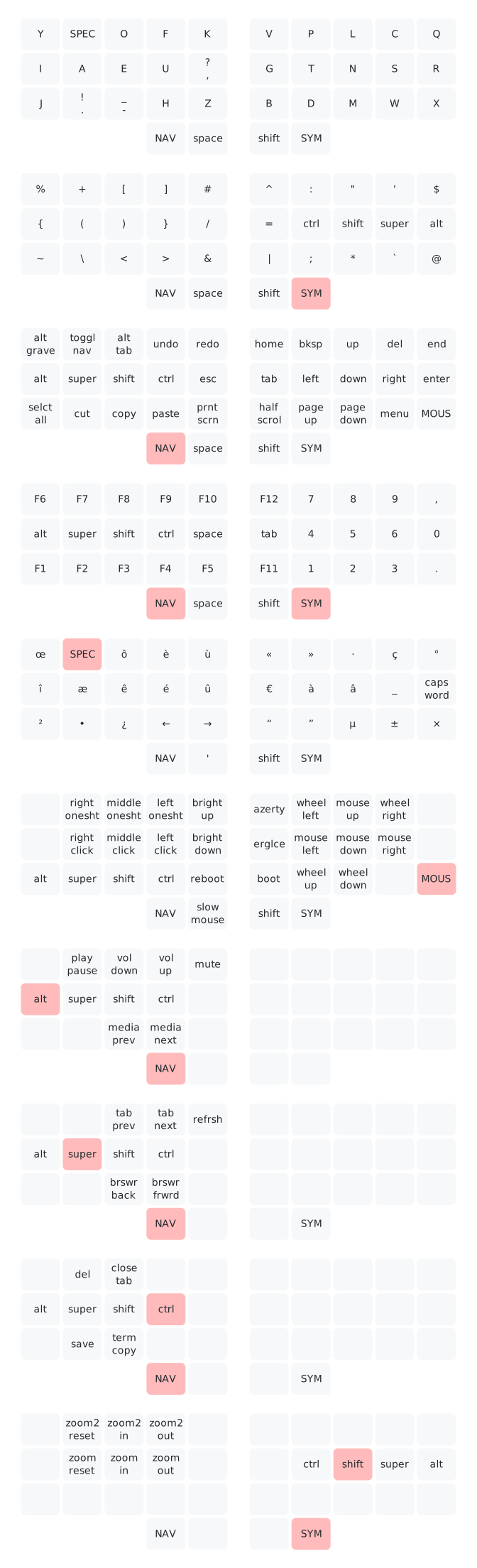
A QMK keymap for the Sweep, a split keyboard with 34 keys. It makes extensive use of layers to fit all keys, and uses callum-style mods.
- Custom layout optimized for French and English, Erglace (can be dynamically switched with AZERTY)
- A layer for all symbols
- A layer for navigation keys, like the arrow keys
- A tri layer for numbers and function keys
- One shot modifiers, taken from the awesome Callum's keymap
- One shot layer for French accents and useful Unicode characters, inspired by QWERTY Lafayette
- Swapper keys to emulate Alt+Tab like behaviors with one key, once again from Callum's keymap
- A layer to emulate a mouse
- Key overrides with modifiers to fit media keys and useful shortcuts
- Compilation for QWERTY or AZERTY depending on a config flag (by default, the computer should be set to French input)

Full version, with mouse layer and key overrides.
- The one shot modifiers are on the
NAVandSYMlayers. When a mod is tapped, it is queued and will be applied to the next key (for exemple a letter on the base layer). - Pressing
NAVorSYMagain cancels any queued modifier. - To do the same shortcut multiple times, the modifier can be held. It stays active even if the layer changes.
caps wordis a QMK feature that enables caps lock for one word only, useful to write constants.- Accented letters from the one shot layer can be made uppercase with
shift. - An override is defined to be able to do a quick press of the
superkey, achieved withsuper+ctrlon theNAVlayer
- Because it is used very often, the
NAVlayer can be toggle on by pressingNAVandshifttogether, or the dedicatedtoggle navkey.NAVcan then be released and the layer stays active. - One shot mods still work (the layer is momentarily turned off for the shortcut).
- The
toggle navkey toggles off the layer.
- This feature is a mix between key overrides and tri layers: activating a layer AND pressing a key activates another layer. This is useful to put many shortcuts on the left split, to be used with the mouse.
NAV+altactivates a media keys layerNAV+superactivates a browser navigation layerNAV+ctrlactivates a shortcuts layerSYM+shiftactivates a zoom layer
slow mousebutton make the cursor speed slower for more precision.oneshtbuttons stand for 'one shot click'. The mouse layer is disabled after the button is clicked, unlike the other buttons.- A tap on
NAV,SYMorshiftexits the mouse layer. erglcestands for Erglace, my custom layout. It can be switched with AZERTY (including the one shot special characters layer, see the keymap definition).
- Install the QMK CLI (available on Arch repos as
qmk) - Download the latest release
- Run
qmk flash ferris_sweep_lysquid.hex - Put your keyboard in bootloader mode (with a
bootkey or a reset button) - If you are flashing your keyboard for the first time, you must flash the two sides separately with the flags
-bl avrdude-split-leftand-bl avrdude-split-right