A lightweight, fully local REST API that simulates prompt/response behavior like ModelVault or OpenAI—no cloud required. Supports local LLMs via Ollama, with a stub fallback for universal testability.
See a full walkthrough of setup, stubbed and Ollama-backed responses, and API testing via CLI, Swagger, and Postman:
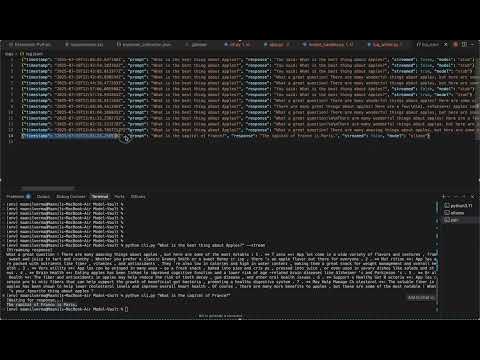
POST /generate— Synchronous prompt/response endpointPOST /stream— Streams output token-by-token (SSE)- Stub fallback if Ollama is not running
- Logs all requests/responses to
logs/log.jsonl - CLI and Postman collection for easy testing
- OpenAPI docs at
/docs
minivault-api/
├── app.py                  # FastAPI app
├── model_handler.py        # Model/stub logic
├── log_writer.py           # Logging utility
├── cli.py                  # CLI tool (supports both /generate and /stream)
├── postman_collection.json # Postman config
├── requirements.txt        # Python dependencies
├── logs/
│   └── log.jsonl           # Log file
└── README.md               # This file
python3 -m venv env
source env/bin/activate
pip install -r requirements.txt- Download Ollama:
https://ollama.com/download
Open the.dmg, drag Ollama to Applications, and start the Ollama application (double-click in Applications folder). - Add Ollama to your PATH (if needed):
Ifollamais not found in Terminal, run:(Add this to yourexport PATH="/Applications/Ollama.app/Contents/MacOS:$PATH"
~/.zshrcfor persistence.) - Verify installation:
ollama --version
- Download and run a model:
ollama run llama3
- The first run will download the model (may take a few minutes).
- You can interact with the model in the terminal, or just close it after the download.
- Ready!
Ollama’s API will be available at
http://localhost:11434for your MiniVault API.
- Download Ollama:
https://ollama.com/download
Run the installer and start the Ollama application from the Start Menu. - Add Ollama to your PATH (if needed):
The installer should add Ollama to your PATH automatically. If not, add the install directory (e.g.,C:\Program Files\Ollama) to your PATH manually. - Open Command Prompt or PowerShell and verify installation:
ollama --version
- Download and run a model:
ollama run llama3
- The first run will download the model (may take a few minutes).
- Ready!
Ollama’s API will be available at
http://localhost:11434for your MiniVault API.
uvicorn app:app --reloadsource env/bin/activatepython cli.py "What is the capital of France?"python cli.py "Tell me a joke" --stream- The
--streamflag will print tokens as they arrive from the/streamendpoint. - Omit
--streamto use the/generateendpoint for a full response.
$ python cli.py "Tell me a joke" --stream
[Streaming response]
Why did the chicken cross the road? To get to the other side!Note: Swagger UI does not display streaming responses in real time. For real-time streaming, use the CLI or Postman.
- Input:
{ "prompt": "..." } - Output:
{ "response": "..." } - Behavior: Uses Ollama if available, else stub.
- Input:
{ "prompt": "..." } - Output: SSE stream, one token per event
- Behavior: Streams tokens from Ollama or stub
- Import
postman_collection.json - Try
/generateand/stream - Limitation: Postman does not support real-time SSE streaming. You will only see the full response after streaming is finished. For real-time streaming, use the CLI or
curl:curl -N -X POST http://127.0.0.1:8000/stream -H "Content-Type: application/json" -d '{"prompt": "Tell me a joke"}'
- Visit http://127.0.0.1:8000/docs
- Note: Streaming responses will only appear after the stream is finished.
- All interactions are logged to
logs/log.jsonlin JSONL format:{ "timestamp": "...", "prompt": "...", "response": "...", "streamed": true, "model": "ollama" }
| Topic | Decision | Reason |
|---|---|---|
| Ollama vs Hugging Face | Ollama | Fast setup, small disk, production-ready local LLMs |
| Stub Fallback | Yes | Ensures project runs even without Ollama |
| Streaming | SSE (not WebSockets) | Simpler, natively supported, less boilerplate |
| Split endpoints | /generate and /stream |
Clarity, avoids confusion about response type |
| Web UI | Skipped | Out of scope; Postman + CLI + Swagger suffice |
| Token delay simulation | Included in /stream stub |
Adds realism, mimics LLM latency |
| Logging format | JSONL | Efficient for appending, analytics, replay |
- ✅ Local REST API (stub + optional LLM)
- ✅ Logs all prompts/responses
- ✅ Postman, CLI, Swagger support
- ✅ No internet/cloud dependencies
- ✅ Bonus: streaming token-by-token