 This project has received funding from the European Union’s Horizon 2020 research and innovation programme under the Marie Sklodowska-Curie grant agreement No 101030275
Latest software release:


First copy this repository to your pc running the following in your python terminal (Python 3.9 recommended)
git clone https://github.com/MarnixMeersman/DocumeNDT_Controller
Then install all required libraries using:
pip install -r requirements.txt
Then proceed with reading this README. Have fun!
When you cloned this repo, you will see two main_...py files: main_grid and main_inputfile. We recommend to use main_grid for your first test cycle and use the output of your first cycle to re-run the other cycles uing main_inputfile.py.
- Adjust your portname, if you are using mac is should be something like:
portname = '/dev/tty.usbmodem2101'. For Windows, tryportname = 'COM3'orportname = COM4.
- If you struggle to find your portname, have a look
-
Define the speed limit for WALL-E. We recommend to not go above 15 000 steps per second for the lifetime of the motors.

-
Run your file. Your terminal should show you a clickable link. It should automatically open your browser. If not, paste the url in your browser (only tested for Chrome and Safari).

-
You should see something like this:
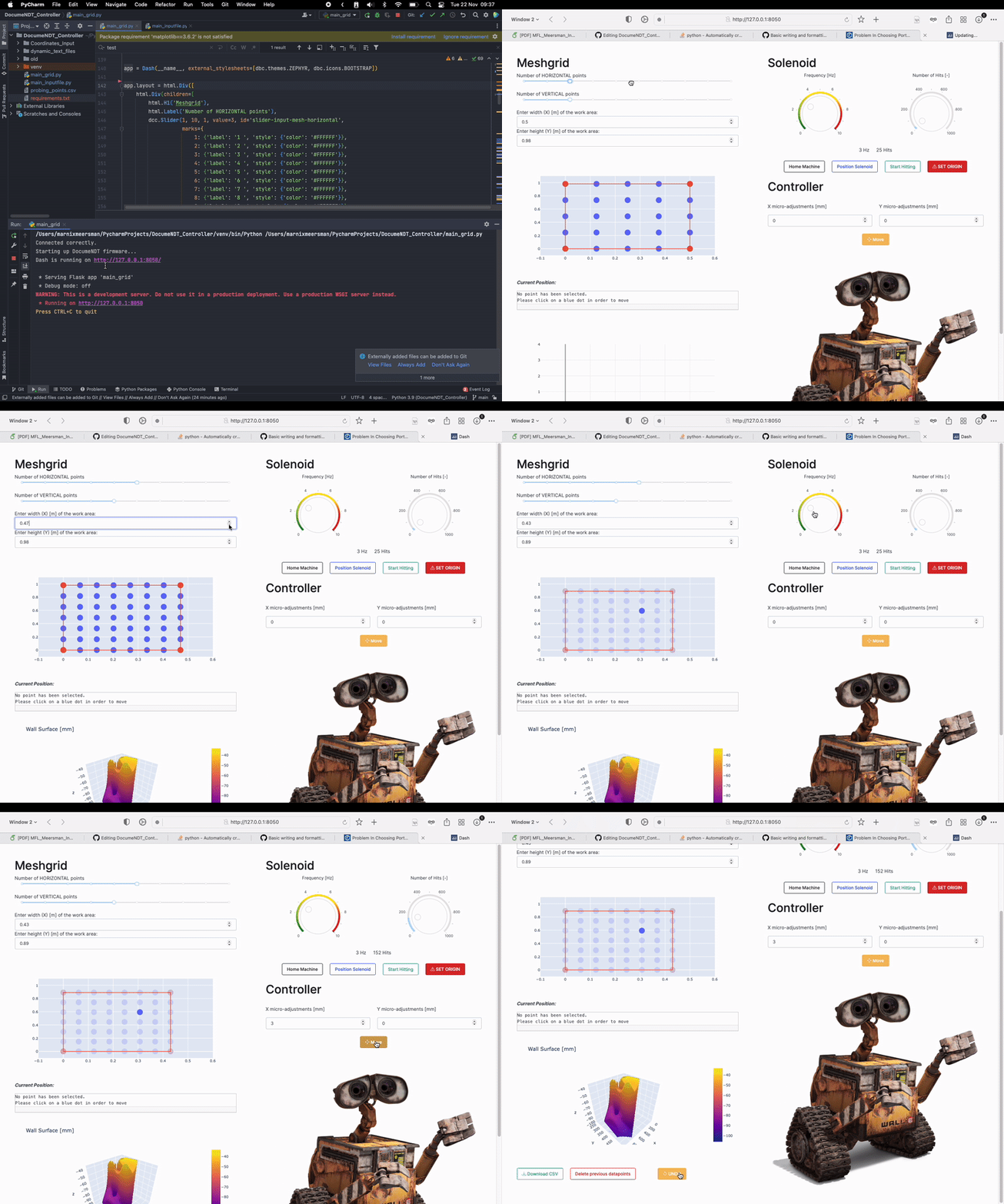
Hopefully the interface in intuitive by itself, still here a few highlights:
- To start, DISABLE the power of WALL-E and place the head at your origin location, then turn on two power buttons.
- Secondly, open your interface and click the big red SET ORIGIN! button. This saves the cureent location as the origin.
- Measure the width and height of the working area relative to the origin point and enter it into the input bars.
- If you're starting a new cycle click the 'delete previous datapoints' button, such that you start of with clean file.
- Using the sliders you can make a probing meshgrid which is automatically adjusted in the scatterplot. Click a point to move towards it.
- In order tot start a hitting cycle, adjust the two controllers for number of hits and frequency to your liking.
- When you have finished your cycle, save the datapoints using the green button in the bottom left.
- Not that if you probed at a location you are unhappy with, click the undo button, micro adjust and try again. probing points are always saved unless you press UNDO, which then delets the last probe you did.
- To repeat the same cycle over again, copy the .csv file you just downloaded and paste it into the folder 'Coordinates_Input'. Name the file you just pasted 'cc.csv'
- Then run main_inputfile.py and click the black button named 'generate mesh'. The probing points you performed in the first cycle should appear. The rest works similar to main_grid.py
DocumeNDT_Controller is available under the CC0 license. See the LICENSE file for more info