MediBot is a suite of advanced medical chatbots designed to assist with various healthcare tasks. The project is organized into three main applications: Basic, Report Assistant, and Advanced, each providing specialized functionalities for different use cases.
MediBot is designed to offer medical assistance through interactive chat interfaces. It utilizes OpenAI's GPT-4 model to provide responses and facilitate conversations tailored to medical contexts. The project includes:
- Basic: A simple chat interface for basic medical queries.
- Report Assistant: Assists with report analysis and answers questions based on provided documents.
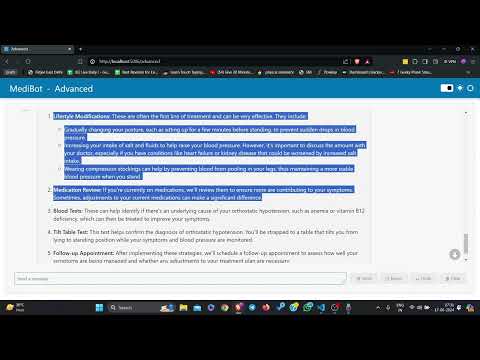
- Advanced: A comprehensive medical diagnostic system with multiple agents and tasks.
To set up the MediBot, follow these steps:
-
Clone the repository:
git clone https://github.com/yourusername/MediBot.git cd MediBot -
Create and activate a virtual environment:
python3 -m venv env source env/bin/activate -
Install the dependencies:
pip install -r requirements.txt
-
Set up environment variables:
- Create a
.envfile in the project root directory. - Add your OpenAI API key:
OPENAI_API_KEY=your_openai_api_key
- Create a
To run the Basic MediBot:
panel serve src\basic.pyTo run the Report Assistant MediBot:
panel serve src\report_assistant.pyTo run the Advanced MediBot:
panel serve src\advanced.pyTo run all 3 together and get an option to select from these three:
panel serve src\advanced.py src\basic.py src\report_assistant.pyThen go to your browser and type:
http://localhost:5006/- Simple chat interface
- Real-time responses using OpenAI's GPT-4 model
- Upload PDF reports for analysis
- Retrieve answers to queries based on the content of the reports
- Multi-agent system with specific roles (Clinical Assistant, Medical Diagnostician, General Doctor)
- Sequential task processing for comprehensive diagnostics
- Customizable human interface for interaction
openai
panel
dotenv
langchain
chroma
crew
crewaiAgents Configuration (config/agents.yaml):
Defines the agents involved in the diagnostic process.
Tasks Configuration (config/tasks.yaml):
Specifies the tasks and the sequence of their execution.