


Provides methods for running rainfall quality control.
RainfallQC can be installed from PyPi:
pip install rainfallqcLet's say you have data for a single rain gauge stored in "hourly_rain_gauge_data.csv" which looks like this:
| time | rain_mm |
|---|---|
| 2020-01-01 00:00 | 0.0 |
| 2020-01-01 01:00 | 0.1 |
| 2020-01-01 02:00 | 0.0 |
| 2020-01-01 03:00 | 105.0 |
| 2020-01-01 04:00 | 0.6 |
| ... | ... |
For the majority of the checks in RainfallQC, you can load in your data using polars and run the checks directly. Below, we run 2 example QC checks:
check_intermittency- to flag years where there are periods of non-zero bounded by 0 (see Figure 1.),
daily_accumulations- to flag accumulations of hourly values into daily.

Figure 1. Example of an intermittency issue within the rainfall record
import polars as pl
from rainfallqc import gauge_checks, timeseries_checks

data = pl.read_csv("hourly_rain_gauge_data.csv")

intermittent_years = gauge_checks.check_intermittency(data, target_gauge_col="rain_mm")

daily_accumulation_flags = timeseries_checks.check_daily_accumulations(
    data,
    target_gauge_col="rain_mm",
    gauge_lat=52.0,
    gauge_lon=2.0,
    smallest_measurable_rainfall_amount=0.1,
)
Please note that some checks may require additional metadata, such as gauge location (latitude and longitude) or smallest measurable rainfall amount (e.g. 0.1 mm). This could look like:
| station_id | latitude | longitude | start_datetime | end_datetime | path |
|---|---|---|---|---|---|
| rain_mm_gauge_1 | 53.0 | 2.0 | 2020-01-01 00:00 | 2024-01-01 00:00 | path/to/gauge_1.csv |
| rain_mm_gauge_2 | 54.1 | -0.5 | 2018-01-01 00:00 | 2023-01-01 00:00 | path/to/gauge_2.csv |
| rain_mm_gauge_3 | 56.9 | 1.9 | 2015-01-01 00:00 | 2025-01-01 00:00 | path/to/gauge_3.csv |
| ... | ... | ... | ... |
You could then run checks that require metadata i.e. the check_hourly_exceedance_etccdi_rx1day QC check which flags rainfall values exceeding
the hourly day rainfall 1-day record at a given location (see Figure 2):
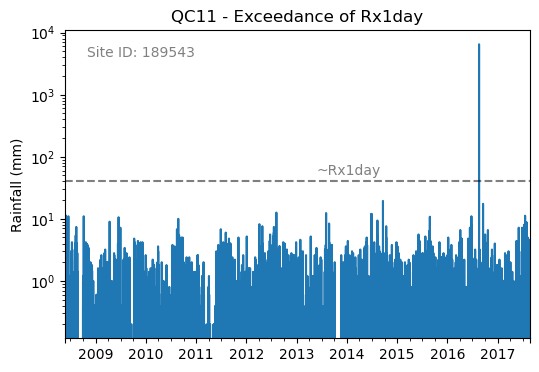
Figure 2. Example of an Rx1day check from the IntenseQC framework
The code for that check looks like:
import polars as pl
from rainfallqc import comparison_checks

data = pl.read_csv("hourly_rain_gauge_data_gauge_1.csv")
metadata = pl.read_csv("rain_gauge_metadata.csv")

target_gauge_id = "rain_mm_gauge_1"
target_metadata = metadata.filter(pl.col("station_id") == target_gauge_id)

rx1day_check = comparison_checks.check_hourly_exceedance_etccdi_rx1day(
     data,
     target_gauge_col=target_gauge_col,
     gauge_lat=target_metadata["latitude"],
     gauge_lon=target_metadata["longitude"]
)
Output flags will then look like:
| time | rx1day_check |
|---|---|
| 2020-01-01 00:00 | 0 |
| 2020-01-01 01:00 | 0 |
| 2020-01-01 02:00 | 0 |
| 2020-01-01 03:00 | 1 |
| 2020-01-01 04:00 | 0 |
| ... | ... |
To run multiple QC checks, you can use the apply_qc_framework() method to run QC methods from a given framework (e.g. IntenseQC).
Let's say you have hourly rainfall values from a rain gauge network data like:
| time | rain_mm_gauge_1 | rain_mm_gauge_2 | rain_mm_gauge_3 |
|---|---|---|---|
| 2020-01-01 00:00 | 0.0 | 0.5 | 0.0 |
| 2020-01-01 01:00 | 0.5 | 0.0 | 1.0 |
| 2020-01-01 02:00 | 0.0 | 1.0 | 0.0 |
| 2020-01-01 03:00 | 105.0 | 0.0 | 0.5 |
| 2020-01-01 04:00 | 0.0 | 0.5 | 0.0 |
| ... | ... | ... | ... |
... and metadata like example metdata 1. You can then run multiple QC checks at once by defining a QC framework, the methods to run and parameters for those methods.
As of RainfallQC v0.3.0, there are three QC frameworks:
- "intenseqc" - All 25 checks from IntenseQC/GSDR-QC with names like: "QC1", "QC2" ... "QC25",
- "pypwsqc" - 2 checks from pyPWSQC with the names: "FZ" and "SO",
- "custom" - Allows the user to select a custom set of checks (see Example 8 in Tutorials).
Let's run some QC checks from intenseqc framework below:
import polars as pl
from rainfallqc.qc_frameworks import apply_qc_framework

network_data = pl.read_csv("hourly_rain_gauge_network.csv")
metadata = pl.read_csv("rain_gauge_metadata.csv")

# 1. Decide which QC methods of IntenseQC will be run
qc_framework = "IntenseQC"
qc_methods_to_run = ["QC1", "QC8", "QC9", "QC10", "QC11", "QC12", "QC14", "QC15", "QC16"]

# 2. Determine nearest neighbouring gauges for neighbourhood checks
gauge_lat = gpcc_metadata["latitude"]
gauge_lon = gpcc_metadata["longitude"]
nearest_neighbourhours = ["rain_mm_gauge_2", "rain_mm_gauge_3", ...] # or see Example 3 if not determined

# 2 Decide which parameters for QC
qc_kwargs = {
    "QC1": {"quantile": 5},
    "QC14": {"wet_day_threshold": 1.0, "accumulation_multiplying_factor": 2.0},
    "QC16": {
        "list_of_nearest_stations": nearest_neighbourhours,
        "wet_threshold": 1.0,
        "min_n_neighbours": 5,
        "n_neighbours_ignored": 0,
    },
    "shared": {
        "target_gauge_col": "rain_mm_gauge_1",
        "gauge_lat": gauge_lat,
        "gauge_lon": gauge_lon,
        "time_res": "daily",
        "smallest_measurable_rainfall_amount": 0.1,
    },
}

# 3. Run QC methods on network data
qc_result = apply_qc_framework.run_qc_framework(
    daily_rain_gauge_network, qc_framework=qc_framework, qc_methods_to_run=qc_methods_to_run, qc_kwargs=qc_kwargs
)
Because lots of the checks share the same parameters with a standard vocabulary, you can use the "shared" part of the qc_kwargs dictionary to set those.
Of course, your data may not be tabular, or may not be stored in a single file. Therefore, please see our other Tutorials.
There is also a demo notebook.
Finally, different QC methods are suitable for different temporal resolutions, see our Which checks are suitable for my data's temporal resolution? for more information.
- RainfallQC is developed and maintained by UKCEH.
- Free software: GNU General Public License v3
- Documentation: https://rainfallqc.readthedocs.io.
- 27 rainfall QC methods (25 from IntenseQC, 2 from pyPWSQC)
- polars DataFrame support for fast data processing
- modular structure so you can pick and choose which checks to run
- support for single gauges or networks of gauges
- editable parameters so you can tweak thresholds, streak or accumulation lengths, and distances to neighbouring gauges
To cite a specific version of RainfallQC, please see Zenodo DOI. For v0.3.1: https://doi.org/10.5281/zenodo.17457013
- Builds upon IntenseQC, and (is compatible with) pyPWSQC:
- Please email tomkee@ceh.ac.uk if you have any questions.
- This package was created with Cookiecutter and the audreyr/cookiecutter-pypackage project template.