Made by: Kopacz Mădălina-Elena (@MadalinaKopacz), Năstase Matei-Dorian (@matei-dorian) and Negruț Maria-Daniela (@NMDMaria).
Please contact us if you plan on using this code.
This was a group project in our Operating Systems class. Finished and presented in January 2022.
It's a chat system with rooms made for short-message broadcasting made for Linux distributions, so far only on localhost. Using a tree system the messages from a parent are propagated to all indirect childs. The server has been integrated in a daemon and has a dynamyc library.
For the clients, you can use our menu and connect as either one. After choosing a type of client you'll be asked to enter a path which should follow the format: room_name/another_room_name/.../final_room_name (room names separated with slash)
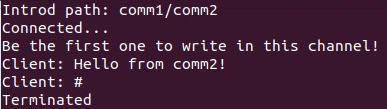
After this you'll recieve a connected message from the server, also the last message found in this room. After this you can chat freely!
When you want to end the connection, you can enter '#' in the chat.

- Go to
<your download path>/chatsystem/libs/serverliband in a terminal write:
gcc -c -Wall -Werror -fpic server.c
gcc -shared -o libserver.so server.o
- Go to
<your download path>/chatsystem/programs/serverand in terminal write:
gcc -L/<your download path>/chatsystem/libs/serverlib - Wl,-rpath=/<your download path>/chatsystem/libs/serverlib - Wall -o server server.c -lserver
- Make the daemon work at reboot. Open in a terminal
crontab -eand after selecting your prefered text editor go to the end of file and write:
@reboot .<your download path>/chatsystem/programs/server
Now you just have to compile the client side and reebot.
- Go to
<your download path>/chatsystem/libs/clientliband in a terminal write:
gcc -c -Wall -Werror -fpic client.c
gcc -shared -o libserver.so client.o
- Go to
<your download path>/chatsystem/programs/clientand in terminal write:
gcc -L/<your download path>/chatsystem/libs/clientlib - Wl,-rpath=/<your download path>/chatsystem/libs/clientlib - Wall -o sublisher sublisher.c -lclient
gcc -L/<your download path>/chatsystem/libs/clientlib - Wl,-rpath=/<your download path>/chatsystem/libs/clientlib - Wall -o publisher publisher.c -lclient
gcc -L/<your download path>/chatsystem/libs/clientlib - Wl,-rpath=/<your download path>/chatsystem/libs/clientlib - Wall -o subscriber subscriber.c -lclient
- Open the menu.c file and at line 13 and make sure that the path leads to where you installed the program.
- Go to
<your download path>and open a terminal and write:
gcc menu.c -o menu
- Open a terminal where you downloaded the project and open the menu!
./menu
The client types are:
- Publisher - can only broadcast/send messages without seeing any messages sent by other user
- Subscriber - can only see the messages
- Sublisher - a combination of both, can send & recieve messages. Only downside: you have to send a message to recieve all the messages (if you have a solution for this contact us!)
After choosing the client type you'll encounter the message Introduce path:. The format for the path is room_name/another_room_name/.../final_room_name. You can have 2 or more clients connected to the same channel and maximum of 30 users connected in the chat system at the same time.
Send as many messages you want and see how the system propagates them!
When you are ready to exit, if you are a sublisher or publisher you can enter # in the chat. As a subscriber you'll have to stop the program with Ctrl + C (not so gracious, we know.)