
A powerful and secure backend system for a blogging platform with role-based access control, developed with TypeScript, Node.js, Express, and MongoDB.
- 🔗 Live Deployment (Server) Link: Vercel
- 🔐 Admin Login Credentials:
- email:
admin@stack-write.com - Password:
admin@123
- email:
- 🎥 Project Overview Video: Watch Here
- Project Overview
- Features
- Tech Stack
- API Endpoints
- Entity Relationship Diagram (ERD)
- Installation
- Environment Variables
- Error Handling
- License
- Contribution
- About Me
The Stack Write backend provides a fully functional API for a blogging platform, enabling users to perform CRUD operations on their blogs. It also includes role-based permissions for Admins and Users, secure JWT-based authentication, and a powerful public API for reading blogs with advanced search, filter, and sort functionalities.
- Admin
- Manually created
- Can block users and delete any blog
- User
- Can register, log in
- Can create, update, delete their own blogs
- JWT-based authentication
- Role-based access control
- Secure routes with middleware
- CRUD operations for blogs (by authors only)
- Public blog listing with search, filter, and sort
- Block any user
- Delete any blog
- Language: TypeScript
- Runtime: Node.js
- Framework: Express.js
- Database: MongoDB with Mongoose
- Authentication: JSON Web Token (JWT)
- Validation: Zod
- Security: Bcrypt
Please refer to the full API documentation here or check below for highlights:
POST /api/auth/register— Register new userPOST /api/auth/login— Login and receive access tokenPOST /api/auth/refresh-token— Generates the new access token after being expired
POST /api/blogs— Create blog (Auth Required)PATCH /api/blogs/:id— Update blog (Author Only)DELETE /api/blogs/:id— Delete blog (Author Only)GET /api/blogs— Public endpoint withsearch,sortBy,sortOrder, andfilterquery support
PATCH /api/admin/users/:userId/block— Block userDELETE /api/admin/blogs/:id— Delete any blog
The following diagram illustrates the database structure, including entities like User, Role, and Blog, along with their relationships.
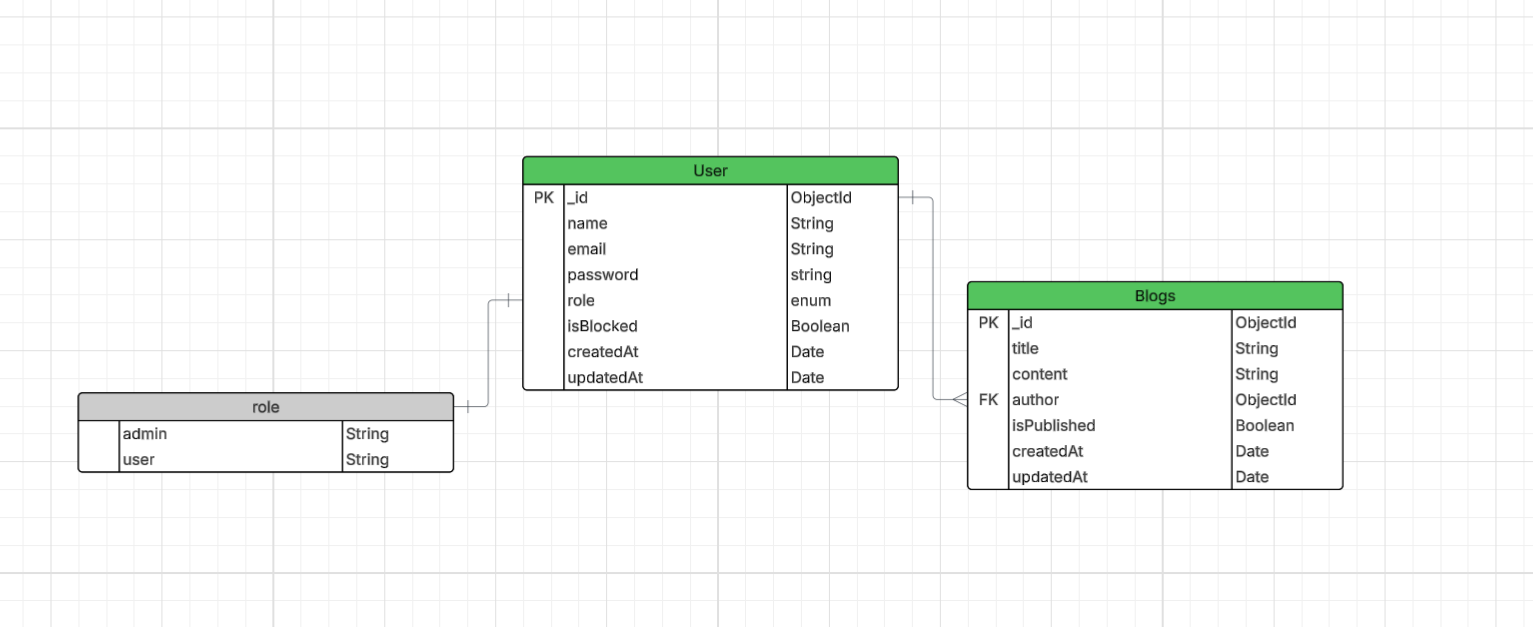
👉 Click here to view the full diagram on Lucid Chart.
git clone https://github.com/Nadim-Nion/stack-write.git
cd stack-writenpm installCreate a .env file in the root directory of your project and copy the environment variables from below:
To run the project in development mode with automatic reloading on code changes:
npm run start:devThis uses ts-node-dev under the hood, which watches your TypeScript files and restarts the server automatically on changes.
Make sure you have ts-node-dev installed:
npm install --save-dev ts-node-devYour package.json should include:
"scripts": {
  "start:dev": "ts-node-dev --respawn --transpile-only ./src/server.ts"
}- Build the production-ready files:
npm run build- Start the server:
npm run start:prodThis will execute the compiled code from the dist/ directory.
Your package.json should include:
"scripts": {
 "start:prod": "node ./dist/server.js",
  "start:dev": "ts-node-dev --respawn --transpile-only ./src/server.ts",
  "build": "tsc",
}Make sure to include the following in your .env file:
NODE_ENV=<your-environment> # e.g., development, production
PORT=<your-port-number>
DATABASE_URL=<your-mongodb-uri>

BCRYPT_SALT_ROUNDS=<your-salt-rounds> # e.g., 10, 12, 14

JWT_ACCESS_SECRET=<your-access-secret>
JWT_ACCESS_EXPIRES_IN=<your-access-token-expiry> # e.g., 1d, 2h, 30m

JWT_REFRESH_SECRET=<your-refresh-secret>
JWT_REFRESH_EXPIRES_IN=<your-refresh-token-expiry> # e.g., 365d, 30d, 7d
To set up a secure JWT access secret, you'll need a strong 64-byte (512-bit) secret key.
Run the following command in your node terminal. Run command node to enter the Node.js REPL, then paste the command below to generate a secure random string:
require('crypto').randomBytes(64).toString('hex')This will output a long hexadecimal string. Example output:
e9b5f19e27a2a9e6a40d74b2dabc6d6f3a3b99ea8c4d10f5ff1c47c6a83d0b7f...Copy the generated string and set it in your .env file:
JWT_ACCESS_SECRET=your_generated_secret_here
NODE_ENV=<your-environment> # e.g., development, production
PORT=<your-port-number>
DATABASE_URL=<your-mongodb-uri>

BCRYPT_SALT_ROUNDS=<your-salt-rounds> # e.g., 10, 12, 14

JWT_ACCESS_SECRET=<your-access-secret>
JWT_ACCESS_EXPIRES_IN=<your-access-token-expiry> # e.g., 1d, 2h, 30m

JWT_REFRESH_SECRET=<your-refresh-secret>
JWT_REFRESH_EXPIRES_IN=<your-refresh-token-expiry> # e.g., 365d, 30d, 7d
All endpoints follow a consistent error response format:
{
  "success": false,
  "message": "Error message",
  "statusCode": 400,
  "error": { "details": "Validation or other error info" },
  "stack": "Error stack trace (only in development)"
}-
ZOD_ERROR: Schema validation failed
-
NOT_FOUND_ERROR: Resource not found
-
VALIDATION_ERROR: Input issue
-
AUTH_ERROR: Invalid credentials
-
AUTHORIZATION_ERROR: No permission
-
INTERNAL_SERVER_ERROR: General backend failure
This project is licensed under the MIT License.
Feel free to fork the project and submit PRs. For major changes, please open an issue first to discuss.
Hi, I am Nadim Mahmud Nion. I have recently concluded my graduation from the department of Computer Science and Engineering (CSE) at the Daffodil International University (DIU). I have been learning MERN Stack Web Development since 2022. I am expertise in the following skills:
- React
- Express.js
- TypeScript
- Mongoose
- Postman
- MongoDB Compass
- NoSQLBooster
- Node.js
- MongoDB Atlas
- JWT
- Stripe
- Vite
- React Router
- Firebase (Authentication & Hosting)
- Vercel
- JavaScript
- Advanced JavaScript
- Daisy UI
- Bootstrap
- Tailwind
- HTML5
- CSS3
- Media Query
I have built multiple projects using these skills. You are invited to my GitHub profile to know about my projects and don't forget to give a star to my projects.
Developed by Nadim Mahmud Nion 💻