Explain what the Blockchain is in your own words.
- A blockchain is a distributed database that stores data on nodes of a computer network
Explain what a Smart Contract is.
- A smart contract is an application that determines the rules in which users can interact with the blockchain
Explain the difference between a script and a transaction.
- A script allows users to view data and is free. A transaction makes changes to data on the blockchain and costs money.
What are the 5 Cadence Programming Language Pillars?
- Safety & Security
- Clarity
- Approachability
- Developer Experience
- Resource Oriented Programming
In your opinion, even without knowing anything about the Blockchain or coding, why could the 5 Pillars be useful (you don't have to answer this for #5)?
- The 5 pillars could be useful to:
- make it easier for more developers to learn Cadence thus attracting more developers to flow
- the more developers on flow, the more applications exist for users to interact on flow which could increase user participation on the flow blockchain
- make it easy to ensure the security of smart contracts so users' valuables are not compromised on the blockchain
- make the flow blockchain more mainstream
- make it easier for more developers to learn Cadence thus attracting more developers to flow
-
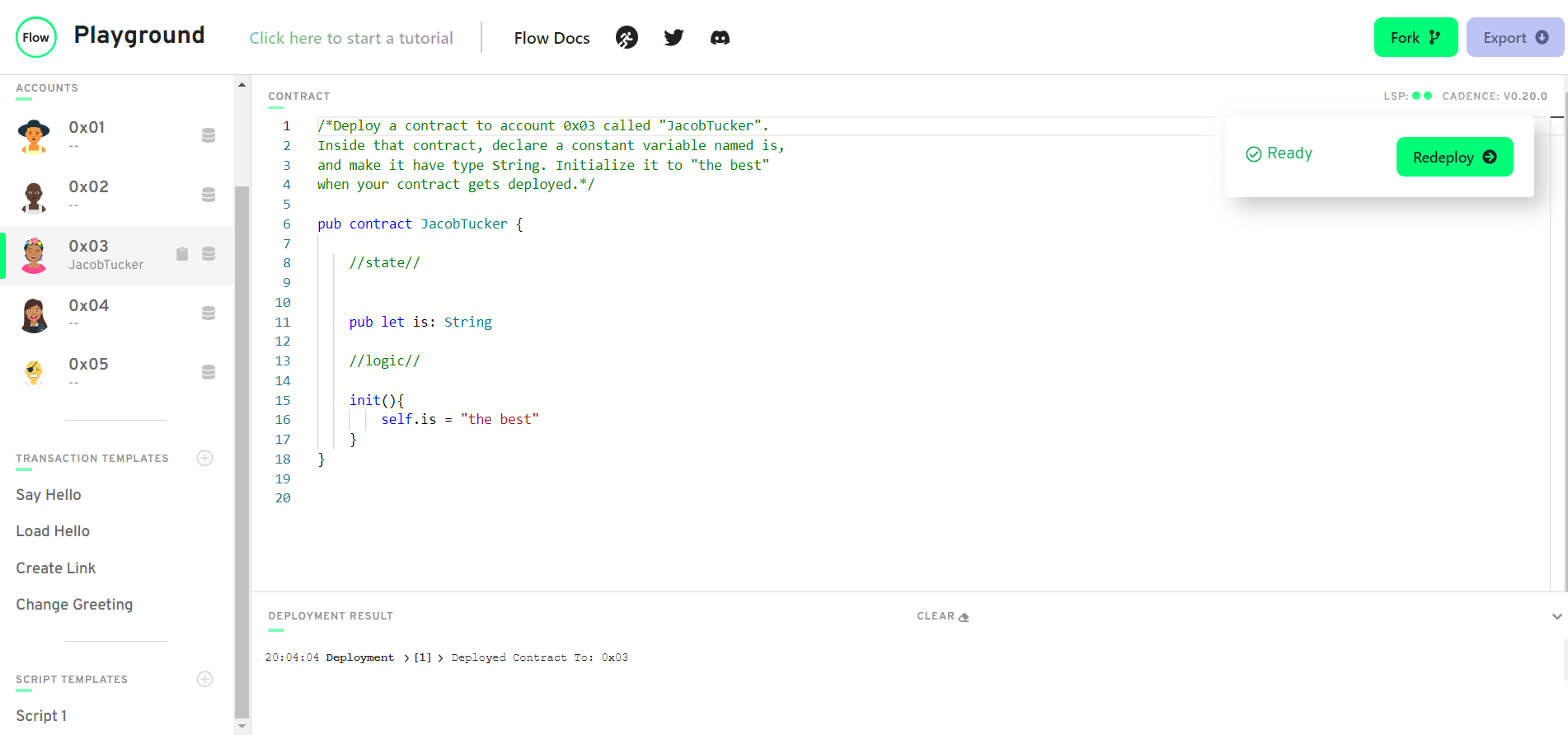
Deploy a contract to account 0x03 called "JacobTucker". Inside that contract, declare a constant variable named is, and make it have type String. Initialize it to "the best" when your contract gets deployed.
-
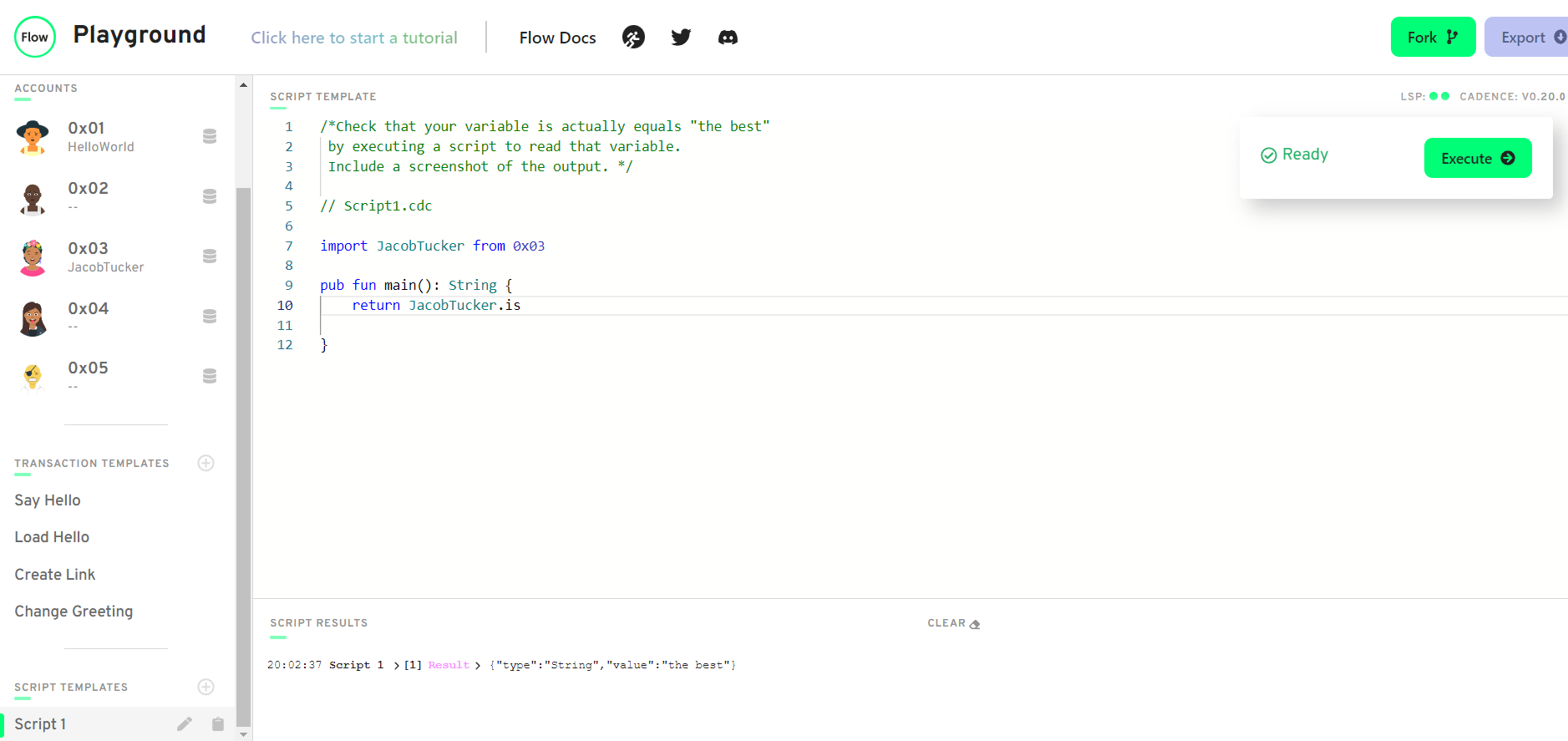
Check that your variable is actually equals "the best" by executing a script to read that variable. Include a screenshot of the output.
-
Explain why we wouldn't call changeGreeting in a script.
- The changeGreeting function literally changes data in the greeting string in the contract. Anything that modifies data on the blockchain is a transaction. Scripts only view data on the blockchain.
-
What does the AuthAccount mean in the prepare phase of the transaction?
- AuthAccount is what is used to access data in the signer's account in order to approve a transaction.
-
What is the difference between the prepare phase and the execute phase in the transaction?
- In the prepare phase, we have access to the data in the account. In the execute phase we do not. The execute phase is where we change data on the blockchain.
-
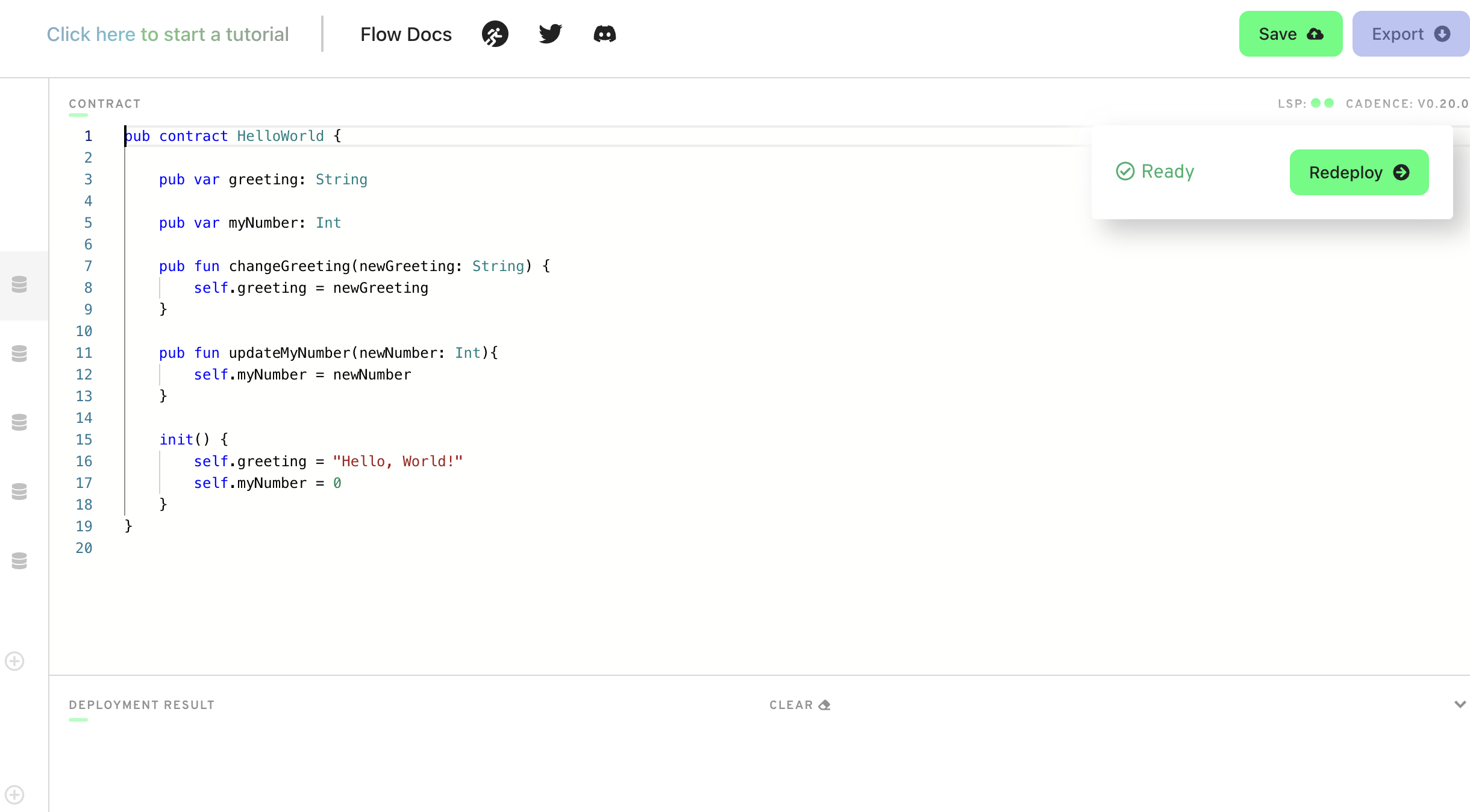
This is the hardest quest so far, so if it takes you some time, do not worry! I can help you in the Discord if you have questions. Add two new things inside your contract:
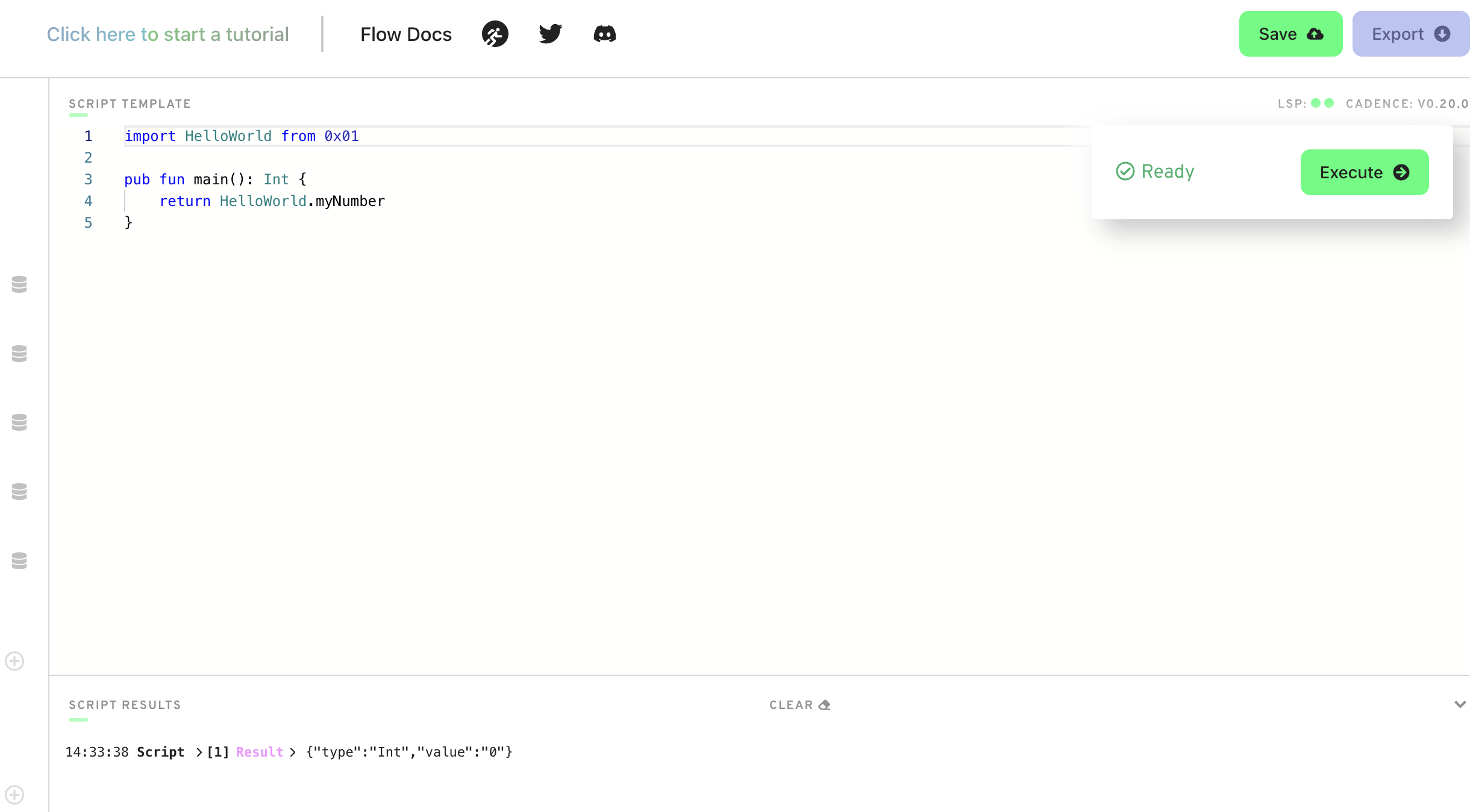
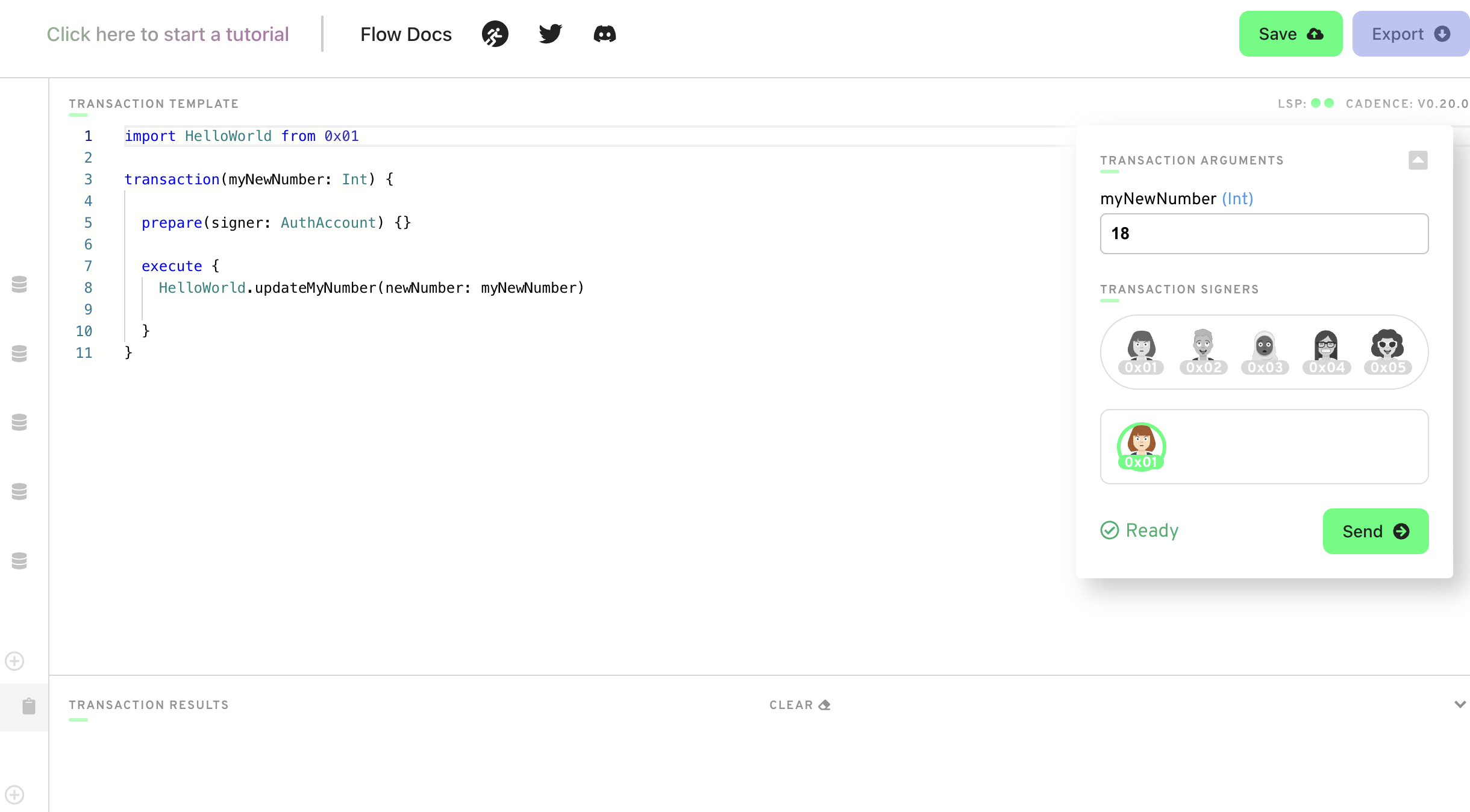
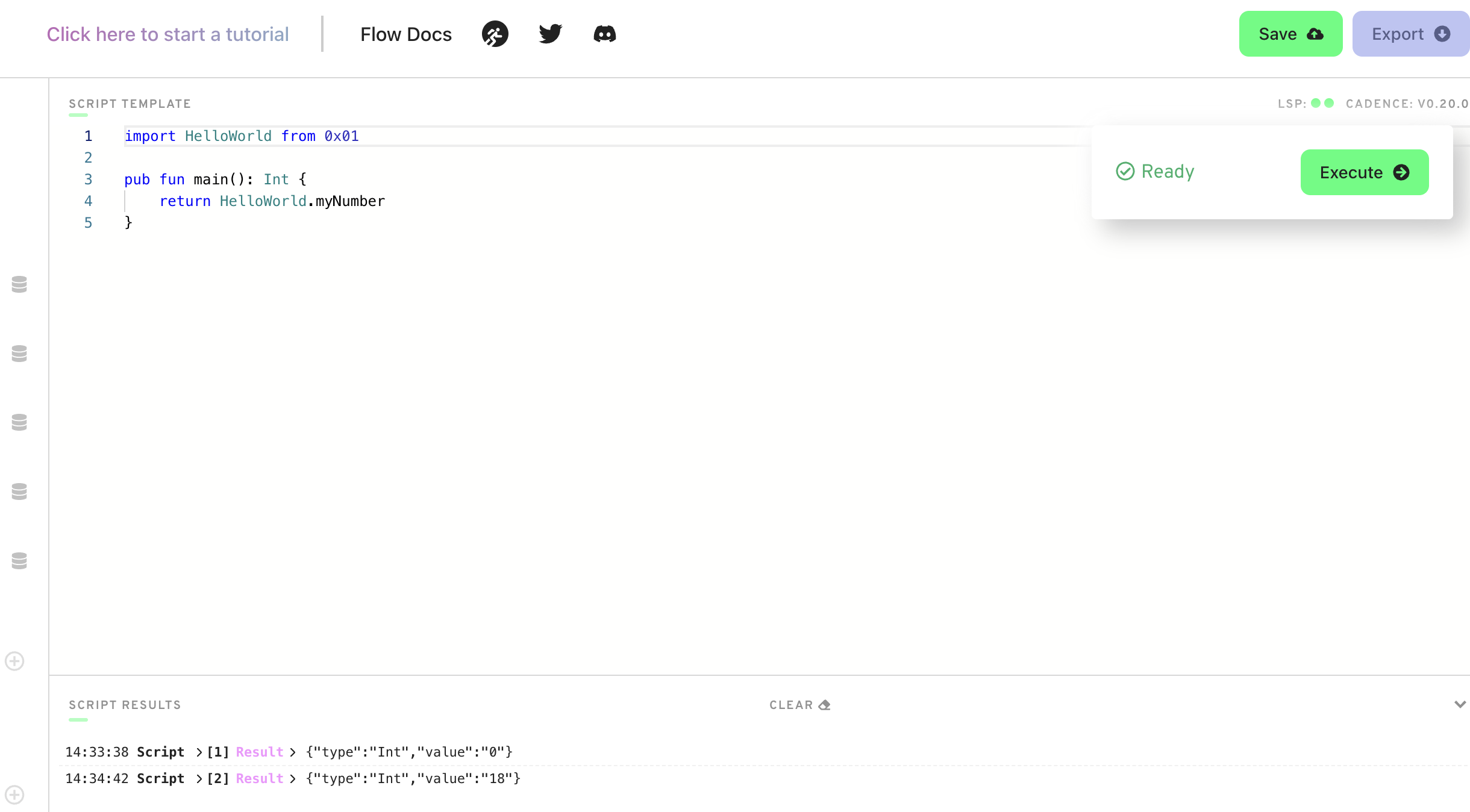
A variable named myNumber that has type Int (set it to 0 when the contract is deployed) A function named updateMyNumber that takes in a new number named newNumber as a parameter that has type Int and updates myNumber to be newNumber Add a script that reads myNumber from the contract
Add a transaction that takes in a parameter named myNewNumber and passes it into the updateMyNumber function. Verify that your number changed by running the script again.
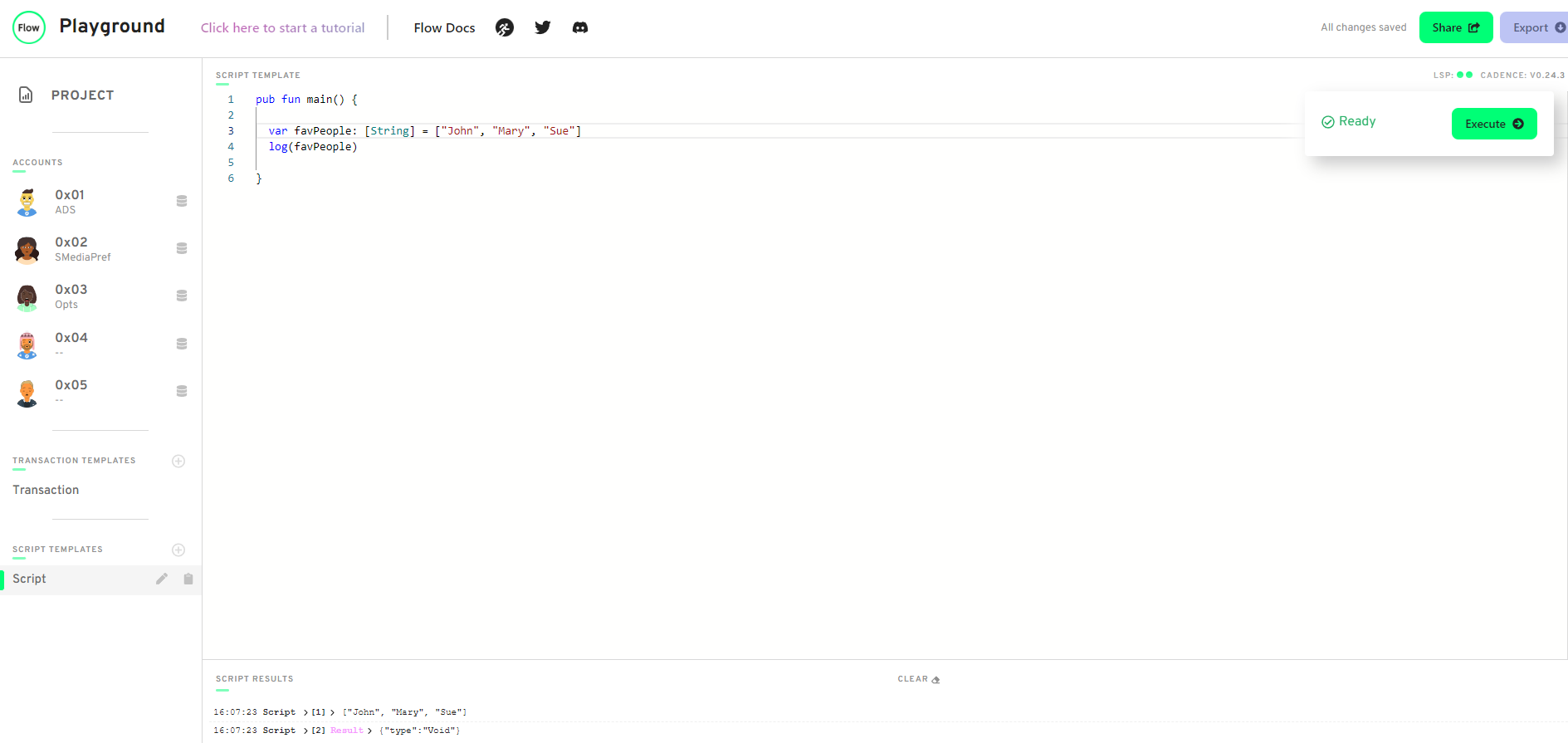
In a script, initialize an array (that has length == 3) of your favourite people, represented as Strings, and log it.
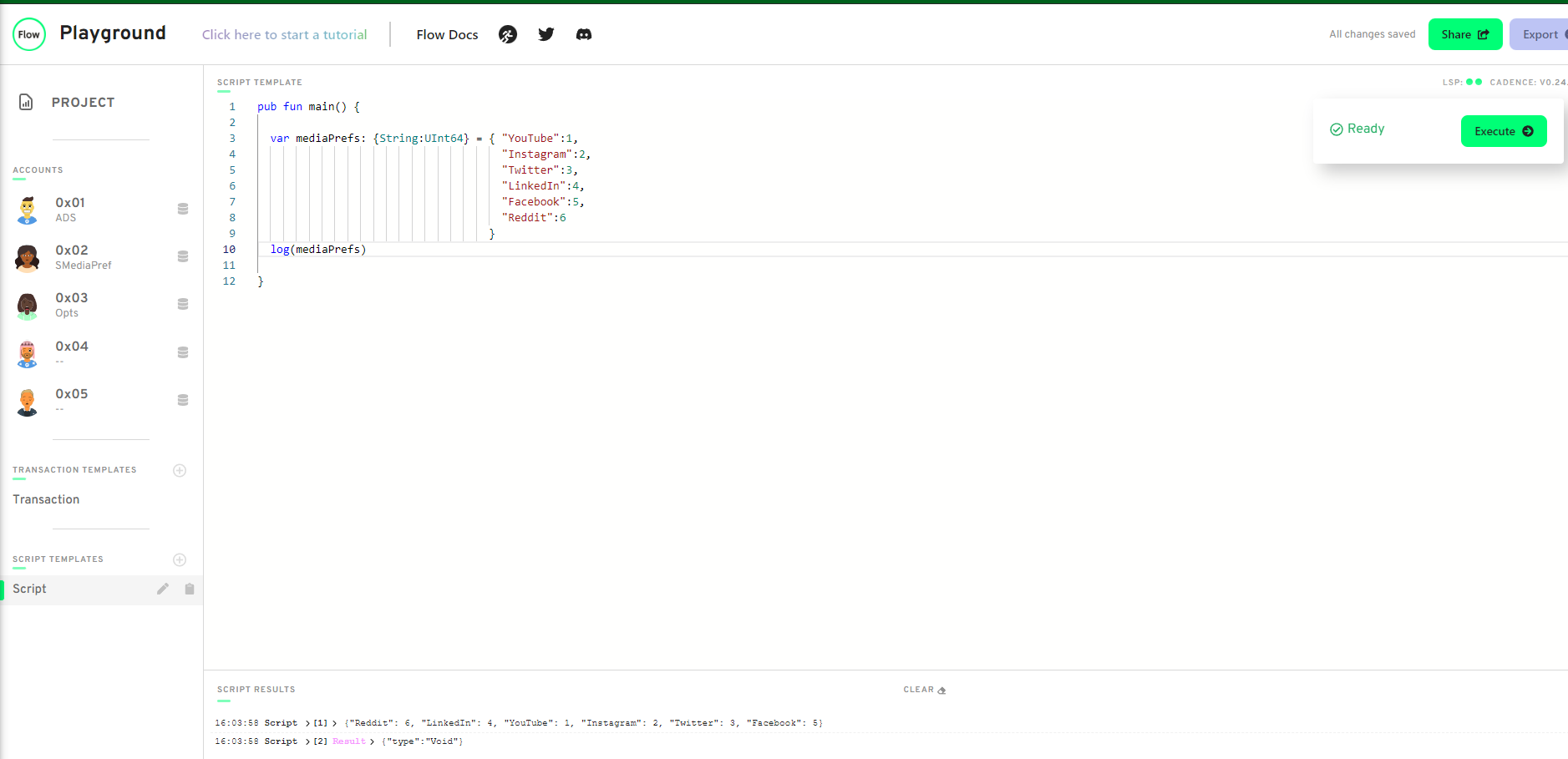
In a script, initialize a dictionary that maps the Strings Facebook, Instagram, Twitter, YouTube, Reddit, and LinkedIn to a UInt64 that represents the order in which you use them from most to least. For example, YouTube --> 1, Reddit --> 2, etc. If you've never used one before, map it to 0!
Explain what the force unwrap operator ! does, with an example different from the one I showed you (you can just change the type). Given an optional type can be either a datatype or a nil, the force unwrap declares whether the variable is in fact the datatype or the nil, ie:
pub fun main(): String {                                                // return type is expected to be a String
  var sampleDict: {String: String} = {"Mary": "J", "Biggie": "Smalls"}
  return sampleDict["Mary"]!                                            //without !, the return type would be String?
}
Using this picture below, explain...
-
What the error message means:
- The expected return type is a String. An optional was returned instead
-
Why we're getting this error:
- Dictionaries return optionals by default. Therefore the return type should be an optional or the element returned should be forced unwrapped to reveal a String
-
How to fix it:
-
Option 1:
pub fun main(): String? { let thing: {Address: String} = {0x01: "One", 0x02: "Two", 0x03: "Three"} return thing[0x03] } -
Option 2:
pub fun main(): String {
  let thing: {Address: String} = {0x01: "One", 0x02: "Two", 0x03: "Three"}
  return thing[0x03]!
}
-
Deploy a new contract that has a Struct of your choosing inside of it (must be different than Profile).
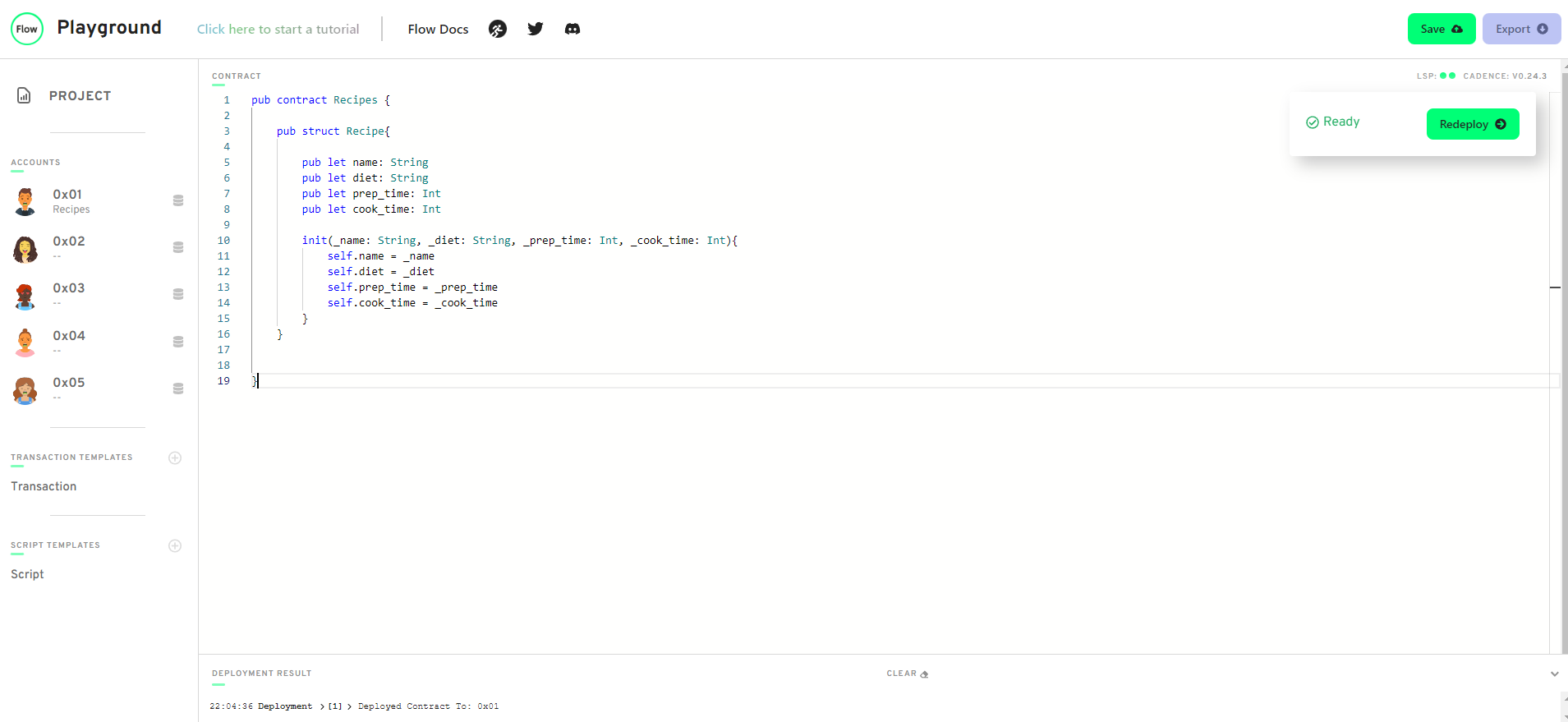
Create a dictionary or array that contains the Struct you defined
pub contract Recipes {

    pub var recipeDict: {String: Recipe}

    pub struct Recipe{

        pub let name: String
        pub let diet: String
        pub let prep_time: Int
        pub let cook_time: Int

        init(_name: String, _diet: String, _prep_time: Int, _cook_time: Int){
            self.name = _name
            self.diet = _diet
            self.prep_time = _prep_time
            self.cook_time = _cook_time
        }
    }

    init() {
        var recipe = Recipe(_name: "eggplant parm",
                            _diet: "vegetarian",
                            _prep_time: 20,
                            _cook_time: 40)
        self.recipeDict = {}
        self.recipeDict[recipe.name] = recipe
    }


}
Create a function to add to that array/dictionary.
pub contract Recipes {

    pub var recipeDict: {String: Recipe}

    pub struct Recipe{

        pub let name: String
        pub let diet: String
        pub let prep_time: Int
        pub let cook_time: Int

        init(_name: String, _diet: String, _prep_time: Int, _cook_time: Int){
            self.name = _name
            self.diet = _diet
            self.prep_time = _prep_time
            self.cook_time = _cook_time
        }
    }

    pub fun addRecipe(name: String, diet: String, prep_time: Int, cook_time: Int){
        let newRecipe = Recipe(_name: name,
                               _diet: diet,
                               _prep_time: prep_time,
                               _cook_time: cook_time)

        self.recipeDict[name] = newRecipe

    }

    init() {
        var recipe = Recipe(_name: "eggplant parm",
                            _diet: "vegetarian",
                            _prep_time: 20,
                            _cook_time: 40)
        self.recipeDict = {}
        self.recipeDict[recipe.name] = recipe
    }


}
Add a transaction to call that function in step 3.
import Recipes from 0x01

transaction(name:String, diet: String, prep_time: Int, cook_time: Int){

    prepare(signer: AuthAccount) {}

    execute {
        Recipes.addRecipe(name:name, diet:diet, prep_time: prep_time, cook_time:cook_time)
    }
}
Add a script to read the Struct you defined.
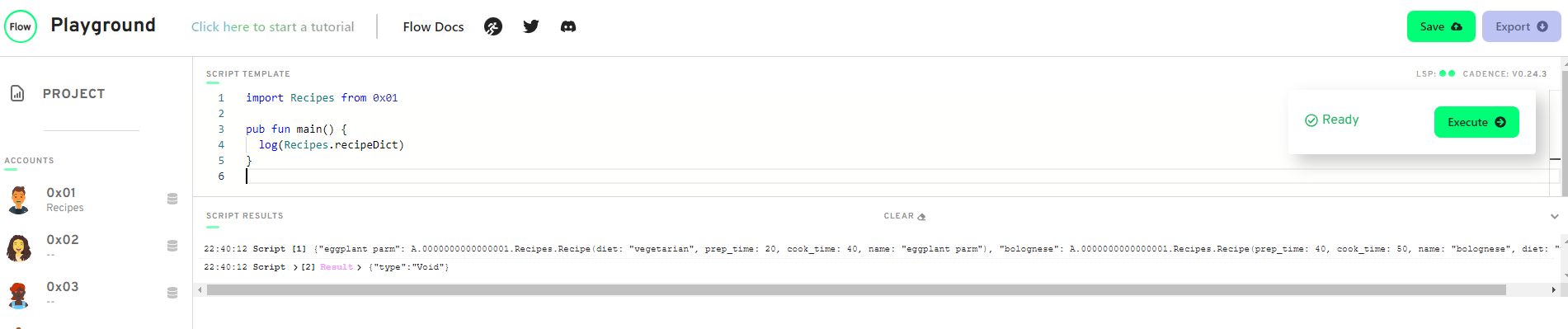
-
In words, list 3 reasons why structs are different from resources.
- Structs can be copied. Resources cannot be copied
- Structs can be overwritten. Resources cannot be overwritten
- Structs can be created whenever you want. Resources cannot be created whenever you want.
-
Describe a situation where a resource might be better to use than a struct.
- NFTs are meant to be unique therefore resources can accommodate this attribute since they cannot be copied.
-
What is the keyword to make a new resource?
- create
-
Can a resource be created in a script or transaction (assuming there isn't a public function to create one)?
- No. Resources can only be created via the "create" keyword which can only be used inside a contract
-
What is the type of the resource below?
pub resource Jacob {
}
- type is Jacob
-
Let's play the "I Spy" game from when we were kids. I Spy 4 things wrong with this code. Please fix them.
pub contract Test {

    // Hint: There's nothing wrong here ;)
    pub resource Jacob {
        pub let rocks: Bool
        init() {
            self.rocks = true
        }
    }

    /* -----------------  WRONG ----------------------
    pub fun createJacob(): Jacob { // there is 1 here
        let myJacob = Jacob() // there are 2 here
        return myJacob // there is 1 here
    }
    --------------------  WRONG ----------------------*/

    //--------------- CORRECT ---------------
    pub fun createJacob(): @Jacob{
        let myJacob: @Jacob <- create Jacob()
        return <- myJacob
    }
}
Write your own smart contract that contains:
-
Two state variables:
- An array of resources
- A dictionary of resources.
-
Fcn to remove each of them
-
Fcn to add to each of them.
pub contract Recipes {

    pub var recipeArray: @[Recipe]
    pub var recipeDict: @{String: Recipe}

    pub resource Recipe {
        pub let name: String
        pub let prep_time: Int
        pub let cook_time: Int
        init() {
            self.name = "Eggplant Parm"
            self.prep_time = 20
            self.cook_time = 50
        }
    }

    pub fun addRecipeToArray(recipe: @Recipe) {
        self.recipeArray.append(<- recipe)
    }

    pub fun addRecipeToDict(recipe: @Recipe) {
        let key = recipe.name

        let oldRecipe <- self.recipeDict[key] <- recipe
        destroy oldRecipe
    }

    pub fun removeRecipeFromArray(index: Int): @Recipe {
        return <- self.recipeArray.remove(at: index)
    }

    pub fun removeRecipeFromDict(key: String): @Recipe {
        let recipe <- self.recipeDict.remove(key: key)!
        return <- recipe
    }

    init() {
        self.recipeArray <- []
        self.recipeDict <- {}
    }

}
- Define your own contract that stores a dictionary of resources. Add a function to get a reference to one of the resources in the dictionary.
pub contract Recipes {

  pub var recipeDict: @{String: Recipe}

  pub resource Recipe {
      pub let name: String
      pub let prep_time: Int
      pub let cook_time: Int
      init( _name: String, _prep_time: Int, _cook_time: Int) {
          self.name = _name
          self.prep_time = _prep_time
          self.cook_time = _cook_time
      }
  }

  pub fun getReference(key: String): &Recipe {
      return (&self.recipeDict[key] as &Recipe?)!
  }

  init() {
      self.recipeDict <- {
          "Eggplant Parm": <- create Recipe(_name:"Eggplant Parm", _prep_time: 30, _cook_time: 50),
          "Manicotti": <- create Recipe(_name: "Manicotti", _prep_time: 20, _cook_time: 60)
      }
  }
}
- Create a script that reads information from that resource using the reference from the function you defined in part 1.
import Recipes from 0x01

pub fun main(): Int {
  let ref = Recipes.getReference(key: "Manicotti")
  return ref.cook_time
}
- Explain, in your own words, why references can be useful in Cadence.
- References are a convenient way to access resources without having to move them around
-
Explain, in your own words, the 2 things resource interfaces can be used for (we went over both in today's content)
- Implement requirements: Resource interfaces can mandate that resources implement fields specified in the interface
- Restrict access: Resource interfaces allow you to restrict access to certain fields
-
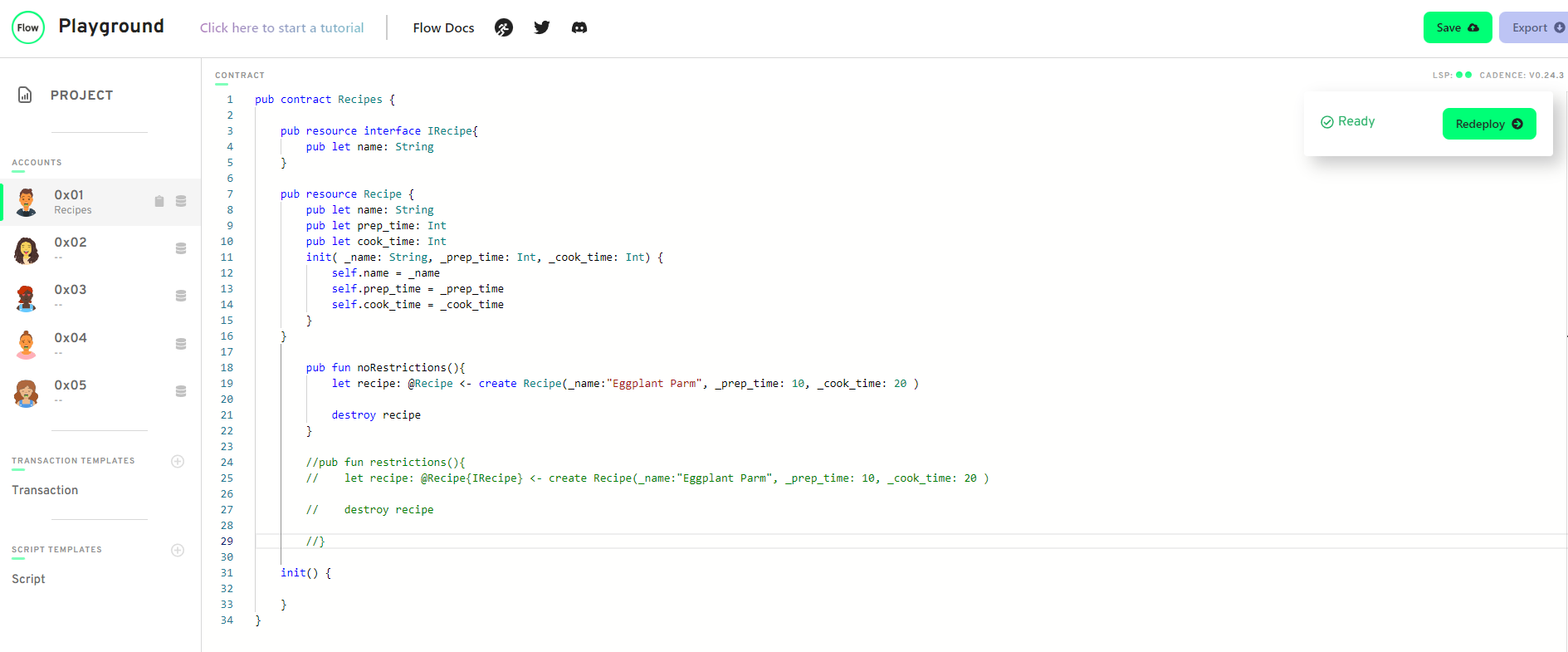
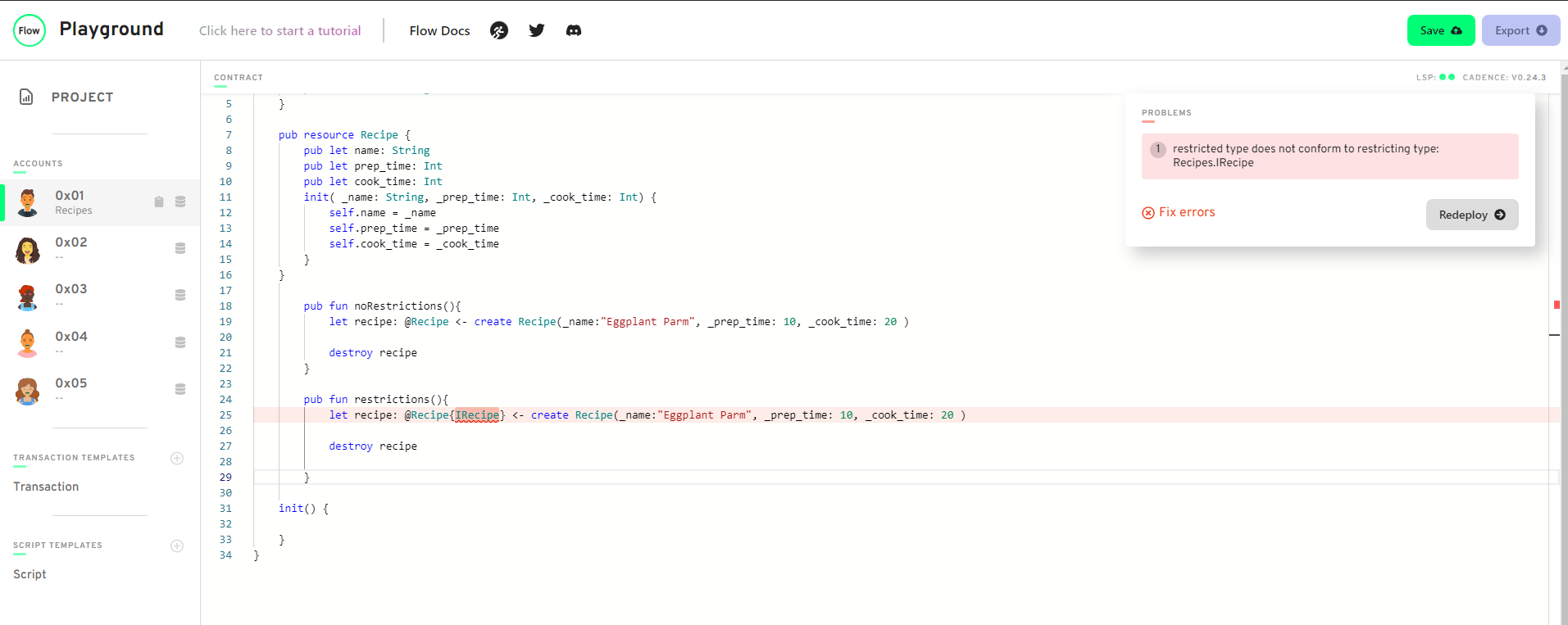
Define your own contract. Make your own resource interface and a resource that implements the interface. Create 2 functions. In the 1st function, show an example of not restricting the type of the resource and accessing its content. In the 2nd function, show an example of restricting the type of the resource and NOT being able to access its content.
- How would we fix this code?
pub contract Stuff {

    pub struct interface ITest {
      pub var greeting: String
      pub var favouriteFruit: String
    }

    // ERROR:
    // `structure Stuff.Test does not conform
    // to structure interface Stuff.ITest`
    pub struct Test: ITest {
      pub var greeting: String
      pub var favouriteFruit: String //Add favouriteFruit here

      pub fun changeGreeting(newGreeting: String): String {
        self.greeting = newGreeting
        return self.greeting // returns the new greeting
      }

      init() {
        self.greeting = "Hello!"
        self.favouriteFruit = "Apple" //Initialize favouriteFruit here
      }
    }

    pub fun fixThis() {
      //let test: Test{ITest} = Test()
      let test: Test = Test()  //Remove interface restriction
      let newGreeting = test.changeGreeting(newGreeting: "Bonjour!") // ERROR HERE: `member of restricted type is not accessible: changeGreeting`
      log(newGreeting)
    }
}
For today's quest, you will be looking at a contract and a script. You will be looking at 4 variables (a, b, c, d) and 3 functions (publicFunc, contractFunc, privateFunc) defined in SomeContract. In each AREA (1, 2, 3, and 4), I want you to do the following: for each variable (a, b, c, and d), tell me in which areas they can be read (read scope) and which areas they can be modified (write scope). For each function (publicFunc, contractFunc, and privateFunc), simply tell me where they can be called.
    access(all) contract SomeContract {
        pub var testStruct: SomeStruct

        pub struct SomeStruct {

            //
            // 4 Variables
            //

            pub(set) var a: String
            pub var b: String
            access(contract) var c: String
            access(self) var d: String

            //
            // 3 Functions
            //

            pub fun publicFunc() {}
            access(contract) fun contractFunc() {}
            access(self) fun privateFunc() {}


            pub fun structFunc() {
                /**************/
                /*** AREA 1 ***/
                /**************/

                /*
                Read:
                [Var] - a
                [Var] - b
                [Var] - c
                [Var] - d

                Modified:
                [Var] - a
                [Var] - b
                [Var] - c
                [Var] - d

                Access Scope:
                [Fcn] - publicFunc()
                [Fcn] - contractFunc()
                [Fcn] - privateFunc()

             */
            }

            init() {
                self.a = "a"
                self.b = "b"
                self.c = "c"
                self.d = "d"
            }
        }

        pub resource SomeResource {
            pub var e: Int

            pub fun resourceFunc() {
                /**************/
                /*** AREA 2 ***/
                /**************/

                /*
                Read:
                [Var] - a
                [Var] - b
                [Var] - c

                Modified:
                [Var] - a

                Access Scope:
                [Fcn] - publicFunc()
                [Fcn] - contractFunc()

             */
            }

            init() {
                self.e = 17
            }
        }

        pub fun createSomeResource(): @SomeResource {
            return <- create SomeResource()
        }

        pub fun questsAreFun() {
            /**************/
            /*** AREA 3 ****/
            /**************/

            /*
                Read:
                [Var] - a
                [Var] - b
                [Var] - c

                Modified:
                [Var] - a

                Access Scope:
                [Fcn] - publicFunc()
                [Fcn] - contractFunc()

             */
        }

        init() {
            self.testStruct = SomeStruct()
        }
    }
This is a script that imports the contract above:
   import SomeContract from 0x01

   pub fun main() {
     /**************/
     /*** AREA 4 ***/
     /**************/

     /*
       Read:
       [Var] - a
       [Var] - b

       Modified:
       [Var] - a

       Access Scope:
       [Fcn] - publicFunc()

    */

   }
-
Explain what lives inside of an account.
- Contract code and all of your data (account storage) lives inside an account
-
What is the difference between the /storage/, /public/, and /private/ paths?
- They have difference access level.
- /storage is only accessible to account owner
- /public is accessible to anyone
- /private is accessible to account owner and those owner gives access to
-
What does .save() do? What does .load() do? What does .borrow() do?
- .save() saves data to account storage
- .load() takes data out of account storage
- .borrow() gets a reference to resource in storage in order to simply look at it
-
Explain why we couldn't save something to our account storage inside of a script.
- account storage is not accessible from a script but from the prepare stage in a transaction
-
Explain why I couldn't save something to your account.
- data is saved to /storage and /storage is only accessible to the account owner
-
Define a contract that returns a resource that has at least 1 field in it.
  pub contract Recipes {

      pub resource Recipe {
          pub let name: String
          pub let prep_time: Int
          pub let cook_time: Int
          init( _name: String, _prep_time: Int, _cook_time: Int) {
              self.name = _name
              self.prep_time = _prep_time
              self.cook_time = _cook_time
          }
      }

      pub fun createRecipe(): @Recipe{
          let myRecipe: @Recipe <- create Recipe(_name:"Eggplant Parm", _prep_time: 10, _cook_time: 40)
          return <- myRecipe
      }
  }
Then, write 2 transactions:
-
i. A transaction that first saves the resource to account storage, then loads it out of account storage, logs a field inside the resource, and destroys it.
-
Save resource to account storage
import Recipes from 0x01 transaction { prepare(acct: AuthAccount) { acct.save(<- Recipes.createRecipe(), to: /storage/myRecipe) } execute {} } -
Loads, logs, and destroys resource from account storage
import Recipes from 0x01

transaction {

prepare(acct: AuthAccount) {
    let myRecipe <- acct.load<@Recipes.Recipe>(from: /storage/myRecipe)!

    log(myRecipe.name)
    destroy myRecipe
}

execute {}

}
-
-
ii. A transaction that first saves the resource to account storage, then borrows a reference to it, and logs a field inside the resource.
-
Save resource to account storage
import Recipes from 0x01 transaction { prepare(acct: AuthAccount) { acct.save(<- Recipes.createRecipe(), to: /storage/myRecipe) } execute {} } -
Borrows and logs resource from account storage
import Recipes from 0x01

transaction {

prepare(acct: AuthAccount) {
    let myRecipe = acct.borrow<&Recipes.Recipe>(from: /storage/myRecipe) ?? panic("Could not borrow recipe")

    log(myRecipe.name)
}

execute {}

}
-
-
-
What does .link() do?
- .link() takes what's in storage and makes it publically available
-
In your own words (no code), explain how we can use resource interfaces to only expose certain things to the /public/ path.
- When you link a reference to a resource, you can specify the interface it implements, which only allows access to data in that interface regardless of all that data in the resource. This is the only data that will be exposed publically
-
Deploy a contract that contains a resource that implements a resource interface. Then, do the following:
pub contract Recipes { pub resource interface IRecipe{ pub let name: String } pub resource Recipe: IRecipe { pub let name: String pub let prep_time: Int pub let cook_time: Int init() { self.name = "Eggplant Parm" self.prep_time = 10 self.cook_time = 40 } } pub fun createRecipe(): @Recipe{ return <- create Recipe() } }-
In a transaction, save the resource to storage and link it to the public with the restrictive interface.
import Recipes from 0x01 transaction { prepare(acct: AuthAccount) { //save acct.save(<- Recipes.createRecipe(), to: /storage/myRecipe) //link acct.link<&Recipes.Recipe{Recipes.IRecipe}>(/public/MyRecipePublic, target:/storage/myRecipe) } execute {} } -
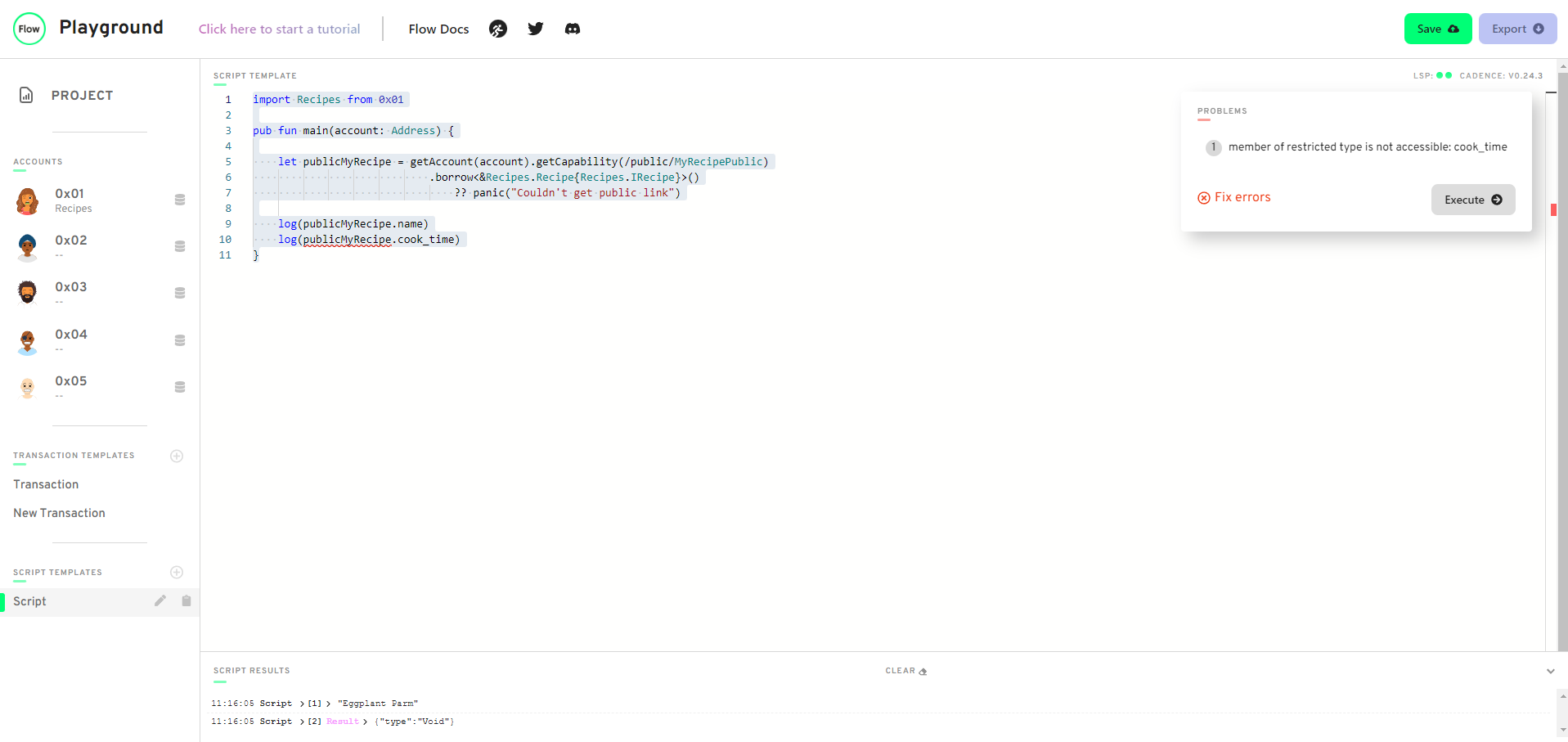
Run a script that tries to access a non-exposed field in the resource interface, and see the error pop up.
-
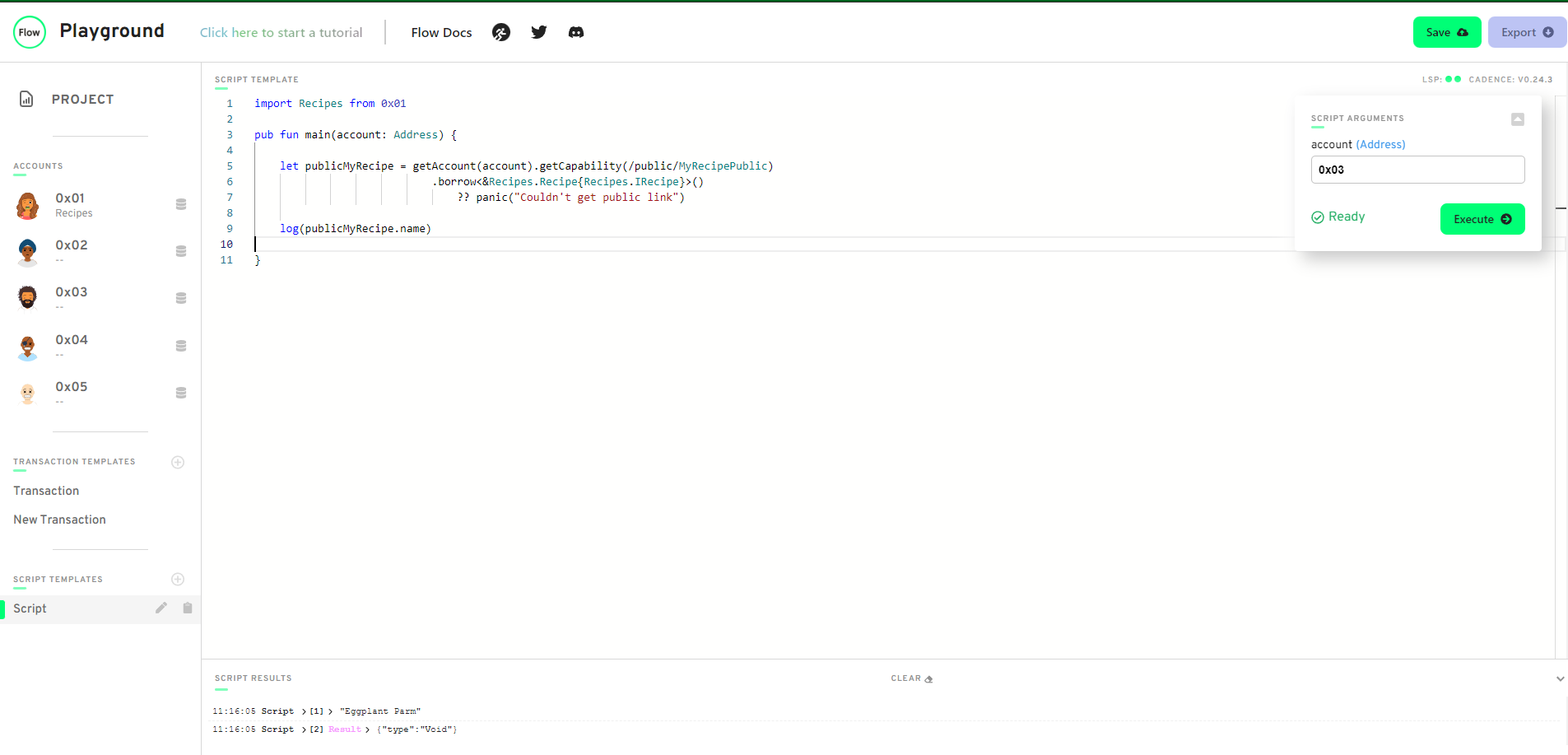
Run the script and access something you CAN read from. Return it from the script.
-
-
Why did we add a Collection to this contract? List the two main reasons.
- Allows us to store multiple NFTs in a Collection which is then stored in a single storage path. Without a collection, you can only store 1 NFT per storage path
- Allows others to give us NFTs
-
What do you have to do if you have resources "nested" inside of another resource? ("Nested resources")
- You have to add a destroy function so that when you destroy the resource you destroy all the data within
-
Brainstorm some extra things we may want to add to this contract. Think about what might be problematic with this contract and how we could fix it.
-
Idea #1: Do we really want everyone to be able to mint an NFT? 🤔.
- No we want to control who has the authority to mint an NFT from the contract so we can add a resource to restrict access to the createNFT function
-
Idea #2: If we want to read information about our NFTs inside our Collection, right now we have to take it out of the Collection to do so. Is this good?
- No we can add a function to read it instead, ie. borrow
-
- Take our NFT contract so far and add comments to every single resource or function explaining what it's doing in your own words. Something like this:
  pub contract CryptoPoops {
    pub var totalSupply: UInt64

    // This is an NFT resource that contains a name,
    // favouriteFood, and luckyNumber
    pub resource NFT {
      pub let id: UInt64

      pub let name: String
      pub let favouriteFood: String
      pub let luckyNumber: Int

      init(_name: String, _favouriteFood: String, _luckyNumber: Int) {
        self.id = self.uuid

        self.name = _name
        self.favouriteFood = _favouriteFood
        self.luckyNumber = _luckyNumber
      }
    }

    // This is a resource interface that allows us to control what data is accessible in the Collection resource
    pub resource interface CollectionPublic {
      pub fun deposit(token: @NFT)
      pub fun getIDs(): [UInt64]
      pub fun borrowNFT(id: UInt64): &NFT
    }

    /* This is a Collection resource that contains the NFT resources as well as functions defined by the CollectionPublic interface
    Provides the user the ability to deposit, withdraw, borrow NFTs, and get NFT ids
    */
    pub resource Collection: CollectionPublic {
      pub var ownedNFTs: @{UInt64: NFT}

      //function to deposit NFT into collection at id
      pub fun deposit(token: @NFT) {
        self.ownedNFTs[token.id] <-! token
      }

      //function to withdraw NFT from collection by id
      pub fun withdraw(withdrawID: UInt64): @NFT {
        let nft <- self.ownedNFTs.remove(key: withdrawID)
                ?? panic("This NFT does not exist in this Collection.")
        return <- nft
      }

      //function to return all IDs for all NFTs in collection
      pub fun getIDs(): [UInt64] {
        return self.ownedNFTs.keys
      }

      // function to read NFT without having to move it out of the collection
      pub fun borrowNFT(id: UInt64): &NFT {
        return (&self.ownedNFTs[id] as &NFT?)!
      }

      // standard initialize this entity function
      init() {
        self.ownedNFTs <- {}
      }

      //function to delete/destroy all NFTs that belong to this collection
      destroy() {
        destroy self.ownedNFTs
      }
    }

    // function to create an empty resource to store multiple NFT resources
    pub fun createEmptyCollection(): @Collection {
      return <- create Collection()
    }

    // function to restrict ability to create and mint NFT to the owner of this contract
    pub resource Minter {

      //function to create NFT resource
      pub fun createNFT(name: String, favouriteFood: String, luckyNumber: Int): @NFT {
        return <- create NFT(_name: name, _favouriteFood: favouriteFood, _luckyNumber: luckyNumber)
      }

      //function to give admin/"Minter" access to a resource
      pub fun createMinter(): @Minter {
        return <- create Minter()
      }

    }

    init() {
      self.totalSupply = 0  //initialize NFT counter to 0
      self.account.save(<- create Minter(), to: /storage/Minter)  //saves Minter resource to contract owner's account storage
    }
  }
-
Describe what an event is, and why it might be useful to a client.
- A method for a smart contract to send notification that something has occurred which can be convenient for clients such that they wouldn't have to constantly check the contract for changes
-
Deploy a contract with an event in it, and emit the event somewhere else in the contract indicating that it happened.
    pub contract Recipes {

    //Event
    pub event RecipeCreated(name: String)

    pub resource interface IRecipe{
        pub let name: String
    }

    pub resource Recipe: IRecipe {
        pub let name: String
        pub let prep_time: Int
        pub let cook_time: Int
        init() {
            self.name = "Eggplant Parm"
            self.prep_time = 10
            self.cook_time = 40
        }
    }

    pub fun createRecipe(): @Recipe{
        let recipe <- create Recipe()
        emit RecipeCreated(name: recipe.name)
        return <- recipe
    }
  }
- Using the contract in step 2), add some pre conditions and post conditions to your contract to get used to writing them out.
    pub contract Recipes {

        //Event
        pub event RecipeCreated(name: String)

        pub resource interface IRecipe{

            pub let name: String

            pub fun changeCookTime(newCookTime: Int){
                pre {
                    newCookTime > 0: "Cook time must be greater than 0"
                }
            }
        }

        pub resource Recipe: IRecipe {
            pub let name: String
            pub let prep_time: Int
            pub var cook_time: Int

            pub fun changeCookTime(newCookTime: Int){
                post {
                    self.cook_time != before(self.cook_time)
                }
                self.cook_time = newCookTime
            }

            init() {
                self.name = "Eggplant Parm"
                self.prep_time = 10
                self.cook_time = 40
            }
        }

        pub fun createRecipe(): @Recipe{
            let recipe <- create Recipe()
            emit RecipeCreated(name: recipe.name)
            return <- recipe
        }
    }
- For each of the functions below (numberOne, numberTwo, numberThree), follow the instructions.
    pub contract Test {

      // TODO
      // Tell me whether or not this function will log the name.
      // name: 'Jacob'
      // answer: NOPE
      pub fun numberOne(name: String) {
        pre {
          name.length == 5: "This name is not cool enough."
        }
        log(name)
      }

      // TODO
      // Tell me whether or not this function will return a value.
      // name: 'Jacob'
      // answer: Yes
      pub fun numberTwo(name: String): String {
        pre {
          name.length >= 0: "You must input a valid name."
        }
        post {
          result == "Jacob Tucker"
        }
        return name.concat(" Tucker")
      }

      pub resource TestResource {
        pub var number: Int

        // TODO
        // Tell me whether or not this function will log the updated number.
        // Also, tell me the value of `self.number` after it's run.
        // Answer:  Function will not log the updated number. self.number == 1 after it's fun
        pub fun numberThree(): Int {
          post {
            before(self.number) == result + 1
          }
          self.number = self.number + 1
          return self.number
        }

        init() {
          self.number = 0
        }

      }

    }
-
Explain why standards can be beneficial to the Flow ecosystem.
- It's convenient for both contract developers and clients because it creates a uniformity amongst certain types of contracts which prevents developers from having reinvent the wheel for each contract that is of the same type. They won't have to implement different functions for every NFT contract. Clients can have a singular way of interacting with multiple contracts.
-
What is YOUR favourite food?
- Sushi
-
Please fix this code (Hint: There are two things wrong):
- The contract interface:
pub contract interface ITest { pub var number: Int pub fun updateNumber(newNumber: Int) { pre { newNumber >= 0: "We don't like negative numbers for some reason. We're mean." } post { self.number == newNumber: "Didn't update the number to be the new number." } } pub resource interface IStuff { pub var favouriteActivity: String } pub resource Stuff { pub var favouriteActivity: String } } - The implementing contract:
  import ITest from 0x04

  pub contract Test: ITest {
    pub var number: Int

    pub fun updateNumber(newNumber: Int) {
      //self.number = 5
      self.number = newNumber
    }

    pub resource interface IStuff {
      pub var favouriteActivity: String
    }

    pub resource Stuff: IStuff {
      pub var favouriteActivity: String

      init() {
        self.favouriteActivity = "Playing League of Legends."
      }
    }

    init() {
      self.number = 0
    }
  }
- The contract interface:
-
What does "force casting" with as! do? Why is it useful in our Collection?
- force casting limits the deposit of NFTs into our collection to a specified type rather than any NFT of a more generic type, @NonFungibleToken.NFT. Gives us more control over what gets deposited into our Collections.
-
What does auth do? When do we use it? auth downcasts a generic type to a more specific type so that if we are trying to access data that is restricted by its generic type, we can downcast the type returned from generic to specific where the data we're trying to access is not restricted.
-
This last quest will be your most difficult yet. Take this contract:
import NonFungibleToken from 0x02
pub contract CryptoPoops: NonFungibleToken {
  pub var totalSupply: UInt64

  pub event ContractInitialized()
  pub event Withdraw(id: UInt64, from: Address?)
  pub event Deposit(id: UInt64, to: Address?)

  pub resource NFT: NonFungibleToken.INFT {
    pub let id: UInt64

    pub let name: String
    pub let favouriteFood: String
    pub let luckyNumber: Int

    init(_name: String, _favouriteFood: String, _luckyNumber: Int) {
      self.id = self.uuid

      self.name = _name
      self.favouriteFood = _favouriteFood
      self.luckyNumber = _luckyNumber
    }
  }

  pub resource Collection: NonFungibleToken.Provider, NonFungibleToken.Receiver, NonFungibleToken.CollectionPublic {
    pub var ownedNFTs: @{UInt64: NonFungibleToken.NFT}

    pub fun withdraw(withdrawID: UInt64): @NonFungibleToken.NFT {
      let nft <- self.ownedNFTs.remove(key: withdrawID)
            ?? panic("This NFT does not exist in this Collection.")
      emit Withdraw(id: nft.id, from: self.owner?.address)
      return <- nft
    }

    pub fun deposit(token: @NonFungibleToken.NFT) {
      let nft <- token as! @NFT
      emit Deposit(id: nft.id, to: self.owner?.address)
      self.ownedNFTs[nft.id] <-! nft
    }

    pub fun getIDs(): [UInt64] {
      return self.ownedNFTs.keys
    }

    pub fun borrowNFT(id: UInt64): &NonFungibleToken.NFT {
      return (&self.ownedNFTs[id] as &NonFungibleToken.NFT?)!
    }

    init() {
      self.ownedNFTs <- {}
    }

    destroy() {
      destroy self.ownedNFTs
    }
  }

  pub fun createEmptyCollection(): @NonFungibleToken.Collection {
    return <- create Collection()
  }

  pub resource Minter {

    pub fun createNFT(name: String, favouriteFood: String, luckyNumber: Int): @NFT {
      return <- create NFT(_name: name, _favouriteFood: favouriteFood, _luckyNumber: luckyNumber)
    }

    pub fun createMinter(): @Minter {
      return <- create Minter()
    }

  }

  init() {
    self.totalSupply = 0
    emit ContractInitialized()
    self.account.save(<- create Minter(), to: /storage/Minter)
  }
}
and add a function called borrowAuthNFT just like we did in the section called "The Problem" above. Then, find a way to make it publically accessible to other people so they can read our NFT's metadata. Then, run a script to display the NFTs metadata for a certain id.
You will have to write all the transactions to set up the accounts, mint the NFTs, and then the scripts to read the NFT's metadata. We have done most of this in the chapters up to this point, so you can look for help there :)