


A powerful sorting extension for Umbraco CMS that provides enhanced sorting capabilities for content nodes in the backoffice.
- Enhanced sorting options for Umbraco content nodes
- Easy-to-use backoffice integration
- Compatible with Umbraco v17+
Add the package to an existing Umbraco website (v17+) from nuget:
dotnet add package OC.PowerSort
Once the package is installed, before it will show in the backoffice, you need to allow the section in the user groups that you want to have access to it. To do this:
- Navigate to the "Users" section in your Umbraco backoffice
- Select the user group you want to grant access to
- In the "Sections" tab, check the box for "PowerSort"
- Save the changes
- Refresh your backoffice to see the new section available for users in that group
Once this is done, the package will automatically integrate with your Umbraco backoffice.
- Navigate to the PowerSort section in your Umbraco backoffice
- Select the parent node containing the items you want to sort
- Use the PowerSort action to access advanced sorting options
- Choose your sorting criteria and apply the changes
This package does not give a frontend implementation for displaying your content, that is up to you. What it does do is update the "sort order" of nodes. A very basic implementation could look like
@if(Model.Children().Any())
{
    <ul>
        @foreach(var child in Model.Children())
        {
            <li>@child.Name</li>
        }
    </ul>
}
else
{
    <p>No children found.</p>
}
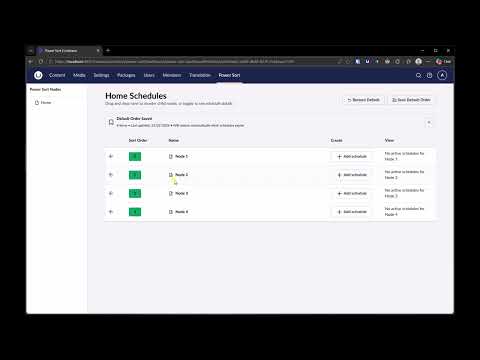

You can schedule sort orders e.g. if you want a node to be pushed up a listing tomorrow at 9am, no problem.
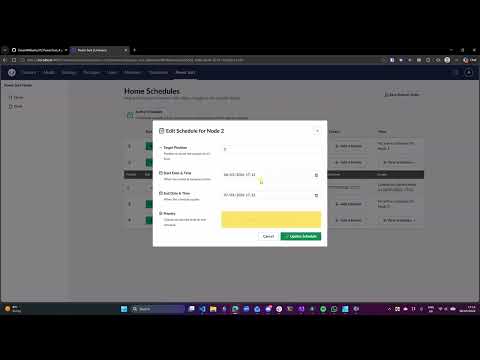
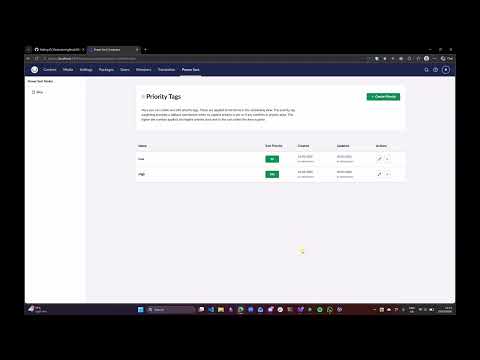
If two nodes on the same schedule share the same Sort Order, the priority set can boost an order. e.g. If 2 items have a sort order of 0, the one with the highest priority will be displayed first.
No additional configuration is required other than granting access to the section for the relevant user groups as described in the usage section. The package will automatically integrate with your Umbraco backoffice and provide enhanced sorting capabilities for content nodes.
- Umbraco v17+
- .NET 10
Contributions to this package are most welcome! Please read the Contributing Guidelines.
This package has been created by Owain Williams and Harrie Mayhew. It is licensed under the MIT License (see LICENSE for details).
