Upload files in an asynchronous way
This is an old project of mine, that I created back in 2007.
Imported into GitHub for archival puposes only.
There will be no updates.
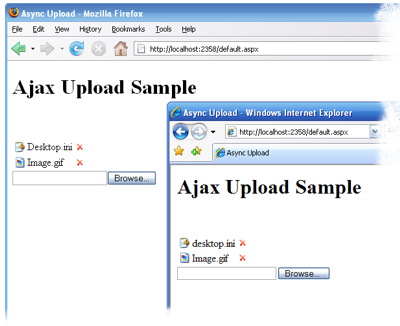


I was working on a project and I needed to upload a series of file to the web server (one at a time), without refreshing the whole page. While the ASP.NET AJAX library is quite useful with the UpdatePanel that permits a wide range of page updates without refreshing the whole thing, it's currently incompatible with file uploading.
Searching through the web, I found a few techniques to upload a file to a web server: using a proprietary component, using the ADODB.Stream, and using a hidden IFrame.
The proprietary component was out of the question, not just because the probable price tag, but also because the requirement to install something in the user's box.
Using the ADODB.Stream, while a valid solution, it not only prevents using it in a cross-browser manner, as well, requires a change of configuration of the Internet Explorer on the user's box.
So, the technique used by this control is the hidden IFrame, which allow a cross browser functionality, while creating the desired result.
When the user selects a file to upload the control starts a post back directing the result to a hidden IFrame and when the file is received by the server the control raises at the server the UploadedFile event.
During the UploadedFile event the page housing the control can access the uploaded file by accessing the property of the event arguments. In C# add the handler in the constructor method. VB users can add the event handler in the Sub New or adding the Handles... directive at the appropriated method.
None of the page events or initialization methods and events (OnInit, Init, OnInitComplete, InitComplete, OnLoad, Load, OnLoadComplete and LoadComplete) are called when an uploaded file is received by the server. The reasons for this behavior are unknown, but welcome, at this point.
Each file receives a GUID that is passed in the event arguments of the UploadedFile event, and refereed to in the RemovedFile event, and in the FileList property.
If the user removes a file from the list of uploaded files, the event RemovedFile is raised.
Update: I have changed the sample page in order to save the uploaded file under the project's root, in order to use the VirtualPath property.
Known Issues:
- Currently the AjaxUpload control is incompatible with the .NET Framework 3.5 UpdatePanel. It will throw an exception in the
Sys$WebForms$PageRequestManager$_endPostBackfunction.
To work around this issue, add aPostBackTriggerto theUpdatePanelspecifying the AjaxUpload control as its source.
 | ConfirmRemoveMessageGets or sets the message shown when the user attempts to remove a file Public Property ConfirmRemoveMessage() As String |
| DisplayIconGets or sets a value indicating whether the file icon will be shown. Public Property DisplayIcon() As Boolean |
| ErrorMessageGets or sets the message to be displayed when the file failed to be uploaded. Public Property ErrorMessage() As String |
| FileListRead Only. Gets an array of AjaxUpload.FileInfo that represents the files information uploaded by the client.Note: This property is only available during post backs. All other times this property is empty, unless the StoreFileListInSession is set to true.Public ReadOnly Property FileList() As AjaxUpload.FileInfo() |
| NoControlMessageGets or sets the message to be displayed when the control does not have an input type=file available. Public Property NoControlMessage() As String |
| RemoveMessageGets or sets the message when the user hover over the remove icon. Public Property RemoveMessage() As String |
| StoreFileListInSessionGets or sets a value indicating if the file list will be sotred in the Session object rather than in hidden fields. Public Property StoreFileListInSession() As Boolean |
 | ClearRemoves all the files from the list. Note: for each file the AjaxUpload control will raise the RemovedFile event, which in turn may set the PreventRemove property that the Clear method will respect.So, even calling Clear does not guarantee that the FileList property will be empty.Public Sub Clear() |
| ContainsReturns true if in the AjaxUpload file list contains the specified file name.Public Function Contains( _ |
 | UploadedFileOccurs when a file is uploaded to the server. Public Event UploadedFile( _
ByVal sender As Object, _
ByVal e As UploadedFileEventArgs)If the page housing the control updates the VirtualPath property of the UploadedFileEventArgs the AjaxUpload control will show a link to the uploaded file, instead of only showing the name.If, for some reason, the file is rejected by the housing page, callers should set the UploadError property of the event arguments and, optionally, the ErrorMessage informing the user the motive. |
| RemovedFileOccurs when a file is being removed at the client. Public Event RemovedFile( _
ByVal sender As Object, _
ByVal e As RemovedFileEventArgs)If, for some reason, the file should not be removed from the list, callers should set the PreventRemove property of the event arguments and, optionally, the PreventRemoveReason informing the user the reason. |
| ContentTypeGets the content-type of an uploaded file. Public Property ContentType() As String |
| FileNameGets the name of an uploaded file. Public Property FileName() As String |
| FileSizeGets the size, in bytes, of an uploaded file. Public Property FileSize() As Integer |
| IDGets the GUID that represents the ID given by the AjaxUpload control to the uploaded file.Public Property ID() As System.Guid |
| UrlGets the System.Uri object that was set, by the page housing the control, during the UploadedFile event.Public Property Url() As System.Uri |