Take the fun out of combing through your ATD reports searching for IoCs to populate your PaloAlto Firewall security policy with OpenDXL-ATD-PANFW integration.
ATD-PANFW continuously listens for new ATD indicators discovered through any numerous means. Once discovered, IPs and domains which are convicted as malicious will be stored in the sqlite db. The sqlite db is dynamically generated on first use and automatically updated each use thereafter.
Simultaneously, ATD-PANFW creates 2 web urls ~/ip and ~/domain which can be used in PAN FW to create an External Dynamic Blocklist.
During startup, the code checks for the existence of the ips_domains.db database. If it does not exist, it is created. Then a connection is made to the DXL fabric and the client begins listening for new ATD IoCs.
$ git clone https://github.com/PoesRaven/ATD_PANFW.gitATD-PANFW requires Python 2.7 or later with the following required modules:
- web.py
- dxlclient
Install the required Python dependencies with the requirements.txt file:
$ pip install -r requirements.txtThis will install the dxlclient and web.py modules.
The OpenDXL Python Client's command line interface supports the
provisionconfig operation which generates the information necessary for
a client to connect to a DXL fabric (certificates, keys, and broker
information).
As part of the provisioning process, a remote call will be made to a provisioning server (ePO or OpenDXL Broker) which contains the Certificate Authority (CA) that will sign the client's certificate.
NOTE: ePO-managed environments must have 4.0 (or newer) versions of DXL ePO extensions installed.
Here is an example usage of provisionconfig operation::
python -m dxlclient provisionconfig config myserver client1
The parameters are as follows:
configis the directory to contain the results of the provisioning operation.myserveris the host name or IP address of the server (ePO or OpenDXL Broker) that will be used to provision the client.client1is the value for the Common Name (CN) attribute stored in the subject of the client's certificate.
NOTE: If a non-standard port (not 8443) is being used for ePO or the
management interface of the OpenDXL Broker, an additional "port" argument
must be specified. For example -t 443 could be specified as part of the
provision operation to connect to the server on port 443.
When prompted, provide credentials for the OpenDXL Broker Management Console or ePO (the ePO user must be an administrator)::
Enter server username:
Enter server password:
On success, output similar to the following should be displayed::
INFO: Saving csr file to config/client.csr
INFO: Saving private key file to config/client.key
INFO: Saving DXL config file to config/dxlclient.config
INFO: Saving ca bundle file to config/ca-bundle.crt
INFO: Saving client certificate file to config/client.crt
As an alternative to prompting, the username and password values can be specified via command line options::
python -m dxlclient provisionconfig config myserver client1 -u myuser -p mypass
See the Command Line Provisioning (Advanced) section for advanced operation options.
For more information on configuring the DXL client see the OpenDXL Python Client SDK Documentation
The integration works by creating a dynamic block list for PaloAlto Firewall to read from. Starting in PAN 7.1, External Dynamic Blocklists can be of multiple types including IPs and Domains. Both of which, this integration supports.
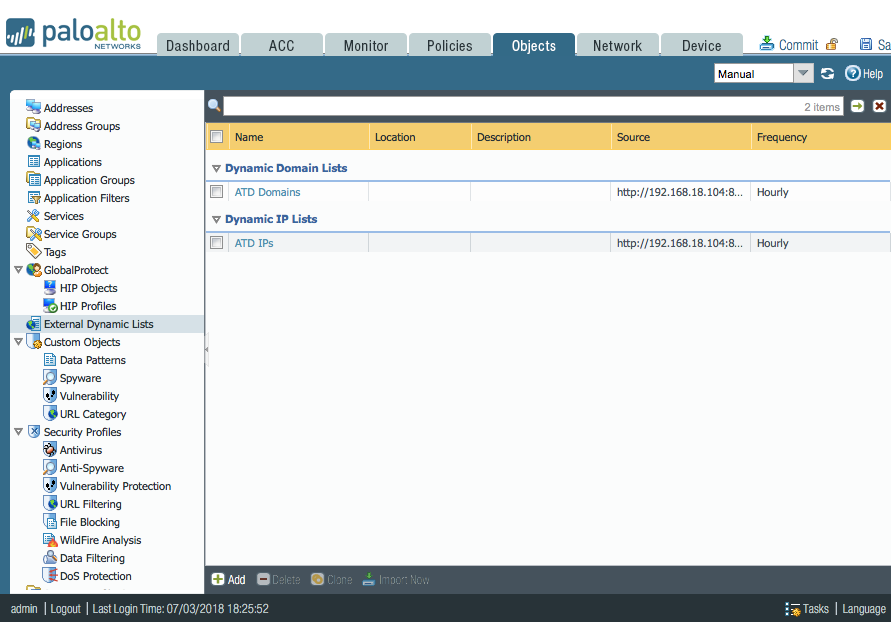
Use the details from PAN's site to setup your dynamic blocklist with the following URLs:
Domain Blocklist URL
http://<running host IP>:8080/domain
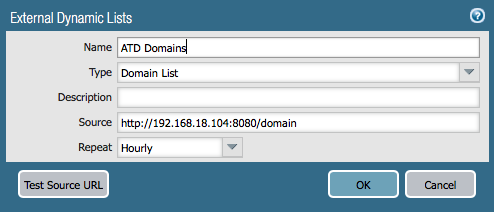
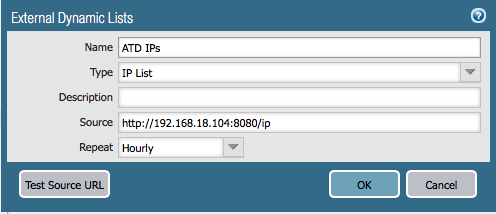
IP Blocklist URL
http://<running host IP>:8080/ip
Lastly, don't forget to setup a security policy with a rule blocking traffic to and from these dynamic blocklists!
$ python atd_panfw.pyor run it as a service in the background
$ nohup python atd_panfw.py &