




DevEvent is a high-performance, visually stunning event management and discovery platform built from the ground up for developers. It serves as a unified catalog for hackathons, technical meetups, and conferences, allowing users to discover events, RSVP instantly, and enable organizers to publish new events with cloud media integration.
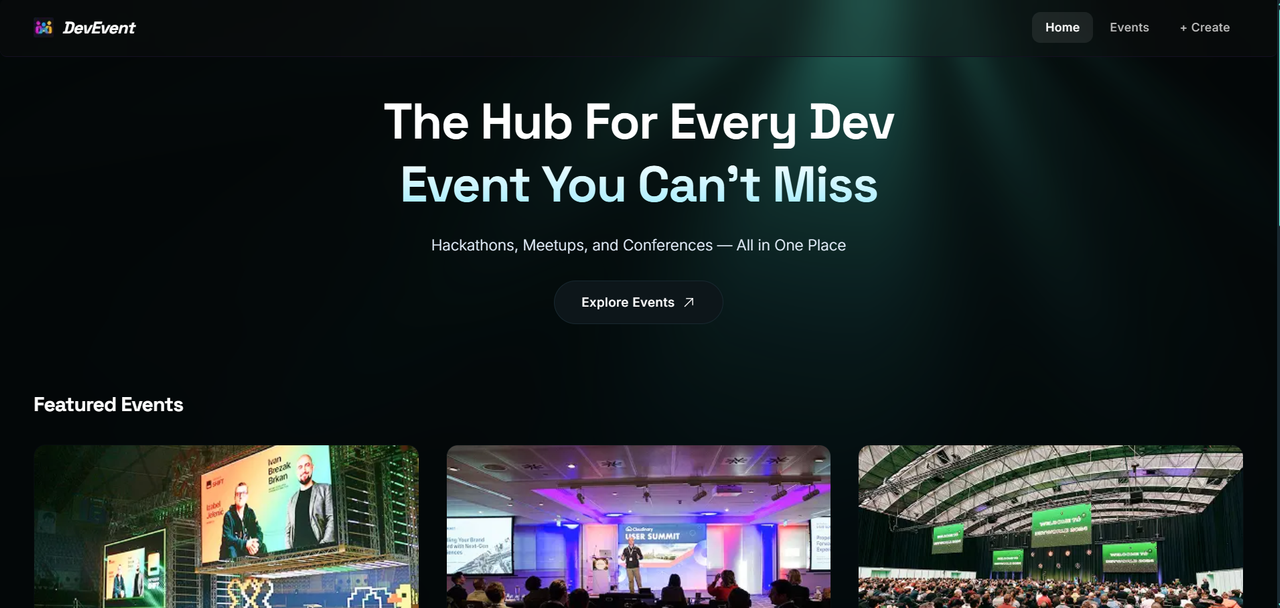
Technological events, hackathons, and developer meetups are typically scattered across disparate websites (e.g., Meetup, Eventbrite, Devpost, Discord channels). This fragmentation makes it hard for developers to find relevant learning and networking opportunities, and equally challenging for event hosts to reach their target technical audience.
DevEvent centralizes developer-focused events in a single, blazing-fast web portal. Organizers can seamlessly create events complete with custom poster banners, detailed agendas, and target audience segments. Developers can explore these events in a highly immersive UI, check schedules, and RSVP with a simple, secure one-click booking workflow.
- Software Developers & Engineers searching for hackathons and tech meetups.
- Tech Event Organizers seeking to host, manage, and promote conferences or local developer groups.
- Sponsors and Recruiters looking to connect with technical talent at localized events.
- 🎨 Immersive Canvas Shaders: Premium WebGL-rendered background glow using
LightRaysshader canvas elements via the OGL library for an interactive, modern user experience. - 📅 Dynamic Event Directory: Real-time listing of events with search capabilities, tags, event modes (online, offline, hybrid), and timing details.
- ⚡ One-Click Instant booking: Quick RSVP validation ensuring each developer (unique email address) can claim only one ticket per event, complete with instant server-side double-booking protection.
- 📤 Cloud-Integrated Creator Hub: Fully controlled creation form allowing organizers to upload banner images directly to Cloudinary and structure event agendas on a modular timeline.
- 📈 Privacy-First Event Telemetry: Integrated PostHog tracking configured through a local server-side reverse proxy (
/ingest) to route events safely without adblocker interference. - 📱 Responsive Layout & Micro-Animations: Built with mobile-first layout design using React 19, Tailwind CSS v4, custom-compiled component hooks, and smooth animation transitions.
- Framework: Next.js 16.2.6 (App Router)
- Library: React 19.2.4
- Styling: Tailwind CSS v4 with
@tailwindcss/postcss - Components: Custom build using Shadcn UI primitives, Radix UI, and Lucide React icons.
- Graphics: OGL 1.0.11 (Ultra-light WebGL engine for custom shaders).
- Notifications: Sonner (Toast notices).
- Server: Next.js Server Actions & API Route Handlers
- Database: MongoDB via Mongoose 9.6.2 (ODM)
- Media Uploads: Cloudinary API (Secure cloud hosting for event images)
- Analytics Platform: PostHog JS integrated client-side via Next.js instrumentation and custom rewrites.
The architecture leverages Next.js App Router hybrid rendering strategies combined with serverless MongoDB configurations.
                    ┌────────────────────────┐
                    │     Next.js Client     │
                    │   (React 19 Frontend)  │
                    └─────┬────────────┬─────┘
                          │            │
             (Server Actions)         (API Endpoints)
             createBooking()          GET/POST /api/events
                          │            │
                          ▼            ▼
                    ┌────────────────────────┐
                    │      Next.js Server    │
                    ├────────────┬───────────┤
                    │ Cloudinary │ PostHog   │
                    │ Media API  │ Ingest px │
                    └─────┬──────┴─────┬─────┘
                          │            │
                   (Media Storage) (Analytics Ingestion)
                          │            │
                          ▼            ▼
                    ┌────────────────────────┐
                    │        Database        │
                    │    (MongoDB Atlas)     │
                    └────────────────────────┘
- User RSVP Form: The user submits their email on an event detail card.
- Server Action Validation: The server invokes
createBooking()which automatically connects to the database via Mongoose. - Database Guardrails: A compound index constraints (
eventId+email) prevents duplicate registration. - Analytics Funnel: On successful booking, PostHog logs
event_card_clickedwith payload tags to build user conversion stats.
- Node.js v20.x or above
- npm, yarn, or pnpm installed
- A running MongoDB instance (or free MongoDB Atlas cluster)
- A Cloudinary Account for media hosting
- A PostHog Project for behavioral analytics
-
Clone the Repository
git clone https://github.com/Pranjal-Sahu21/nextjs-project.git cd nextjs-project -
Install Dependencies
npm install
-
Configure Environment Variables Create a
.env.localfile in the root directory. Copy the structure from below and fill in your credentials.
To run the application, define these environment variables in your .env.local file:
# Database Connection String
MONGODB_URI=mongodb+srv://<db_user>:<db_password>@<cluster_address>/?retryWrites=true&w=majority

# Cloudinary Credentials for Banner Uploads
CLOUDINARY_URL=cloudinary://<api_key>:<api_secret>@<cloud_name>

# Application URL configurations
NEXT_PUBLIC_BASE_URL=http://localhost:3000

# PostHog Analytics Configurations
NEXT_PUBLIC_POSTHOG_PROJECT_TOKEN=phc_your_posthog_project_token_here
NEXT_PUBLIC_POSTHOG_HOST=https://eu.i.posthog.com
Note
The CLOUDINARY_URL is parsed by the Cloudinary SDK directly. Do not expose your private secret keys to client-side bundles (do not prefix with NEXT_PUBLIC_).
Run these commands inside your project root directory:
| Script | Command | Purpose |
|---|---|---|
| Development | npm run dev |
Runs the app on http://localhost:3000 with hot-reloading |
| Production Build | npm run build |
Compiles and optimizes the project for production |
| Start Production | npm run start |
Runs the compiled build in server mode |
| Linting | npm run lint |
Checks typescript, eslint rules, and code styles |
import { createBooking } from "@/lib/actions/booking.actions";

const handleRegister = async (email: string, eventId: string, slug: string) => {
  const response = await createBooking({ eventId, slug, email });

  if (response.success) {
    console.log("Successfully registered!");
  } else {
    console.error("Booking error:", response.error); // Handles duplicate email validations
  }
};import { getSimilarEventsBySlug } from "@/lib/actions/event.actions";
// Returns a list of events sharing tags with the current event, excluding itself
const related = await getSimilarEventsBySlug("react-nexus-2026");
console.log(related);- Endpoint:
GET /api/events - Query Parameters:
limit(number, optional): Max number of events to return.
- Success Response (200 OK):
{
  "message": "Events fetched successfully",
  "events": [
    {
      "_id": "67f81a7b...",
      "title": "React Nexus 2026",
      "slug": "react-nexus-2026",
      "date": "2026-06-15",
      "venue": "Grand Hall, SF",
      "image": "https://res.cloudinary.com/..."
    }
  ]
}
- Endpoint:
GET /api/events/[slug] - Success Response (200 OK):
{
  "message": "Event fetched successfully",
  "event": {
    "title": "React Nexus 2026",
    "slug": "react-nexus-2026",
    "description": "Deep dive into React 19 and Next.js 16 compiler features...",
    "overview": "React 19 updates, Server components, compiler diagnostics.",
    "tags": ["react", "frontend", "nextjs"],
    "agenda": ["09:00 AM - Registration", "10:00 AM - React 19 Deep Dive"]
  }
}
- Endpoint:
POST /api/events - Content-Type:
multipart/form-data - Payload Structure:
image(File, required): Poster banner file.tags(stringified JSON array, required): e.g.,["react", "nextjs"]agenda(stringified JSON array, required): e.g.,["09:00 - Welcome", "10:00 - Keynote"]- Extra text fields:
title,description,overview,venue,location,date,time,mode,audience,organizer.
The code follows the standardized Next.js App Router design layout:
├── app/
│   ├── api/
│   │   └── events/
│   │       ├── [slug]/route.ts   # Fetch specific event details
│   │       └── route.ts          # List & create events API endpoints
│   ├── create-event/
│   │   ├── loading.tsx           # Form loading skeleton state
│   │   └── page.tsx              # Event publishing form
│   ├── events/
│   │   ├── [slug]/
│   │   │   ├── loading.tsx       # Detail page skeletons
│   │   │   └── page.tsx          # Single event visual display
│   │   ├── loading.tsx           # Directory loading fallback
│   │   └── page.tsx              # Grid view of all events
│   ├── globals.css               # Core styling tokens
│   ├── layout.tsx                # Master page templates
│   └── page.tsx                  # Home hero & featured event list
├── components/
│   ├── ui/                       # Shadcn UI primitives & shaders
│   │   ├── LightRays.tsx         # Custom WebGL OGL Canvas shader
│   │   └── LightRays.css         # Canvas specific overlays
│   ├── BookEvent.tsx             # RSVP interactive registration
│   ├── CreateEventForm.tsx       # Controlled multi-part form
│   ├── EventCard.tsx             # Event preview wrapper cards
│   ├── EventDetails.tsx          # Full screen view content
│   └── Navbar.tsx & Footer.tsx   # Global site layouts
├── database/
│   ├── booking.model.ts          # Mongoose Booking schema & hooks
│   ├── event.model.ts            # Mongoose Event validation, slugs & dates
│   └── index.ts                  # Unified model exports
├── lib/
│   ├── actions/                  # Next.js Server Actions
│   │   ├── booking.actions.ts    # Database writes for booking events
│   │   └── event.actions.ts      # Query logic for matching events
│   ├── mongodb.ts                # Mongoose global connection pooler
│   └── utils.ts                  # Layout utility functions
├── next.config.ts                # Turbopack & rewrite configurations
├── package.json                  # Dependencies configuration
└── tsconfig.json                 # TypeScript strict definitions
- Install Vercel CLI or log in to the Vercel Dashboard.
- Link your GitHub repository hosting the code.
- In Settings -> Environment Variables, configure your production MongoDB URI and Cloudinary credentials.
- Set the Build Command to
npm run buildand Output Directory to.next. - Deploy! Vercel automatically sets up edge serverless functions to run API routes.
This project incorporates strict static type enforcement and code quality standards:
To inspect structural code layout, run the automated linting checks:
npm run lintEnsure database instances are properly verified. You can test your remote MongoDB configuration directly by querying the endpoint:
curl http://localhost:3000/api/events