
See who reads your content, right inside Sanity Studio.
Your team writes and publishes in Sanity. But to see if anyone reads it, they have to leave the Studio and log in to another dashboard. Many analytics tools also need a cookie pop-up, and lots of visitors click "no" or leave. Bots then puff up the numbers that are left.
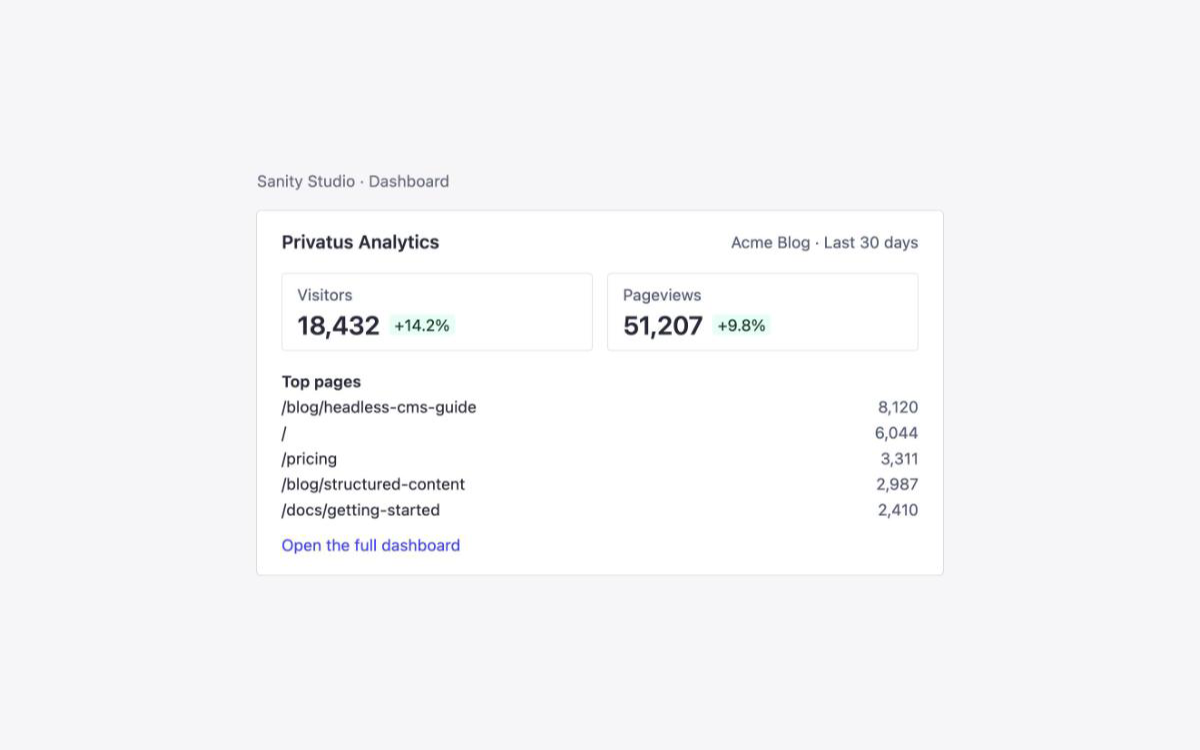
This plugin brings your Privatus Analytics numbers into Sanity Studio. Your editors see visitors, pageviews and top pages next to the content they manage, with no extra login. Privatus Analytics counts visits without cookies, so you need no cookie pop-up for it. It also leaves bots out, so the numbers are honest.
Free plan, no card: 10,000 events a month (an event is a page view or an action you track) on up to 3 sites. Start free at privatusanalytics.com.
- An Analytics tool in the Studio's top menu. It shows your full Privatus Analytics dashboard: visitors, pages, sources, countries, devices and more.
- A dashboard widget for
@sanity/dashboard. It shows visitors and pageviews for the period you pick, the change from the period before, and your top pages.
Use one or both. The plugin only reads your reports. It does not track anyone in the Studio.
- Sanity Studio 4, 5 or 6. The widget needs
@sanity/dashboard. - A Privatus Analytics account with your website added as a site. There is a free plan.
- The Privatus Analytics script on your website (the front end, not the
Studio), so visits are counted. Put it in the
<head>of your pages:
<script defer src="https://privatusstats.com/js/pa.js" data-site="pa_YOURSITEID"></script>You find your site id (it starts with pa_) in Privatus Analytics under
Site settings, Tracking.
npm install sanity-plugin-privatus-analytics- In Privatus Analytics, open your site, then Site settings, Sharing.
- Create a link of the kind Public or Embed. Pick the sections you want your editors to see.
- Copy the link. It looks like
https://privatusanalytics.com/share/abc123.
Why a share link? Sanity puts your Studio settings into JavaScript that the browser downloads. A secret API key there would not stay secret. A share link is made to be seen, it only shows what you picked, and you can revoke it at any time.
import {defineConfig} from 'sanity'
import {dashboardTool} from '@sanity/dashboard'
import {privatusAnalytics, privatusWidget} from 'sanity-plugin-privatus-analytics'

const shareUrl = 'https://privatusanalytics.com/share/abc123'

export default defineConfig({
  // ...
  plugins: [
    // The Analytics tool in the top menu
    privatusAnalytics({shareUrl}),

    // The widget on the Studio dashboard
    dashboardTool({
      widgets: [privatusWidget({shareUrl, period: '30d'})],
    }),
  ],
})
Tip: keep the link in an environment variable such as
SANITY_STUDIO_PRIVATUS_SHARE_URL and read it with
process.env.SANITY_STUDIO_PRIVATUS_SHARE_URL.
| Option | Default | What it does |
|---|---|---|
shareUrl |
(needed) | Your public or embed share link |
title |
Analytics |
The name in the top menu |
name |
analytics |
The tool's address, as in /analytics |
| Option | Default | What it does |
|---|---|---|
shareUrl |
(needed) | Your public or embed share link |
period |
7d |
today, yesterday, 24h, 7d, 30d, 90d, mtd (month so far), last_month, ytd (year so far) or 12mo |
topPages |
5 |
How many top pages to list, from 0 to 10 |
title |
Privatus Analytics |
The widget heading |
layout |
{width: 'medium'} |
The widget size on the dashboard |
If the share link locks a period, the widget shows that period.
- "This share link was not found." The link was revoked or mistyped. Make a new one in Site settings, Sharing.
- "Could not reach Privatus Analytics." Password links and team-only links need a sign-in, so the Studio cannot read them. Use a Public or Embed link.
The plugin only loads your share link from Privatus Analytics. It sends no data about your editors or your content anywhere.
- Docs: https://privatusanalytics.com/docs
- JSON API: https://privatusanalytics.com/docs/api
- MCP server for AI assistants: https://github.com/Privatus-Analytics/mcp-server
- Help: hello@privatusanalytics.com
npm ci
npm run typecheck
npm test
npm run build
./run-docker.sh # builds a real Sanity Studio with this plugin in DockerMIT, Two Phase LLC. See LICENSE.