Repository navigation
Export Nodes SourceIOImageSourceNode
Feeds a Blender Image datablock into the export graph as a Texture. It is the usual start of every texture chain.
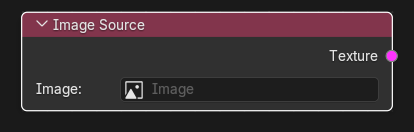
None.
| Output | Type | Description |
|---|---|---|
| Texture | Texture | The pixels of the chosen Blender Image as RGBA floats (an RGB image gets an opaque alpha). Connect it to a VTF Output, to a VMT texture input (VTF Output is inserted automatically), or to any texture operator. |
| Control | Meaning |
|---|---|
Image (image) |
The Blender Image to use. Required: without one the export fails with "Image Source requires a Blender Image". Packed, generated, painted or file-based images all work, because the pixel buffer is read from memory. |
When a downstream node needs pixels the node reads Image.pixels (RGBA, float). Blender exposes 8-bit images as their stored, gamma-encoded values (no colour-management conversion), and the graph keeps them unchanged: an sRGB PNG arrives with its sRGB-encoded numbers, a float image (EXR/HDR) arrives with its linear numbers. The VTF Output default (Linear space) then writes those numbers back unchanged, which is what vtex does for ordinary 8-bit images. If an image holds linear float data and you want it stored as sRGB, add a Color Space node or turn Linear space off on the VTF Output.
An image with zero width or height is rejected ("Image ... has no pixels"). If the image is used directly by a VTF Output, its size is used as is, then rounded down to a power of two by the VTF encoder.
- Create or load the albedo in Blender (Image Editor), save/pack it.
- Add Image Source, pick the image.
- Connect Texture to a VMT node's Base texture input; configure the inserted VTF Output.
Normal map from a Blender bake: Image Source -> Normal Map Ops (Flip Green on) -> VMT Normal texture.
- Changes to the Blender Image are picked up at the next export/preview; the Update Preview button of a Texture Preview re-reads it.
- Only the image's RGBA pixels are used; Blender colour space settings of the image are ignored (the numbers stored in the buffer are used).
- Image sequences and movies do not expose a usable pixel buffer here; use a still image or an External Texture Source.
Pixel data in the graph. Texture sockets carry float RGB/RGBA images (values 0-1, rows stored bottom-up like Blender); Channel sockets carry a single float image (height x width). Only same-type sockets can be linked: a Texture-to-Channel (or other mismatched) link is removed automatically, so go through Split Channels / Combine Channels to convert. The one exception is a Texture link dropped on a VMT material's VTF input, which gets a VTF Output inserted automatically.