



- Overview
- Docs
- Structs and Configuration Explanation
- How it Works
- Example Configuration
- Code Highlights
- Setup instructions
The domainSentinel plugin is a Traefik middleware designed to centrally manage access control based on source IP addresses, organized by domain and URL path. Instead of configuring access lists individually on routers, this plugin allows you to define and enforce those rules in one central location within Traefik.
It provides fine-grained control by allowing both domain-wide and path-specific whitelisting using individual IP addresses and CIDR blocks. This is especially useful for protecting administrative interfaces, staging environments, internal APIs, or other sensitive routes, ensuring only trusted sources can reach them.
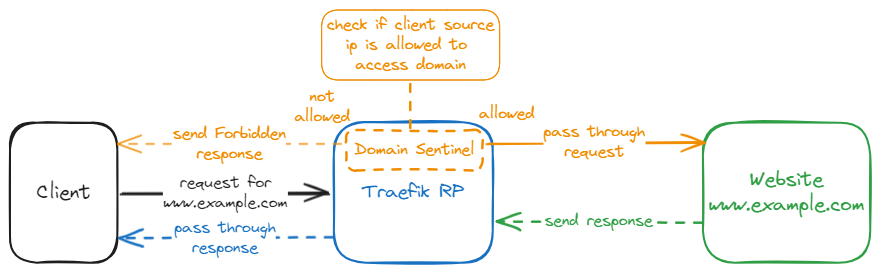
Purpose: Holds the entire plugin configuration, mapping domain names to their respective access rules.
Fields:
DomainPathRules- Type:
map[string]DomainConfig - Description: Maps each domain name to a
DomainConfigstruct, which contains access rules for that domain and its paths.
- Type:
Purpose: Contains source IP allowlists for a domain and its individual path rules.
Fields:
-
SourceIPs- Type:
[]string - Description: List of IP addresses or CIDR blocks that are allowed to access the domain globally.
- Example:
sourceIPs:
  - "192.168.1.0/24"
  - "10.0.0.1"
- Type:
-
PathRules- Type:
[]PathConfig - Description: A list of access rules that apply to specific URL paths within the domain. If a request path matches a rule, its corresponding IPs override the domain-wide list.
- Example:
pathRules:
  - path: "/admin/*"
    sourceIPs:
      - "10.0.0.0/24"
      - "203.0.113.1"
- Type:
Purpose: Defines access rules for a specific path pattern.
Fields:
-
Path- Type:
string - Description: The URL path to protect. Supports exact match or wildcard prefix (
/path/*). - Example:
"/admin/*"
- Type:
-
SourceIPs- Type:
[]string - Description: List of allowed IPs or CIDRs for this specific path. If a path rule matches, only these IPs are used to validate the request.
- Example:
sourceIPs:
  - "192.168.100.1"
  - "10.0.0.0/24"
- Type:
- Extracts the domain from the
Hostheader (ignoring any port). - Looks up the domain config in
DomainPathRules.- If no config is found → the request is allowed.
- Checks path-specific rules:
- If any rule’s
Pathmatches the request URL:- Validates the request's source IP against the rule’s
SourceIPs. - If the IP is allowed → the request proceeds.
- Else → the request is blocked with
403 Forbidden.
- Validates the request's source IP against the rule’s
- If any rule’s
- Fallback to domain-wide IP rules if no path rule matches.
- Same logic applies using the
DomainConfig.SourceIPs.
- Same logic applies using the
- Supports both individual IPs (
203.0.113.5) and CIDR blocks (192.168.0.0/24). - The client IP is derived from
req.RemoteAddrusingnet.SplitHostPort. - All IP checks are done using Go's built-in
net.ParseIPandnet.ParseCIDR.
- Paths can either:
- Match exactly:
/admin - Use a wildcard:
/admin/*matches/admin/,/admin/settings, etc.
- Match exactly:
- If multiple path rules are defined, the first matching rule wins.
http:
  middlewares:
    domain-sentinel:
      plugin:
        domainSentinel:
          domainPathRules:
            "www3.example.com":
              sourceIPs:
                - "192.168.1.0/24"
                - "78.6.34.123"
                - "10.10.3.112"
                - "10.0.2.11"
            "www4.example.com":
              sourceIPs:
                - "0.0.0.0/0"
              pathRules:
                - path: "/admin/*"
                  sourceIPs:
                    - "10.10.4.0/24"
                    - "192.168.1.2"
                    - "80.187.117.232"
                - path: "/oai/*"
                  sourceIPs:
- "76.5.98.123"www3.example.comis protected globally, and all paths require IPs from the specified list.www4.example.comallows all IPs (0.0.0.0/0) except for restricted paths:/admin/*is restricted to specific internal and external IPs./oai/*only allows76.5.98.123.
- Entry point for request handling.
- Extracts domain and path.
- Matches path rules or falls back to domain IP list.
- Validates IP → allows or blocks the request.
- Checks if request path matches a rule using exact or wildcard matching.
- Supports
/path/*pattern prefixing.
- Checks if client IP matches any allowed CIDR or exact IP.
- Uses
net.ParseIP,net.ParseCIDRand CIDR containment. - Avoids misconfigured CIDRs by falling back to direct IP matching if needed.
Step 1: Load/import the plugin into traefik
-
Edit your Traefik static configuration file (e.g., traefik.yml or traefik.toml), and add the plugin's Github repository:
Example:
traefik.yml:experimental: plugins: domainSentinel: moduleName: "github.com/Rau-N/DomainSentinel" version: "v1.0.0"
Ensure to use the current version tag.
Step 2: Configure Dynamic Configuration
-
Create a new or use an already existing dynamic configuration file (e.g., dynamic.yml) that defines how the plugin should behave:
Example
dynamic.yml:http: middlewares: domain-sentinel: plugin: domainSentinel: domainPathRules: "www3.example.com": sourceIPs: - "192.168.1.0/24" - "78.6.34.123" - "10.10.3.111" "www4.example.com": sourceIPs: - "0.0.0.0/0" pathRules: - path: "/admin/*" sourceIPs: - "10.10.4.0/24" - "192.168.1.2" - path: "/oai/*" sourceIPs: - "76.5.98.123" "www5.example.com": sourceIPs: - "10.10.3.0/24" - "64.2.120.12"
- This configuration defines the global rules for the
domain-sentinelmiddleware, consisting of any combination of domain names, requested paths, and source IP addresses.
- This configuration defines the global rules for the
Step 3: Associate the middleware plugin to the entrypoint
-
Edit your Traefik static configuration file
traefik.yml:Example
traefik.yml:entryPoints: webinsecure: address: ":80" http: middlewares: - domain-sentinel@file
- This configuration ensures that the
domain-sentinelmiddleware can analyze and intervene in the whole network traffic passing through the traefik proxy.
- This configuration ensures that the
Step 4: Restart Traefik
-
Start or restart traefik to load the plugin and apply the new configuration
docker compose down && docker compose up -d