A comprehensive starter template for building robust and scalable RESTful APIs using ASP.NET Core 9. This project is built upon the principles of Clean Architecture and comes pre-configured with a rich set of features to accelerate modern web application development.
It includes Entity Framework Core for data access (with MySQL), JWT authentication alongside ASP.NET Core Identity, API versioning, and Swagger for clear API documentation.
Before you begin, ensure you have the following installed:
- .NET 9 SDK: The project targets .NET 9.
- MySQL Server: The default database provider is MySQL. You can adapt it to another EF Core compatible database if needed.
- An IDE or Code Editor:
- Visual Studio 2022 (or later)
- Visual Studio Code
- JetBrains Rider
- Git: For cloning the repository.
Follow these steps to configure the application:
-
Clone the Repository: Open your terminal or command prompt and clone the repository:
git clone <your-repository-url>
cd <repository-name>
-
Database Connection String: The application needs to connect to a MySQL database. You'll need to update the connection string in the
appsettings.Development.jsonfile (andappsettings.jsonfor production environments).- Navigate to
src/Web.API/. - Open
appsettings.Development.json. - Locate the
ConnectionStringssection and update theDataBaseConnectionvalue:
{
  // ... other settings
  "ConnectionStrings": {
    "DataBaseConnection": "Server=your_mysql_server;Port=3306;Database=your_database_name;Uid=your_mysql_user;Pwd=your_mysql_password;"
  }
  // ... other settings
}
Replace
your_mysql_server,your_database_name,your_mysql_user, andyour_mysql_passwordwith your actual MySQL server details. - Navigate to
-
JWT Settings (Optional Review): The JWT settings are configured in
appsettings.jsonandappsettings.Development.json. For local development, the default values are usually sufficient. However, for production, you must change theJWT:Secretto a strong, unique value.{ // ... other settings "JWT": { "Secret": "REPLACE_THIS_WITH_A_VERY_STRONG_AND_UNIQUE_SECRET_KEY_IN_PRODUCTION", "Issuer": "https://localhost:5001", // Should match your API's issuer URI "Audience": "https://localhost:5001", // Should match your API's audience URI "AccessExpirationInMinutes": 60 } // ... other settings }Secret: A long, random, and unique string used to sign the JWTs.Issuer: The authority that issues the token (typically your API's base URL).Audience: The intended recipient of the token (also typically your API's base URL).AccessExpirationInMinutes: The lifetime of the access token.
-
Initial Admin User (Optional): The application can automatically create an initial administrator user on startup. This is configured in
src/Web.API/appsettings.Development.json(orappsettings.json).{ // ... other settings "InitialAdmin": { "FirstName": "Admin", "LastName": "User", "Email": "admin@example.com", "Password": "ComplexPassword_123!", // Ensure this meets password policy "PhoneNumber": "+1234567890" } // ... other settings }- If you provide an
EmailandPassword, the application will attempt to create this user with the "Admin" role if a user with that email doesn't already exist. - Important for Production: It's generally recommended to disable automatic admin creation or ensure the configuration is securely managed in production environments. The template logs a warning and throws an exception if an admin with the configured email already exists in a non-development environment while this feature is enabled.
- If you provide an
-
Allowed Origins (CORS): Configure the allowed origins for Cross-Origin Resource Sharing (CORS) in
appsettings.Development.json(andappsettings.json). This is important if your API will be consumed by front-end applications hosted on different domains.{ // ... other settings "AllowedOrigins": [ "https://localhost:5001", // Example: Your local dev frontend "https://your-production-frontend.com" ] // ... other settings }
Entity Framework Core migrations are used to manage the database schema.
-
Ensure EF Core Tools are Installed: If you haven't already, install the EF Core command-line tools globally:
dotnet tool install --global dotnet-ef
Or, ensure they are installed locally to the project (less common for global use).
-
Apply Migrations: The application is configured to attempt to apply migrations on startup by default if
ApplyMigrationsistrueinappsettings.json. However, it's often better to apply them manually, especially in production.To apply migrations manually:
- Open your terminal/command prompt.
- Navigate to the
Infrastructureproject directory:cd src/Infrastructure - Run the database update command, specifying the
Web.APIproject as the startup project:This command will create the database (if it doesn't exist) based on your connection string and apply all pending migrations to create the necessary tables (including ASP.NET Core Identity tables).dotnet ef database update --startup-project ../Web.API
Alternatively, if using Visual Studio:
- Open the Package Manager Console (
View > Other Windows > Package Manager Console). - Set the "Default project" to
Infrastructure. - Run the command:
Update-Database
Once configured, you can run the application using various methods:
-
Using the .NET CLI:
- Navigate to the
Web.APIproject directory:cd src/Web.API - Run the application:
Or, if you have multiple launch profiles (like "HTTP" and "Swagger" defined in
dotnet run
launchSettings.json):By default, the application might run ondotnet run --launch-profile Swagger
http://localhost:5000andhttps://localhost:5001(check the console output orlaunchSettings.json).
- Navigate to the
-
Using Visual Studio:
- Open the
ASP-Core-Template.slnsolution file in Visual Studio. - Set
Web.APIas the startup project. - Choose a launch profile (e.g., "Swagger" or "HTTP") from the debug toolbar.
- Press
F5or click the "Start" button.
- Open the
-
Using Visual Studio Code:
- Open the project folder in VS Code.
- Ensure you have the C# extension installed.
- Open the integrated terminal (
Ctrl + \or `Cmd + ``). - Navigate to
src/Web.API. - Run
dotnet runor use the "Run and Debug" panel (F5) if you have alaunch.jsonconfigured.
-
API Base URL: Typically
https://localhost:5001orhttp://localhost:5000during development. -
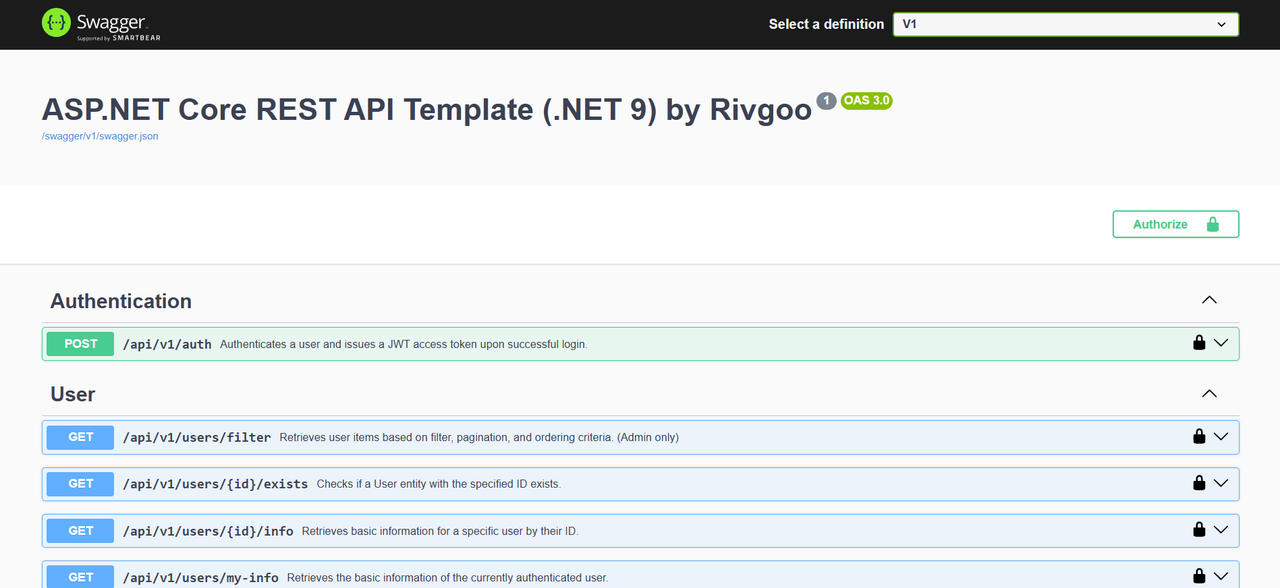
Swagger UI: Once the application is running, open your web browser and navigate to:
https://localhost:5001/swagger(Adjust the port if necessary based on your
launchSettings.jsonor console output). You'll find interactive API documentation where you can explore endpoints, view models, and test API calls directly.
This template provides a solid foundation for your next API project, emphasizing separation of concerns, testability, and maintainability.
- Framework: ASP.NET Core 9
- Architecture: Clean Architecture (Domain, Application, Infrastructure, Web.API)
- Database: Entity Framework Core 8 with Pomelo.EntityFrameworkCore.MySql provider for MySQL.
- Authentication & Authorization:
- JSON Web Tokens (JWT) Bearer scheme for stateless authentication.
- ASP.NET Core Identity for comprehensive user and role management.
- API Documentation: Swagger (OpenAPI) integration with support for API versioning.
- API Versioning: Flexible API versioning (URL segment, header, or media type).
- Data Handling:
- Generic Repository & Unit of Work patterns.
- Advanced filtering, sorting, and pagination capabilities.
- Error Handling: Robust
Resultpattern for operation outcomes. - Dependency Injection: Extensively used throughout the application.
- Configuration: Strongly-typed options pattern for managing settings.
- Testing: Includes a GitHub Actions workflow (
.github/workflows/build_and_test.yml) for automated build and test on pull requests.
The solution is organized into the following layers, promoting a clean separation of concerns:
-
DomainLayer:- Contains enterprise-wide logic and types. This is the core of your application.
- Includes entities (e.g.,
User,Role), value objects (if any), and core abstractions (IBaseEntity,IAuditableEntity,IEntity). - This layer has no dependencies on other layers in the solution.
-
ApplicationLayer:- Contains application-specific business logic, orchestrating domain objects to fulfill use cases.
- Defines interfaces for repositories (
IUserRepository), services (IUserService,IAuthenticationService), Data Transfer Objects (DTOs likeUserDto), and theResultpattern (Result<T>,Error) for operation outcomes. - Handles application-level concerns such as validation, complex query specifications (e.g.,
IFilterService,UserFilter), and mapping between domain entities and DTOs. - Depends only on the
Domainlayer.
-
InfrastructureLayer:- Provides implementations for interfaces defined in the
ApplicationandDomainlayers. - Handles data persistence using Entity Framework Core (
CoreDbContext,UserRepository). - Manages external concerns like database migrations, interaction with file systems, or third-party service integrations.
- Implements the
IUnitOfWorkpattern, and concrete filter sorters/selectors (e.g.,UserSorter,UserSelector). - Depends on the
Applicationlayer.
- Provides implementations for interfaces defined in the
-
Web.APILayer:- The entry point of the application, exposing functionalities via RESTful API endpoints.
- Contains API controllers (
UserController,AuthenticationController), request/response models, and API-specific configurations (Swagger, JWT authentication, CORS, API versioning, middleware). - Handles request processing, model binding, API-level validation, and mapping service results to HTTP responses.
- Depends on the
ApplicationandInfrastructure(primarily for DI setup and options) layers.
This template comes packed with essential features to get you started quickly:
- User Authentication & Authorization:
- Secure user registration for different roles (e.g., Customers can register themselves, Admins can be registered by other Admins).
- JWT-based login mechanism generating access tokens.
- Role-based access control (RBAC) with predefined
AdminandCustomerroles. - Full ASP.NET Core Identity integration for managing users, roles, passwords, claims, and tokens.
- User Management Module:
- Example API endpoints for user management tasks (e.g., creating users, retrieving user lists with filters, fetching user info).
- Logic for updating user's last login timestamp.
- Data Persistence & Handling:
- Entity Framework Core configured for MySQL, including necessary Identity tables.
- Database migrations managed with EF Core tools (initial migration included).
- Efficient data access via the Repository pattern (generic operations like
IAddOperations,IGetOperations, etc., and specificIUserRepository) and Unit of Work pattern (IUnitOfWork). - Auditable entities (
IAuditableEntity,BaseEntity) with automaticCreatedAtandUpdatedAttimestamp tracking.
- Advanced Querying System:
- Flexible server-side filtering capabilities using dedicated filter objects (e.g.,
UserFilter) and a filter service (IFilterService). - Dynamic sorting based on multiple fields and directions (
QueryableOrder). - Paginated list responses (
PaginatedList<TResult>) for handling large datasets efficiently. - Selector pattern (
ISelector) for projecting entities to DTOs.
- Flexible server-side filtering capabilities using dedicated filter objects (e.g.,
- Robust API Design & Error Handling:
- Consistent
Resultpattern (Result,Result<TValue>) for all service operations, clearly distinguishing success from failure with detailedErrorobjects (includingErrorCode,Description, andErrorType). - Centralized error definitions for different modules (e.g.,
UserErrors,FilterErrors,AuthenticationErrors). - API versioning configured (e.g.,
api/v1/...). - Comprehensive Swagger/OpenAPI documentation automatically generated for all API versions and endpoints, including XML documentation comments.
- Consistent
- Configuration & Setup:
- Environment-specific configurations using
appsettings.jsonandappsettings.Development.json. - Strongly-typed options pattern (e.g.,
JwtOptions,FilterSettingsOptions,InitialAdminOptions) for easy and safe access to settings. - Capability to seed an initial administrator user during application startup (configurable).
- Environment-specific configurations using
- Development Workflow & Utilities:
- GitHub Actions workflow (
build_and_test.yml) for continuous integration (build and test on pull requests tomain). - Solution structured for high cohesion, low coupling, and improved testability.
StringUtilitiesfor common string operations and validation (email, phone number, password complexity).Guardclauses for basic input validation within application logic.- AutoMapper pre-configured for seamless DTO-to-entity (and vice-versa) mapping.
- GitHub Actions workflow (
This section provides detailed guidance on how to use the core components of this template and how to extend it with your own features.
The template employs a Result pattern for all service operations to clearly communicate success or failure. This avoids ambiguity and promotes robust error handling.
Application.Results.Result: Represents an operation that doesn't return a value on success.Application.Results.Result<TValue>: Represents an operation that returns a value of typeTValueon success.Application.Results.Error: Encapsulates error details, including a uniqueCode, a human-readableDescription, and anErrorType(e.g.,NotFound,BadRequest,Conflict).
-
Success:
// For operations without a return value
public Result SomeOperation()
{
    // ... logic ...
    return Result.Ok();
}

// For operations with a return value
public Result<UserDto> GetUser(string id)
{
    var userDto = // ... fetch user ...
    if (userDto == null)
        return Result<UserDto>.Bad(UserErrors.NotFoundById(id)); // Or your specific entity error

    return Result<UserDto>.Ok(userDto);
}
-
Failure: Use predefined error objects from classes like
UserErrors,FilterErrors,AuthenticationErrors, or create your own.// In a service public async Task<Result<User>> CreateUserAsync(RegistrationUserModel model) // Assuming RegistrationUserModel { if (string.IsNullOrWhiteSpace(model.Email)) return Result<User>.Bad(UserErrors.InvalidEmail); // Example: UserErrors.InvalidEmail // ... further logic ... var user = new User { /* ... map from model ... */ }; _userRepository.Add(user); // Assuming _userRepository is injected await _unitOfWork.SaveChangesAsync(); // Assuming _unitOfWork is injected return Result<User>.Ok(user); }
Controllers receive Result objects from services and convert them into appropriate IActionResult responses.
- Using
ToActionResult()extension methods: Located inWeb.API.Core.Extensions.ResultExtensions.cs.// In UserController.cs [HttpGet("{id}")] public async Task<IActionResult> GetUserById(string id) { // Assuming _userService.GetUserInfoByIdAsync returns Result<UserInfo> Result<UserInfo> result = await _userService.GetUserInfoByIdAsync(id); return result.ToActionResult(); // Automatically returns Ok(value) or an error ObjectResult } [HttpPost("customer/register")] public async Task<IActionResult> RegisterCustomer([FromBody] RegistrationUserRequest request) { var model = _mapper.Map<RegistrationUserModel>(request); Result<User> registrationResult = await _userRegistrator.RegisterCustomerAsync(model); // Match can be used for more complex logic before returning return registrationResult.Match( user => CreatedAtAction(nameof(GetUserById), // Assuming GetUserById action exists new { id = user.Id }, new CreatedResponse<string>(user.Id)), // For 201 Created error => registrationResult.ToActionResult() // Handles various error types ); }
Create static error-providing classes for your modules, similar to UserErrors.cs:
// Example: src/Application/YourModule/YourModuleErrors.cs
using Application.Results;
// using Domain.Entities.YourModule; // Assuming you have YourEntity

public static class YourModuleErrors // : EntityErrors<YourEntity, YourEntityIdType> if applicable
{
    public static Error SomeSpecificError(string detail) =>
        Error.BadRequest($"YourModule.SomeSpecificError", "Something specific went wrong: {0}", detail);

    public static Error ResourceLocked(string resourceId) =>
        Error.Conflict($"YourModule.ResourceLocked", "Resource '{0}' is currently locked.", resourceId);
}Domain.Abstractions.BaseEntity<TId>andBaseEntity(forintID): ProvideId,CreatedAt, andUpdatedAtproperties.CreatedAtandUpdatedAtare automatically managed byCoreDbContextduringSaveChangesAsync.If you need a different ID type (e.g.,// Example: src/Domain/Entities/Product.cs using Domain.Abstractions; public class Product : BaseEntity // Uses int Id by default { public string Name { get; set; } = string.Empty; public decimal Price { get; set; } public int CategoryId { get; set; } // Example property // Other properties... }
Guid):public class Order : BaseEntity<Guid> { public Guid CustomerId { get; set; } // Other properties... }
The template provides generic interfaces for common repository operations:
IAddOperations<TEntity>IDeleteOperations<TEntity>IGetOperations<TEntity, TId>IUpdateOperations<TEntity>IExistByIdOperation<TId>IEntityOperations<TEntity, TId>(combines all above)IRepository(marker interface)
Creating a New Repository:
-
Define the Interface (Application Layer):
// src/Application/Products/Abstractions/IProductRepository.cs
using Application.Abstractions.Repositories;
using Domain.Entities; // Assuming Product entity exists (created above)
using System.Collections.Generic;
using System.Threading;
using System.Threading.Tasks;

public interface IProductRepository : IEntityOperations<Product, int> // Product uses int ID
{
    Task<IEnumerable<Product>> GetProductsByCategoryAsync(int categoryId, CancellationToken cancellationToken = default);
    Task<bool> ExistsByNameAsync(string name, CancellationToken cancellationToken = default);
}
-
Implement the Interface (Infrastructure Layer): Inherit from
Infrastructure.Abstractions.OperationsRepository<TEntity, TId>.// src/Infrastructure/Repositories/ProductRepository.cs using Application.Products.Abstractions; using Domain.Entities; using Infrastructure.Abstractions; using Infrastructure.Core; using Microsoft.EntityFrameworkCore; using System.Collections.Generic; using System.Linq; // Required for Where, ToListAsync using System.Threading; // Required for CancellationToken using System.Threading.Tasks; // Required for Task internal class ProductRepository : OperationsRepository<Product, int>, IProductRepository { public ProductRepository(CoreDbContext dbContext) : base(dbContext) { } public async Task<IEnumerable<Product>> GetProductsByCategoryAsync(int categoryId, CancellationToken cancellationToken = default) { return await _entities.AsNoTracking() .Where(p => p.CategoryId == categoryId) .ToListAsync(cancellationToken); } public async Task<bool> ExistsByNameAsync(string name, CancellationToken cancellationToken = default) { return await _entities.AnyAsync(p => p.Name == name, cancellationToken); } }
-
Register in DI (Infrastructure Layer): The
Infrastructure/Dependency.csfile has logic to automatically discover and register repositories implementingIRepository. Your newIProductRepositoryshould be picked up ifProductRepositoryimplements it andProductRepositoryinherits from a base that implementsIRepository. -
Add
DbSettoCoreDbContext:// src/Infrastructure/Core/CoreDbContext.cs // Add this line inside the CoreDbContext class public DbSet<Product> Products { get; set; } = default!;
And configure it in
OnModelCreatingif necessary (e.g., table name, relationships).// Inside OnModelCreating in CoreDbContext.cs modelBuilder.Entity<Product>(b => { b.ToTable("products"); // Snake case naming convention is applied globally by UseSnakeCaseNamingConvention() // b.HasKey(p => p.Id); // BaseEntity already defines Id as Key b.Property(p => p.Name).IsRequired().HasMaxLength(200); b.Property(p => p.Price).HasColumnType("decimal(18,2)"); // Configure CategoryId relationship if it's a foreign key // e.g., b.HasOne<Category>().WithMany().HasForeignKey(p => p.CategoryId); });
-
Create a Migration: In the terminal, from the
src/Infrastructuredirectory:dotnet ef migrations add AddedProductEntity --startup-project ../Web.API dotnet ef database update --startup-project ../Web.API
Inject IUnitOfWork into your services to save changes made across multiple repositories in a single transaction.
// In a service constructor
private readonly IProductRepository _productRepository;
// private readonly IOrderRepository _orderRepository; // Assuming another repository
private readonly IUnitOfWork _unitOfWork;

public YourService(IProductRepository productRepository, /* IOrderRepository orderRepository,*/ IUnitOfWork unitOfWork)
{
    _productRepository = productRepository;
    // _orderRepository = orderRepository;
    _unitOfWork = unitOfWork;
}

public async Task<Result> UpdateProductAndLogAsync(Product product, string logMessage) // Example
{
    _productRepository.Update(product);
    // SomeOtherRepository.Add(new LogEntry(logMessage));

    // All changes are tracked by the DbContext
    await _unitOfWork.SaveChangesAsync(); // Commits the transaction

    return Result.Ok();
}Application services orchestrate business logic.
Creating a New Service:
-
Define the Interface (Application Layer):
// src/Application/Products/Abstractions/IProductService.cs
using Application.Abstractions.Services;
using Application.Products.Dtos; // Assuming ProductDto exists
using Application.Results;
using Domain.Entities; // Your Product entity
using System.Collections.Generic; // For IEnumerable
using System.Threading;
using System.Threading.Tasks;

public interface IProductService : IEntityService<Product, int> // Inherits base CRUD
{
    Task<Result<IEnumerable<ProductDto>>> GetFeaturedProductsAsync(CancellationToken cancellationToken = default);
    Task<Result> UpdateProductPriceAsync(int productId, decimal newPrice, CancellationToken cancellationToken = default);
}
-
Implement the Interface (Application Layer): Inherit from
Application.Abstractions.Services.BaseEntityService<TEntity, TId, TRepository>.// src/Application/Products/ProductService.cs using Application.Abstractions; // For IUnitOfWork using Application.Abstractions.Services; using Application.Products.Abstractions; using Application.Products.Dtos; using Application.Results; // For Result, EntityErrors using AutoMapper; using Domain.Entities; using System.Collections.Generic; using System.Threading; using System.Threading.Tasks; using System.Linq; // For Select in GetFeaturedProductsAsync example internal class ProductService : BaseEntityService<Product, int, IProductRepository>, IProductService { private readonly IMapper _mapper; public ProductService(IProductRepository productRepository, IUnitOfWork unitOfWork, IMapper mapper) : base(productRepository, unitOfWork) { _mapper = mapper; } public async Task<Result<IEnumerable<ProductDto>>> GetFeaturedProductsAsync(CancellationToken cancellationToken = default) { // Example: Assuming IProductRepository has a method like GetByConditionAsync // For a real "featured" scenario, you'd have specific logic in the repository or here. var products = await _entityRepository.GetAllAsync(cancellationToken); // Placeholder for actual featured logic var featuredProductDtos = _mapper.Map<IEnumerable<ProductDto>>(products.Take(5)); // Example: take first 5 return Result<IEnumerable<ProductDto>>.Ok(featuredProductDtos); } public async Task<Result> UpdateProductPriceAsync(int productId, decimal newPrice, CancellationToken cancellationToken = default) { var productResult = await GetByIdAsync(productId, cancellationToken); // GetByIdAsync is from BaseEntityService if (productResult.IsFailure) return productResult; // Propagate the error (e.g., NotFound) var product = productResult.Value!; // Specific validation for this operation if (newPrice <= 0) return Result.Bad(EntityErrors<Product, int>.ValueTooLow(nameof(Product.Price), 0.01m)); product.Price = newPrice; // base.UpdateAsync calls ValidateEntityAsync and _unitOfWork.SaveChangesAsync() var updateResult = await base.UpdateAsync(product); return updateResult; } // Override ValidateEntityAsync for product-specific validation rules // This is called by CreateAsync and UpdateAsync in BaseEntityService protected override async Task<Result> ValidateEntityAsync(Product entity) { if (string.IsNullOrWhiteSpace(entity.Name)) return Result.Bad(EntityErrors<Product, int>.RequiredProperty(nameof(Product.Name))); if (entity.Name.Length > 200) return Result.Bad(EntityErrors<Product, int>.StringTooLong(nameof(Product.Name), 200)); if (entity.Price <= 0) return Result.Bad(EntityErrors<Product, int>.ValueTooLow(nameof(Product.Price), 0.01m)); // Example: Check for uniqueness of product name (only if it's a new entity or the name has changed) var existingProductWithSameName = await _entityRepository.GetByConditionAsync(p => p.Name == entity.Name && p.Id != entity.Id); if (existingProductWithSameName.Any()) { return Result.Bad(EntityErrors<Product, int>.Conflict(nameof(Product.Name), entity.Name)); } // (Note: GetByConditionAsync is a hypothetical method you might add to your IProductRepository for such checks) return Result.Ok(); // All validations passed } }
-
Register in DI (Application Layer): The
Application/Dependency.csfile has logic to automatically discover and register services ending with "Service" and implementing application-specific interfaces.IProductServiceshould be picked up.
Data Transfer Objects (DTOs) are used to shape data for API responses and requests. AutoMapper is used for mapping between entities and DTOs.
-
Define DTOs (Application Layer):
// src/Application/Products/Dtos/ProductDto.cs
using System; // For DateTime

public class ProductDto
{
    public int Id { get; set; }
    public string Name { get; set; } = string.Empty;
    public decimal Price { get; set; }
    public int CategoryId { get; set; } // Assuming you want to expose this
    public DateTime CreatedAt { get; set; }
}
// src/Web.API/Controllers/V1/Products/Requests/CreateProductRequest.cs (Example API Request DTO)
using System.ComponentModel.DataAnnotations;

public class CreateProductRequest
{
    [Required]
    [MaxLength(200)]
    public string Name { get; set; } = string.Empty;

    [Range(0.01, (double)decimal.MaxValue)]
    public decimal Price { get; set; }

    [Required]
    public int CategoryId { get; set; }
}
-
Create AutoMapper Profile (Web.API Layer or where DTOs are most relevant for API): Create a class inheriting from
Profilein theWeb.APIproject (e.g.,Web.API/Controllers/V1/Products/ProductProfile.cs).// src/Web.API/Controllers/V1/Products/ProductProfile.cs using Application.Products.Dtos; // DTO using AutoMapper; using Domain.Entities; // Entity using Web.API.Controllers.V1.Products.Requests; // API Request Model public class ProductProfile : Profile { public ProductProfile() { CreateMap<Product, ProductDto>(); // Entity to DTO // For creating, map from request model to entity CreateMap<CreateProductRequest, Product>(); // For updating, you might have a different request model // CreateMap<UpdateProductRequest, Product>() // .ForMember(dest => dest.Id, opt => opt.Ignore()); // Don't map Id from update request } }
AutoMapper profiles are automatically discovered from all loaded assemblies by
services.AddAutoMapper(AppDomain.CurrentDomain.GetAssemblies());inWeb.API/Extensions/ServiceCollectionExtensions.cs.
The template includes a powerful system for querying data.
UserFilter Example:
The Application.Users.UserFilter class demonstrates how to define filter criteria.
The Infrastructure.Filters.Sorters.UserSorter implements ISorter<User, UserFilter> to apply these filters to an IQueryable<User>.
The Infrastructure.Filters.Selectors.UserSelector implements IUserSelector (which is ISelector<User, UserDto>) to project User entities to UserDto.
Creating Filters for a New Entity (Product):
-
Define Filter Object (Application Layer):
// src/Application/Products/ProductFilter.cs
using Application.Filters.Abstractions;
using Domain.Entities; // Your Product entity

public class ProductFilter : BaseFilter<Product> // Inherits PageIndex and ordering logic
{
    public string? NameSearch { get; set; }
    public decimal? MinPrice { get; set; }
    public decimal? MaxPrice { get; set; }
    public int? CategoryId { get; set; }
}
-
Implement Sorter (Infrastructure Layer):
// src/Infrastructure/Filters/Sorters/ProductSorter.cs
using Application.Filters.Abstractions; // For ISorter
using Application.Products; // ProductFilter
using Domain.Entities;
using Infrastructure.Core;
using Infrastructure.Filters.Abstractions; // For BaseSorter
using LinqKit; // For PredicateBuilder and AsExpandable
using Microsoft.EntityFrameworkCore; // For EF.Functions
using System.Linq; // For IQueryable

internal class ProductSorter : BaseSorter<Product, ProductFilter>, ISorter<Product, ProductFilter>
{
    public ProductSorter(CoreDbContext dbContext) : base(dbContext) { }

    public override IQueryable<Product> GetSort(ProductFilter filter)
    {
        var queryPredicate = PredicateBuilder.New<Product>(true); // Start with a true predicate

        if (!string.IsNullOrWhiteSpace(filter.NameSearch))
        {
            queryPredicate = queryPredicate.And(p => EF.Functions.Like(p.Name, $"%{filter.NameSearch}%"));
        }
        if (filter.MinPrice.HasValue)
        {
            queryPredicate = queryPredicate.And(p => p.Price >= filter.MinPrice.Value);
        }
        if (filter.MaxPrice.HasValue)
        {
            queryPredicate = queryPredicate.And(p => p.Price <= filter.MaxPrice.Value);
        }
        if (filter.CategoryId.HasValue)
        {
            queryPredicate = queryPredicate.And(p => p.CategoryId == filter.CategoryId.Value);
        }

        // _entities is the DbSet<Product> from BaseSorter
        return _entities.AsExpandable().Where(queryPredicate);
    }
}
-
Implement Selector (Infrastructure Layer): First, define the selector interface in the Application layer:
// src/Application/Products/Abstractions/IProductSelector.cs
using Application.Filters.Abstractions; // For ISelector
using Application.Products.Dtos; // For ProductDto
using Domain.Entities; // For Product

public interface IProductSelector : ISelector<Product, ProductDto> { }
Then, implement it in the Infrastructure layer:
// src/Infrastructure/Filters/Selectors/ProductSelector.cs
using Application.Products.Abstractions; // IProductSelector
using Application.Products.Dtos;
using Domain.Entities;
using Infrastructure.Core;
using Infrastructure.Filters.Abstractions; // BaseSelector
using System.Linq; // For IQueryable and Select

internal class ProductSelector : BaseSelector<Product, ProductDto>, IProductSelector
{
    public ProductSelector(CoreDbContext dbContext) : base(dbContext) { }

    public override IQueryable<ProductDto> Select(IQueryable<Product> source)
    {
        return source.Select(p => new ProductDto
        {
            Id = p.Id,
            Name = p.Name,
            Price = p.Price,
            CategoryId = p.CategoryId,
            CreatedAt = p.CreatedAt
            // Map other properties as needed
        });
    }
}
-
Register Sorter and Selector in DI (Infrastructure Layer): In
Infrastructure/Dependency.cswithin theAddInfrastructureServicesmethod:// Inside the #region Filters services.AddScoped<ISorter<Product, ProductFilter>, ProductSorter>(); services.AddScoped<IProductSelector, ProductSelector>();
-
Using in a Controller (Web.API Layer): Inject
IFilterService<Product, ProductFilter>into yourProductsController.// In a ProductController.cs // ... (constructor injection for IFilterService<Product, ProductFilter> as _filterService) ... [HttpGet("filter")] [Authorize(Roles = RoleNames.Admin)] // Or allow anonymous if appropriate [ProducesResponseType(typeof(PaginatedList<ProductDto>), StatusCodes.Status200OK)] [ProducesResponseType(typeof(Application.Results.Error), StatusCodes.Status400BadRequest)] public async Task<IActionResult> GetProductsByFilter( [FromQuery] int pageSize = 10, // Default page size [FromQuery] string[]? orderField = null, [FromQuery] List<QueryableOrderType>? orderType = null, [FromQuery] ProductFilter filter) // ProductFilter comes from query parameters { // Default ordering if not provided by client if (orderField == null || orderField.Length == 0) { orderField = ["Name"]; // Default sort field for products orderType = [QueryableOrderType.OrderBy]; } // ApplyOrdering is in ApiController base class var applyOrderResult = ApplyOrdering(filter, orderField, orderType ?? new List<QueryableOrderType>()); if (applyOrderResult.IsFailure) return applyOrderResult.ToActionResult(); var filterResult = await _filterService .SetPageSize(pageSize) .AddFilter(filter) // .AddSorter<ISorter<Product, ProductFilter>>() // Sorter can be implicitly resolved if only one ISorter for these types is registered .ApplyAsync<ProductDto, IProductSelector>(); // Use your selector return filterResult.ToActionResult(); }
- Inherit from
ApiController(for general API controllers) orEntityApiController<TService>(for entity-specific CRUD controllers). - Use attributes like
[Authorize(Roles = RoleNames.Admin)],[AllowAnonymous],[HttpGet],[HttpPost], etc. - Inject services and use
IMapperfor request/response models. - Return
IActionResultby converting serviceResultobjects using the.ToActionResult()extension.
Creating a New Controller (Example: ProductsController):
Assume CreateProductRequest.cs exists in Web.API/Controllers/V1/Products/Requests/.
// src/Web.API/Controllers/V1/ProductsController.cs
using Application.Filters.Abstractions;
using Application.Products; // For ProductFilter
using Application.Products.Abstractions;
using Application.Products.Dtos;
using Asp.Versioning;
using AutoMapper;
using Domain; // For RoleNames
using Domain.Entities; // Product entity
using Microsoft.AspNetCore.Authorization;
using Microsoft.AspNetCore.Mvc;
using Web.API.Core;
using Web.API.Core.BaseResponses;
using Web.API.Core.Extensions;
using Web.API.Controllers.V1.Products.Requests; // Your request DTO
using System.Collections.Generic; // For List
using System.Threading.Tasks; // For Task
using Application.Results; // For Error type hint

[ApiVersion("1")]
[Route("api/v{version:apiVersion}/products")]
public class ProductsController : EntityApiController<IProductService>
{
    private readonly IFilterService<Product, ProductFilter> _filterService;

    public ProductsController(
        IMapper mapper,
        IProductService entityService, // This is IProductService
        IFilterService<Product, ProductFilter> filterService) : base(mapper, entityService)
    {
        _filterService = filterService;
    }

    [HttpGet("{id}")]
    [AllowAnonymous] // Example: Publicly readable product
    [ProducesResponseType(typeof(ProductDto), StatusCodes.Status200OK)]
    [ProducesResponseType(typeof(Error), StatusCodes.Status404NotFound)]
    public async Task<IActionResult> GetProductById(int id)
    {
        // GetByIdAsync from BaseEntityService returns Result<Product>
        var result = await _entityService.GetByIdAsync(id);

        // If you need ProductDto directly from service, create a method like GetProductDtoByIdAsync in IProductService
        // Otherwise, map it here:
        return result.Match(
            product => Ok(_mapper.Map<ProductDto>(product)), // Map Product entity to ProductDto
            error => result.ToActionResult() // Handles NotFound, etc.
        );
    }

    [HttpPost]
    [Authorize(Roles = RoleNames.Admin)] // Only Admins can create products
    [ProducesResponseType(typeof(CreatedResponse<int>), StatusCodes.Status201Created)]
    [ProducesResponseType(typeof(Error), StatusCodes.Status400BadRequest)]
    [ProducesResponseType(typeof(Error), StatusCodes.Status409Conflict)] // For unique constraint violations
    public async Task<IActionResult> CreateProduct([FromBody] CreateProductRequest request)
    {
        var productToCreate = _mapper.Map<Product>(request); // Map request DTO to Product entity
        var result = await _entityService.CreateAsync(productToCreate); // CreateAsync from BaseEntityService

        return result.Match(
            createdProduct => CreatedAtAction(nameof(GetProductById),
                                            new { version = "1", id = createdProduct.Id },
                                            new CreatedResponse<int>(createdProduct.Id)),
            error => result.ToActionResult()
        );
    }

    // Implement your GetProductsByFilter similar to the example in section 5.5
    // ... other PUT, DELETE endpoints as needed ...
    // Example:
    // [HttpPut("{id}")]
    // [Authorize(Roles = RoleNames.Admin)]
    // public async Task<IActionResult> UpdateProduct(int id, [FromBody] UpdateProductRequest request)
    // {
    //     var productToUpdate = _mapper.Map<Product>(request);
    //     productToUpdate.Id = id; // Ensure Id is set for update
    //     var result = await _entityService.UpdateAsync(productToUpdate);
    //     return result.ToActionResult();
    // }

    // [HttpDelete("{id}")]
    // [Authorize(Roles = RoleNames.Admin)]
    // public async Task<IActionResult> DeleteProduct(int id)
    // {
    //     var result = await _entityService.DeleteByIdAsync(id);
    //     return result.ToActionResult();
    // }
}-
Define the Role Name: Add a constant to
Domain/RoleNames.cs:public const string Moderator = nameof(Moderator);
-
Seed the Role (Optional but Recommended for Consistency): In
Infrastructure/Core/CoreDbContext.cs, within theOnModelCreatingmethod, under#region Set Identity Roles:modelBuilder.Entity<Role>().HasData( new Role("e0ddbbf0-c810-432d-8554-640db86c4443", RoleNames.Admin), // Keep existing GUIDs new Role("0de7a5f6-d02a-4041-9c1f-abeb8ed44c92", RoleNames.Customer), new Role("YOUR_NEW_UNIQUE_GUID_HERE", RoleNames.Moderator) // Generate a new unique GUID );
- Generate a new GUID for the
Moderatorrole (e.g., using an online GUID generator orGuid.NewGuid().ToString()in C# interactive). - This ensures the role exists in the database with a consistent ID.
- Generate a new GUID for the
-
Create a New Migration: From the
src/Infrastructuredirectory in your terminal:dotnet ef migrations add AddedModeratorRole --startup-project ../Web.API dotnet ef database update --startup-project ../Web.API
-
Use the Role: You can now use
RoleNames.Moderatorin[Authorize(Roles = RoleNames.Moderator)]attributes on your API controllers/actions, or when assigning roles to users viaUserManager<User>.// Example in a controller // [HttpPost("moderate-content")] // [Authorize(Roles = $"{RoleNames.Admin},{RoleNames.Moderator}")] // Admin OR Moderator // public IActionResult ModerateContent([FromBody] ContentToModerateRequest request) // { // // ... logic ... // }
Use the strongly-typed options pattern for accessing application settings.
-
Define Options Class (Application or relevant layer):
// src/Application/ExternalServices/Options/PaymentGatewayOptions.cs
namespace Application.ExternalServices.Options // Example namespace
{
    public class PaymentGatewayOptions
    {
        public const string SectionName = "PaymentGateway"; // Matches appsettings.json section

        public string ApiKey { get; set; } = string.Empty;
        public string ServiceUrl { get; set; } = string.Empty;
        public int TimeoutSeconds { get; set; } = 30;
    }
}
-
Add to
appsettings.json(andappsettings.Development.jsonas needed):{ // ... other settings ... "PaymentGateway": { "ApiKey": "your_gateway_api_key_here_or_use_user_secrets", "ServiceUrl": "https://api.paymentgateway.com/v1", "TimeoutSeconds": 60 } }Security Note: For sensitive data like API keys, consider using User Secrets in development and Azure Key Vault (or similar) in production.
-
Register in DI (Typically in
Application/Dependency.csorInfrastructure/Dependency.cs): If the options are primarily used by Application layer services: InApplication/Dependency.cswithin theAddApplicationServicesmethod:// In #region Configuration services.Configure<PaymentGatewayOptions>(configuration.GetSection(PaymentGatewayOptions.SectionName));
-
Inject and Use: Inject
IOptions<YourOptionsClass>(orIOptionsSnapshotfor per-request updates,IOptionsMonitorfor live updates) into your services or other components.// In a service, e.g., src/Application/ExternalServices/PaymentService.cs using Application.ExternalServices.Options; // Your options class using Microsoft.Extensions.Options; // For IOptions // ... public class PaymentService // : IPaymentService (example) { private readonly PaymentGatewayOptions _gatewayOptions; private readonly HttpClient _httpClient; public PaymentService(IOptions<PaymentGatewayOptions> gatewayOptions, HttpClient httpClient) { _gatewayOptions = gatewayOptions.Value; // .Value gives you the actual options instance _httpClient = httpClient; // You might configure HttpClient base address or default headers here using _gatewayOptions.ServiceUrl } public async Task<bool> ProcessPaymentAsync(decimal amount) { var apiKey = _gatewayOptions.ApiKey; var serviceUrl = _gatewayOptions.ServiceUrl; // ... use apiKey and serviceUrl to make a call ... return true; // Placeholder } }
This project is licensed under the MIT License. See the LICENSE file for more details.