

Blogify is my hands-on Product Ops lab: a simple, live blog that serves as a simulated company. I use it to explore product tools and workflows—from task tracking and roadmapping to analytics, customer feedback, and releases—and try selected ideas on a working app. The app is simple on purpose. Some examples of what's in place today:
- Release pipelines: every pull request and every push to
mainruns lint, a build, browser tests and API tests in CI. A deploy is one command, and the previous version is kept for rollback. - Consent-first analytics: Google Analytics loads only after a visitor accepts it in the cookie banner, and the footer's "Cookie settings" lets them change their mind.
- AI-run maintenance: Claude reviews my pull requests, Dependabot's minor and patch updates merge themselves once CI passes, and Claude Code commands handle package updates, pushes and deploys.
Underneath, it is a full-stack blog built with React and Vite on the front end, Node.js and Express on the back end, MongoDB Atlas for storage and Firebase Authentication for sign-in. It is deployed as a single service on Google Cloud App Engine.
Live site: https://app.ronirachmani.com
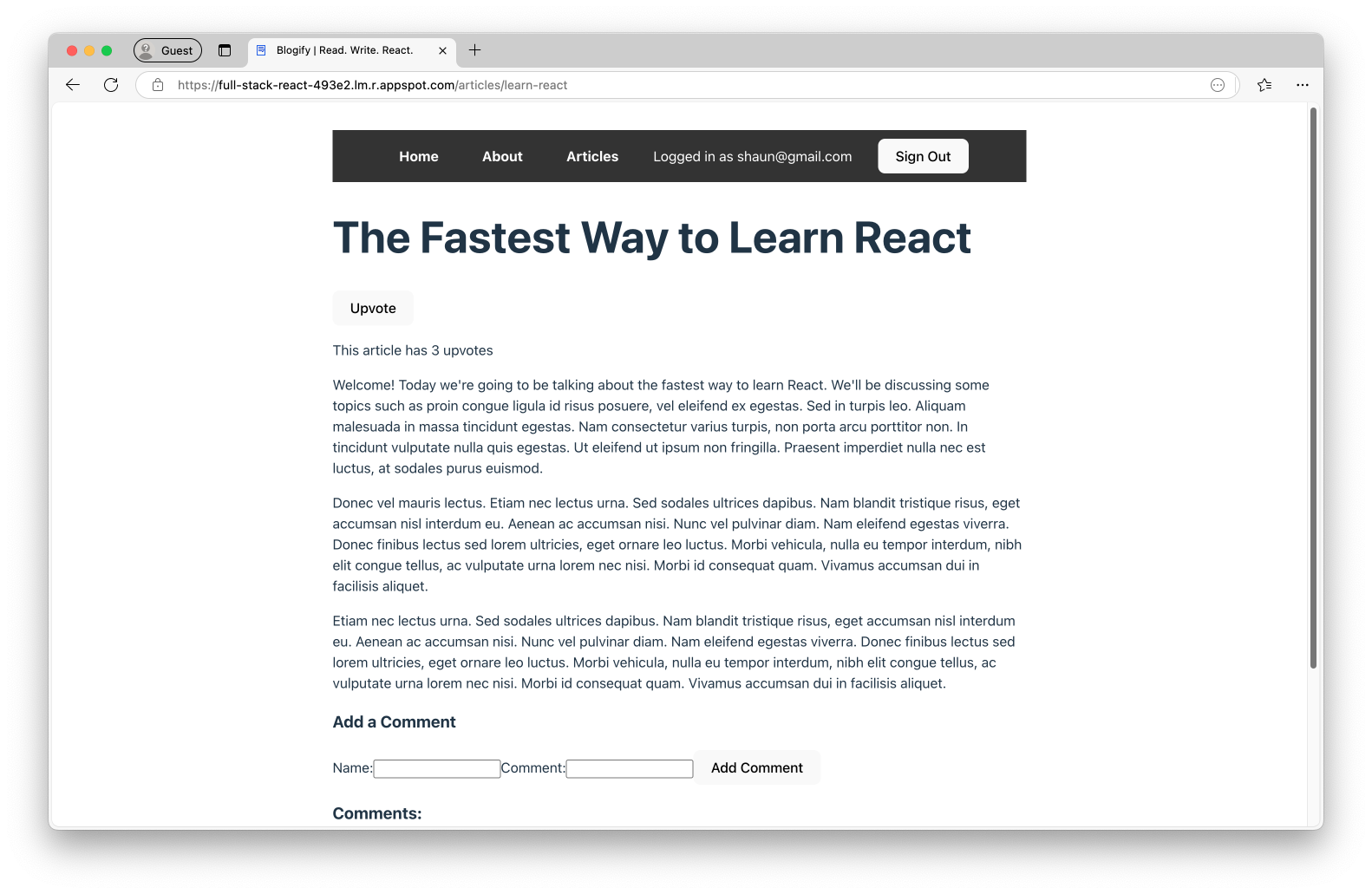
I explore tools across the product lifecycle, looking at what they offer and how they might fit this project. Some become working integrations; others remain research. The features and tech stack below describe what Blogify currently uses.
Have a product tool or workflow worth exploring? Open an issue with a suggestion and the problem it could help solve.
- Dark or light theme (follows the OS setting) with a top navigation bar
- Public pages: Home, About, Articles list and individual articles
- Accounts: sign in, create an account and sign out with Firebase Authentication (email and password)
- A display name, set when creating an account and changeable on the Profile page
- Signed-in users can upvote an article (once per user) and add comments. A comment shows its author's display name, or "Anonymous" if they haven't set one; email addresses are never shown.
- Google Analytics loads only after a visitor accepts it in the cookie banner, and the footer's "Cookie settings" lets them change their mind
| Layer | Tools |
|---|---|
| Front end | React 19, React Router 7 (data loaders), Vite, Axios, Firebase Web SDK, plain CSS |
| Back end | Node.js 24, Express 5, MongoDB Node driver, Firebase Admin SDK |
| Data | MongoDB Atlas |
| Hosting | Google Cloud App Engine (standard, nodejs24 runtime) |
| Tooling | ESLint 10, node:test, GitHub Actions, Dependabot, Claude Code |
.
├── front-end/                 # React single-page app (Vite)
│   ├── src/
│   │   ├── pages/             # Route components (Home, About, Articles, Article, Login, ...)
│   │   ├── article-content.js # Article titles and bodies (static)
│   │   ├── useUser.js         # Hook exposing the current Firebase user
│   │   ├── displayName.js     # Display name validation and save helper
│   │   ├── text.js            # Text limits and name clean-up (copy of back-end/src/text.js)
│   │   ├── firebase.js        # Firebase client config
│   │   ├── analytics.js       # Analytics consent: Analytics loads only once accepted
│   │   └── main.jsx           # Entry point
│   ├── e2e/                   # Browser tests (Playwright; Firebase faked, /api is the real back end)
│   └── vite.config.js         # Dev server proxies /api to localhost:8000
├── back-end/                  # Express API that also serves the built front end
│   ├── src/
│   │   ├── app.js             # Routes, built by createApp({ db, verifyIdToken })
│   │   ├── text.js            # Text limits and name clean-up, shared with the front end
│   │   ├── db.js              # MongoDB connection (Atlas URI or MONGODB_URI)
│   │   └── server.js          # Startup: reads secrets, connects to MongoDB, listens
│   ├── scripts/               # One-off maintenance scripts (not deployed)
│   ├── test/                  # API tests (node:test, in-memory fakes)
│   └── app.yaml               # App Engine config
├── .claude/                   # Claude Code slash commands and SessionStart hook
└── .github/                   # CI, Dependabot and Claude workflows
Article text lives in the front end (front-end/src/article-content.js). MongoDB only stores the per-article upvotes and comments, matched by the article's name.
- Node.js 24 (see
.nvmrc; runnvm useif you use nvm) - A MongoDB Atlas cluster
- A Firebase project with Email/Password sign-in enabled
- The Google Cloud CLI, only if you deploy
cd back-end && npm install
cd ../front-end && npm installThese files are gitignored. Never commit them.
| File | Used for | Contents |
|---|---|---|
back-end/credentials.json |
Firebase Admin, to verify sign-in tokens | A Firebase service account key (Firebase console → Project settings → Service accounts → Generate new private key) |
back-end/.env |
Local development | MONGODB_USERNAME=... and MONGODB_PASSWORD=... |
back-end/prod-env.yaml |
App Engine deploys (included by app.yaml) |
The same two variables, under env_variables: |
All three are kept in 1Password, in the Blogify Inc. vault: .env and prod-env.yaml as the items "Blogify back-end env" and "Blogify back-end prod env", and credentials.json as the document "Blogify back-end credentials.json". The committed back-end/.env.tpl and back-end/prod-env.yaml.tpl hold no secrets, only references to those fields. With the 1Password CLI signed in, rebuild all three files from back-end/:
npm run secrets:pullAfter you add, change or remove a key, or replace credentials.json, run npm run secrets:push from back-end/ to update 1Password and the .tpl files, then commit the .tpl files. A push replaces what 1Password holds with your local files, so a key you removed locally is removed there too.
Example prod-env.yaml:
env_variables:
  MONGODB_USERNAME: "your-user"
  MONGODB_PASSWORD: "your-password"
To use a different MongoDB, such as a local mongod, set MONGODB_URI (e.g. MONGODB_URI=mongodb://localhost:27017) instead of the username and password.
The Atlas cluster host and database name (full-stack-react-db) are set in back-end/src/db.js, and the Firebase client config is in front-end/src/firebase.js. Change both if you point the app at your own projects.
Create an articles collection in the full-stack-react-db database with one document per article in article-content.js:
db.articles.insertMany([
  { name: 'learn-react', upvotes: 0, upvoteIds: [], comments: [] },
  { name: 'learn-node',  upvotes: 0, upvoteIds: [], comments: [] },
  { name: 'mongodb',     upvotes: 0, upvoteIds: [], comments: [] },
]);In two terminals:
cd back-end && npm run dev    # API on http://localhost:8000 (restarts on change via node --watch)
cd front-end && npm run dev # App on http://localhost:5173, proxies /api to the back end| Directory | Command | What it does |
|---|---|---|
front-end |
npm run dev |
Start the Vite dev server |
front-end |
npm run build |
Build to front-end/dist |
front-end |
npm run lint |
Run ESLint |
front-end |
npm run preview |
Serve the production build locally |
front-end |
npm run test:e2e |
Build the app and run the browser tests in Chromium. Firebase is faked and the API is the real back end with an in-memory database, so no MongoDB or secrets are needed, but back-end must have its dependencies installed. Run npx playwright install chromium once first |
back-end |
npm test |
Run the API tests. They use in-memory fakes, so no database or secrets are needed |
back-end |
npm run dev |
Start the API with node --watch |
back-end |
npm start |
Start the API (what App Engine runs) |
back-end |
npm run anonymize-emails |
One-off clean-up: count the comments whose author is shown as an email address, which older versions saved for users without a display name. Add -- --apply to replace them with "Anonymous". Uses the same .env or MONGODB_URI as the server |
All routes are under /api. Write routes need a Firebase ID token in an authtoken request header. A missing or invalid token returns 401, and an unknown article returns 404.
Requests are rate limited and return 429 over the limit: 1000 requests per client IP every 15 minutes across the whole site, and 30 upvotes and comments per user every 15 minutes. Responses carry the standard RateLimit and RateLimit-Policy headers.
| Method | Path | Auth | Description |
|---|---|---|---|
GET |
/api/articles |
No | Get an array of article summaries as { name, upvotes, comments }, where comments is a count. No comment text, authors or user IDs are sent |
GET |
/api/articles/:name |
No | Get an article as { name, upvotes, upvoted, comments }, each comment as { postedBy, text, postedAt }. postedAt is an ISO 8601 timestamp; older comments may omit it. Send a token (optional) to have upvoted say whether that user has upvoted; without one, or with an invalid one, it's false. Who upvoted and commenters' uids are never sent. The two POST routes return the same shape |
POST |
/api/articles/:name/upvote |
Yes | Upvote an article, once per user. Returns 403 if already upvoted |
POST |
/api/articles/:name/comments |
Yes | Add a comment. Body: { "text": "..." }, 1–1000 characters after trimming, otherwise 400. The author comes from the sign-in token, never the body: the user's display name, or Anonymous if they have no name or it has nothing visible in it (never their email). Names have control and bidi-override characters removed and are cut to 50 characters without splitting an emoji. Limits count Unicode code points, so an emoji is one character. Each comment also stores the author's uid, since display names aren't unique |
Any other non-/api path returns the front end's index.html, so client-side routes work on refresh.
The back end serves the built front end from back-end/dist, so the whole app deploys as one App Engine service:
cd front-end && npm run build
rm -rf ../back-end/dist && cp -r dist ../back-end/dist
cd ../back-end && gcloud app deploy --project=<your-project-id>
credentials.json and prod-env.yaml must be present in back-end/ when you deploy. In Claude Code, the /deploy command runs these steps, checks for the secret files first and removes old App Engine versions afterwards.
- CI (
.github/workflows/ci.yml) runs on every pull request and on pushes tomain. It lints and builds the front end, runs the browser tests and the back-end tests, and checks that the back end's dependencies load. - Dependabot opens weekly update PRs for npm packages and GitHub Actions. npm minor and patch updates are grouped and merge automatically once CI passes. Major updates and GitHub Actions updates wait for review. Workflows pin actions to commit SHAs.
- Claude Code reviews pull requests automatically, and responds when someone mentions
@claudein an issue or PR.
See CONTRIBUTING.md and the Code of Conduct. To report a security issue, see SECURITY.md.
Based on the LinkedIn Learning course React: Creating and Hosting a Full-Stack Site.