🎙️ My Podcast Studio — Open-Source AI Voiceover & Podcast Narration SaaS (Free ElevenLabs / Murf AI Alternative)
Generate lifelike AI voiceovers and podcast narrations with advanced speech synthesis in seconds. A production-ready, self-hostable Next.js SaaS boilerplate with fine-grained voice controls (speed, pitch, volume), MiniMax Speech 2.6 engine, and built-in Stripe billing. A free open-source alternative to ElevenLabs, Murf AI, Descript, Play.ht, and Listnr — powered by the MuAPI AI engine.
Tech stack: Next.js 14 (App Router) · Prisma · PostgreSQL · NextAuth (Google OAuth) · Stripe · Tailwind CSS · MuAPI · MiniMax Speech 2.6 Use cases: Podcast creators · YouTube voiceovers · Audiobook narration · E-learning content · Video ad voiceovers · News readers · Language learning apps · Accessibility tools
Hosted Demo: my-podcast-iota.vercel.app
Experience the full dark-mode, responsive interface. Sign in with Google to explore the Narration Studio, advanced parameter sliders, 470+ voice selection, and credit tiers directly from your browser.
My Podcast Studio is not just another wrapper — it's a production-ready, highly-optimized AI web application. Out of the box, it seamlessly manages User Authentication, Credits & Billing, Creations Persistence, and asynchronous AI voice generation using a sleek Next.js (App Router) architecture. It empowers you to build professional-grade AI workflows with built-in mobile optimization, making it the perfect starting point for your next AI SaaS.
Why use My Podcast Studio?
- Production-Ready SaaS — Complete with Google OAuth and Stripe Checkout workflows built-in.
- Advanced Voice Workstation — Configure custom voice profiles, adjust speed/pitch/volume sliders, specify formats (MP3/WAV/PCM/FLAC), sample rates, and select emotions.
- Dynamic 470+ Speaker Dropdown — Custom interactive selector categorized by language, gender, and search filters.
- History Archive & Live Player — Review previously generated narrations in a unified list, stream them using the custom output player, and download high-quality files.
- Responsive UX — Dynamic sliding dropdowns, micro-animations, and complete mobile-stacked responsiveness.
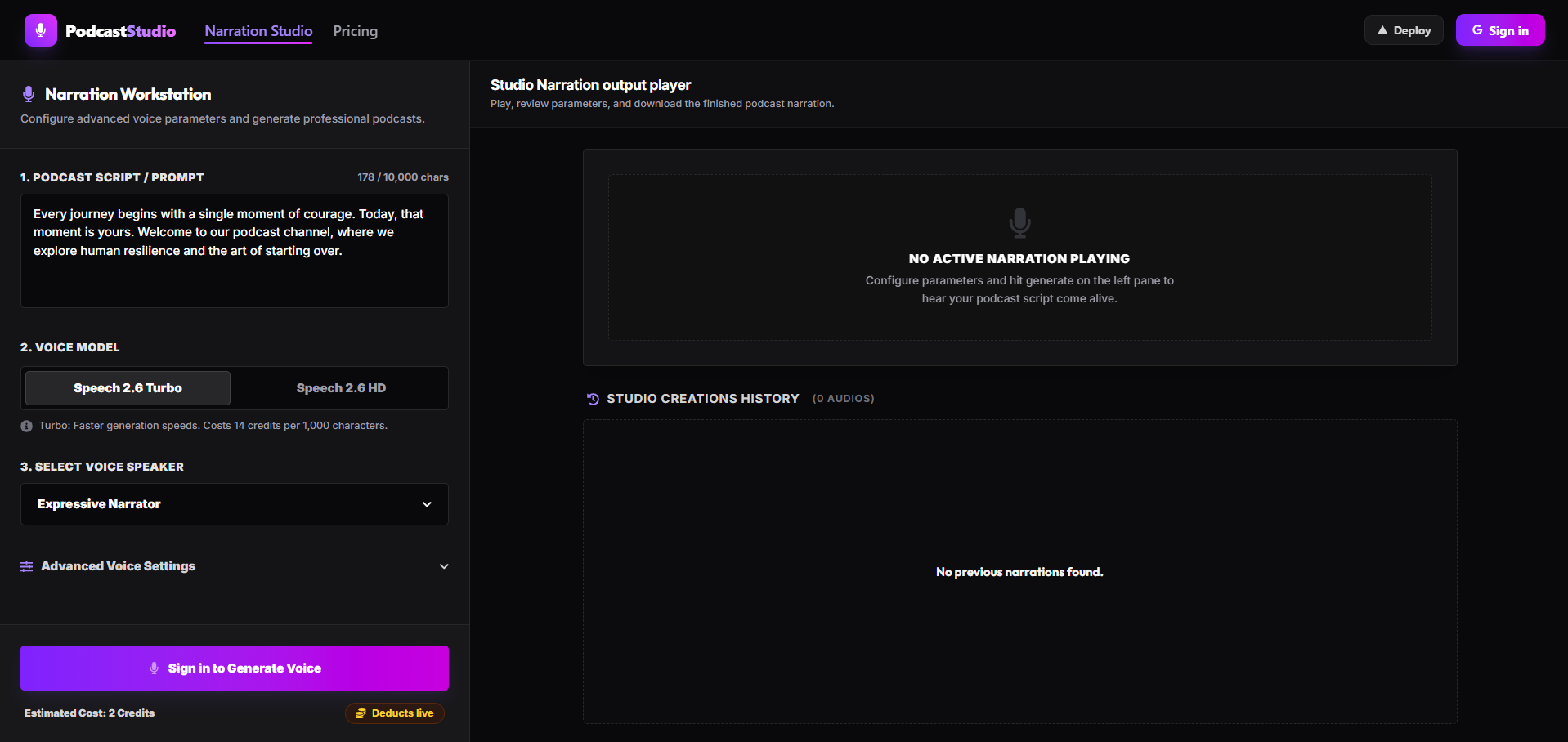
- Kinetic Narration Workstation — Convert script prompts (up to 10,000 characters) into lifelike speech. Choose between Speech 2.6 Turbo (faster, 14 credits/1k chars) and Speech 2.6 HD (studio grade, 26 credits/1k chars) voice models.
- Custom Dropdown Selector — Browse and filter 470+ unique voices dynamically by language (English, Chinese, Spanish, Portuguese, French, German, Italian, etc.) and gender with real-time search.
- Advanced Voice Tuning — Precision sliders for speech Speed (0.5x to 2.0x), Volume (0.1x to 10.0x), and Pitch Semitones (-12 to +12), along with custom selectors for Emotion Modes (Happy, Sad, Angry, Fearful, Disgusted, Surprised, Neutral) and English Normalization.
- Studio Creations History — Persist all generated audio clips to PostgreSQL. View and manage creations in a dedicated history list with options to stream via an integrated output player, download high-res files, and delete entries.
- Credit Tiers & Billing — Fully integrated Stripe checkout workflows. Top up account credits through flexible, tier-based pricing packs ($1 = 200 credits) to support continuous voice generation.
- Beautiful & Dynamic UI — Dark-mode glassmorphic dashboard styled using Tailwind CSS and React Icons, complete with smooth animations, custom dropdown overlays, and mobile-ready layouts.
Deploying an instance of My Podcast Studio to the web requires minimal configuration. The architecture is engineered explicitly for Vercel serverless environments.
Pro Tip: Fork this repository, replace
YOUR_GITHUB_USERin the link above, to streamline deployments for your private forks.
To successfully deploy and run, populate the following environment variables in your Vercel project settings:
| Service | Variable | Description & Source |
|---|---|---|
| Database | DATABASE_URL |
PostgreSQL connection string (Supabase or Neon) |
DIRECT_URL |
Direct DB connection for Prisma migrations | |
| NextAuth / Google | NEXTAUTH_SECRET |
Secure random string generated via openssl rand -base64 32 |
NEXTAUTH_URL |
Your production domain (e.g. https://my-podcast-iota.vercel.app) |
|
GOOGLE_CLIENT_ID |
Get from Google Cloud Console | |
GOOGLE_CLIENT_SECRET |
Get from Google Cloud Console | |
| Stripe Billing | STRIPE_SECRET_KEY |
Get from Stripe Dashboard |
NEXT_PUBLIC_STRIPE_PUBLISHABLE_KEY |
Get from Stripe Dashboard | |
STRIPE_WEBHOOK_SECRET |
Webhook secret for resolving credit purchases | |
| AI Generator | MUAPIAPP_API_KEY |
Create an account and get key from muapi.ai/access-keys |
- Database Provisioning: Create a new Postgres database (via completely free tiers on Vercel Postgres, Supabase, or Neon). Retrieve the pooling connection string (
DATABASE_URL) and direct connection string (DIRECT_URL). - Project Creation: Import your GitHub fork into the Vercel dashboard.
- Configure Environment Variables: Copy the variables above into the Vercel project settings environment tab.
- Deploy: Hit "Deploy". Vercel will automatically run the build steps (
npm run build). - Database Push: Since Prisma does not automatically migrate via Vercel builds by default, you may want to append
npx prisma db push &&to your Vercel build command, or manually run it locally pointing to your production database URL. - Integrations Setup:
- Establish a Google Cloud OAuth app, enabling the callback URL:
https://your-app.vercel.app/api/auth/callback/google - Setup a Stripe Webhook, pointing to
https://your-app.vercel.app/api/stripe/webhookand selecting thecheckout.session.completedevent to grab your webhook signing secret.
- Establish a Google Cloud OAuth app, enabling the callback URL:
Ready to iterate locally? Setup is straightforward.
- Node.js (v18 or higher)
- A local PostgreSQL instance or a free cloud Database URL.
# 1. Clone the repository
git clone https://github.com/SamurAIGPT/my-podcast
cd my-podcast

# 2. Install dependencies
npm install

# 3. Setup Environment
cp .env.example .env
# Open .env and insert your specific keys. You can use a local DB or your dev cloud DB.

# 4. Initialize Database Schema
npx prisma generate
npx prisma db push

# 5. Start the Development Server
npm run dev
The graphical console should now be heavily responsive on http://localhost:3000.
⚠️ Database Safety Warning: This application shares a single PostgreSQL database instance on Supabase with other applications in this workspace. Follow the cycle below to synchronize models safely:
- Pull all existing tables:
npx prisma db pull(introspects all 20+ active tables) - Declare relation changes: Inject the
PodcastCreationmodel in your localschema.prismaand link it inside theUsermodel. - Push to database: Run
npx prisma db pushto merge changes safely. - Local Schema Cleanup: Strip away other applications' models from your local
schema.prisma, leaving onlyAccount,Session,User,VerificationToken, andPodcastCreation. - Compile local client: Run
npx prisma generateto build your local Prisma client.
This application decouples visually rich UI elements from core business logic layers, emphasizing modularization.
my-podcast/
├── prisma/
│   └── schema.prisma           # Postgres tables: Users, Accounts, Sessions, PodcastCreations
├── src/
│   ├── app/                    # Next.js 16 App Router
│   │   ├── api/                # Backend API Routes (Stripe, MuAPI voice, Auth)
│   │   │   ├── auth/           # NextAuth credentials handling
│   │   │   ├── podcast/        # Credit deduction and MuAPI call endpoint
│   │   │   ├── podcasts/       # GET (fetch history) and DELETE creations endpoints
│   │   │   └── stripe/         # Stripe session builder and webhook callback routes
│   │   ├── dashboard/          # Detailed visual creations page
│   │   ├── pricing/            # Interactive packaging tier checkout selection page
│   │   └── page.js             # Main Studio voice generation workstation
│   ├── components/
│   │   ├── layout/
│   │   │   └── Navbar.jsx      # Sticky responsive navigation component
│   │   └── Providers.js        # NextAuth SessionProvider wrapper
│   └── lib/
│       ├── prisma.js           # Shared ORM client singleton
│       ├── auth.js             # NextAuth adapter configuration
│       ├── config.js           # Central config mapping Google, Stripe, MuAPI keys
│       ├── stripe.js           # Stripe instance initializer
│       ├── voices.js           # 472 voice configuration metadata
│       └── services/
│           ├── user.js         # Credit management service
│           └── billing.js      # Stripe checkout and payment webhook parser
├── next.config.mjs             # Next Configuration
└── package.json
Check out other open-source SaaS templates from the same ecosystem:
| Template | Description | GitHub |
|---|---|---|
| TryOn AI | AI Virtual Try-On & Outfit Fitting SaaS | github.com/SamurAIGPT/ai-tryon |
| AI Social Post Generator | High-conversion AI social feed manager | github.com/SamurAIGPT/social-post |
| AI Kissing Video Generator | Photorealistic romance video generator | github.com/SamurAIGPT/ai-kissing-video-generator |
| Nano Banana Generator | Multi-model AI image generator platform | github.com/SamurAIGPT/nano-banana-generator |
MIT Licensed. Fork it, brand it, and start earning.
My Podcast Studio: A premium, dark-mode, fully responsive AI narration workstation built for podcast hosts, publishers, and content creators.