The following screenshots provide evidence of the complete SocketCAN, DBC, CAN decoding, dashboard, DBC modification, Ambient Temperature, and AI-assisted development workflow.
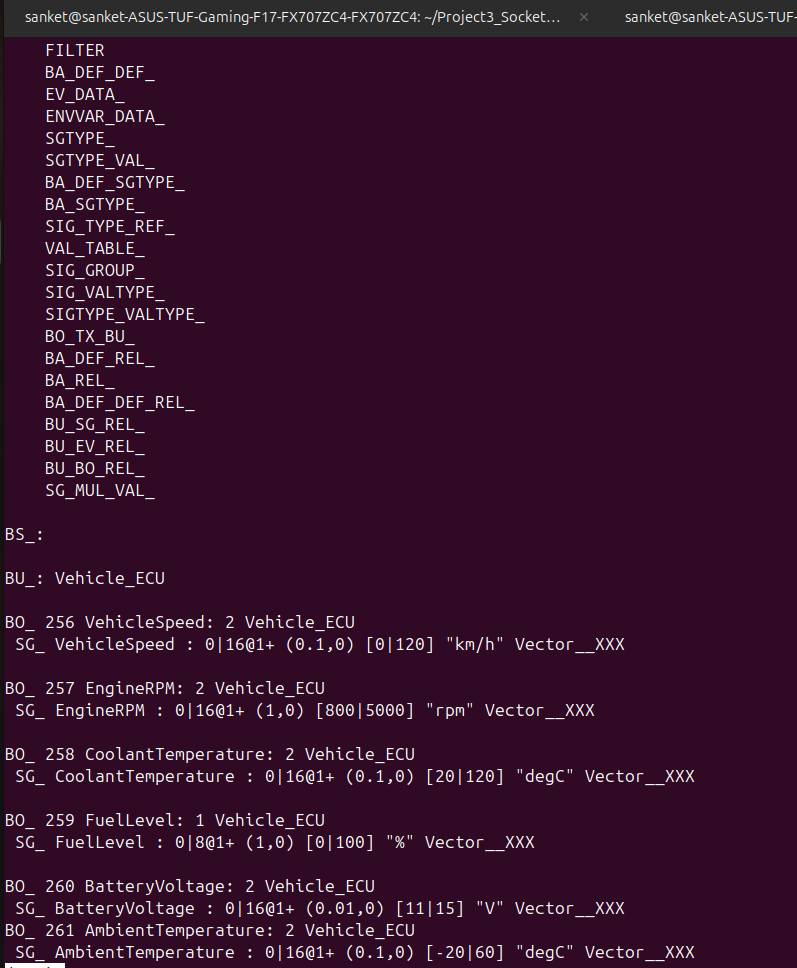
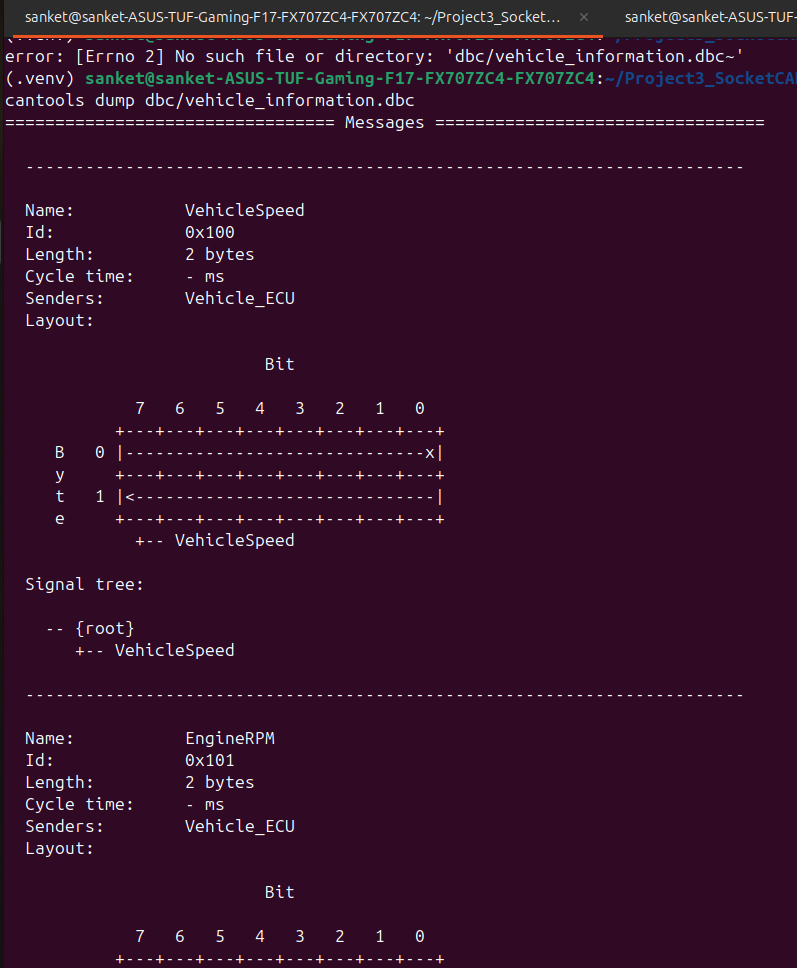
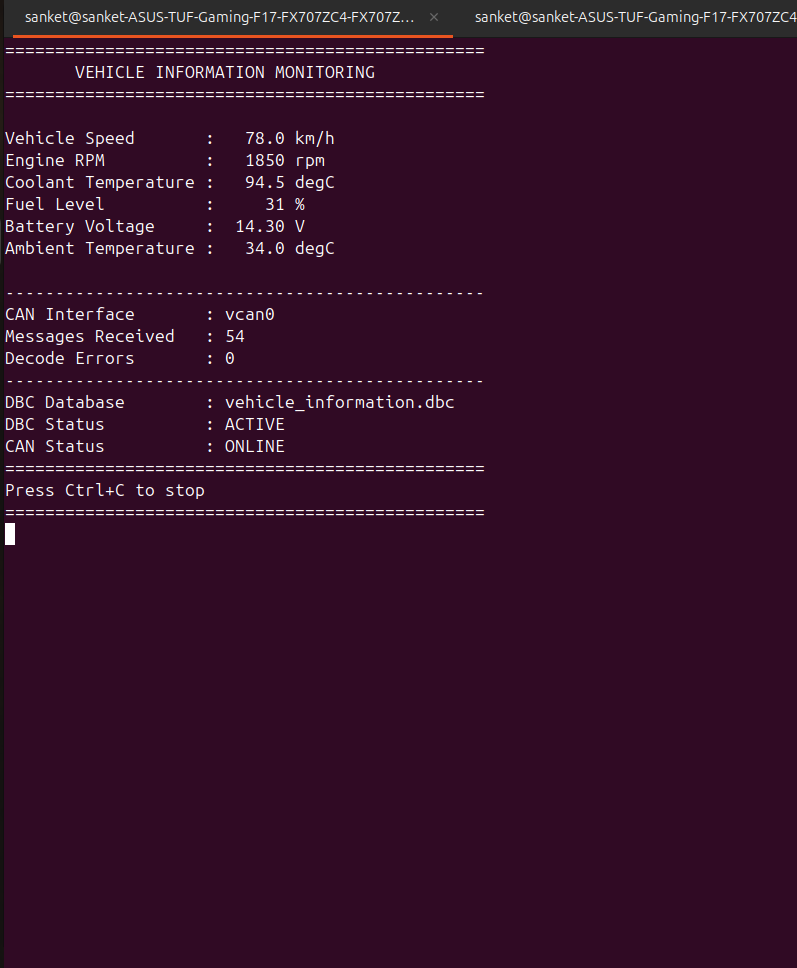
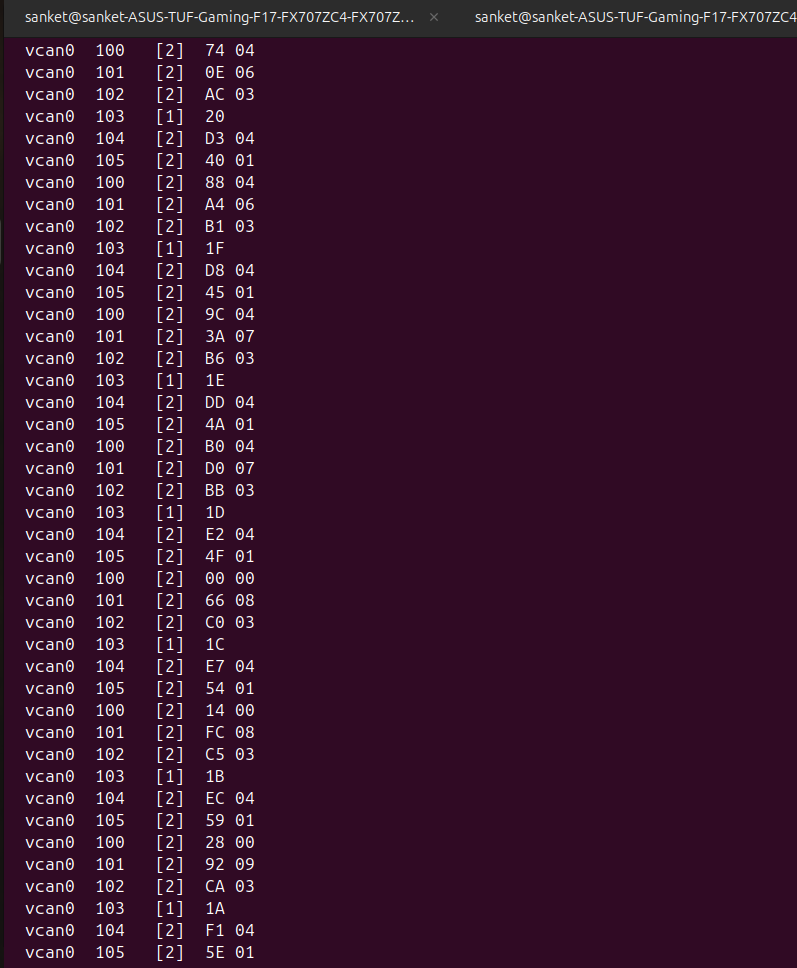
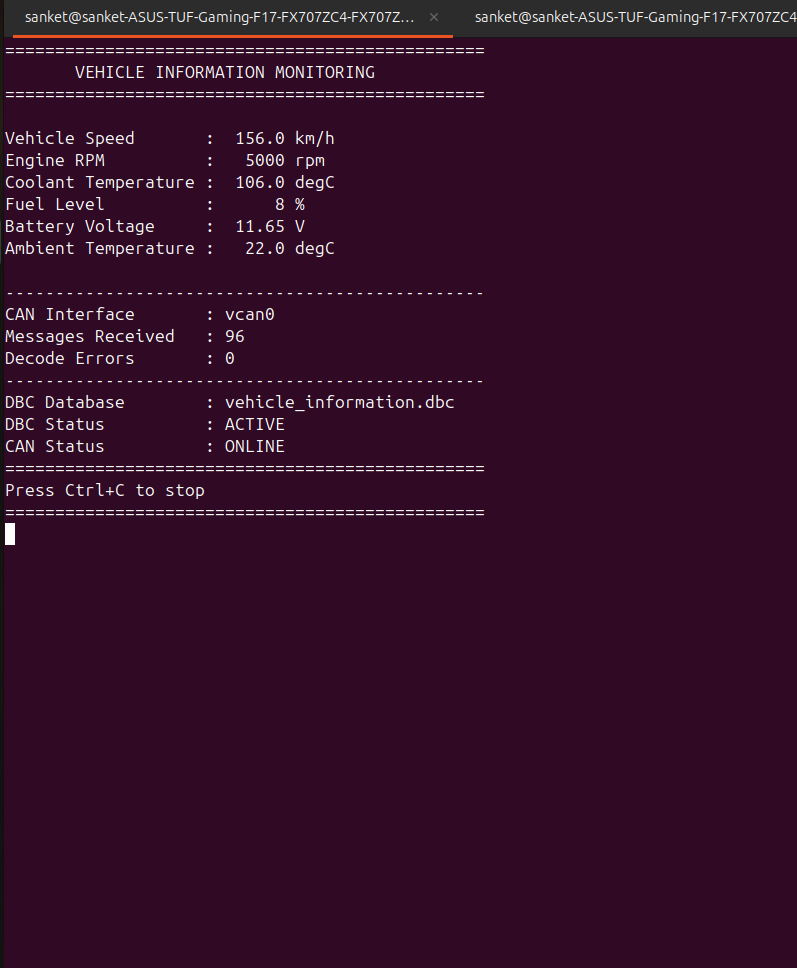
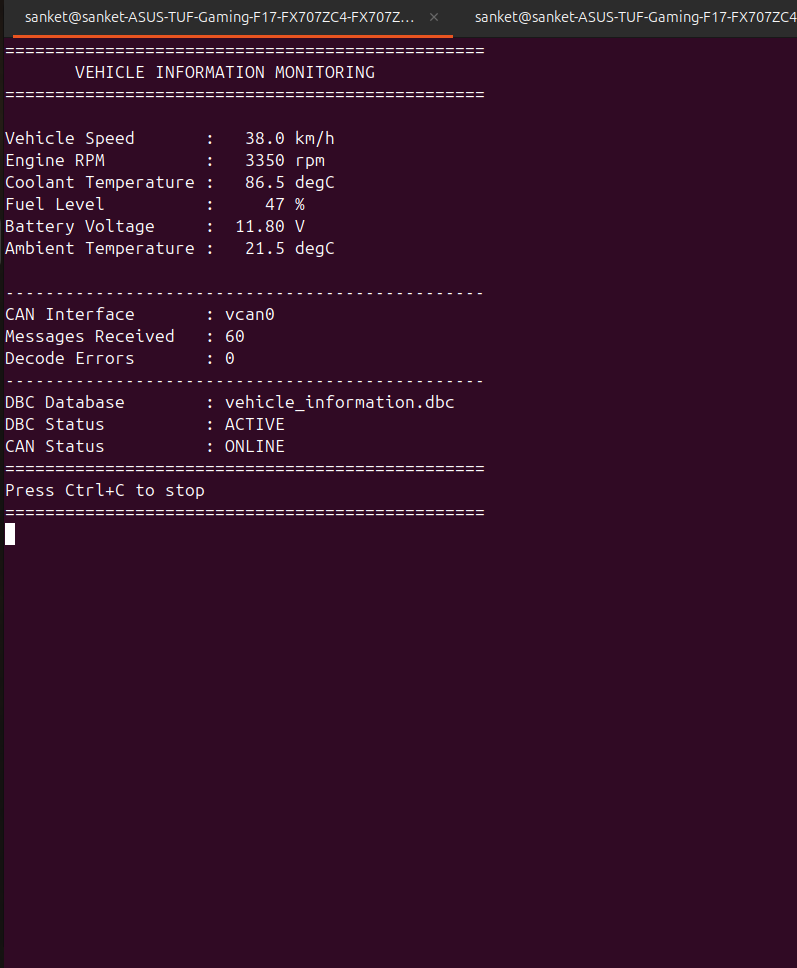
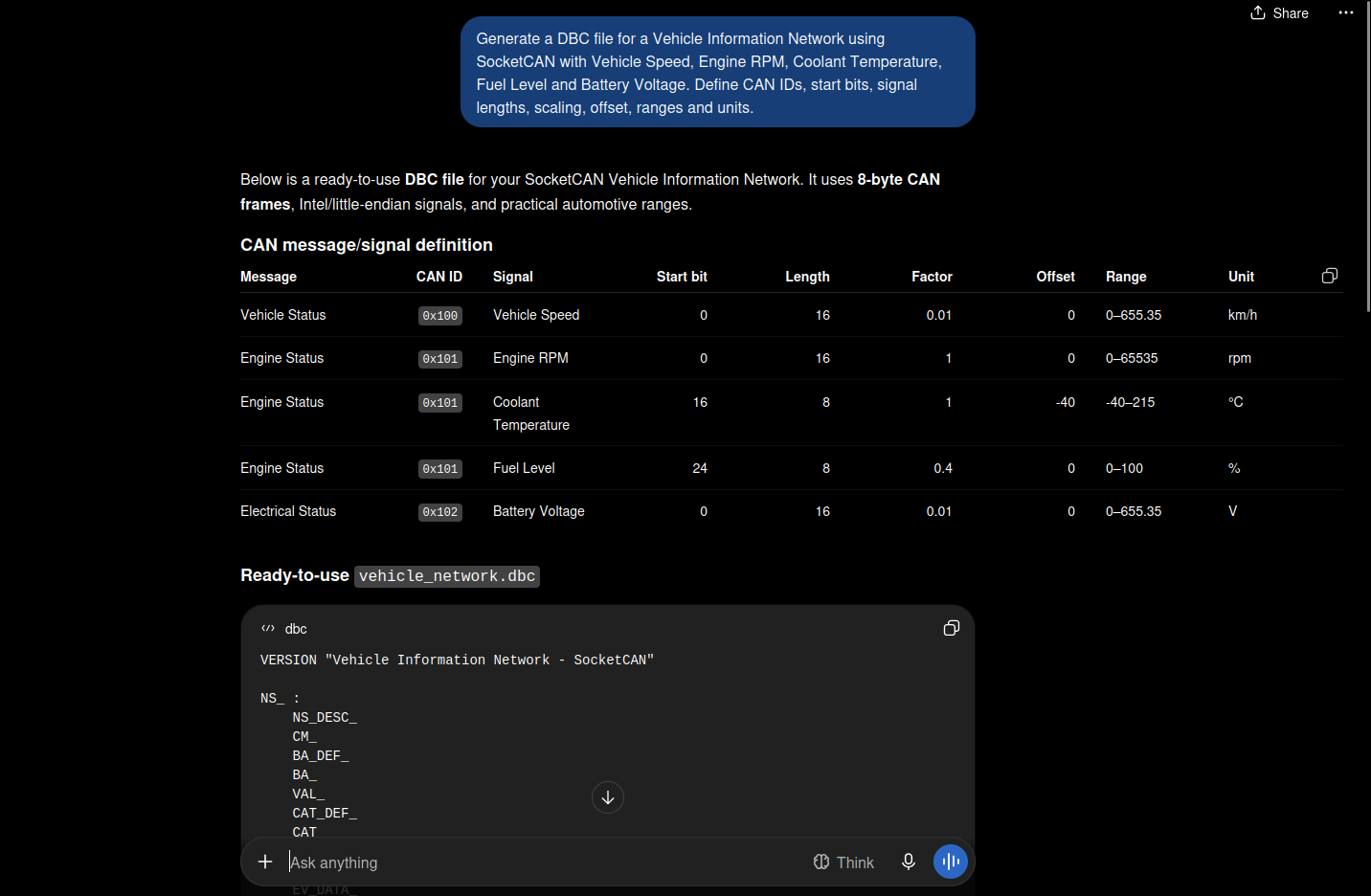
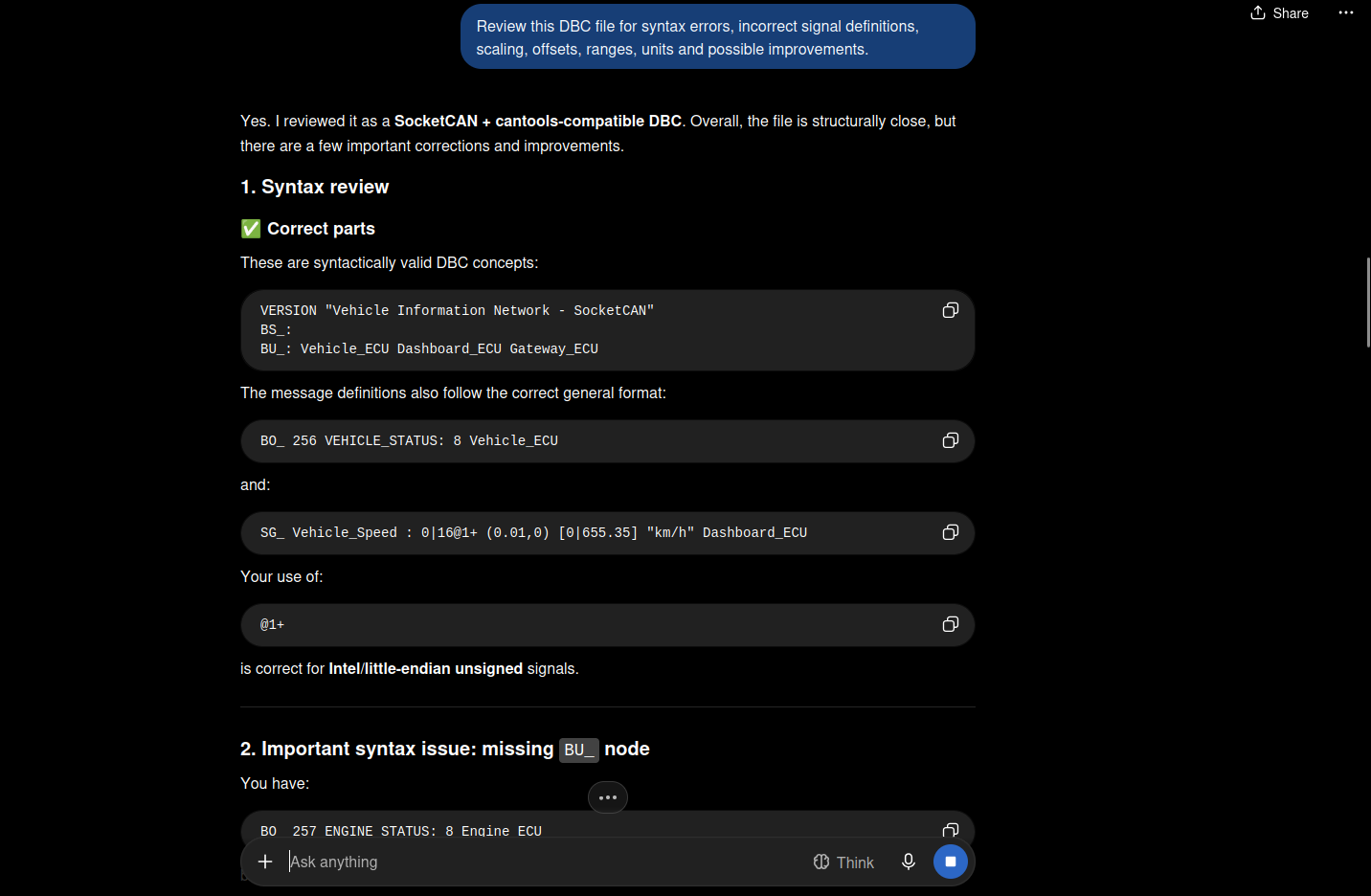
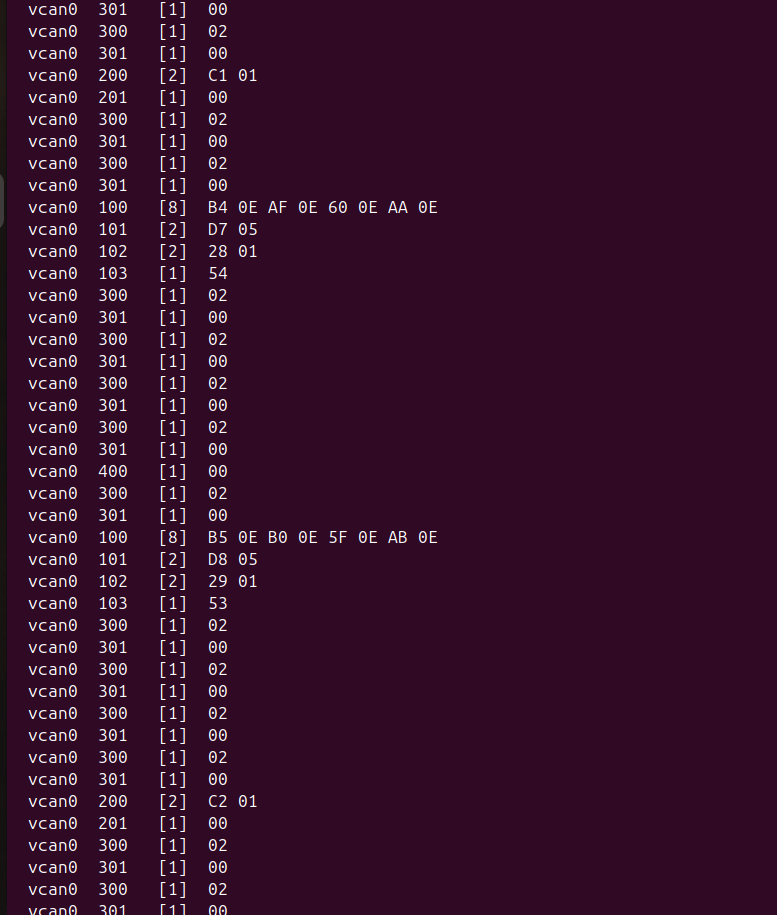
The screenshots demonstrate:
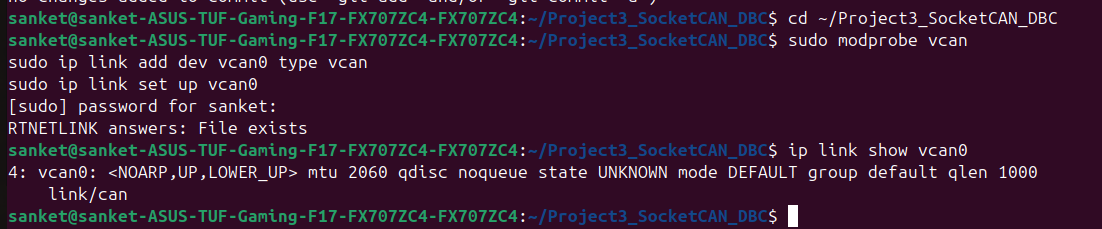
- Virtual CAN interface setup
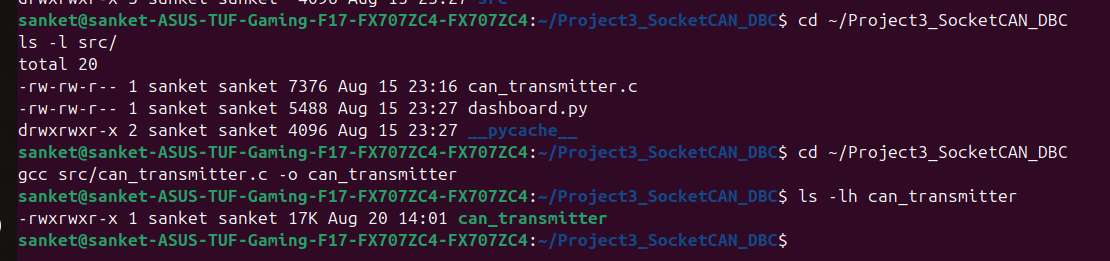
- Project compilation
- CAN transmitter execution
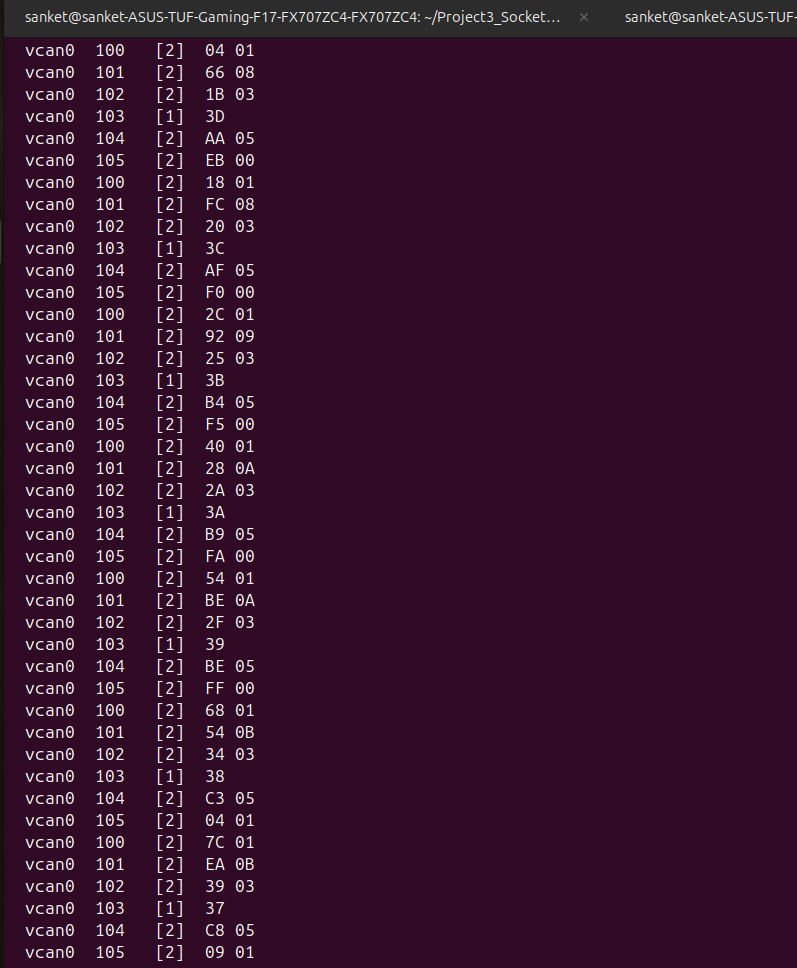
- Raw CAN traffic
- DBC file implementation
- DBC validation
- DBC-based signal decoding
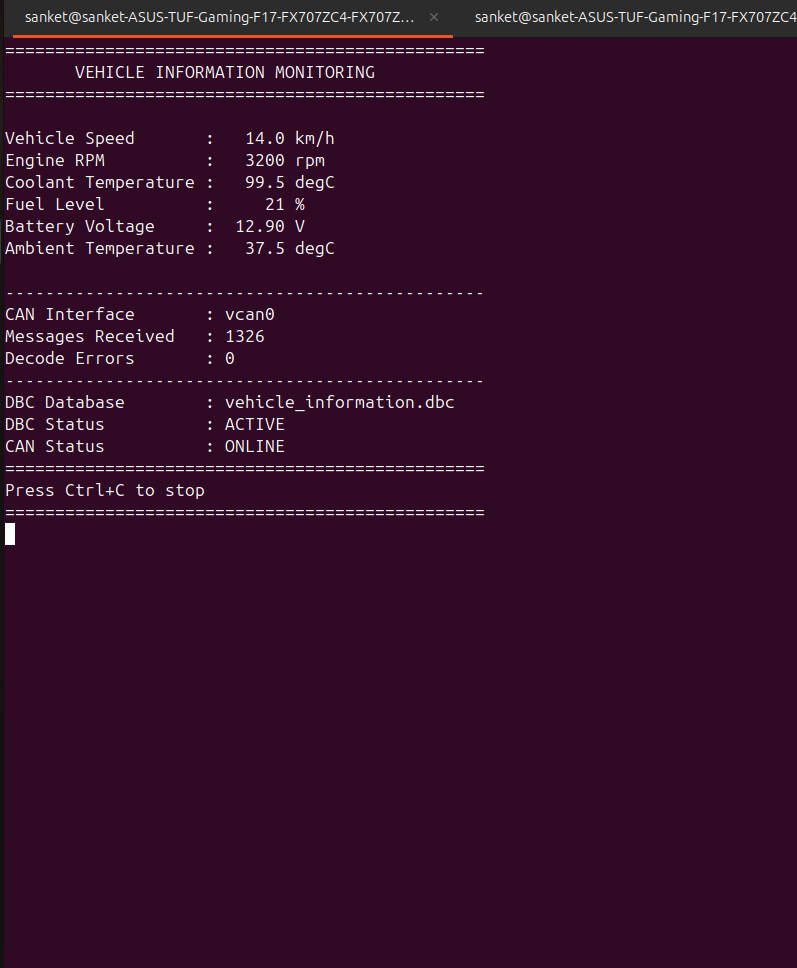
- Real-time dashboard visualization
- Raw CAN versus decoded data
- DBC signal modification
- Ambient Temperature signal addition
- AI-assisted DBC generation
- AI-assisted DBC review
- Overall CAN communication
A Linux-based automotive CAN communication project demonstrating how raw CAN frames can be transformed into meaningful engineering values using a DBC (CAN Database).
The project uses Linux SocketCAN with the virtual CAN interface vcan0. A C-based transmitter generates vehicle information, while a DBC file defines CAN messages and signals. Raw CAN traffic is monitored using candump, decoded using cantools, and displayed through a Python monitoring dashboard.
The project also demonstrates AI-assisted DBC generation, DBC validation, DBC review, DBC modification, addition of a new signal, and visualization of decoded CAN data.
In automotive and embedded systems, Electronic Control Units (ECUs) exchange information using CAN communication.
A raw CAN frame mainly contains:
- CAN Identifier
- Data Length Code (DLC)
- Data Payload
Raw hexadecimal data is difficult to understand without information about the signal structure.
A DBC file provides the information required to interpret CAN messages and convert raw CAN data into meaningful engineering values.
Signal Definition
        ↓
CAN Message Design
        ↓
DBC Creation
        ↓
AI-Assisted Review
        ↓
SocketCAN Communication
        ↓
Raw CAN Frames
        ↓
DBC-Based Decoding
        ↓
Engineering Values
        ↓
Visualization
2. Problem Statement

The objective is to design a simple Vehicle Information Network using CAN communication.

The network contains the following vehicle signals:

Signal	Unit
Vehicle Speed	km/h
Engine RPM	rpm
Coolant Temperature	°C
Fuel Level	%
Battery Voltage	V

An additional Ambient Temperature signal is added as part of the challenge task.

The CAN messages are transmitted using Linux SocketCAN and decoded using a DBC file.

3. Objectives

The main objectives of this project are:

Understand the purpose of DBC files.
Design CAN messages and signals.
Generate a DBC using AI assistance.
Review and validate the DBC.
Implement CAN communication using Linux SocketCAN.
Generate vehicle information using C.
Monitor raw CAN traffic.
Decode CAN messages using the DBC.
Display decoded engineering values.
Modify a DBC signal and observe its effect.
Add Ambient Temperature as a new signal.
Perform AI-assisted DBC review.4. Learning Outcomes

This project provides practical understanding of:

CAN communication
CAN frames
CAN identifiers
CAN signals
DBC files
Start bits
Signal lengths
Scaling
Offset
Signal ranges
Engineering units
Linux SocketCAN
Virtual CAN
vcan0
candump
cantools
Python CAN monitoring
DBC validation
DBC modification
AI-assisted engineerin
Demonstrate the complete CAN communication workflow.5. System Description

The project implements a simple Vehicle Information Network.

The C transmitter generates vehicle information and sends CAN frames through the virtual CAN interface.

The main signals are:

Vehicle Speed       : km/h
Engine RPM          : rpm
Coolant Temperature : °C
Fuel Level          : %
Battery Voltage     : V
Ambient Temperature : °C

The receiver/dashboard decodes the raw CAN data using the DBC database.6. System Architecture
                 +----------------------+
                 |   C CAN Transmitter  |
                 +----------+-----------+
                            |
                            | CAN Frames
                            v
                 +----------------------+
                 |      SocketCAN       |
                 |        vcan0         |
                 +----------+-----------+
                            |
                +-----------+-----------+
                |                       |
                v                       v
       +----------------+       +----------------+
       |    candump     |       |    cantools    |
       | Raw CAN Frames |       | DBC Decoder    |
       +----------------+       +-------+--------+
                                        |
                                        v
                               +------------------+
                               | Python Dashboard |
                               +------------------+
                                        |
                                        v
                              Engineering Values7. Project Directory Structure
Project3_SocketCAN_DBC/
│
├── dbc/
│   └── vehicle_information.dbc
│
├── docs/
│
├── screenshots/
│   ├── 1_vcan0_setup.png
│   ├── 2_project_build.png
│   ├── 3_can_transmitter.png
│   ├── 5_dbc_file.png
│   ├── 6_dbc_validation.png
│   ├── 7_dashboard.png
│   ├── 08_raw_vs_decoded.png
│   ├── 08a_raw_vs_decoded.png
│   ├── 09_dbc_modification.png
│   ├── 10_ambient_temperature.png
│   ├── 10a_ambient_temperature.png
│   ├── 10_overall_can_traffic.png
│   ├── 11_ai_dbc_generation.png
│   └── 12_ai_dbc_review.png
│
├── src/
│   ├── can_transmitter.c
│   └── dashboard.py
│
├── can_transmitter8. DBC File

DBC stands for CAN Database.

The project uses:

dbc/vehicle_information.dbc

The DBC defines the CAN messages and signals required to decode the transmitted CAN frames.

The DBC contains information such as:

CAN Identifier
Message name
Signal name
Start bit
Signal length
Byte order
Data type
Scaling factor
Offset
Minimum value
Maximum value
Unit
├── Makefile
└── README.md9. CAN Signal Design

The project contains the following signals:

Signal	Unit	Purpose
Vehicle Speed	km/h	Vehicle road speed
Engine RPM	rpm	Engine rotational speed
Coolant Temperature	°C	Engine coolant temperature
Fuel Level	%	Remaining fuel
Battery Voltage	V	Battery voltage
Ambient Temperature	°C	External temperature
10. Signal Ranges
Signal	Range	Unit
Vehicle Speed	0 - 120	km/h
Engine RPM	800 - 5000	rpm
Coolant Temperature	20 - 120	°C
Fuel Level	0 - 100	%
Battery Voltage	11 - 15	V11. Why DBC is Required

A raw CAN frame contains hexadecimal data, but the data does not directly describe the physical signal.

For example:

CAN ID : 0x200
DATA   : XX XX

Without a DBC, the meaning of these bytes is unknown.

Using the DBC:

Raw CAN Frame
      ↓
CAN ID
      ↓
DBC Message
      ↓
DBC Signal
      ↓
Raw Value
      ↓
Scaling + Offset
      ↓
Engineering Value

The result can be displayed as:

Vehicle Speed : XX.X km/h12. AI-Assisted DBC Generation

AI was used to assist in the development of the DBC file.

AI Tool
ChatGPT

AI assistance was used for:

DBC generation
Signal definition
CAN ID planning
Start-bit planning
Signal length
Scaling
Offset
Range verification
Unit verification
DBC review
Documentation

AI-generated content was reviewed and verified before implementation.

13. AI DBC Generation Prompt

Example prompt:

Generate a valid DBC file for a Vehicle Information Network using
Linux SocketCAN.


Define signals for:


Vehicle Speed
Engine RPM
Coolant Temperature
Fuel Level
Battery Voltage


For each signal define:


CAN ID
Start Bit
Signal Length
Data Type
Scaling
Offset
Minimum
Maximum
Unit


Use realistic automotive engineering values.
14. AI DBC Review

The generated DBC was reviewed for:

Syntax errors
Incorrect signal definitions
Incorrect scaling
Incorrect offsets
Incorrect ranges
Incorrect units
Signal layout
Naming
Possible improvements

The final DBC was then tested with actual CAN communication.15. DBC Validation

The DBC was validated against the actual CAN communication.

Validation included:

CAN message definitions
CAN IDs
Signal definitions
Signal lengths
Scaling
Offset
Minimum values
Maximum values
Units
Decoded values
Compatibility with transmitter
Compatibility with dashboard
16. Linux SocketCAN

The project uses Linux SocketCAN for CAN communication.

A virtual CAN interface is used:

vcan0

Virtual CAN allows CAN applications to be tested without physical CAN hardware.17. Creating vcan0

Load the required kernel modules:

sudo modprobe can
sudo modprobe vcan

Create the virtual CAN interface:

sudo ip link add dev vcan0 type vcan

Bring it up:

sudo ip link set up vcan0

Check the interface:

ip link show vcan018. CAN Transmitter

The CAN transmitter is implemented in:

src/can_transmitter.c

The transmitter:

Opens a SocketCAN raw socket.
Connects to vcan0.
Generates vehicle information.
Converts values into CAN signal data.
Creates CAN frames.
Sends the frames periodically.

The executable is:

can_transmitter
19. Building the CAN Transmitter

Compile using GCC:

gcc src/can_transmitter.c -o can_transmitter

Run:

./can_transmittercan_transmitter

20. Monitoring Raw CAN Traffic

Install can-utils:

sudo apt install can-utils

Monitor CAN traffic:

candump vcan0

Example:

vcan0  200   [2]  XX XX
vcan0  201   [2]  XX XX
vcan0  300   [1]  XX
vcan0  301   [1]  XX
vcan0  400   [1]  XX
21. Raw CAN vs Decoded Data
Raw CAN
CAN ID : 0x200
DATA   : XX XX
Decoded CAN

The DBC converts the raw data into engineering values:

Vehicle Speed       : XX.X km/h
Engine RPM          : XXXX rpm
Coolant Temperature : XX.X °C
Fuel Level          : XX %
Battery Voltage     : XX.X V
Ambient Temperature : XX.X °C

This demonstrates the purpose of the DBC database.

22. Python Dashboard

The monitoring dashboard is implemented in:

src/dashboard.py

The dashboard uses:

Python
cantools
SocketCAN
DBC database

The dashboard receives CAN frames from vcan0, decodes them using the DBC, and displays the engineering values.

23. Installing cantools

Install the Python DBC library:

python3 -m pip install cantools

If required:

python3 -m pip install --user cantools

Check installation:

python3 -c "import cantools; print('cantools installed successfully')"
24. Running the Dashboard

Run:

python3 src/dashboard.py

The dashboard displays:

===============================================
       VEHICLE INFORMATION MONITORING
===============================================


Vehicle Speed       : XX.X km/h
Engine RPM          : XXXX rpm
Coolant Temperature : XX.X °C
Fuel Level          : XX %
Battery Voltage     : XX.X V
Ambient Temperature : XX.X °C


CAN Interface       : vcan0
DBC Database        : vehicle_information.dbc


===============================================
25. DBC Decoding

The decoding process is:

CAN Frame
    ↓
CAN ID
    ↓
DBC Message
    ↓
DBC Signal
    ↓
Raw Signal Value
    ↓
Scaling
    ↓
Offset
    ↓
Engineering Value

This allows the dashboard to display human-readable vehicle information.

26. DBC Modification

One of the project challenges is to modify a DBC signal definition.

Possible parameters include:

Scaling
Offset
Unit
Signal length

The same raw CAN data can produce a different engineering value if the DBC definition is changed.

Same Raw CAN Frame
        ↓
Original DBC
        ↓
Original Engineering Value

After modification:

Same Raw CAN Frame
        ↓
Modified DBC
        ↓
Modified Engineering Value

This demonstrates the importance of correct DBC definitions.

27. Ambient Temperature Signal

An additional signal called:

Ambient Temperature

was added to the project.

The signal is integrated into:

DBC file
CAN transmitter
CAN communication
DBC decoding
Python dashboard
Documentation

The decoded value is displayed by the dashboard.

28. Complete Validation Workflow
DBC Design
    ↓
AI-Assisted Generation
    ↓
Human Review
    ↓
DBC Validation
    ↓
CAN Transmitter
    ↓
SocketCAN
    ↓
vcan0
    ↓
Raw CAN Traffic
    ↓
candump
    ↓
cantools
    ↓
DBC Decoding
    ↓
Python Dashboard
    ↓
Engineering Values
29. Demonstration Procedure
Step 1 - Start vcan0
ip link show vcan0
Step 2 - Start CAN transmitter
./can_transmitter
Step 3 - Monitor CAN traffic
candump vcan0
Step 4 - Start dashboard
python3 src/dashboard.py
Step 5 - Observe decoded signals

Observe:

Vehicle Speed
Engine RPM
Coolant Temperature
Fuel Level
Battery Voltage
Ambient Temperature
Step 6 - Compare raw and decoded values

Compare candump output with the dashboard.

Step 7 - Modify the DBC

Modify one signal definition and observe the effect.

Step 8 - Demonstrate Ambient Temperature

Verify the new signal in the DBC and dashboard.

Step 9 - Demonstrate AI assistance

Show the AI-assisted DBC generation and review.

30. Technologies Used
Technology	Purpose
C	CAN transmitter
Python	Monitoring dashboard
Linux	Development environment
SocketCAN	CAN communication
vcan0	Virtual CAN interface
can-utils	CAN traffic monitoring
cantools	DBC decoding
DBC	CAN database
Git	Version control
GitHub	Repository
ChatGPT	AI-assisted development
31. Software Requirements

The project requires:

Ubuntu / Linux
GCC
Python 3
SocketCAN
can-utils
cantools
Git

Install CAN utilities:

sudo apt install can-utils

Install cantools:

python3 -m pip install cantools
32. Assignment Deliverables
DBC File
dbc/vehicle_information.dbc
CAN Transmitter
src/can_transmitter.c
Python Dashboard
src/dashboard.py
Documentation

The README documents:

CAN architecture
DBC design
Signal definitions
SocketCAN setup
CAN transmission
Raw CAN monitoring
DBC decoding
Dashboard
DBC modification
Ambient Temperature
AI-assisted DBC generation
AI-assisted DBC review
33. Challenges Completed
Challenge 1 - Raw Data vs Decoded Data

Raw CAN traffic was compared with DBC-decoded engineering values.

Challenge 2 - DBC Modification

A DBC signal definition was modified and its effect was observed.

Challenge 3 - New Signal

Ambient Temperature was added and integrated into the system.

Challenge 4 - AI Review

AI was used to review the DBC for syntax, scaling, offset, range, unit, and signal-definition issues.

34. Lessons Learned

The project demonstrates:

Raw CAN frames contain hexadecimal data.
DBC files define the meaning of CAN data.
Scaling and offset convert raw values into physical values.
SocketCAN provides a Linux interface for CAN communication.
vcan0 enables CAN testing without physical hardware.
candump is useful for monitoring raw CAN traffic.
cantools provides DBC-based decoding.
Incorrect DBC definitions can produce incorrect engineering values.
AI can assist with DBC development.
AI-generated DBC definitions must be verified.
Adding a new signal requires updates to the DBC, transmitter, decoder, and visualization.
35. Conclusion

This project demonstrates an end-to-end automotive CAN communication and DBC decoding workflow using Linux SocketCAN.

A C-based transmitter generates vehicle information and sends CAN frames through the virtual vcan0 interface.

The DBC file defines how the raw CAN data should be interpreted.

The candump utility is used to monitor raw CAN traffic, while cantools is used for DBC-based decoding.

A Python monitoring dashboard displays the decoded engineering values.

The project also demonstrates:

AI-assisted DBC generation
DBC validation
AI-assisted DBC review
Raw CAN traffic monitoring
DBC decoding
DBC modification
Ambient Temperature signal addition
Real-time signal visualization
36. Author

Sanket Chavan

Electronics and Telecommunication Engineering

Project: AI-Assisted DBC Generation and CAN Data Visualization Using SocketCAN