
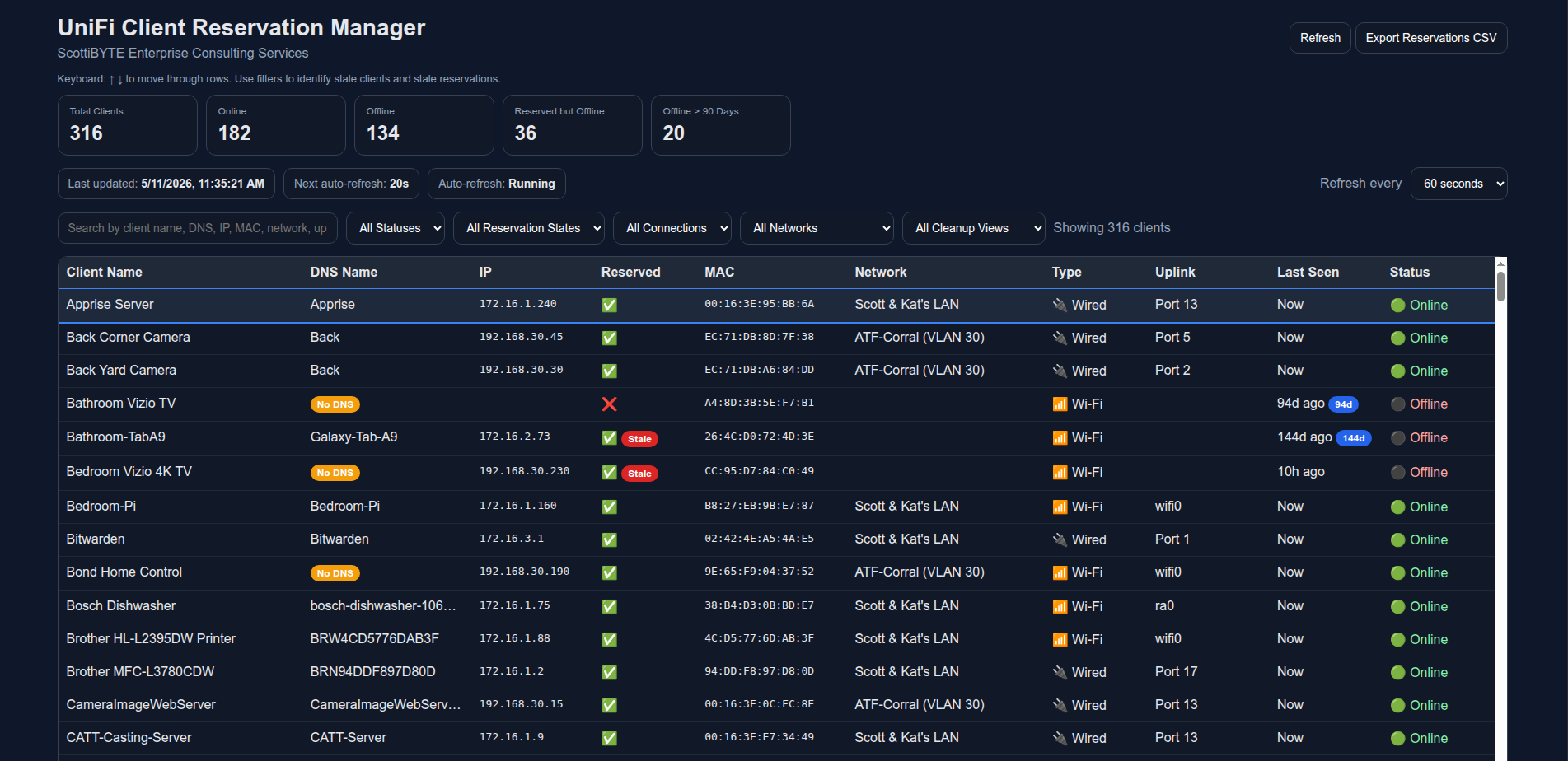
A modern web-based management utility for UniFi Network environments that provides advanced visibility into clients, DHCP reservations, stale devices, and offline systems.
Designed for administrators who need significantly more visibility and cleanup capability than the default UniFi client interface provides.
- Real-time UniFi client inventory
- Online/offline client tracking
- DHCP reservation management
- Toggle fixed IP reservations
- Forget/remove UniFi clients
- Identify stale offline devices
- Identify stale reservations
- Offline aging indicators
- Search and filtering
- Wired/Wi-Fi identification
- Uplink port visibility
- Network/VLAN visibility
- CSV export support
- Keyboard navigation
- Dark modern responsive interface
- Lightweight Node.js + Docker deployment
Create a working directory:
mkdir unifi-client-manager
cd unifi-client-manager
Create the environment file:
nano .envPaste the following into the .env file:
UNIFI_BASE_URL=https://192.168.1.1
UNIFI_USERNAME=admin
UNIFI_PASSWORD=password
UNIFI_SITE=default
PORT=3000
POLL_INTERVAL_MS=15000
VERIFY_SSL=false
Save the file.
Create the Docker Compose file:
nano docker-compose.ymlPaste the following into docker-compose.yml:
services:
  unifi-client-manager:
    image: scottibyte/unifi-client-manager:latest
    container_name: unifi-client-manager
    restart: unless-stopped

    ports:
      - "3000:3000"

    env_file:
      - .env
Save the file.
Start the container:
docker compose up -dVerify the container is running:
docker psView logs if needed:
docker logs -f unifi-client-managerOpen your browser:
http://YOUR_SERVER_IP:3000
Example:
http://192.168.1.50:3000
| Variable | Description |
|---|---|
UNIFI_BASE_URL |
URL of your UniFi controller or gateway |
UNIFI_USERNAME |
UniFi username |
UNIFI_PASSWORD |
UniFi password |
UNIFI_SITE |
UniFi site name |
PORT |
Web UI port |
POLL_INTERVAL_MS |
Client refresh interval |
VERIFY_SSL |
Verify SSL certificates (true or false) |
Pull the latest image:
docker pull scottibyte/unifi-client-manager:latestRestart the container:
docker compose down
docker compose up -ddocker compose down| Endpoint | Purpose |
|---|---|
/api/health |
Health status |
/api/clients |
Full client list |
/api/export/reservations.csv |
Export reservations |
/api/debug/raw-clients |
Debug sample clients |
The default UniFi client interface becomes difficult to manage in larger environments with:
- stale offline clients
- outdated DHCP reservations
- IoT device sprawl
- VLAN-heavy deployments
- hundreds of devices
This utility provides a fast operational view specifically designed for cleanup, auditing, and reservation management.
Credentials are supplied through Docker environment variables and are not embedded into the container image.
For production deployments, consider:
- reverse proxy authentication
- Cloudflare Tunnel
- VPN-only access
- internal-only exposure
- SSL termination
This container works well behind:
- NGINX Proxy Manager
- Traefik
- Caddy
- SWAG
- Cloudflare Tunnel
- UniFi Statistics Dashboard
- UniFi Reservation Cleanup Utilities
- ScottiBYTE Incus Dashboard
Need help with Unifi Client Manager, Docker deployment, Incus profile management, container creation, or ScottiBYTE utilities?
Join the ScottiBYTE Rocket.Chat community:
New users can start in #general. From there, you can find other ScottiBYTE project channels and community discussions.
For bugs and feature requests, please continue to use GitHub Issues. For quick questions and community discussion, use Rocket.Chat.