


A one-time code field for React Native. It draws its cells over one hidden TextInput and reads codes from SMS with Google Play services on Android.

- Paste and autofill that find the code in
123-456or in a whole message - SMS reading with no permissions: the User Consent or Retriever API on Android, WebOTP on the web
- Verifying, success and error states from the promise
onCompletereturns - A resend timer that keeps counting while the app is in the background
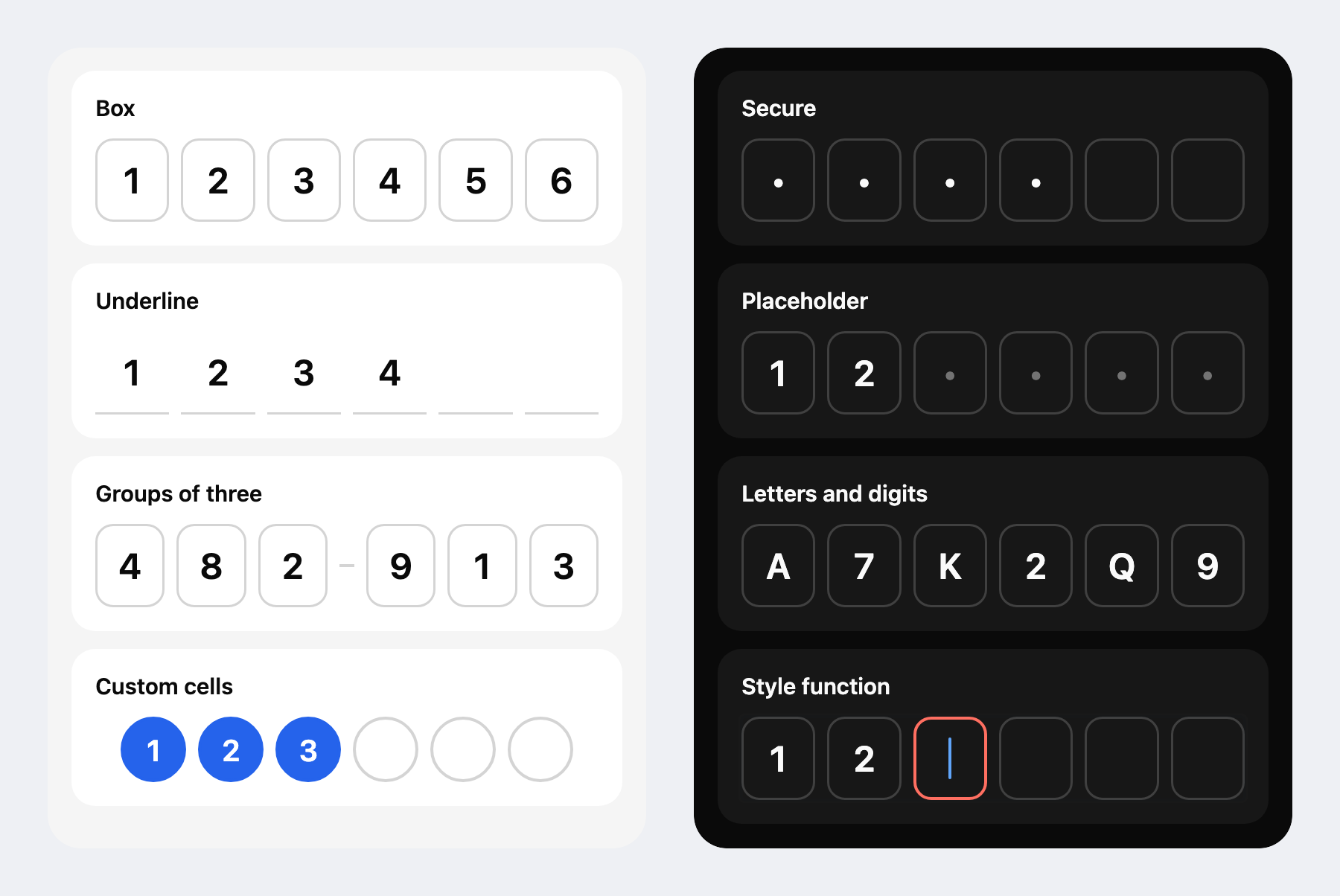
- Box and underline looks for light and dark color schemes, custom cells and a headless hook
- One labeled input for screen readers, with spoken status changes
Note
Read the guides to style the cells, read codes from SMS, fill the phone number and use it on the web.
# npm
npm install react-native-otpkit
# Yarn
yarn add react-native-otpkit
# Bun
bun add react-native-otpkit
Requirements:
- React Native 0.86+ (Expo SDK 57+)
- iOS 15.1+
- Android 7.0+ (API 24)
- Web: react-native-web 0.21+
- Expo: a development build for SMS reading
import { useRef } from 'react';
import { Button, View } from 'react-native';
import { OTPField, type OTPFieldRef, SmsMode, useResendTimer } from 'react-native-otpkit';

export function CodeStep(props: { verify: (code: string) => Promise<void>; resend: () => void }) {
  const field = useRef<OTPFieldRef>(null);
  const timer = useResendTimer(30);

  return (
    <View style={{ gap: 16, padding: 24 }}>
      <OTPField ref={field} sms={SmsMode.Consent} onComplete={props.verify} />
      <Button
        title={timer.canResend ? 'Resend code' : `Resend in ${timer.remaining}s`}
        disabled={!timer.canResend}
        onPress={() => {
          props.resend();
          timer.restart();
          field.current?.listenForSms();
        }}
      />
    </View>
  );
}OTPField takes the usual View props, plus:
| Prop | Type | Default | Description |
|---|---|---|---|
length |
number |
6 |
The number of cells. |
type |
'numeric' | 'alpha' | 'alphanumeric' | RegExp |
'numeric' |
The characters the field accepts. A RegExp is tested on each character. Only 'numeric' opens a number keyboard. Arabic-Indic, Persian, Devanagari and full-width digits become ASCII digits. |
value |
string |
The code, for a controlled field. | |
defaultValue |
string |
The starting code, for an uncontrolled field. | |
onChange |
(code: string) => void |
Called on every change, with no debounce. | |
onComplete |
(code: string) => void | Promise<unknown> |
Called each time the code becomes complete. Return a promise to show verifying while it's pending, then success or an error. Success blurs the field. | |
status |
'idle' | 'verifying' | 'error' | 'success' |
Sets the status yourself. The field then only styles itself and never clears on its own. | |
clearOnError |
boolean |
true |
Clears the code 600 ms after a rejected onComplete and focuses the field again. |
blurOnComplete |
boolean |
false |
Blurs the field when onComplete returns without a promise. |
transform |
(text: string) => string |
Runs on all incoming text (typed, pasted, autofilled or read from SMS) before filtering. | |
secure |
boolean |
false |
Draws a dot in each filled cell. Android accessibility services can still read the code from the hidden input. |
disabled |
boolean |
false |
Blocks focus and input. |
onFocus, onBlur |
() => void |
Called when the field gains or loses focus. | |
sms |
false | 'consent' | 'retriever' | { mode, sender? } |
false |
Reads the code from an SMS on Android. 'consent' asks the user to share one message, and 'retriever' reads a message that contains the app hash without asking. Pass { mode: 'consent', sender } to read only messages from the phone number sender. On the web, both modes use WebOTP. |
autoFocus |
boolean |
true |
Focuses the field on mount. |
placeholder |
string |
One character to show in each empty cell. | |
groups |
number[] |
Cell counts per group, such as [3, 3]. A dash shows between groups. |
|
variant |
'box' | 'underline' |
'box' |
The look of the built-in cells. |
caret |
boolean |
true |
Shows a blinking caret in the active cell. |
statusMessages |
{ verifying, error, success } |
'Verifying code', 'Incorrect code', 'Code verified' |
What screen readers hear when the status changes. |
accessibilityLabel |
string |
'Verification code' |
The label screen readers read for the field. |
testID |
string |
Also names the hidden input <testID>-input and each cell <testID>-cell-<index>. |
|
cellStyle |
StyleProp<ViewStyle> | (cell: Cell) => StyleProp<ViewStyle> |
Style for every cell. A function gets each cell and returns its style, so ({ isActive }) => isActive && { borderColor: '#FF6F61' } colors the focused cell. Its width and height resize the cells, which are 52 wide and 56 tall by default. |
|
textStyle |
StyleProp<TextStyle> | (cell: Cell) => StyleProp<TextStyle> |
Style for the characters and the placeholder. A function gets each cell, and the placeholder shows in cells where isFilled is false. |
|
caretStyle |
StyleProp<ViewStyle> |
Style for the caret. | |
renderCell |
(cell: Cell) => ReactNode |
Draws each cell from { index, char, isFilled, isActive, isDisabled, status }. char is a dot when secure is on. variant and the cell, text and caret styles don't apply. |
|
renderSeparator |
(afterIndex: number) => ReactNode |
Replaces the dash between groups. afterIndex is the index of the cell before it. |
|
textInputProps |
TextInputProps |
Props for the hidden TextInput, applied over the field's own. value, onChangeText and the ref stay the field's. |
| Method | Description |
|---|---|
focus(), blur() |
Show or hide the keyboard. |
clear() |
Empty the field. A pending onComplete promise is then ignored. |
setValue(text) |
Fill the field as if text were pasted. 'Your code is 123456' fills 123456. |
listenForSms() |
Listen for the SMS again, for example after a resend. It does nothing unless sms is set. |
| Function | Description |
|---|---|
useOTPField(options) |
Holds the field logic for an input and cells you draw yourself. Its options are the props from length to onBlur, and it returns { value, status, isFocused, cells, inputProps, focus, blur, clear, setValue }. Spread inputProps on a TextInput laid over your cells at an opacity of 0.011. iOS ignores touches on views below 0.01. |
useSmsCode({ mode, length, type, sender, extract, enabled }) |
Listens for an SMS without a field and returns { code, message, status, start, stop }. extract(message) replaces the default code search, except on the web, where the browser hands over the code. With enabled: false, it waits for start(). |
useResendTimer(seconds, { autoStart }) |
Counts down for a resend button and returns { remaining, canResend, restart }. It starts on mount unless autoStart is false. Time in the background counts. |
getAppHash() |
Resolves to the 11-character hash a Retriever message must contain, or to null off Android. The hash comes from the signing key, so debug and release builds have different ones. |
requestPhoneNumberHint() |
Opens Google's phone number sheet on Android and resolves to the picked number in E.164, such as +15551234567. It resolves to null when the user closes the sheet, and off Android. |
The status from useSmsCode is one of:
| Status | Meaning |
|---|---|
idle |
Not listening yet, or stopped with stop(). |
listening |
Waiting for a message. |
received |
A message arrived. message holds its text (on the web, the code), and code the code found in it, or null. |
timeout |
No message arrived within five minutes. |
denied |
The user declined the consent sheet, or the browser refused WebOTP. |
unavailable |
SMS can't be read here: iOS, Expo Go, a browser without WebOTP or Android without Google Play services. |
Each option type is also an object of constants with the same name. The value of each constant is its key in lowercase, so SmsMode.Consent and 'consent' both work.
| Constant | Keys |
|---|---|
CodeType |
Numeric, Alpha, Alphanumeric |
SmsMode |
Consent, Retriever |
Variant |
Box, Underline |
OTPStatus |
Idle, Verifying, Error, Success |
SmsStatus |
Idle, Listening, Received, Timeout, Denied, Unavailable |
Change the import:
- import { OTPTextInput, type OTPTextInputHandle } from '@sectiontn/otp-input';
+ import { OTPField, type OTPFieldRef } from 'react-native-otpkit';defaultValue, autoFocus and the ref's clear() and setValue() keep working. A few things change:
inputCountis nowlength, and the default went from 4 to 6.tintColorandoffTintColorare now acellStylefunction, such as({ isActive }) => ({ borderColor: isActive ? '#FF6F61' : '#D4D4D4' }).onTextChangeHandleris nowonChange, and it runs on every change with no debounce.typereplacesuseNumbersRegex,useCustomRegex,customRegexandkeyboardType. It takes'numeric','alpha','alphanumeric'or aRegExpfor one character.
The OTPKit skill gives coding agents such as Claude Code, Codex and Cursor the API and its pitfalls:
npx skills add SectionTN/react-native-otpkit- 1.0: Code field, SMS reading, verifying state and resend timer on Android, iOS and web
- 1.1: Phone number hint on Android
See the contributing guide. Questions and ideas go to Discussions.
MIT
Made by SectionTN