

Orders do not stop when the Wi-Fi does.
An offline-first order and customer manager for independent sellers and small businesses.
App Store · Google Play · Website · Engineering notes
Flutter · Drift · SQLite · Firebase · Provider · offline-first

The private production app is currently at Orderly 1.13.2 · build 92.
The latest release line focused on making the daily follow-up loop faster and clearer:
- Needs Attention on Dashboard for overdue orders, due-today work, payment follow-ups, and unanswered customers
- reusable, editable WhatsApp message templates with localized defaults
- Order Again for repeat orders using the normal creation flow
- Recent and Favourite items for faster order entry
- persistent Chat, Call, and More actions while reviewing an order
- clearer labelled receipt and reply actions
- direct WhatsApp chat with no forced prefilled message
- release-time billing configuration checks so Pro pricing and purchases remain available in production builds
A lot of small businesses do not need a giant ERP.
They need to know:
- who ordered what
- how much is still unpaid
- what needs to be delivered next
- whether they already replied to the customer
- what needs attention today
- what the business actually made
And they need all of that to keep working when the connection is bad.
customer messages you
        ↓
log the order
        ↓
local database commits immediately
        ↓
customer + balance + dashboard update
        ↓
sync catches up when the network is ready
That local-first loop is the core of the product.
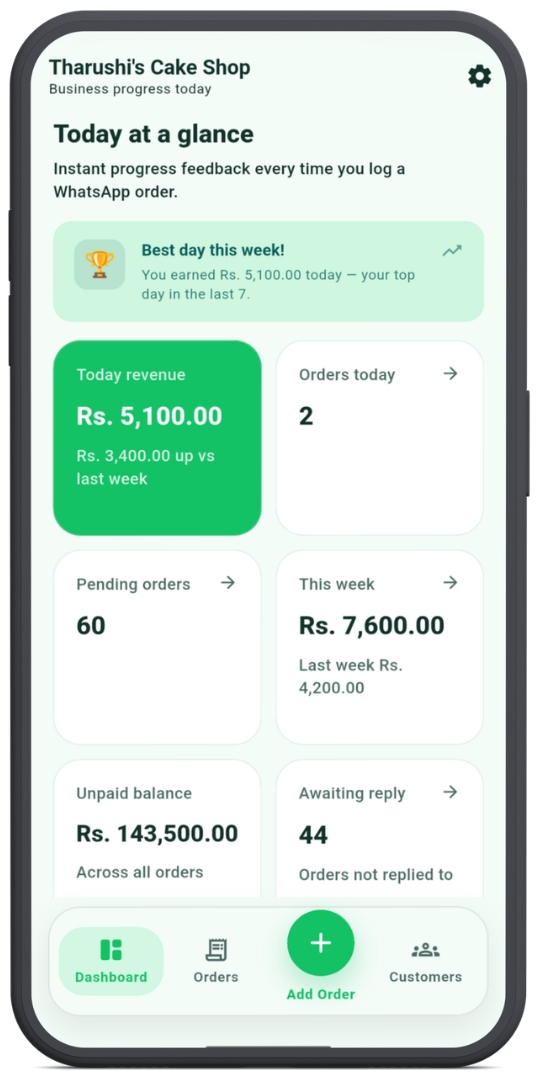
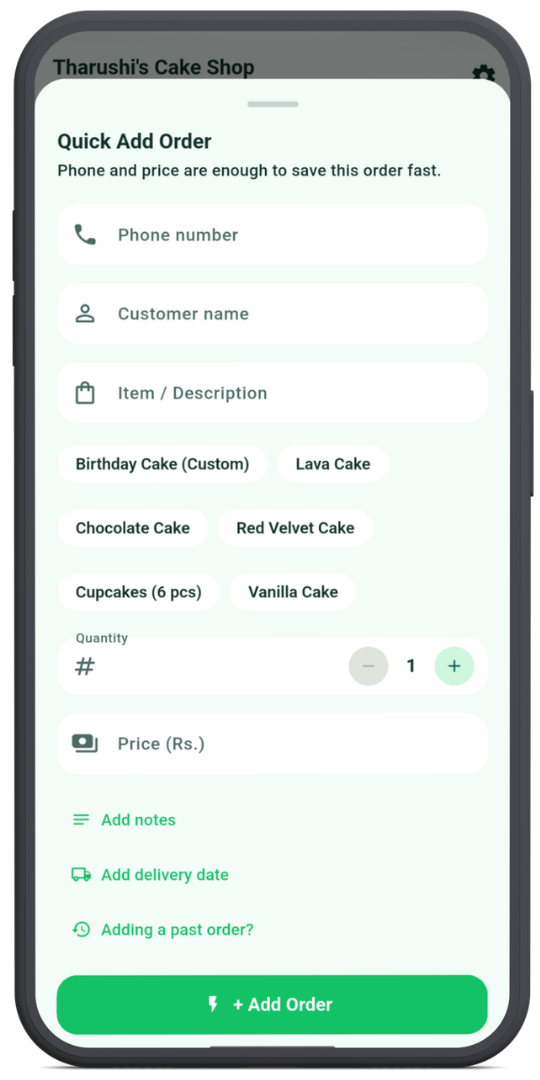
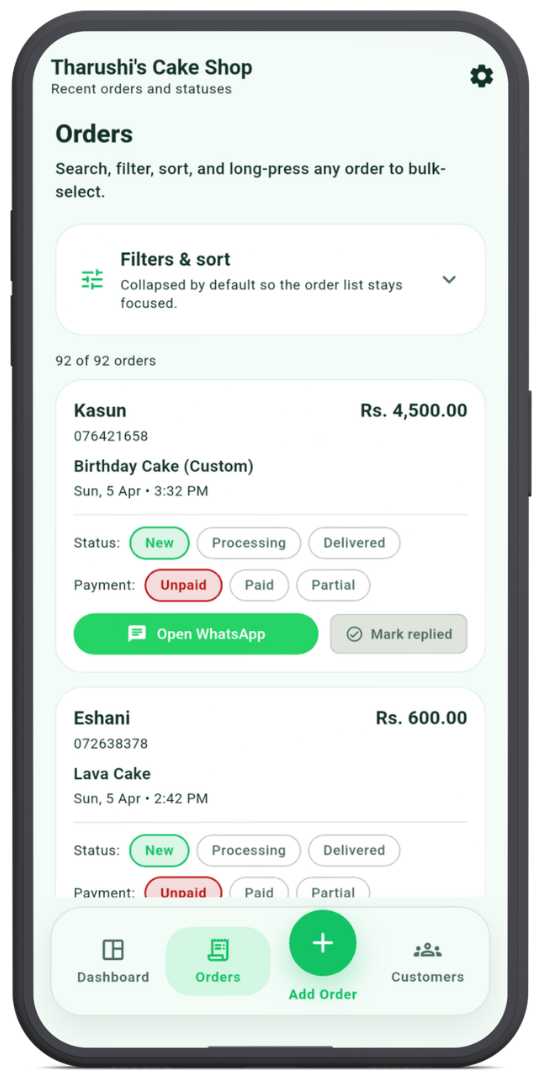
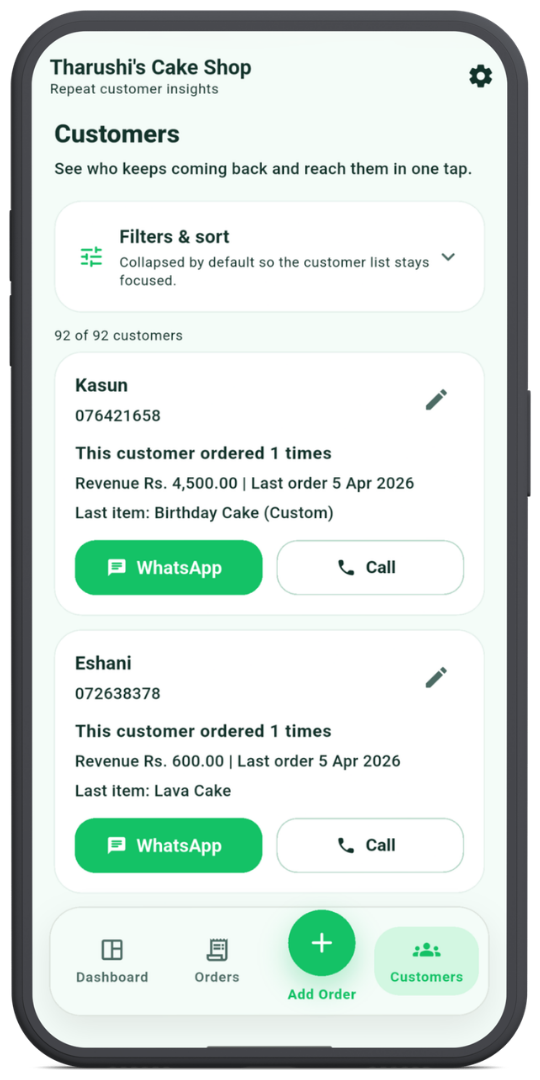
Orders can include multiple line items, customer details, payment state, delivery or pickup information, order source, notes, discounts, delivery fees, partial payments, settlement dates, courier details, and custom timestamps for past orders.
Known customers can be filled from phone history. Recent and favourite items speed up repeat entry, while Order Again lets a seller start from an existing order and review it before saving a new one.
The latest release adds a dedicated Needs Attention surface to Dashboard. It brings together overdue work, orders due today, payment follow-ups, and unanswered customers with direct links back into matching order views.
Daily reminders can surface the same operational context and open Dashboard when tapped.
Order detail keeps Chat, Call, and More visible while scrolling, so contact actions do not disappear on long orders.
WhatsApp can open as a blank chat or use reusable message templates for common moments. Receipt and reply actions are fully labelled instead of hidden behind ambiguous icons.
Orders can be unpaid, partially paid, or paid. Balance due is calculated from the real order charge and advance already received.
That state feeds order cards, customer history, dashboard metrics, receipts, and reporting.
Completed orders can produce branded PDF receipts inside the app.
Business details, logo, accent colour, payment information, line items, totals, and customer details flow into the generated document, which can be previewed and shared directly.
Customer profiles surface order history, lifetime value, unpaid balance, repeat-customer context, frequently ordered items, and quick contact actions.
Phone numbers are normalized using the selected seller market so matching remains useful across countries.
The dashboard focuses on operational information:
- revenue today / this week / longer ranges
- orders created today
- pending work
- deliveries due
- outstanding balances
- customers waiting for a reply
- Needs Attention follow-ups
- best customers and popular items
Most cards deep-link back into filtered order views so analytics stay connected to an action.
Seller-market configuration drives currency, date formatting, phone normalization, payment options, sample data, suggested cities, and courier hints.
The core UI is localized in English, Sinhala, and Tamil.
Orderly supports CSV import/export, PDF export, printing, and receipt sharing.
Orderly treats the local SQLite database as the working copy of the app.
UI action
   ↓
repository
   ↓
Drift / SQLite transaction
   ├── write the entity
   ├── mark the row dirty
   └── enqueue an outbox mutation
            ↓
        UI is already done
            ↓
      SyncService runs later
            ↓
         Firestore
When connectivity returns, the sync engine drains pending mutations and refreshes remote state.
Remote data cannot simply replace the local database because there may be local edits that have not reached the server yet. The merge path preserves dirty rows, removes only clean rows that disappeared remotely, and applies remote rows only when they do not overwrite pending local work.
The production app also handles reconnect-triggered sync, app-resume sync, overlapping sync triggers, first-device hydration, remote account deletion, pending offline changes, and server-side entitlement changes.
More detail is in docs/engineering.md.
Flutter UI
   ↓
Provider / feature state
   ↓
Repositories
   ↓
┌───────────────────────────┐
│ Drift / SQLite            │  ← working local state
│ + outbox + sync metadata  │
└─────────────┬─────────────┘
              ↓
         SyncService
              ↓
      Cloud Firestore
| Area | Choice |
|---|---|
| Mobile | Flutter / Dart |
| State | Provider |
| Local database | Drift + SQLite |
| Cloud | Firebase Authentication + Cloud Firestore |
| Sync | Local outbox + dirty rows + merge-based refresh |
| Analytics | Firebase Analytics |
| Diagnostics | Crashlytics + Performance + structured app logging |
| Documents | CSV + PDF + print/share pipelines |
| Purchases | App Store / Google Play in-app purchase flows |
| Localization | Flutter gen-l10n + ARB |
| Automation | GitHub Actions |
Every new account starts with a full-feature 20-order trial.
Orderly Pro Lifetime is a one-time purchase that removes the order cap permanently. Cloud backup and sync are included during the trial and with Pro. Existing data stays accessible after the trial ends.
There is no recurring subscription.
Orderly is live on iOS/iPadOS and Android.
The private production repository has CI for formatting, static analysis, tests, pricing-model consistency, and release validation. The 1.13.2 release line also added an explicit build-time guard around store product configuration so a release artifact cannot silently ship with the Pro purchase path disabled.
This public repository is the product + engineering showcase. The production source remains private because it contains commercial app code, backend integration, signing configuration, and release infrastructure.
The goal was never to build the most complicated order-management system possible.
It was to make the common path reliably boring:
a customer sends an order → you log it → it stays there → you know what happens next.
Making that statement stay true offline, across devices, through app restarts, and through conflicting edits is where most of the engineering went.
Built by Senith Umesha.