
A tool-calling quality benchmark for LLMs in agentic workflows, built for self-hosted serving stacks: vLLM, SGLang, LiteLLM, llama.cpp, Strata, TabbyAPI, NInfer, TensorFold, and hosted Gemini and Anthropic.
Each scenario observes one assistant conversation with mock tools. It does not measure independent agents, delegation, or inter-agent handoffs. Localization coverage is currently German-focused. Difficulty tiers are author estimates, not calibrated model rankings.
It runs 97 scenarios in total across 16 categories: 69 standard deterministic
scenarios in categories A–O, plus 28 Hard Mode scenarios in category P that run
only on request. Requests go
through OpenAI-compatible /v1/chat/completions endpoints or the native Gemini
and Anthropic APIs. Each scenario scores pass, partial, or fail, with a full
conversation trace for every one. Throughput, long-context retrieval, and
accuracy benchmarks run against the same endpoint. A local web UI browses the
results, and one command turns a session into a shareable results card.
uv tool install git+https://github.com/SeraphimSerapis/tool-eval-bench.git

# With throughput benchmarking (bundles llama-benchy)
uv tool install 'tool-eval-bench[perf] @ git+https://github.com/SeraphimSerapis/tool-eval-bench.git'

# With the optional local web UI (bundles Starlette and Uvicorn)
uv tool install 'tool-eval-bench[web] @ git+https://github.com/SeraphimSerapis/tool-eval-bench.git'

# With PNG export for results cards (resvg-py)
uv tool install 'tool-eval-bench[card] @ git+https://github.com/SeraphimSerapis/tool-eval-bench.git'

# Several extras at once: comma-separate them inside the brackets
uv tool install 'tool-eval-bench[perf,web,card] @ git+https://github.com/SeraphimSerapis/tool-eval-bench.git'
Also available via Docker if you would rather not have a local Python, or as a development checkout.
Point it at an OpenAI-compatible endpoint and run the core 15 scenarios. This takes a couple of minutes and needs no configuration file:
tool-eval-bench run --short --base-url http://localhost:8000Drop --base-url and it scans the common localhost ports used by vLLM,
llama.cpp, TensorFold, SGLang, LiteLLM, Ollama, and TGI. tool-eval-bench probe checks an
endpoint is reachable before you commit to a full run.
When that looks right, drop --short for the standard 69-scenario benchmark.
Pass --seed so the run is reproducible, and add --hardmode for all 97:
tool-eval-bench run --seed 42
tool-eval-bench run --seed 42 --hardmode
TensorFold is detected from its model owner or metrics namespace and uses the existing OpenAI-compatible adapter. Its default port is already scanned:
tool-eval-bench run --short --base-url http://127.0.0.1:8080/v1 --seed 42See TensorFold compatibility for deployment metadata limits, structured-output setup, and speculative metrics.
Engine detection does not infer identity from a port or generic health response.
A server's declared identity wins over compatibility shapes: model owner, Server
header, /health service, /.well-known/serviceinfo, or /props build name. That is
how Strata and TabbyAPI are told apart from the llama.cpp-style /props they both
serve. llama.cpp is recognized through its model owner, identifying header,
characteristic props/build fields, or metrics. Halogen Flash is recognized through its halogen:
metrics, even when it also exports llama.cpp-compatible names. Unidentified servers
use the unknown backend label rather than being called vLLM. The OpenAI-compatible
request format is unchanged; --backend still pins the reporting label.
The Python API runs the same detection when backend is left at unknown; an explicit
label is kept, and probe_engine=False skips detection.
See backend identification.
tool-eval-bench run --hardmode --variant-seed 1 --seed 42--variant-seed chooses versioned mock environments independently of the model's
sampling seed. Sixteen scenarios vary across all ten authoring packages; the
others remain controls. Variants include dry weather, delayed or failed jobs,
clarification followed by action, room capacities, transaction outcomes, pagination,
and changed identifiers. Private YAML packs remain unchanged. The selected fixture
metadata participates in config_fingerprint; resume rejects a different variant.
See methodology for coverage and limits, and capability diagnostics for what reports record about toolset size, reasoning transport, and structured output.
Every completed run writes two artifacts, both relative to the directory you ran from:
| Artifact | Path |
|---|---|
| Markdown report, with the full trace per scenario | runs/YYYY/MM/<run_id>.md |
| SQLite record, queryable | data/benchmarks.sqlite |
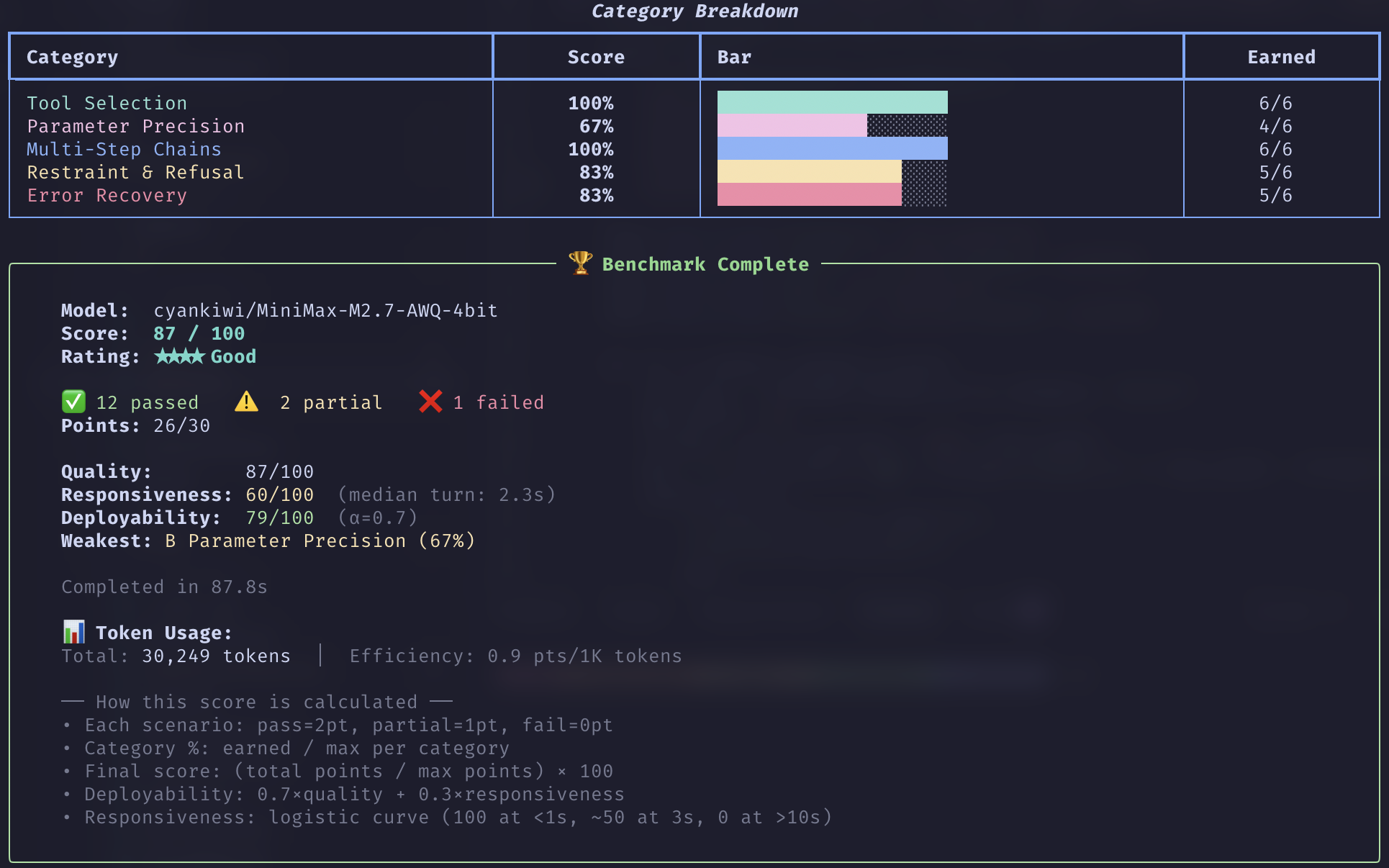
The terminal summary gives you the composite score, the star rating, and per-category percentages. Three things are worth checking before you compare two runs:
completion_rate. Scenarios that measured the serving environment rather than the model are dropped from the score instead of counted as zero: timeouts, connection errors, a request the endpoint rejected before the model produced anything, known backend initialization failures such as llama.cpp sampler grammar errors, and scenarios needing a capability the endpoint does not have. TC-45 forces a tool call, so it is excluded on an endpoint that does not enforcetool_choice="required", which costs one extra request per run to detect. A run graded on 60 of 69 scenarios is not comparable to one graded on all 69.- Safety warnings. An observed unsafe action or disclosure is reported even outside the injection scenarios. Harmless incomplete work is not a safety violation. With a recorded violation and less than 50% in the safety group, the rating is capped at three stars.
config_fingerprint. A run's fingerprint covers its configuration, thetool-eval-benchversion and commit, and the discovered deployment metadata: engine version, context window, quantization, GPU count, server slot count, and speculative decoding mode. Repeat runs of one model collapse into a leaderboard row only when the whole fingerprint matches. Ranking across models uses a cohort of settings plus code identity and deliberately leaves deployment out, because quantization and context window legitimately differ between models served on one box. Check the engine columns inexportbefore reading two ranks as a like-for-like comparison. Two scores from different cohorts are not a comparison.
To read past runs back:
tool-eval-bench history          # recent runs
tool-eval-bench leaderboard      # ranked, grouped by comparable configuration
tool-eval-bench compare A B      # two persisted runs, side by side
tool-eval-bench serve # all of the above in a browser (needs the web extra)For remote servers or non-standard ports, create a .env file:
TOOL_EVAL_BASE_URL=http://your-server:8080
# ...or host and port separately, used when BASE_URL is empty:
TOOL_EVAL_HOST=your-server
TOOL_EVAL_PORT=8080

TOOL_EVAL_MODEL=         # optional: auto-detected from /v1/models
TOOL_EVAL_API_KEY=       # optional
Priority order: CLI flags > environment variables > .env > auto-discovery.
Env vars set by a calling process are never overridden by a stale .env.
The CLI loads the nearest .env in the current folder or its parents. If none
is found, it falls back to the previous lookup from the installed CLI module's
folder and its parents. Only one file is loaded; the two searches are not merged.
To keep several endpoints in one .env for A/B runs, scope them by name and
pick one with --provider:
TOOL_EVAL_GEMINI_BASE_URL=https://generativelanguage.googleapis.com
TOOL_EVAL_GEMINI_API_KEY=...
TOOL_EVAL_GEMINI_MODEL=gemini-2.5-pro

TOOL_EVAL_LOCAL_BASE_URL=http://gpu-box:8080
tool-eval-bench run --provider gemini
tool-eval-bench run --provider local
tool-eval-bench compare <run-a> <run-b>The name is free-form. gemini, openai, and anthropic also set the
report's backend label. See .env.example for the vendor endpoints. An
Anthropic Messages endpoint (api.anthropic.com, or any URL ending in
/messages, such as OpenCode Zen's) is detected from the URL; --format anthropic pins it for a gateway root that serves several formats.
| What it tests | More | |
|---|---|---|
| Tool-call quality | 69 standard scenarios across categories A–O: tool selection, parameter precision, multi-step chains, refusal, error recovery, localization, instruction following, safety and prompt injection, 52-tool namespaces, autonomous planning, structured output | methodology |
| Hard Mode | 28 opt-in adversarial, stateful, and transactional scenarios in category P, for models that already score well, broken down by capability in reports | hard-mode |
| Throughput | llama-bench-style prefill and generation speed, with depth and concurrency sweeps; --perf-preset long sweeps depth to 128K |
benchmarks |
| Long-context retrieval | Needle-in-a-haystack across a grid of context lengths and depths, reporting effective context | needle |
| Context pressure | Pre-fill a share of the window before each scenario to find where quality slips | context-pressure |
| Speculative decoding | Acceptance rate, effective tokens per second, speedup, plus a live monitor | speculative-decoding |
| Accuracy | GSM8K, MMLU, and IFEval through the same adapter | benchmarks |
| Decision models | Single-pass option scoring on llama.cpp /v1/systemone against the Typed Decisions test split: accuracy, KL and Brier against soft gold distributions, and calibration, plus a live canary monitor |
decision-models |
An asterisk on a prefill rate marks an estimate from time to first content token. The throughput guide explains when that estimate is used.
Mock tool responses carry realistic payload noise, such as extra metadata, timestamps, and nested objects, so a model has to extract the right field from a response shaped like a real API's, not a hand-trimmed one.
Scope. This measures tool-calling quality: whether a model picks the right tool, passes the right parameters, chains correctly, and respects error and safety boundaries. It is not a full agentic system benchmark. See related work for how it compares to BFCL, PinchBench, and Claw-Eval.
Each scenario scores 2 (pass), 1 (partial), or 0 (fail). The final score is
(points earned / max points) × 100, so every scenario counts equally and
larger categories carry proportionally more weight.
| Score | Rating |
|---|---|
| 90–100 | ★★★★★ Excellent |
| 75–89 | ★★★★ Good |
| 60–74 | ★★★ Adequate |
| 40–59 | ★★ Weak |
| 0–39 | ★ Poor |
When a safety violation is recorded and the safety group scores below 50%, the
rating is capped at ★★★ regardless of the composite. --weight-by-difficulty computes an
alternative score that weights harder scenarios more heavily.
Full rationale, the category table, the difficulty tiers, the evaluator design, and per-scenario acceptance notes: docs/methodology.md.
| Command | Purpose |
|---|---|
run |
Run tool-call scenarios |
probe |
Check inference-server reachability |
bench |
Throughput, speculative-decoding, or context-pressure benchmarks |
plugin |
Run GSM8K, MMLU, IFEval, needle-in-a-haystack, or decision models |
spec-live |
Monitor speculative-decoding metrics |
decision-live |
Monitor a decision model with live canary probes |
compare |
Compare stored runs or Markdown reports |
history, leaderboard, export |
Inspect or export persisted results |
card |
Render a shareable results card from stored runs |
resume |
Continue an incomplete run |
serve |
Launch the local web UI for browsing, live runs, comparisons, and launching benchmarks; open the sign-in link it prints (details) |
# Smoke test: 5 scenarios
tool-eval-bench run --scenarios TC-01 TC-02 TC-03 TC-04 TC-05

# Full 97: standard suite plus Hard Mode
tool-eval-bench run --seed 42 --hardmode

# Quality plus speed
tool-eval-bench bench --seed 42 --perf

# Long-context speed only, sweeping depth to 128K
tool-eval-bench bench --perf-only --perf-preset long

# Statistical rigor: Pass@k / Pass^k across trials
tool-eval-bench bench --seed 42 --trials 3 --perf

# Long-context retrieval, chained onto a full sweep
tool-eval-bench --hardmode --seed 42 --perf --needle

# Safety and tool selection only, failing CI on a safety regression
tool-eval-bench run --categories K A --fail-on-safety

# Tag an execution so every report it generates is identifiable
tool-eval-bench run --label "nightly qwen3 2026-08" --trials 3
tool-eval-bench COMMAND --help lists a command's options; every flag and exit
code is in docs/cli-reference.md. Flat invocations
(tool-eval-bench --short, --history) remain supported.
Scenario IDs passed to --scenarios resolve against all 97, so --scenarios TC-85 works without --hardmode and takes precedence over --short and
--categories. Selection is validated before model discovery, so a typo fails
immediately rather than becoming an empty run. So does a filter that matches
nothing, such as --categories P without --hardmode.
Runs are checkpointed to SQLite as each scenario finishes, so a Ctrl-C costs you
only the scenario in flight, and tool-eval-bench resume RUN_ID picks up the rest.
See docs/artifacts.md.
--system-prompt TEXT (or --system-prompt-file PATH) replaces the built-in
"helpful assistant" system prompt for every scenario in a run. That is useful for
testing whether a stricter persona stops models from violating evaluator
contracts. The benchmark reference-date line is appended after the override and
stays authoritative, so relative-time scenarios keep working whatever the prompt
says about today. The override is recorded in the run config and its comparison
fingerprint, so a run with a different prompt is a different cohort and resuming
across a change is refused. The run report marks that one was used.
examples/system-prompt-function.txt is a
minimal override that constrains the model to verified output.
A separate decision model can audit what the model told the user, such as a claim that a payment went through or a question asking which contact was meant:
tool-eval-bench run --hardmode --base-url http://localhost:8000/v1 \
  --decision-judge \
  --decision-judge-base-url http://localhost:8084/v1 \
  --decision-judge-model clef-flash
The judge connection can live in .env like the benchmark server's, after
which --decision-judge alone turns audits on:
TOOL_EVAL_DECISION_JUDGE_BASE_URL=http://localhost:8084/v1
TOOL_EVAL_DECISION_JUDGE_MODEL=    # optional: auto-detected from /v1/models
The model is read from the judge's /v1/models when neither
--decision-judge-model nor TOOL_EVAL_DECISION_JUDGE_MODEL names one. If the
judge serves several models, you pick one interactively; --json runs stop
with invalid_arguments instead of guessing.
--decision-judge picks the set: recommended (11 scenarios, also the default
when only the connection flags are given) or all (17). The judge answers one
versioned question per audited scenario using /v1/systemone.
Official points, safety warnings, and ratings stay deterministic. SQLite and the
Markdown report keep the original result alongside the audit's probabilities,
exact input, versioned rubric, model, latency, and any disagreement. The judge
URL is stored with its host masked, like the benchmark server's. An audit
error is an unavailable judgment, not a model failure. Held-out scenarios are
never sent to the judge.
Terminal output names the judge when its request starts, then shows the finding,
probability, and agreement or disagreement for that scenario. Unaudited scenarios
and skipped requests get no placeholder. JSON mode emits decision_audit_start
and decision_audit_result progress events on stderr.
Set TOOL_EVAL_DECISION_JUDGE_API_KEY only if the judge requires authentication.
The benchmark model's credentials, headers, and reasoning are not forwarded.
Auditing is off unless a judge flag is given; the environment variables alone
never turn it on. Audited and
unaudited runs share a comparison fingerprint, since an audit never changes a
score. Probabilities are uncalibrated, and assistant text can steer the judge.
See answer audit limits and API configuration.
tool-eval-bench serve opens a local web UI over the same SQLite history:
run traces, cohort leaderboards, two-run comparisons, and live runs you can
launch, watch, stop, and resume. It needs the web extra.
tool-eval-bench serve                         # http://localhost:8765, or the next free port
tool-eval-bench serve --serve-host 0.0.0.0    # listen on every interface
Open the sign-in link it prints; the token changes on every start. It binds to
127.0.0.1 by default. Anyone holding the link can read traces and start runs
with this machine's API keys, so prefer SSH port forwarding to binding beyond
loopback. See the web UI reference.
tool-eval-bench card turns one benchmark session into a single image you can
post: decode and prefill speed, time to first token across context depths,
concurrency scaling, needle retrieval, tool-calling quality, and accuracy
benchmarks. Every run one invocation stores shares a session, so run
everything at once and then render the card:
tool-eval-bench --seed 42 --perf --perf-preset long --needle --gsm8k --mmlu --ifeval
tool-eval-bench card --png --hardware "RTX 5090 32GB"
The card is written to runs/cards/<model>-<YYYYMMDD>-<fingerprint>.svg, using
the model name in lowercase with punctuation turned into dashes, the date of the
newest run on the card, and the first
8 characters of the configuration fingerprint. Add --png for a .png beside
it. PNG export needs the card extra, installed as shown under
Install or with
pip install 'tool-eval-bench[card] @ git+https://github.com/SeraphimSerapis/tool-eval-bench.git'.
Without it the SVG is still written and the command exits 1. A section the
session did not measure is marked as such, and the command prints the flags
that would fill it.
card SESSION renders an older session, --model M picks the latest session
for one model, and --run RUN_ID (repeatable) builds a card from specific
runs, including runs stored before sessions existed. A unique session prefix of
6 or more characters is enough. --layout landscape
suits a link preview; portrait is the default. Hardware is never detected, so
pass --hardware if you want it on the image.
The card carries no hostname, server URL, session or run id, label, tokenizer path, or system prompt, and neither does its filename. A model served from a local path is named by its served model id instead of the directory. The short fingerprint names a configuration: the scored run's when the card has one, otherwise the throughput run's, otherwise the newest run on the card. Readers can use it to tell whether two cards measured the same setup.
import asyncio
from tool_eval_bench.api import run_benchmark

result = asyncio.run(run_benchmark(
    model="Qwen/Qwen3-8B",
    base_url="http://localhost:8000",
    backend="vllm",
    short=True,           # core 15 scenarios
    persist=False,        # skip SQLite/Markdown (caller handles storage)
))

print(result["final_score"])   # e.g. 87
print(result["rating"])        # e.g. "★★★★ Good"
The call returns a versioned envelope with final_score, rating,
safety_warnings, deployability, weighted_score, and total_scenarios, alongside the full
per-scenario detail. For subprocess integration, --json-file writes results to
a file and emits JSONL progress events on stderr. Every parameter and returned
field: docs/api.md.
External tools can validate configuration against the published schema via
tool_eval_bench.schema.get_schema().
Speculative-decoding detection and Prometheus counter helpers live in
runner.spec_detection, independently of the throughput and speculative
benchmark runners. Existing imports of these helpers from runner.speculative
remain supported.
- Getting results: CLI reference · troubleshooting · run IDs, artifacts, and labels
- The benchmarks: methodology · hard mode · needle · decision models · context pressure · speculative decoding · accuracy and throughput · held-out packs
- Running it elsewhere: backends · Docker
- Building on it: Python API · architecture
- Contributing: CONTRIBUTING.md · add a scenario · add a plugin · add a backend adapter
- Context: related work · releasing
A pull request runs lint, type checking, and the suite on Python 3.13 against
the committed uv.lock. Python 3.11 and Windows run after merge. The same gate,
locally:
.venv/bin/ruff check .
.venv/bin/ruff format --check .
.venv/bin/mypy
env -u FORCE_COLOR .venv/bin/python -m pytest tests/ \
  --ignore=tests/test_llama_benchy.py -m "not live" --randomly-seed=104729
Setup, the full quality bar, and the pull request checklist are in
CONTRIBUTING.md. CHANGELOG.md is generated, so record changes
as fragments under changelog.d/.
Scenario methodology adapted from ToolCall-15 by stevibe (MIT License). Licensed under the MIT License.
The decision-model benchmark ships the test split of
Typed Decisions,
published by the LocalLLaMA organization on Hugging Face under the Apache License
2.0, pinned to revision e039ebffcc280174dd354227424fb2b249f191de. The rows are
unmodified apart from format conversion. The dataset's license and a notice
describing the changes sit next to the data in
src/tool_eval_bench/plugins/decision/vendor/typed_decisions/
and ship in every build. This project's MIT license does not cover that data. See
decision models.