




🌍 English | 简体中文
Magpie is a lightweight window upscaling tool that comes equipped with a variety of efficient scaling algorithms and filters.
This repository is an independent experimental fork of Blinue/Magpie. Magpie and the majority of this codebase were created by Blinue and the upstream contributors. This fork is not an official Magpie release and is not endorsed or supported by the upstream project.
The fork owner used OpenAI Codex as a development assistant to add and test experimental captured-frame integrations for:
- NVIDIA DLSS Super Resolution with shared NVIDIA Optical Flow motion and optional estimated depth.
- NVIDIA DLSS Frame Generation with configurable 2x/3x/4x output and the same shared guidance.
- NVIDIA DLSSNR as a same-resolution SDR AI filter through a locally supplied direct-runtime path.
- AMD FidelityFX Super Resolution 2.2.1 with zero motion vectors, synthetic jitter metadata, or 50%-resolution colour optical flow.
- AMD FidelityFX Super Resolution 3.1.5 upscaling (without frame generation) through D3D11/D3D12 interoperability, with zero motion vectors, synthetic jitter metadata, or 50%-resolution colour optical flow.
- AMD FidelityFX Super Resolution 4.1.1 INT8 with experimental Zero-MV, synthetic-jitter, and 50%-resolution colour-optical-flow modes.
- Intel XeSS 3.0.1 Super Resolution with zero motion vectors, synthetic jitter metadata, or 50%-resolution colour optical flow through D3D11/D3D12 interoperability.
- Intel XeSS Frame Generation with a cross-vendor x2 path and an Intel Arc x2-x4 multi-frame path.
- NVIDIA VideoSuperRes for same-resolution denoising and VSR upscaling.
- MLAA and captured-colour-frame approximations of SMAA T2x/4x, with jittered and non-jittered variants.
These integrations do not have access to engine depth, engine motion vectors, exposure, reactive masks, camera matrices, or projection jitter. Renderer-owned optical flow and Depth Anything V2 are estimates from captured colour, so ghosting and unstable detail remain possible. These are research prototypes, not replacements for native in-game DLSS or FSR support.
The following observations are subjective results from a limited set of systems and games; they are not general performance or image-quality claims.
For normal use, choose either DLSS SR_Experimental or RTXVideo_VSR_Ultra; stacking them is not recommended. DLSS SR defaults to motion guidance on and estimated depth off. The synthetic-Jitter and old Optical Flow names remain legacy experiments.
DLSS SR_Experimental keeps the compatible internal identifier DLSS_ZeroMV but exposes two independent inputs. Use Motion Vectors supplies current-to-previous source-pixel optical flow and defaults to on. Use Estimated Depth supplies normalized inverse relative depth and defaults to off. Depth can still use optical flow internally for temporal stabilization when motion delivery is disabled. Real guidance is only bound when the DLSS input size matches the captured source; otherwise the channel safely falls back to Zero.
| Effect | Observed advantages | Observed disadvantages | Recommendation |
|---|---|---|---|
DLSS SR_Experimental |
Reuses one Renderer-level motion/depth group and safely falls back per channel | Estimated inputs are not engine data and can still produce ghosting | Current non-Jitter test path |
DLSS_ZeroMV_Jitter |
Retains the earlier metadata-only experiment | The source projection is not jittered, so the metadata is not self-consistent | Legacy; not used by the new guidance path |
DLSS_OpticalFlow |
Compatible alias that now requests the shared motion provider | No estimated-depth control and the old name is retained only for profiles | Legacy |
Moving objects, camera motion, and disocclusion can still produce ghosting because the inputs are inferred from captured colour. The non-Jitter path is the current development target.
Supplement: driver-level DLSS model/preset overrides
M, L, J/K, and CNN below are DLSS models or presets selected through driver-level overrides. They are not separate Magpie Effects and do not change the priority of the three Effects above.
| DLSS model/preset | Observed advantages | Observed disadvantages | Recommendation |
|---|---|---|---|
| M | Good antialiasing with the best overall balance; its temporal weighting appeared lower than L, resulting in less ghosting | Slightly less smooth than L | Recommended; balanced |
| L | Smoothest antialiasing and edges | Slightly more temporal ghosting than M; expensive when used for DLAA or near-native-resolution rendering | For users who prioritize smoothness and have sufficient GPU headroom |
| J/K | Functional, but produced no compelling advantage over M/L in this colour-only integration | Overall reconstruction quality was unremarkable | Not recommended |
| CNN | Conservative but generally unremarkable in these tests | Antialiasing and reconstruction were weaker than M/L | Not recommended |
Creating a dedicated Magpie application profile in NVIDIA Profile Inspector is recommended when testing driver-level DLSS model or preset overrides. Switch between M and L per game: M is the more balanced choice, while L prioritizes smoother antialiasing. The public code still requests Balanced mode and Preset J; driver overrides are external to Magpie.
DLSSNR_AI_Filter is a same-resolution SDR post-process and does not upscale. It consumes the shared Frame Guidance group. The Effect exposes Style, Intensity, Local Tone, Local Structure, Automatic Mask, and Frame Guidance controls; NR Preset is fixed internally.
Feature 18 uses the direct D3D12 exports of a locally supplied nvngx_dlssnr.dll; NGX Core only allocates and destroys the parameter block. The filter cannot separate UI already composited into the captured frame and may alter text/UI or produce ghosting and structural drift. HDR is not currently supported.
DLSS FG runs after the effect chain. It can bind the same captured-frame motion and optional estimated depth used by DLSS SR while keeping final colour at backbuffer resolution. XeSS FG remains on its earlier Zero-MV/flat-depth path. Do not combine a Frame Generation Effect with NVIDIA Smooth Motion or another Frame Generation Effect.
While Frame Generation is active, Magpie forces exact duplicate-frame filtering and stops synthesizing repeated base frames through its minimum-FPS timer. XeSSFG also ignores frontend Presents caused only by Magpie's software cursor or overlay, preventing mouse movement from inflating the SDK input rate; the cursor updates with the next genuine captured frame.
| Effect | Hardware and multiplier | Current status |
|---|---|---|
DLSS FG_Experimental |
NVIDIA RTX; configurable x2/x3/x4 | Motion defaults on; estimated depth defaults off. Shared D3D11/D3D12 resources use the same captured base-frame ID. Failure protection preserves real frames and disables DLSSFG only for the current scaling session after repeated failures. |
| XeSS Frame Generation x2 Zero-MV | Compatible Intel, NVIDIA, and AMD GPUs; x2 | Experimental cross-vendor path using the XeSS-FG D3D12 proxy swap chain. |
| XeSS Multi-Frame Generation x2-x4 Zero-MV | Intel Arc; x2/x3/x4 | Experimental Arc multi-frame path. The requested multiplier is clamped to the capability reported by the GPU and driver; non-Arc hardware is limited or falls back to x2. |
These paths can increase displayed frame rate but cannot reconstruct correct object motion, UI separation, disocclusion, or camera changes without game integration. They may add latency or visible interpolation artefacts and should be tested per application.
| Effect | Observed advantages | Observed disadvantages | Recommendation |
|---|---|---|---|
FSR2_ZeroMV |
The result was reasonably good and visually smooth; cross-vendor and lighter than the Optical Flow path | Motion can still leave history artefacts because real disocclusion data is unavailable | Recommended, especially when DLSS is unavailable |
FSR2_OpticalFlow |
Experimental colour-motion input | Image quality was substantially worse than Zero-MV while adding flow-estimation cost | Not recommended |
FSR3 uses AMD's signed DirectX 12 FSR API runtime. Magpie remains a D3D11 renderer, so this backend shares and copies resources and synchronizes fences across D3D11 and D3D12. Frame generation is not integrated.
| Effect | Observed advantages | Observed disadvantages | Recommendation |
|---|---|---|---|
FSR3_ZeroMV |
The backend may be functioning and remains useful as an integration experiment | Current image quality was poor, and the D3D11-to-D3D12 bridge adds copies, synchronization, and uncertainty about whether every input is handled correctly | Not recommended |
FSR3_OpticalFlow |
Tests the upscaler with estimated motion input | Combines the cross-API overhead with unreliable colour flow and produced poor results | Not recommended |
RTX Video provides same-resolution denoising and true VSR upscaling. Its strongest use cases were Galgames, visual novels, and streaming video, where it improved compressed imagery, blurred lines, text, and character edges.
| Effect/quality | Observed result | Recommendation |
|---|---|---|
| Same-resolution Denoise | Improvement was generally modest and it does not upscale | Not recommended |
| VSR Low | Lower cost, but image-quality gains were limited | Not recommended |
| VSR Medium | Better than Low, but not compelling compared with High/Ultra | Not recommended |
| VSR High | Strong image-quality improvement with lower cost than Ultra | Recommended when Ultra is too expensive |
| VSR Ultra | Best reconstruction and denoising in Galgames and streaming video | First choice for Galgames and streaming video |
The trade-off is that RTX Video is NVIDIA-only and its VFX runtime and models greatly increase the distribution size. VSR worked on the developer's Windows 11 test machine, while one Windows 10 system failed to create VideoSuperRes; GPU, driver, OS, and runtime versions may all affect compatibility.
When Smooth Motion is enabled for Magpie through NVIDIA Profile Inspector, repeatedly starting and stopping scaling may cause driver-retained GPU memory to grow. Enable Smooth Motion compatibility mode under Settings → General to restart Magpie after each scaling session, allowing process exit to release those driver resources. The restart path preserves whether Magpie was windowed, minimized, or in the tray; the replacement waits for the previous process to exit before initializing and the old process releases shortcuts before replacement. The option is disabled by default and is intended only for Smooth Motion users.
XeSS uses the cross-vendor D3D12 DP4a path and can run on compatible Intel, NVIDIA, and AMD GPUs. Magpie shares textures and fences with D3D12; the Intel-only native D3D11 XeSS path is deliberately not used.
| Effect | Observed advantages | Observed disadvantages | Recommendation |
|---|---|---|---|
XeSS_ZeroMV |
The backend may be functioning and demonstrates the cross-vendor DP4a path | Current image quality was poor; constant depth cannot identify disocclusion, and the D3D11-to-D3D12 bridge adds overhead and integration uncertainty | Not recommended |
XeSS_OpticalFlow |
Tests XeSS with estimated motion input | Still lacks real depth, adds flow and cross-API overhead, and produced poor results | Not recommended |
None of the current 50%-resolution colour Optical Flow variants are recommended, including the DLSS, FSR2, FSR3, and XeSS versions. Colour flow cannot replace engine-provided motion vectors and disocclusion data; it did not produce consistent image-quality gains and sometimes made the result substantially worse while consuming additional GPU time.
On NVIDIA systems, if a game and display mode support it and additional GPU cost is acceptable, DLDSR is generally a more sensible image-quality path than estimating motion from captured frames. DLDSR renders the game at a higher resolution and then downsamples it, so it is not a direct replacement for temporal upscaling, but it starts with more reliable source samples.
Third-party SDKs, models, wheels, and proprietary NVIDIA binaries are not part of this source repository. Obtain them from their original publishers and accept their respective licenses:
- Original Magpie repository
- NVIDIA DLSS SDK
- AMD FidelityFX FSR 2.2.1
- Community FSR2 DirectX 11 backend
- AMD FSR SDK
- Intel XeSS SDK
- NVIDIA Video Effects SDK samples and setup instructions
- NVIDIA
nvidia-vfxpackage
To build the optional backends, create src/BuildOptions.props.user and define the feature switches and local SDK paths there. The file is excluded by .gitignore; it is machine-specific and must not be committed to the public repository.
The v0.5.6 experimental binary package uses a community-modified nvngx_dlssnr.dll 310.8.0.0 intended for RTX 40-series and RTX 50-series testing. That DLL is a Release asset only: it is not included in this source tree or the automatically generated source archives. Because it was modified, its Authenticode file hash no longer matches NVIDIA's original signature.
Native upscalers and RTX Video are dispatched through the shared NativeEffectBackend interface and NativeEffectBackendFactory. This keeps SDK-specific detection, creation, resize, and draw logic out of the main Renderer path. Frame-generation presenters remain separate because they publish additional frames at the terminal presentation stage.
See Third-party components and redistribution for the per-component inventory and release checklist.
The Magpie-derived source remains licensed under GPLv3. Source distributions must preserve the upstream copyright and license notices. AMD FSR2/FSR3 and Intel XeSS have their own notices and terms. NVIDIA SDKs and runtime files remain under NVIDIA's proprietary terms.
Do not treat a GitHub download link as permission to redistribute a third-party SDK. In particular, do not commit SDK folders, models, wheels, or NVIDIA DLLs to this repository. Public binary releases that combine GPLv3 Magpie code with proprietary NVIDIA components require a separate license-compatibility and redistribution review. The FSR 4 capability-check override likewise requires a specific terms/permission review before binary distribution. Until those reviews are complete, publish source code only, or publish builds without the affected components. This is a project-maintainer precaution, not legal advice.
👉 FAQ
- Supports both fullscreen and windowed scaling
- Includes a variety of built-in algorithms and filters, including Anime4K, FSR, CRT shaders, and more
- WinUI-based user interface with support for light and dark themes
- Multi-monitor support


-
If you have set DPI scaling and the window you want to scale does not support high DPI (which is common in older games), it is recommended to first enter the program's compatibility settings and set "High DPI scaling override" to "Application".
-
Some games support zooming the window, but with extremely naive algorithms. Please set the resolution to the built-in (best) option.
- Windows 10 v1903+ or Windows 11
- DirectX feature level 11
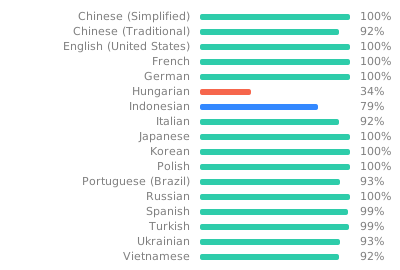
Thanks to Weblate for hosting! Click the image below to visit the translation page.
Thanks go to these wonderful people:


This project follows the all-contributors specification. Contributions of any kind are welcome!
This project is licensed under GPLv3.