

LectorGPT is a professional-grade writing assistant for Visual Studio Code. It empowers authors and creative writers to refine their prose using world-class AI models from OpenAI and Google Gemini.
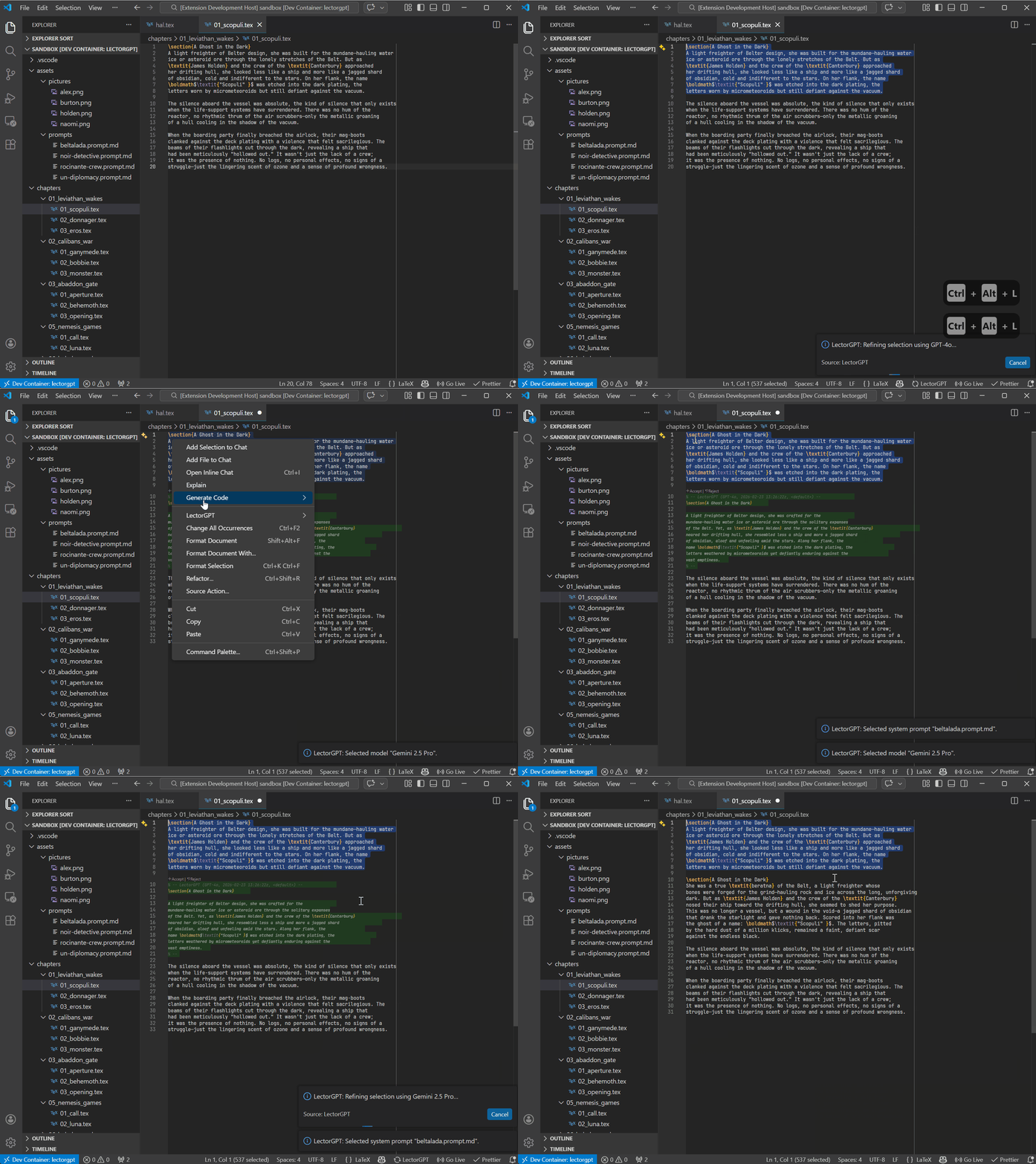
Refining creative prose directly within the editor using the
Refine Active Selection command.
- Dual-Vendor Integration: Seamlessly switch between OpenAI and Google Gemini.
- Contextual Refinement: Enhance your active text selections with a single command.
- Granular Model Control: Select specific models (e.g., GPT-4o, Gemini 1.5 Pro) to balance speed and creativity.
- Customizable Personas: Choose your system prompt source to define the "voice" of your digital editor.
- Secure Configuration: Manage your API keys safely through the native VS Code command palette.
- Secure Configuration: Manage your API keys safely through the native VS Code command palette. Keys are stored encrypted using the VS Code SecretStorage API.
- Fully Customizable System Prompts: Beyond presets, you can define your own global system prompts to transform LectorGPT into a translator, a technical reviewer, or a specialized style editor.
LectorGPT is designed with the needs of researchers and technical writers in mind. Unlike generic writing tools, it understands the importance of maintaining document structure:
- Preserve Commands: Optimized to respect LaTeX commands like
\cite{...},\ref{...}, and environment delimiters. - Mathematical Integrity: Refine the surrounding prose without mangling your inline or block equations.
- Academic Tone: Use specialized system prompts to shift from "creative" to "formal-academic" styles instantly.
- Perfect Companion: Designed to work seamlessly alongside LaTeX Workshop.
Tip: When using the
Refine Active Selectioncommand on LaTeX snippets, LectorGPT focuses on improving your flow and grammar while keeping your technical syntax intact.
LectorGPT uses advanced system prompts to protect LaTeX commands (like \cite,
\ref, or math environments). However, AI performance varies by model:
- Recommended: Use GPT-4o or Gemini 2.5 Pro for complex LaTeX documents. These models have a high "syntax-awareness" and reliably preserve your structure.
- Legacy Models: Older or smaller models (like GPT-3.5 Turbo) may occasionally alter LaTeX commands. We recommend reviewing changes or using them primarily for plain prose.
- Pro Tip: Always select smaller text blocks for refinement to ensure the highest precision in your document's structure.
LectorGPT offers unprecedented control through project-specific prompt files. Instead of a single static setting, you can create multiple "personas" directly in your workspace.
- File-Based: Create files ending in
.prompt.mdanywhere in your project. - Markdown Ready: Write your instructions using standard Markdown. The file
name (e.g.,
academic-review.prompt.md) will appear in the selection menu. - Easy Switching: Use
Ctrl+L+Ctrl+Pto instantly toggle between your custom prompts and the default settings.
Example editor.prompt.md:
"Act as a senior editor for a sci-fi novel. Enhance the atmosphere and sensory details while maintaining a dark, brooding tone."
- Install the Extension: Find LectorGPT in the VS Code Marketplace.
- Register your API Key: Open the Command Palette (
Ctrl+Shift+P/Cmd+Shift+P) and run:LectorGPT: Register New API Key - Configure your Setup:
- Run
LectorGPT: Select Active Vendor Setupto pick your provider. - Run
LectorGPT: Select Active Modelto choose your AI engine.
- Run
- Refine your Prose: Highlight any text in your editor and execute:
LectorGPT: Refine Active Selection
| Command Title | Command ID |
|---|---|
| Refine Active Selection | lectorgpt.refine-active-selection |
| Select Vendor Setup | lectorgpt.select-active-vendors |
| Select Language Model | lectorgpt.select-active-model |
| Register New API Key | lectorgpt.register-new-api-key |
| Unregister API Key | lectorgpt.unregister-api-key |
| Select System Prompt | lectorgpt.select-active-system-prompt-source |
For maximum productivity, LectorGPT uses an ergonomic "Right-Hand-Chord". Press
Ctrl+L followed by a second key:
Shortcut,Action Ctrl+L + Ctrl+L,Lector selected text Ctrl+L + Ctrl+M,Select active Model Ctrl+L + Ctrl+P,Select system Prompt source
| Shortcut | Action |
|---|---|
Ctrl+Alt+L + Ctrl+Alt+L |
Lector selected text |
Ctrl+Alt+L + Ctrl+Alt+O |
Select active Model |
Ctrl+Alt+L + Ctrl+Alt+P |
Select system Prompt source |
- An active API key from OpenAI and or Google AI Studio.
- VS Code version
1.109.0or higher.
This project is licensed under the MIT License.
- Repository: GitHub
- Publisher: Samuel Lörtscher
Developed with ❤️ for creative writers.