
Download YouTube videos in 1080p/4K, extract MP3 audio, and trim clips — directly from the YouTube page, 100% local and private.





⬇️ Download Latest Release · 🐛 Report a Bug · 💡 Request a Feature

Fuk-YT is a free, open-source YouTube downloader Chrome extension that adds a native-feeling download bar directly under any YouTube video. Unlike online YouTube-to-MP4 converter websites, Fuk-YT runs a lightweight local engine (built in Go, powered by yt-dlp and FFmpeg) on your own PC — so there are no upload limits, no ads, no watermarks, and no third-party server ever touches your video.
Use it to download YouTube videos as MP4/MKV in 1080p, 720p, or 4K, convert YouTube to MP3/M4A/OPUS audio, or trim and export a precise clip with live frame-accurate seeking — all in a couple of clicks.
- Key Features
- Screenshots
- Requirements
- Installation Guide
- How to Use
- File Output Location
- Troubleshooting / FAQ
- Tech Stack & Architecture
- Contributing
- License
- 🎨 Native YouTube UI Integration — embeds a dark-themed control bar right below the YouTube player on any watch page, styled to match YouTube's own 36px pill buttons.
- ⚡ High-Speed Local Downloads — 50–100+ Mbps throughput using stream copy and optimized chunk fetching, since everything runs on your machine instead of a remote server.
- 📹 Universal MP4 Compatibility (H.264/AAC) — every video download is guaranteed to play in Windows Media Player, QuickTime, smart TVs, and NLEs like Premiere Pro and DaVinci Resolve.
- ✂️ Interactive Clip Trimmer with Live Frame Seeking — auto-pauses the YouTube player, then lets you drag start/end handles while the player seeks live so you can preview the exact frame before exporting.
- 🎵 YouTube to MP3 / M4A / OPUS Converter — extract audio at 320k, 256k, 192k, or 128k bitrate in one click.
- 🏷️ Automatic Smart Filenames — outputs are named after the video title with quality tags baked in, e.g.
Song Title [1080p].mp4orSong Title [320k].mp3. - 📥 Native Chrome Downloads Integration — every file shows up in
chrome://downloadsand the browser's download shelf like any normal download. - 🔒 Privacy-First, Fully Local — zero tracking, zero ads, zero telemetry, zero cloud upload. Everything runs through Chrome Native Messaging straight to a local Go binary on your PC.
Fuk-YT control bar overview
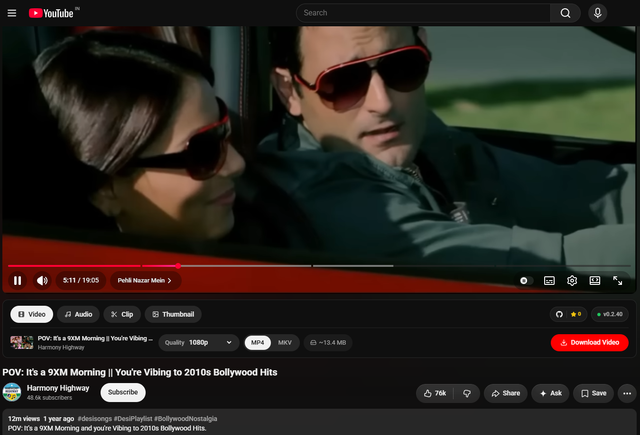
In-page downloader bar embedded under the YouTube video player

Precision clip trimmer with live frame seeking

| Requirement | Details |
|---|---|
| OS | Windows 10 or Windows 11 (64-bit) |
| Browser | Google Chrome, Brave, Edge, or any Chromium MV3 browser |
| Setup | No manual build or coding needed — everything is pre-built in the release package |
For contributors who want to build from source, install dev dependencies with winget:
winget install Go.Go.1.22 OpenJS.NodeJS.LTS Git.Git- Go to the Fuk-YT GitHub Releases page.
- Download the two pre-built zip files from the latest release:
- 📦
fuk-yt-extension.zip(Chrome Extension) - ⚙️
fuk-yt-engine-windows.zip(Local Go Engine)
- 📦
- Extract both
.zipfiles to any folder on your PC.
- Open the extracted
fuk-yt-engine-windowsfolder. - Double-click
install.bat(or right-click → Run as administrator). - This registers the local engine in the Windows Registry.
💡 You only need to run
install.batonce. The registry entry persists across restarts, so Chrome will keep connecting to the engine automatically afterward.
- Open
chrome://extensions. - Enable Developer mode (top-right toggle).
- Click Load unpacked.
- Select the extracted
fuk-yt-extensionfolder.
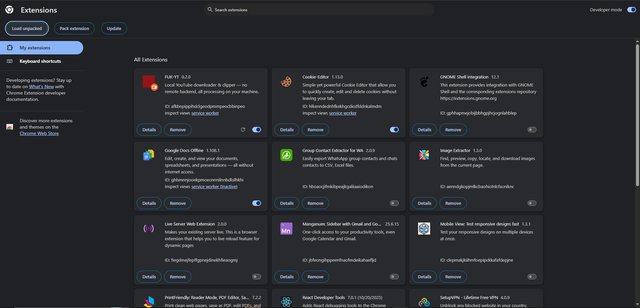

Open any YouTube video and confirm the Fuk-YT control bar appears below the player with an Engine Ready indicator.
🛠️ Developer / Source Build Instructions
cd native-host
go mod tidy
go build -ldflags="-s -w" -o bin/native-host.exe ./cmd/hostCreate/update the registry key HKCU\Software\Google\Chrome\NativeMessagingHosts\com.fukyt.host pointing to the absolute path of native-host/com.fukyt.host.json.
cd extension
npm install
npm run build- Open the Video tab on the control bar.
- Pick a quality (1080p, 720p, 4K).
- Pick a container (MP4 or MKV).
- Click Download Video, then open it from the progress card or
chrome://downloads.
- Open the Audio tab.
- Choose a format (MP3, M4A, OPUS) and bitrate (320k / 256k / 192k / 128k).
- Click Download Audio.
- Open the Clip tab — the YouTube player auto-pauses.
- Drag the Start/End timeline handles, or type exact
MM:SStimestamps. The player seeks live so you can see the exact frame. - Click Video Clip or Audio Clip — the clip is cut with H.264 keyframe alignment in seconds.
Every download is saved as a single clean file (no duplicates) under:
%USERPROFILE%\Downloads\FUK-YT\
├── Videos/    # Full video downloads (.mp4 / .mkv) with quality tags
├── Audio/     # Audio extractions (.mp3 / .m4a) with bitrate tags
└── Clips/     # Trimmed video & audio clips (.mp4 / .mp3)
Click Open File or Open Folder on any progress card to jump straight to it in File Explorer.
Q: The extension shows "Engine Offline" — how do I fix it?
A: The native host registry key or Go binary is missing. Re-run install.bat from the fuk-yt-engine-windows folder as administrator.
Q: The control bar disappeared after a Chrome update or page reload.
A: Refresh the extension at chrome://extensions, then reload the YouTube tab (F5).
Q: My download is stuck at 0%. A: The native engine connection was reset. Click Cancel, then Retry on the progress card.
Q: Is Fuk-YT safe to use? Does it collect any data? A: Fuk-YT runs 100% locally — there's no telemetry, no analytics, and no server that sees your video URLs or files.
Q: Does this work on Mac or Linux? A: Not currently — Fuk-YT's local engine is Windows-only today. Mac/Linux support may be considered in future releases; contributions are welcome.
┌─────────────────────────┐         Chrome Native Messaging         ┌──────────────────────────┐
│ Chrome Extension (MV3)  │ ◄─────────────────────────────────────► │  Go Native Engine Host   │
│ React + TypeScript      │   (JSON stdin/stdout IPC protocol)      │  (native-host.exe)       │
└─────────────────────────┘                                         └────────────┬─────────────┘
             │                                                                   │
             ▼                                                                   ▼
┌─────────────────────────┐                                         ┌──────────────────────────┐
│  Injected Content Script│                                         │ yt-dlp & FFmpeg Pipeline │
│  (YouTube DOM Anchor)   │                                         │ (H.264 + Stream Copy)    │
└─────────────────────────┘                                         └──────────────────────────┘
Built with: Go · React · TypeScript · Chrome Extension Manifest V3 · yt-dlp · FFmpeg · Chrome Native Messaging
Contributions, issues, and feature requests are welcome! Check the issues page or open a pull request.
If Fuk-YT saved you time, consider ⭐ starring the repo — it helps other people find the project.
Distributed under the MIT License. See LICENSE for details.
Keywords: YouTube downloader Chrome extension · download YouTube videos 1080p 4K · YouTube to MP3 converter · YouTube clip trimmer · yt-dlp GUI · free local YouTube downloader Windows · no ads no server video downloader
Made with ❤️ by SoumyA16-git