ShadowSnare brings state-of-the-art neural detection to Windows memory forensics, scanning dump files offline to find hidden malware and explaining each verdict through a streamlined PyQt6 interface.
- 🧠 Memory Dump Pipeline – Acquire with WinPmem, extract behavioral features via Volatility3, and detect malicious activity directly from RAM images.
- 🤖 Deep Learning Integration – TensorFlow/Keras model trained with the CIC-MalMem-2022 dataset for high-accuracy, on-device inference.
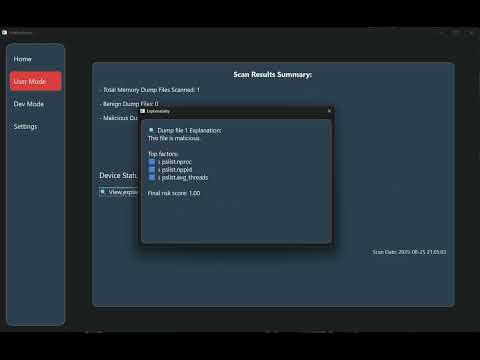
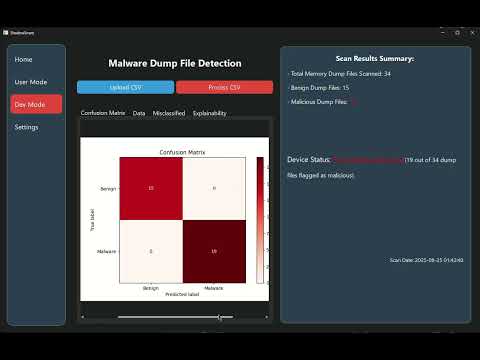
- 🔍 Explainability for Analysts – SHAP per-sample factors, plus confusion matrix and misclassified entries for deeper validation.
- 🖥️ Modern Windows UI – PyQt6 desktop app for Windows 10+ with clean, responsive views (Home · User · Dev · Settings).
- 🔒 Offline by Design – All analysis runs locally; no cloud services or data egress.
Full ShadowSnare Demo Playlist


- Windows 10+ (64-bit)
- Python 3.10.x (64-bit)
- pip
- (For dump creation) WinPmem at C:\winpmem\winpmem.exe
# 1) Clone the repository
git clone https://github.com/TeamShadowSnare/ShadowSnare-app.git
cd ShadowSnare

# 2) Create & activate a virtual environment
python -m venv .venv
.\.venv\Scripts\activate

# 3) Install dependencies
pip install -r requirements.txt

# 4) (Once) Place WinPmem for memory acquisition
#    Download → rename to winpmem.exe → put at C:\winpmem\winpmem.exe

# 5) Run the app (use an elevated terminal if you’ll create a dump)
python main.py- Launch ShadowSnare
- If you plan to create a memory dump, open your terminal/IDE as Administrator.
- (Recommended) Set default paths
- Go to Settings and choose directories for Dump, CSV, and Analysis.
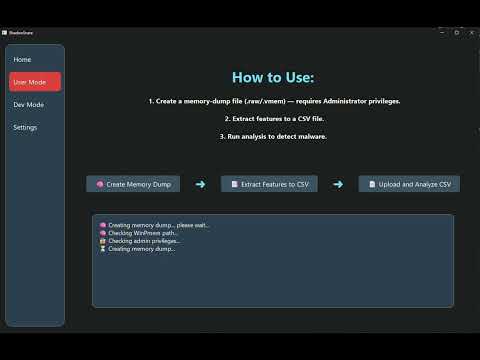
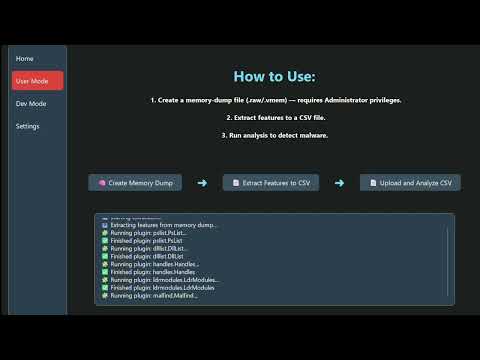
- Open User Mode from the sidebar and follow the flow:
- 🧠 Create Memory Dump (Admin + WinPmem required)
- 📑 Extract Features to CSV (runs Volatility3; produces
output.csv) - 📄 Upload & Analyze CSV (use the new CSV or pick an existing one)
- Review results
- Summary & status (clean / malware found)
- SHAP explanations (click “View explanation” to open the popup)
ℹ️ Deeper analysis (optional): Switch to Dev Mode to see a Confusion Matrix, Misclassified samples, raw Data preview, and detailed Explainability for labeled CSVs (
Benign/Malwarein the first column).
- Rani Izsack – Project Supervisor
- Amos Zohar – Data Acquisition, Feature Extraction, UI Development
- Gal Havshush – Machine Learning Specialist, UI Development
- Ortal Nissim – Machine Learning Specialist, UI Development
- CIC-MalMem-2022 Dataset - Benchmark dataset used for model training and evaluation.
- WinPmem – Memory acquisition tool used for dump creation.
- Volatility – Memory forensics framework used for feature extraction.
- CIC-MalMem-2022 Dataset - reference for how several memory-forensics features were originally derived.creation.