Introducing the Polytype Layout: A Perfect Blend of Comfort and Convenience for Multilingual Typists
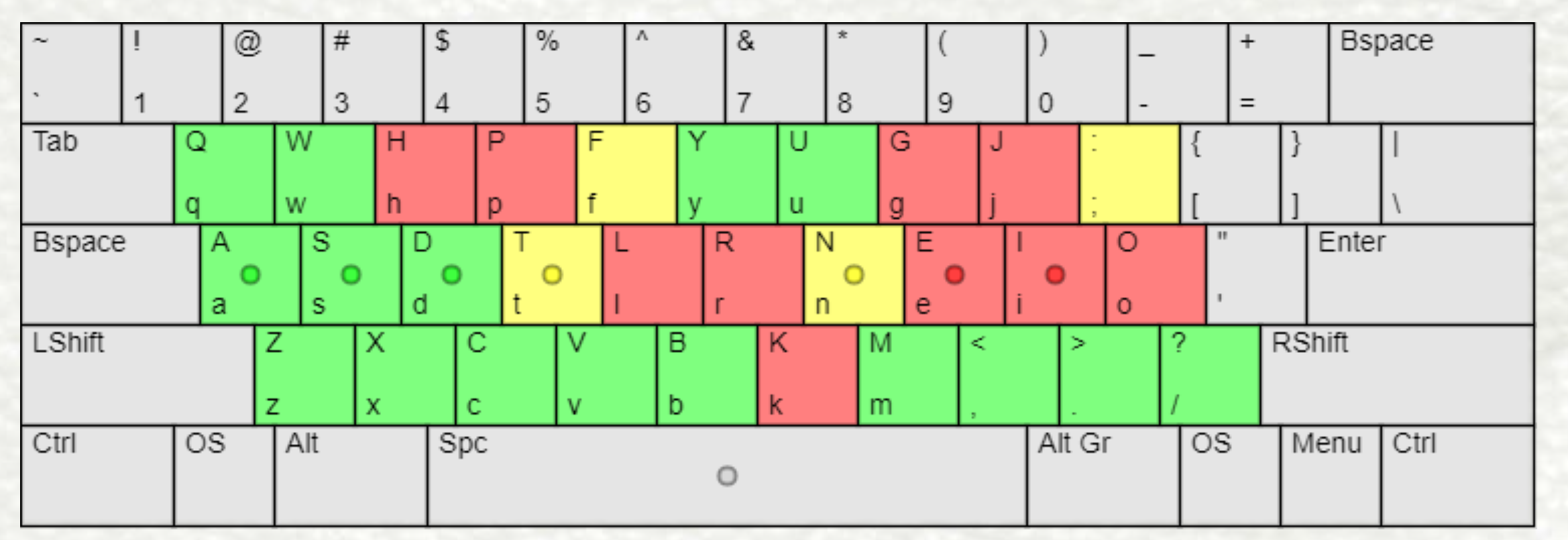
[Image that shows the changed letters relative to QWERTY]
The Polytype Layout offers a seamless solution for individuals who frequently type in multiple languages, striving to deliver unparalleled comfort and convenience. Unlike traditional keyboard layouts, this innovative design prioritizes the most frequently used letter combinations, or bigrams, not only in English but also in Spanish and Portuguese. This inclusive approach makes the Polytype Layout particularly beneficial for polyglots—hence its name—as it enables them to effortlessly switch between their native language and English while typing.
By meticulously considering the bigrams that occur most frequently in these languages, the Polytype Layout ensures that users can optimize their typing experience regardless of the language they are composing in. Whether you're a proficient polyglot or simply someone who frequently communicates in multiple languages, this layout offers an intuitive and efficient solution that adapts to your needs.
Experience the Polytype Layout and discover a new level of typing comfort and efficiency for your multilingual endeavors. Say goodbye to the limitations of traditional keyboard layouts and embrace the versatility and convenience of the Polytype Layout.
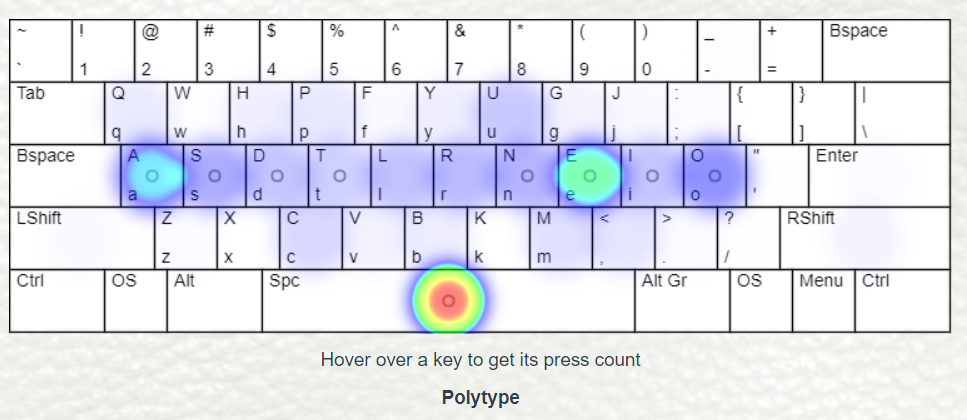
[Heatmap of the Polytype Layout]
| Hand/Finger balance | ||
|---|---|---|
| Finger | LEFT | RIGHT |
| index finger | 18.46% | 20.11% |
| middle finger | 12.49% | 15.57% |
| ring finger | 8.40% | 7.93% |
| pinky finger | 7.94% | 9.09% |
| hand total | 48.5% | 51.5% |
[Table of individual finger usage with the Polytype Layout]
"Why?" you may ask. Well, having experienced both QWERTY and Colemak layouts myself, I've come to appreciate that each layout possesses its own unique strengths and weaknesses, which can vary depending on the individual and their specific needs. For example, a programmer who frequently uses Vim might not prioritize shortcuts like Ctrl+Z, Ctrl+X, Ctrl+C, and Ctrl+V since they may not rely on them as much. On the other hand, individuals who heavily depend on these classic shortcuts would consider them indispensable.
Moreover, different use cases call for different priorities. Gamers who predominantly use the WASD keys for gaming may prioritize a layout that accommodates this requirement. Conversely, proficient typists who have become accustomed to the placement of the comma and period keys may find it disruptive to change their location.
Regardless of your specific needs, there are numerous ergonomic and finger-friendly keyboard layouts available, all of which offer substantial advantages over QWERTY. So, *any choice you make is a step towards improvement*. However, allow me to present a chart that highlights one of the greatest strengths of the Polytype Layout.
| Letter keys relative to Qwerty | |||
| Layout | Unchanged | New location, same finger | New location, different finger |
| Polytype | 13 : Q W A S D Z X C V B Y U M | 3 : F T N | 10 : H P L R K G J E I O |
| Colemak | 10 : Q W A H Z X C V B M | 4 : G J T N | 12 : F P L U Y R S D E I O K |
| Dvorak | 2 : A M | 2 : E H | 22 : P Y F G C R L O U I D T N S Q J K X B W V Z |
| Workman | 6 : Q A S G Z X | 4 : J T Y V | 16 : D R W B F U P H N E O I M C K L |
| Asset | 12 : Q W Y A S H Z X C V B M | 8 : E T I O F G L N | 6 : R U P D J K |
[Chart that showcases the unchanged letters relative to QWERTY for a list of alternative layouts]
As you can observe, the Polytype Layout boasts one of the highest numbers of unchanged letters compared to QWERTY. This means that if you're transitioning from QWERTY, you'll find it easier to learn the Polytype Layout compared to other alternatives. It's worth noting that Polytype draws significant inspiration from Colemak (you may have noticed the similarity in the right home row), so if you're already familiar with Colemak, you'll only need to make adjustments to 10 letters in your layout.
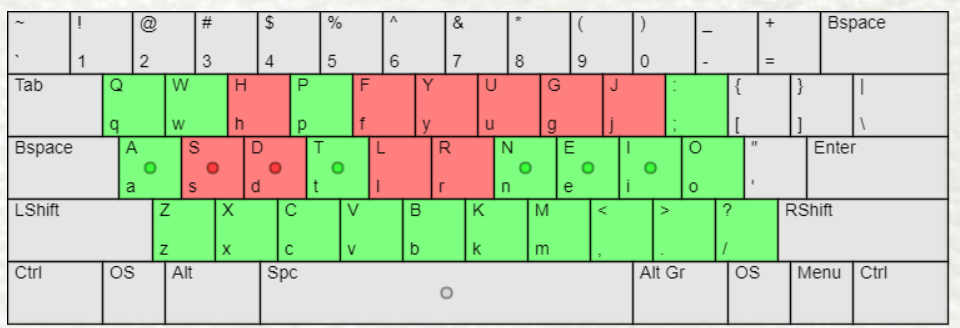
[Image that showcases the unchanged letters relative to Colemak]
When considering a new keyboard layout, it's essential to find one that aligns with your specific requirements. The Polytype Layout offers a compelling combination of familiarity, ergonomic design, and improved typing efficiency, making it a promising option to enhance your typing experience.
Made with 🦔 by @TheRoro