



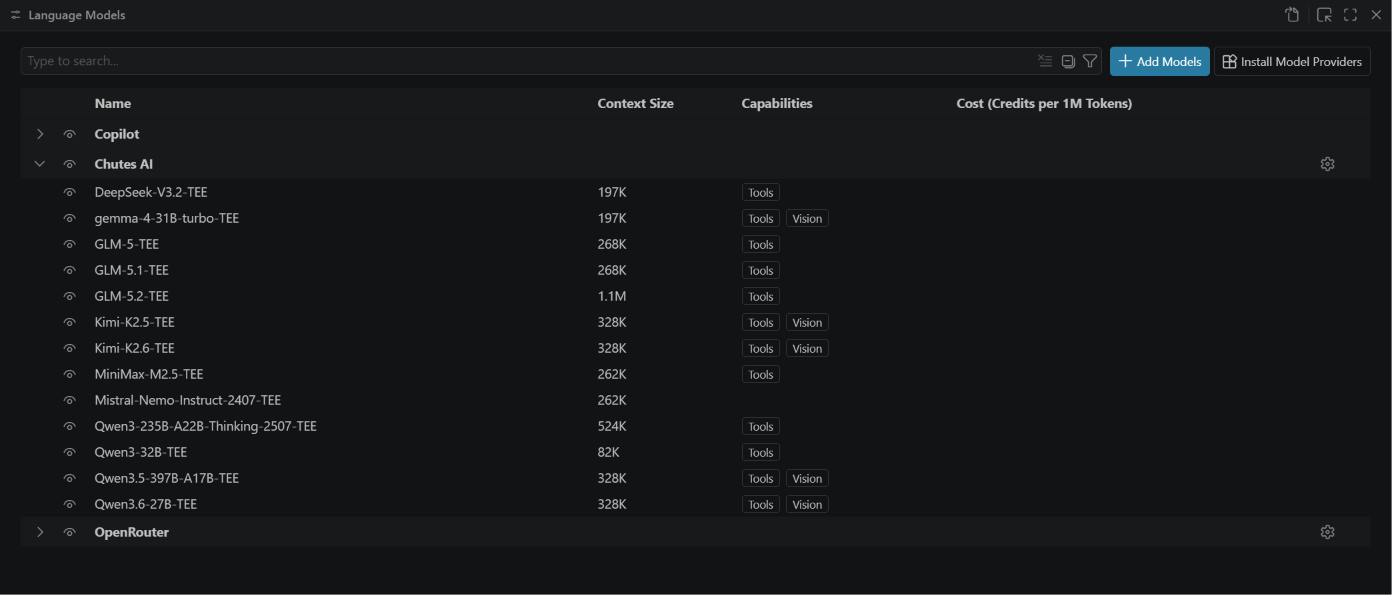
Leverage Chutes.ai open-source models — including DeepSeek, Qwen, GLM and Kimi — directly within VS Code's GitHub Copilot Chat. The full Chutes catalogue is discovered automatically, with streaming, tool calling (agent mode) and vision. No GitHub Copilot subscription required.
- Install the extension from the VS Code Marketplace — or from Open VSX if your editor uses that registry.
- Open VS Code's Chat view.
- Open the model picker and select Manage Models….
- Choose Chutes AI as the provider.
- Paste your Chutes API key (starts with
cpk_, get one at chutes.ai). - Select the models you want to use. 🎉
You can also set the key anytime via Chutes AI: Manage API Key in the Command Palette.
- Automatic model discovery — the full Chutes catalogue is fetched from the API; nothing to maintain by hand.
- Auto model with fallback — a virtual Auto (router) model delegates selection to Chutes' native model routing, which picks a model per task and fails over automatically when one is cold or unavailable. Works on every account: without a configured routing pool it falls back to a built-in inline pool.
- Native chat integration — models appear in Ask, Edit and Agent modes; tool-capable models light up agent mode.
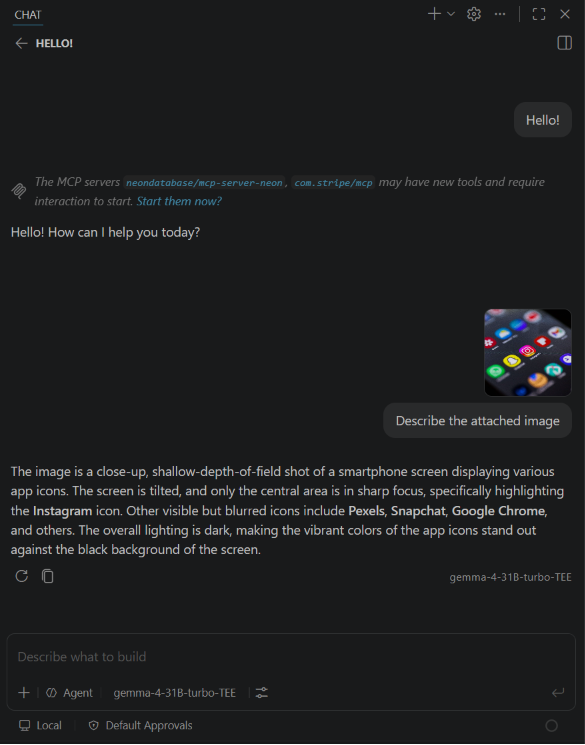
- Vision — models that accept image input can read images attached to a chat.
- Streaming — responses stream token by token and honour cancellation.
- Secure key storage — your API key lives in VS Code SecretStorage (OS keychain), never in settings.
- Configurable filtering — narrow the picker to just the models you care about.
- Usage & spend in chat — ask
@chutes /usagein the chat panel to see your Chutes spend and quotas.
VS Code Chat
    │  Language Model Chat Provider API
    ▼
Chutes AI Provider
    ├── selected model ─────────► chutes.endpoint
    ├── Auto (router) ──────────► chutes.routerEndpoint
    └── @chutes usage commands ─► https://api.chutes.ai

API key ◄──────────────► VS Code SecretStorage (OS keychain)
The extension validates catalogue, account and streaming payloads before exposing them to VS Code. Requests honour cancellation, malformed tool calls fail closed, and bounded response processing prevents an endpoint from returning unlimited data. It does not run a local server, persist prompts or collect telemetry.
- VS Code 1.106.0 or newer (required for image/data chat parts). VS Code 1.125+ also lets you discover this extension from the Language Models editor via Install Model Providers.
- A Chutes API key (starts with
cpk_). Create one at chutes.ai.
| Setting | Default | Description |
|---|---|---|
chutes.endpoint |
https://llm.chutes.ai/v1 |
OpenAI-compatible API base URL. Change only for self-hosted or proxy endpoints. |
chutes.modelFilter |
(empty) | Restrict which models appear. Comma-separated terms use a case-insensitive substring or safe regex (e.g. deepseek, qwen or Qwen3.*TEE); unsafe or invalid regexes are treated literally. Empty shows all chat models. |
chutes.requestTimeoutMs |
15000 |
Timeout (ms) for fetching the model list. Does not limit streaming responses. |
chutes.autoRouterEnabled |
true |
Show the Auto (router) model that delegates selection and automatic cold/unavailable fallback to Chutes' native model routing. |
chutes.routerEndpoint |
https://llm.chutes.ai/v1 |
Base URL the Auto (router) model routes through. Chutes resolves routing natively on this host; change it only for a custom gateway. |
Changes to any chutes.* setting invalidate the model cache immediately; no window reload is required.
| Command | Description |
|---|---|
Chutes AI: Manage API Key |
Set, update or clear your API key. |
Chutes AI: Refresh Models |
Re-fetch the model list (e.g. after Chutes adds models). |
Type @chutes in the chat input to check your Chutes account without leaving the editor:
@chutes /usage— spend for the current billing windows (monthly cap and 4-hour window) plus your daily request quota.@chutes /quota— per-model quotas.
It uses the same API key you configured for the provider. Note: VS Code does not let third-party providers display live spend inside Copilot's own usage UI, so this surfaces it as an on-demand chat reply.
Pick Auto (router) from the model list to stop worrying about which specific model is currently warm. Your request is sent to Chutes with the native routing alias default, and Chutes classifies it (general, reasoning, programming, vision…), routes it to a suitable model, and fails over automatically if that model is cold or unavailable. This is handy because models on Chutes warm up and cool down over time, and a cold model can otherwise return an error.
Selection and fallback are performed by Chutes' server-side routing, not by this extension. If your account has no routing pool configured at chutes.ai/app (Model Routing), the extension steps down once to a live inline pool built from the current catalogue (fastest warm model first); a pool you save on the dashboard takes priority. It is enabled by default; turn it off with chutes.autoRouterEnabled, or route it through a custom gateway with chutes.routerEndpoint.
For a specific model, prompts and attachments are sent to the configured chutes.endpoint. For Auto (router), they are sent to the configured chutes.routerEndpoint. The @chutes usage commands query https://api.chutes.ai. If you configure a custom endpoint or router, your API key and request content are sent to that service, so use only endpoints you trust.
The API key is stored in VS Code SecretStorage and is never written to settings or logs. The extension collects no telemetry or analytics.
Use of the Chutes service is subject to the official Chutes Terms of Service and Chutes Privacy Policy.
git clone https://github.com/TheStreamCode/chutes-model-provider-vscode
cd chutes-model-provider-vscode
npm ci
npm run check
Press F5 to launch an Extension Development Host. See CONTRIBUTING.md and AGENTS.md for the complete development workflow.
- User guide · Troubleshooting
- Security policy · Changelog · GitHub releases
- Chutes documentation
- VS Code Chat Provider API
This independently developed extension is not affiliated with, sponsored by, endorsed by, or approved by Chutes. Chutes, the Chutes logo, and all other third-party names, logos, services, models, and marks remain the property of their respective owners. The MIT License covers only project-owned code and materials; it does not license those third-party rights. See third-party notices.
- Issues: GitHub Issues
- Support the project: github.com/sponsors/TheStreamCode
This project is licensed under the MIT License.