MATLAB Integrated Data Analysis Suite for UNLV's SAE Baja Team

This is Rebel Racing's first expedition into creating a MATLAB application to load, clean, organize, and analyze racing data. We hope that this project will allow us to more rapidly analyze our data collection, and use the information we gain to make meaningful decisions on the future of the car. Of course, if you have any questions you can always email me at tristan.ayala@unlv.edu
...oh and remember, lots of mechanical engineers are required to know how to program as a prerequisite for certain jobs. So this could give you a leg up!
Github is an indispensable tool to help developers keep a single, organized codebase. You may be completely new to this, and that is okay (we're all here to learn anyways, right?). If that is the case, github has a nice getting started page that will introduce you to the basics entitled, Hello World. It's a short read, and afterwards you should have a much better grip on how to work here. It goes over the main topics like what a repository is, branches, forking, pull requests, and more. There are also tons of other tutorials and help pages, just google something like github fork? and you should be well on your way.
The engineer's programming language, created by MathWorks. MATLAB is for scientists and engineers to create apps, models, and visualizations with data to explore the world around us. Our focus with this project is Data Analytics, which seems to be MATLAB's forte. There is a good introduction to MATLAB's Data Analysis features here. Apart from that, MATLAB also has (pretty sweet) features for machine learning and neural networks, computer control systems, computer vision, robotics, and lots more (that you usually have to pay for). You can also use C, or C++ code with MATLAB as well, though it will take some extra effort. MATLAB does have some drawbacks, though we will do our best to get through them. Unfortunately for us, MATLAB isn't free or open source software, it's actually pretty expensive. If you were to purchase a license for yourself, it would set you back over $150.00 without any additional add-ons. Luckily though, many of the computers on campus (and all the ones in TBE-A computer lab) have MATLAB already installed with everything you'll need to contribute to this project. Fortunately for us, too, that the college likes us and we may be able to get you a full copy for free, just ask! If you'd really rather not use MATLAB, there is an open source alternative. GNU Octave. Octave can run most MATLAB code, so you can always develop on this platform before testing your contributions with MATLAB. Once this project is in a reasonably useful state, we will release it on MATLAB Central File Exchange. From there, our whole team will be able to download it, and get to analyzing.
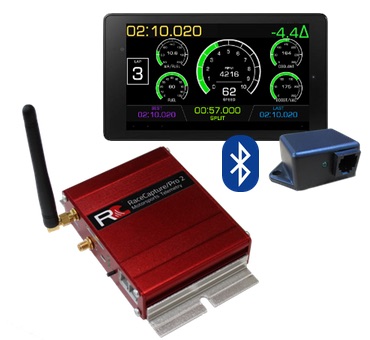
AutosportLabs produces open source racing hardware and software that will help up collect data and stream it on raceday. There are many companies similar to them, but the RaceCapture is well produced and documented (as well as being leagues cheaper) than most of the alternatives out there. Our RaceCapture Pro Mk/2 is our current data system (I know RaceCapture Pro Mk/3 is out). With this system we have access to GPS, 3 axis G-Meter, acclerometers, 8 analog channels, 3 digital channels, and special channels for RPM. You can see the rest of the specs and features of the unit on their wiki. This isn't necessarily the place to talk about fabricating sensor mounts or clock speeds though, all we are concerned about here are the types of files that it produces. The RaceCapture will record the data to a file with a '.log' extension. These '.log' files are modified .csv files in that they are sparsely populated. They do this to save space on the sd card while logging, but that does slightly complicate things for us here. You can take a peek at the log-file-reference. You can find some sample '.log' files in our sample-files folder.
Year,Make,Model
1997,Ford,E350
2000,Mercury,Cougar
2006,Mini,Cooper JCW
2000,Toyota,Corolla
2000,Audi,Ashton's Lame All-road
"Interval"|"ms"|0|0|1,"Utc"|"ms"|0|0|1,"Battery"|"Volts"|0.0|50.0|1,"AccelX"|"G"|0.0|0.0|25,"AccelY"|"G"|0.0|0.0|25,"AccelZ"|"G"|0.0|0.0|25
402,0,,-0.02,-0.03,0.93,0.5,-6.2,-0.2,,,,,,,,,,,,,,,,,,,,
442,0,,-0.02,-0.03,0.95,0.2,-6.0,-0.3,0,,,979,26,0.0,0.0,0.0,0.0,0.0,0,0,0.0,0,0.0,-1,0.0,0.0,0.0,0
482,0,,-0.01,-0.03,0.97,0.1,-5.5,-0.2,,,,,,,,,,,,,,,,,,,,
522,0,,-0.01,-0.03,0.99,0.0,-5.0,-0.2,,,,,,,,,,,,,,,,,,,,
542,0,,,,,,,,0,,,986,26,0.0,0.0,0.0,0.0,0.0,0,0,0.0,0,0.0,-1,0.0,,0.0,0
The goal of this project is to create a comprehensive MATLAB Toolbox that will include functions, an app (or two), simulations, and mathematical models for processing and visualizing the data that we get from our Baja car. This will require us to import our '.log' files, clean the file, munge through it and squeeze out all the significant bits, and then return our findings to the user in a report. The reports and summaries of the data that we collect will be kept as records for future use and reference. Once we get our reports handled to an adequate degree, we can start working on serving the information out to the user in more creative or fun ways like live graphs or other visual aids. You can read about making GUI applications with MATLAB, here. We will keep our application single threaded until we can prove that it works reliably and efficiently, only then can we think about multithreading.
Read on to learn more about the car, and what exactly needs to be analyzed...
- Altimeter - via RaceCapture Pro Mk/2
- Hall Effect Sensor (x2) - for Engine RPM and Wheel RPM
- Steering Angle Sensor - currently not installed
- Ambient Air Temperature Sensor - to monitor current conditions
- Infrared Temperature Sensor (x2) - to monitor CVT Belt and Brake Rotor Temperature
- Accelerometer - via RaceCapture Pro Mk/2
- GPS - via RaceCapture Pro Mk/2
- 3-Axis G-Meter - via RaceCapture Pro Mk/2
- Linear Potentiometer - for monitoring suspension position
- Potentiometer (x3) - for monitoring Throttle, Brake and Gas Pedal positions
The powertrain refers to all parts of the car that produce power and help deliver that power to the ground. In our case, this will refer to our Engine, CVT (Continuous Variable Transmission), and Transaxle. We currently do not have any sensors to measure anything in the transaxle, so we won't focus on that.... yet.
Our Baja is powered by a 10 horsepower Briggs and Stratton single cylinder engine. You read up more about our engine here, if you wish. We are not allowed to modify the engine for competition in any way, per the rules. All that means for us then, is that we just have to make the most out of what we've got. So the next best thing is for us to monitor how well our Engine performs, find out what it's limitations are, plan around those, and choose gearing correctly to grant us the speed to win. We can only analyze systems that we have sensors for, however, so here is what we've got..
- Engine RPM - via Hall Effect sensor
- Governor Position - via Single Turn Potentiometer
These are currently the only two sensors that we have on the engine. Both of these will better help us understand how our engine is performing. With Engine RPM, we need to be able to chart our Engine RPM as a plot. The data should not only show us, but also spell out important information about that testing run such as: our peak RPM, average RPM, rates of change, and local minima and maxima. We can then use this information and create plots to visualize information that gives us a better understanding of our system as a whole. These may look similar to plots like this..
From this picture we can see Engine RPM plotted against Horsepower and Torque. This is a type of graph we would be able to create after running the engine on a engine or chassis dyno. We have one of those now, so thats awesome. We also need to plot Engine RPM vs. Governor position so we know exactly when it is kicking in and killing our power. From that information we can tune our clutch/transmission to keep within the acceptable power band. In the future, we may wish to add additional sensors to the engine sensor suite, I personally would like to see an oxygen sensor for the exhaust so we can monitor and predict when we run rich vs. lean, and when.
A Continuous Variable Transmission (or CVT), can be... tricky to explain. The gist of it is that we can supply the CVT with an RPM (preferably the RPM where we make the most horsepower), and the CVT will change it's gear ratio mechanically to keep the Engine RPM as constant as possible while we gain speed. In essence, that means that we can get the car moving from a low speed to it's top speed, all while delivering optimal power to the wheels. If it's your first time learning about what this even is and you find it super confusing, I get you, I've been there. Don't worry you'll get it in time. These videos might help you understand a little better what it is and why it is a good transmission for this competition.
- Engineering Explained - Are CVTs The Best (Fastest) Transmissions?
- Learn Engineering - Understanding CVT!
The engine drives the primary pulley of the CVT, and the secondary pulley of the CVT is driven by the belt. We currently only have one additional sensor for CVT information.
- Wheel RPM - via Hall Effect sensor
In order to find information about the CVT from the wheel RPM sensor, we need to do a little bit of back tracking. The output shaft of the secondary CVT leads into the transaxle. Since we know what the gear ratio in the transaxle is (since it's a fixed gear ratio), we can back calculate to find what the RPM of the Secondary CVT would need to be in order to produce the output that we collect with our sensor. Once we know what the Primary CVT RPM and Secondary CVT RPM is, then we know what gear ratio we are in at that time. Neat! Currently, we are working on putting even more sensors for the CVT to measure how efficient our system is. This includes ambient air temperature sensors for inside the CVT case, and Infrared Temperature sensors for the belt. More heat == less efficient... probably.
coming soon...