Note
PLEASE READ THE RESOURCE OVERVIEW BEFORE DOWNLOADING THE PLUGIN TO SEE IF THIS PLUGIN FITS YOUR NEEDS. IF YOU HAVE ANY QUESTIONS, JOIN MY DISCORD SERVER AND CREATE A TICKET.
Spigot | Modrinth | Discord | Wiki
It's a plugin compatible with Spigot, Paper, Purpur, and Folia servers designed to enhance the Elytra flying experience in Minecraft. It transforms the vanilla elytra experience into a fully customizable and engaging system. From flight mechanics and cosmetic effects to player stats and leaderboards, this plugin gives you complete control over how players traverse your world.
- Set, manage, and recover player flight time with admin commands.
- Configure global or per-world flight speed limits.
- Disable elytra usage globally, in specific worlds, or prevent equipping them.
- Prevent player death from fall damage (broken elytra, out of time) and high-speed wall collisions.
- Boost flight speed with a configurable item, including a high-speed Super Boost.
- In-game GUI shop for players to buy cosmetic particle effects.
- Track detailed player statistics (/ee stats) with competitive leaderboards (/ee top).
- Performance saver automatically disables effects when server TPS is <18 for 10 consecutive seconds.
- Full support for both SQLite and MySQL.
- Extensive permission nodes for all commands and features.
- Placeholder API and Vault integration for stats and economy.
- Automatic hourly backups for SQLite databases, storing up to 24 copies (one full day).
- Command to restore SQLite database backups with /ee importdb command.
- Fuse any chest plate with elytra in the new /ee forge GUI, transferring all enchantments and durability.
- Armored Elytras can be fully reverted in the forge GUI, restoring the original items and their enchantments.
- Ability to check info about a worn Armored Elytra with the /ee armor command.
- Players can launch into the air from the ground by holding sneak and right-clicking with the boost item.
- Configurable combat tag system to disable elytra on damage.
- Emergency deploy will automatically equip an elytra in the player's inventory if it falls, preventing them from dying.
- Fully configurable achievements and rewards system with integrated GUI (/ee achievements)
- Tandem Flight System integrated, allowing you to fly with a friend and explore together.
- Disable Riptide launch or fireworks boosting.
- Transform your Armored Elytra into an endgame item with over 7 unique, permanent upgrades!
- It supports Minecraft version 1.18.x through 1.21.x.
- Folia Support
Check this section of the wiki for a showcase of the plugin: Showcase
Setting up ElytraEssentials is designed to be as simple as possible.
- Download the latest release of ElytraEssentials, based on your server version, from the release section.
- Place the downloaded .jar file into your server’s
/pluginsfolder. - For full functionality, ensure you have these plugins installed:
- Vault: Required for all economy features in the /ee shop.
- PlaceholderAPI: Required for using any of the %elytraessentials% placeholders.
- Restart your server. This will generate the default configuration files in the
plugins/ElytraEssentials/folder.
For most updates that include bug fixes and small feature additions, you do not need to reset your configuration files.
- Stop your server.
- Delete the old
ElytraEssentials-x.x.x.jarfile from your/pluginsfolder. - Place the new, downloaded .jar file into your
/pluginsfolder and remove the old one. - Start your server. Your existing
config.yml,messages.yml,shop.yml, andachievements.ymlwill be used automatically.
Warning
Always check the changelog before updating. It will state if a configuration reset is necessary. If a reset is recommended, back up your existing plugins/ElytraEssentials folder and delete the necessary configuration files. The database folder is not recommended to be deleted since it will erase your player's data
By default, the plugin is configured to work "out of the box" using a local SQLite database file, requiring no extra setup.
- Database (Optional): If you want to use a dedicated MySQL database, stop your server and edit the config.yml file:
- Change storage type from SQLITE to MYSQL.
- Fill in your MySQL server details (host, port, database, username, password).
- Customization: Open the config.yml, messages.yml, and shop.yml files to customize all features, messages, and shop items to your liking.
- Reload: After making changes, you can use the command /ee reload to apply them without needing a full server restart.
Check this section of the wiki for a explanation on how to use the API of ElytraEssentials: API For Developers
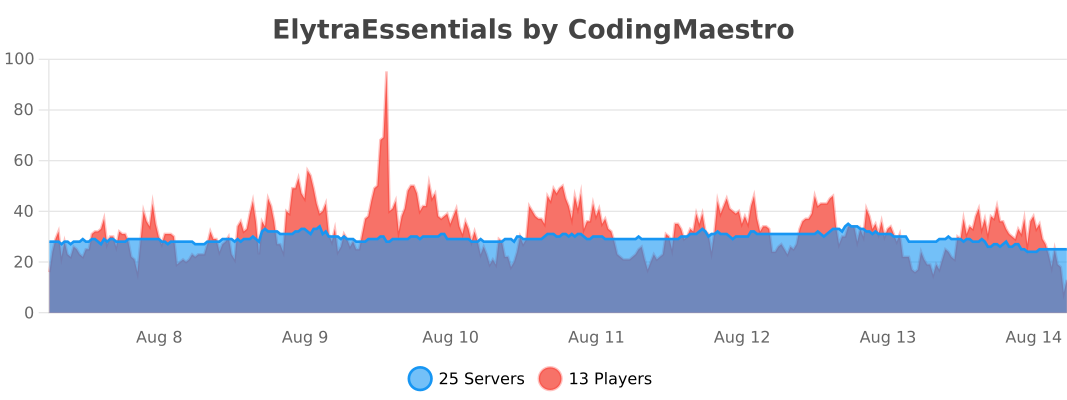
To guide future development and improvements, this plugin utilises bStats to gather anonymous statistics on its usage. This helps me track the total server count, assess version compatibility needs, and see which features are most valued by the community.
You can view all of this information openly on the public dashboard: https://bstats.org/plugin/bukkit/ElytraEssentials
If you prefer to disable bStats, you can manage this setting for your entire server within the plugins/bStats/config.yml configuration file.
Distributed under the GNU GPL v3 License. See LICENSE for more information.