


A CLI and TUI toolkit for Calibre users who treat their libraries as curated collections.
Architecture Note: CalibreQuarry acts as the frontend interface for the cquarry shared library. The database connection logic and the Calibre search grammar engine were extracted into the
cquarrypackage so that other tools in the ecosystem (like Hermitage and Carrel-calibre-web) can guarantee identical behavior and query resolution.
Reads metadata.db directly: no calibredb dependency, no JSON intermediaries.
Note: The core read/search surface is mature and stable, and is known to be fully functional on the primary development environment: Fedora Linux 44 (Workstation Edition), using Calibre 9.8 on Python 3.14. While it is pure Python and should be cross-platform, this specific setup is the only officially tested environment. Development is active again around the cquarry ecosystem (write verbs, batch curation, the pre-import screen);
roadmap.mdcarries the current phases.
- Why this exists
- How this compares
- Features
- Installation · Requirements
- Usage · Recipes
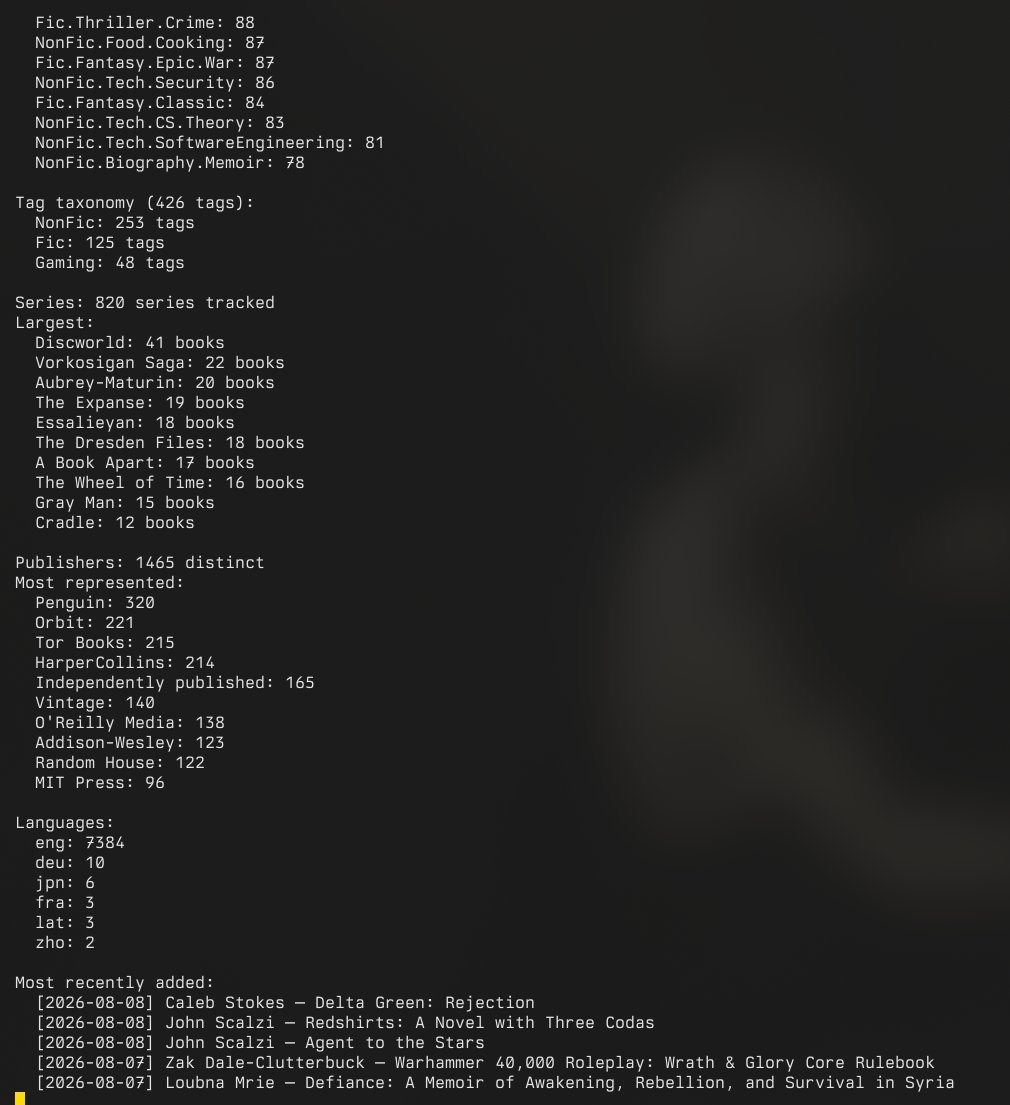
- Sample output
- Search syntax & virtual library resolution
- Troubleshooting
- How it reads the database
- Full help output
- Companion scripts
Calibre is a good database. It is not a good reporting tool. If you maintain a large library (3000+ books) organized with virtual libraries, hierarchical tags, and series tracking, you eventually want answers to questions Calibre's UI doesn't surface well: which series have gaps, how many books are unrated, what does a given wing actually contain, and can I get a machine-readable export without running calibredb list through a parser script.
This tool reads the SQLite database directly in read-only mode. It ships a near-complete port of Calibre's own search engine (field prefixes like tags:, author:, series:, rating:, pubdate:; vl: cross-references; boolean and hierarchical matching), so your existing wing definitions and search habits work without being re-encoded anywhere.
calibredb. The official CLI, and the right tool for adding books, editing metadata, and administering a library. To script against a library while the GUI is open, calibredb's content-server mode is the clean route: run the server from Calibre and point calibredb at it. What calibredb doesn't ship is reporting: no series gap detection, no audit pass, no library statistics, no per-virtual-library catalog sweeps. CalibreQuarry reads the same database and adds that layer; the two compose (the catalog's --show-id output exists precisely for piping into calibredb set_metadata scripts).
Quality Check (GUI plugin). Excellent for hunting metadata problems from inside the Calibre interface, and the better choice if that is where you do your thinking. The audit here covers overlapping ground (duplicate detection, coverless books, metadata-quality flags); beyond that overlap its scope runs elsewhere: series gap detection across a library, filesystem-versus-database mismatches, FTS index staleness, and machine-readable output for every mode.
Scripting it yourself. If you have been piping calibredb list through parser scripts to get machine-readable answers, that pipeline is where this project started. For code, the underlying cquarry library (PyPI, stdlib-only) returns the same data as structured rows instead of text to parse.
| Mode | Flag | Description |
|---|---|---|
| Catalog | --catalog |
Formatted text catalog grouped by author, with ratings and series info |
| All wings | --all-wings |
Generate a separate catalog file for every virtual library; a wing that fails drops its stale file, is warned about, and fails the sweep (exit 1) |
| All saved searches | --all-saved-searches |
Generate a catalog per saved search into --outdir (the --all-wings analog); each file is headed with the search's expression, zero-hit searches write nothing and say so, and a failed write drops the stale file and fails the sweep (exit 1) |
| Full-text search | --fts QUERY |
Content search over Calibre's full-text-search.db sidecar: what the books actually say, not their metadata. Case- and accent-folded; every match names its formats; each run ends with an index-staleness summary (unless --quiet), and --fts-status reports those classes on their own |
| Statistics | --stats |
Format breakdown, rating distribution, tag taxonomy, publisher counts |
| Health digest | --health |
The audit's finding counts in one short screen (book issues with the top problems, duplicate groups, series gaps, conversion overrides, the metadata-quality trio, filesystem tree, FTS coverage, pending OPF sync); always exit 0, composes with --restrict |
| Audit | --audit |
Report untagged, unrated, coverless, low-resolution-cover and cover-file-missing books; deprecated-format-only and duplicate books; detect series gaps; list books with manual conversion overrides and pending OPF sync; flag invalid uuids, sentinel pubdates, and non-ISO-639-2 language values (the metadata-quality rows, advisory); and audit the filesystem against the database (missing book dirs and format files, extra/unknown files, extra covers, orphan book/author dirs, malformed paths; root dot-entries and workspace docs whitelisted) |
| Recent | --recent N |
Show the N most recently added books (default: 20) |
| Series | --series |
List all series with completeness status and gap detection |
| Analytics | --analytics {author,pace,tags,genres,overlap,reading} |
Per-author breakdowns, reading-pace trend, tag-taxonomy tree, genre share breakdown (--genre-depth N descends the tag hierarchy), Wing-overlap analysis, and reading analytics (status funnel in the column's enum order, recent finishes, days-from-added-to-finished; strictly read-only) |
| Export | --export |
Full library export to JSON, CSV, or an AI-readable flat format (includes native page counts) |
| LibraryThing | --exportlt |
Export library to LibraryThing formatted CSVs (can be combined with --search) |
| Annotations | --export-annotations |
Dump e-reader highlights, bookmarks, and notes as JSON (scope to one book with --id) |
| Set title | --set-title BOOK_ID TITLE |
Rename a book through cquarry's opt-in write module (trigger-safe; refreshes the sort key and queues an OPF regeneration). Close Calibre first |
| Write verbs | --set-authors, --set-rating, --set-comments / --clear-comments, --set-column / --clear-column, --remove-book [--confirm-remove] |
Core opt-in write surface via cquarry ≥1.5: authors (author_sort recomputed), ratings (0–5), comments HTML, generic custom columns (enum-validated, non-editable refused) and guarded book removal (dry-run by default) |
| Curation verbs | --rename-entity KIND OLD NEW, --set-author-sort BOOK SORT, --set-title-sort BOOK SORT |
Rename a tag/author/series/publisher everywhere (a rename into an existing name merges the two); verbatim sort overrides that a later --set-authors / --set-title deliberately recomputes over |
| Write verbs, expanded | --add-tag / --remove-tag, --set-identifier / --clear-identifier, --set-series (+ --series-index) / --clear-series, --set-publisher / --clear-publisher, --set-languages / --clear-languages, --add-format / --remove-format, --set-cover |
Full coverage of cquarry ≥1.5's write module: tags (orphaned rows pruned), identifier EAV upserts, series assignment with index, publisher, language lists (canonicalized English → eng), format registration/removal, and the has-cover flag. All queue OPF regeneration via metadata_dirtied |
| Run verbs (Phase 17) | run phase1 DIR, run sign --manifest F, run phase2 --manifest F --backup-dir D, run phase3 --manifest F [--answer-file A] |
The acquisition pathway as commands: phase 1 vets a downloads directory into an acquisition-manifest/1 manifest (duplicate screen, DRM audit, PDF/DJVU battery via scripts/check_pdf.py, bindery's EPUB slice; filename-derived stamps and provenance seeds for the review to correct); run sign seals the reviewed manifest (an HMAC over the approved set, the stamps, the provenance, the lossy flags, and the decisions; any later edit refuses to load until re-signed); phase 1 is dry against book files unless --stamp/--apply-lossy/--quarantine are passed (quarantine moves true DRM hits only); phase 2 imports the SIGNED, SEALED manifest as one transaction (add_book, #source/#audience stamped, tags+rating cleared on the imported ids, timestamped backups, metadata downloads whose failures become decisions, resumable); phase 3 refuses a live Calibre and banned answer-file columns like every other write path, and its mechanical-pass trouble fails the verb |
| Set writes | --ids / --from-search / --from-untagged / --from-manifest + --batch-* verbs, --apply, --backup-dir, --format json |
One target set, many verbs, one transaction (Phase 16). Dry-run by default; --apply demands a closed Calibre and a backup of metadata.db outside the library directory, then commits as ONE batch() pass (all-or-nothing; --commit-per-book for very large sets). --commit-per-book really commits one transaction per book (a failing book rolls back alone; the report and JSON say which). --batch-clear-rating is legal ONLY against a valid, sealed batch manifest, and only for ids it imported (the bulk-ratings ban, mechanically enforced); empty-string values are refused; #reading_status/status/date_read are refused by name at every door; reporting counts applied / already-so / failed per verb, with a machine-readable JSON report that names the resolved ids |
| Trash | --trash |
List the library's .caltrash entries (what run merge moved aside): category, book id, age, files; library-shape, so --restrict does not scope it |
| Book detail | --book BOOK_ID[,BOOK_ID...], --book --untagged |
Full dossier for one book or a comma-separated list: identifiers, format files with catalogued sizes and on-disk paths, cover, comments (HTML stripped), custom columns, annotations, per-device reading progress, plugin data, conversion overrides; publication date shown alongside the timestamps. --book --untagged (no ids) selects every untagged book (the phase-3 curation entry state) via cquarry's find_untagged() |
| Entities | --entities KIND |
List authors/series/publishers/tags/languages/ratings with book counts; authors/series/publishers carry their sort and link columns |
| Reading progress | --reading-progress |
Every recorded reading position across devices with progress bars, newest first |
| Custom columns | --columns |
Custom-column schema: label, search location, datatype, editability, enum values |
| Library info | --info |
Library dossier: identity UUID, wings with their defining expressions, saved searches, @Name user categories, grouped search terms, news feeds, conversion overrides, and the sync queues Calibre will consume |
| Format stats | --format-stats |
Per-format book counts and total catalogued bytes |
| Search | --search QUERY |
Books matching a Calibre search expression; prints to stdout, or to a file with --output. Grouped-search terms and annotations: work too |
| Wings | --wings |
List all virtual libraries with book counts |
| Tags | --tags |
Flat dump of every tag with its book count |
| Version | --version |
Show version and exit |
run convert, run polish, run cover, run export, run merge,
run flush, and run backfill drive the external tools
(ebook-convert, ebook-polish, calibredb,
fetch-ebook-metadata) over a resolved set and register the outcome
through cquarry's write module; run trash (below) is the pure
filesystem lifecycle. Every verb is a dry run until
--apply, which demands a closed Calibre and (for the
metadata-mutating verbs) a --backup-dir outside the library. A
book that already has the requested conversion target is skipped at
plan time ("already has TARGET"; the file stands untouched), the
flush passes ids to calibredb embed_metadata space-separated (a
hyphen range would cover every book between its endpoints), and the
closed-Calibre pgrep guard is fail-closed: a timeout counts as
Calibre running.
# Plan conversions for a wing, then run them
cquarry run convert --search 'formats:PDF' --to EPUB --db ~/Calibre/metadata.db
cquarry run convert --search 'formats:PDF' --to EPUB --apply     --backup-dir ~/backups --db ~/Calibre/metadata.db

# Fold a duplicate into its keeper (unique formats move; the duplicate
# lands in the library's trash, recoverable by hand)
cquarry run merge --keeper 42 --duplicate 43 --apply     --backup-dir ~/backups --db ~/Calibre/metadata.db

# Regenerate embedded metadata for everything Calibre has queued
cquarry run flush --db ~/Calibre/metadata.db

# Review what the merges moved aside, then expire what is older than
# 14 days (the dry run is the listing)
cquarry run trash --db ~/Calibre/metadata.db
cquarry run trash --expire 14 --apply --db ~/Calibre/metadata.dbrun phase1 DIR vets a downloads directory and emits the batch manifest;
run sign --manifest F seals it for phase 2; run phase2 --manifest F --backup-dir D imports the approved files as one transaction; run phase3 --manifest F [--answer-file A] curates and mechanically finishes
the pass. Phase 1 seeds each file's manifest record with filename-derived
stamps and provenance (the #source vocabulary value the filename's site
markers indicate: the "-- Anna's Archive" trailer, z-library.sk/1lib.sk
naming, libgen.li; no marker, no seed); both are mechanical guesses the
review step corrects in the manifest before signing. The file-side
consents phase 1 accepts are --stamp (drive
stamp_pdf on PDFs whose filename parses), --apply-lossy (bindery's
gated content repairs), and --quarantine (move true DRM hits into
_quarantine/; without it the verdict is only recorded). --bindery-report FILE also captures bindery's raw phase-1 JSON. Phase 2 stamps #audience
(--audience, default Brandon) and #source from the manifest's
provenance, and every run of it takes a timestamped backup in
--backup-dir. All of it needs the repository checkout (the verbs drive
scripts/, which the wheel does not carry).
Modifiers: --restrict SEARCH scopes every read mode to the books matching a search expression (or vl:Name for a wing): stats, audits, analytics, exports, catalogs, and full-text search all compute over the restricted set only; write verbs, the run verbs, and --book/--id refuse the combination, since explicit targets are not a set to narrow. --show-tags swaps ratings for tag display in catalogs, --show-id prefixes each book with its Calibre ID (useful for scripting against calibredb set_metadata), --show-custom COL loads a Calibre custom column (the display name or the #label both work since cquarry 1.9's dual resolution), --primary-only collapses multi-author entries to the first author, --format {json,csv,ai,md} selects the output shape for --export and --search (and emits the set writes' machine-readable report as JSON); --catalog and the catalog sweeps accept md for the Markdown shape, --plugin-data NAME appends a third-party plugin value (e.g. goodreads_id, wordcount from Calibre's books_plugin_data table) to catalog and search lines, --output PATH writes to a file instead of stdout (and no file output can ever be the database itself: the read surface refuses metadata.db and its sqlite sidecars before anything opens, and stages every file through a temp copy so a failed report never truncates), --quiet suppresses decorative output.
Running with no arguments launches a full-screen interactive TUI (arrow-key navigable) with a built-in scrollable output pager (supporting / search and n/N match jumping) or a text-based menu if curses is unavailable. The TUI remembers your database path between sessions, and a corrupt or foreign database at the configured path is reported in prose and re-prompted, never a traceback. Its menu covers every read mode above including the Phase 19 surfaces (full-text content search, FTS index status, reading analytics, saved-search catalogs, the library health digest, each with an optional --restrict-style scope prompt) plus a Write (Calibre closed) section: an Edit Book submenu (title, authors, rating, tags, series, publisher, languages, identifiers, comments, custom columns, cover flag, formats, all backed by the same writeops executors as the CLI) and a guarded Remove Book flow (dry run first, then a double confirmation).
pip install calibrequarry
# or
pipx install calibrequarry
# or
uv tool install calibrequarry
This gives you the cquarry command:
cquarry --catalog --db ~/Calibre/metadata.db
cquarry --stats
cquarry   # launches interactive TUI
Or run without installing:
PYTHONPATH=src python -m cquarry_cli --statsPython 3.14+. Requires cquarry, vir-tui, and tqdm (sqlite3, json, csv, argparse, curses, re, unicodedata, datetime).
(3.14 is the tested floor, matching the development environment. The code does not lean on bleeding-edge language features, so it is likely fine on somewhat older interpreters, but only 3.14+ is supported.)
# Build a catalog for a specific wing
cquarry --catalog --wing "The Tabletop" --primary-only --db ~/Calibre/metadata.db

# Same catalog, but showing tags instead of star ratings
cquarry --catalog --wing "The Tabletop" --show-tags --db ~/Calibre/metadata.db

# Catalog with Calibre IDs (for piping into calibredb set_metadata scripts)
cquarry --catalog --show-id --db ~/Calibre/metadata.db

# Generate catalogs for all virtual libraries at once
cquarry --all-wings --db ~/Calibre/metadata.db --outdir ~/docs/catalogs

# Library statistics
cquarry --stats --db ~/Calibre/metadata.db

# Audit: find unrated books, missing tags, series gaps
cquarry --audit --db ~/Calibre/metadata.db --output audit.csv

# Rename a book in place (writes via cquarry's WritableCalibreDB; queues an
# OPF regeneration so Calibre picks the change up on its next startup)
cquarry --set-title 42 "Dune Messiah" --db ~/Calibre/metadata.db

# Set write: clear tags and set a column on every untagged book. Dry-runs
# first (shows the resolved ids and planned verbs), then --apply commits the
# whole pass as one transaction after backing metadata.db up outside the
# library (Calibre must be closed)
cquarry --from-untagged --batch-clear-tags --batch-set-column '#audience' Brandon \
    --db ~/Calibre/metadata.db
cquarry --from-untagged --batch-clear-tags --batch-set-column '#audience' Brandon \
    --apply --backup-dir ~/backups --db ~/Calibre/metadata.db

# Recently added books
cquarry --recent 10 --db ~/Calibre/metadata.db

# Series completeness and gap detection
cquarry --series --db ~/Calibre/metadata.db

# Extended analytics: per-author stats, reading pace, tag tree, genre
# shares, wing overlap
cquarry --analytics author --db ~/Calibre/metadata.db
cquarry --analytics pace --db ~/Calibre/metadata.db
cquarry --analytics genres --db ~/Calibre/metadata.db
cquarry --analytics genres --genre-depth 2 --db ~/Calibre/metadata.db

# Reading analytics: the status funnel, recent finishes, days-to-read
# (strictly read-only; the #reading_status write ban is untouched)
cquarry --analytics reading --db ~/Calibre/metadata.db

# Full-text content search: which books actually discuss something
# (needs Calibre's FTS index; every run ends with an index-staleness
# summary, and --fts-status prints just that)
cquarry --fts "the spice must flow" --db ~/Calibre/metadata.db
cquarry --fts-status --db ~/Calibre/metadata.db

# Scope any read mode to a wing or expression with --restrict
cquarry --stats --restrict "vl:The Tabletop" --db ~/Calibre/metadata.db
cquarry --audit --restrict "tags:Fic.SciFi" --output scifi_audit.csv \
    --db ~/Calibre/metadata.db

# One catalog per saved search
cquarry --all-saved-searches --outdir ~/docs/catalogs --db ~/Calibre/metadata.db

# Export full library to JSON (or CSV, or an AI-readable flat format)
cquarry --export --db ~/Calibre/metadata.db --format json --output library.json

# Search with a Calibre expression; prints to the terminal by default
cquarry --search 'series:Mistborn and rating:>=4' --db ~/Calibre/metadata.db

# Same search as JSON, written to a file
cquarry --search 'tags:Fic.SciFi and pubdate:>2015' --format json --output recent_scifi.json

# Display a custom column alongside catalog/export output
cquarry --catalog --show-custom "Status" --db ~/Calibre/metadata.db

# List all virtual library wings with counts
cquarry --wings --db ~/Calibre/metadata.db

# Run a named saved search straight from Calibre's preferences
cquarry --search 'search:"Needs Filtering"' --db ~/Calibre/metadata.db

# Count-operator queries: books with more than two formats, or zero identifiers
cquarry --search 'formats:#>2' --db ~/Calibre/metadata.db
cquarry --search 'identifiers:#=0' --db ~/Calibre/metadata.db

# Export e-reader highlights and notes as JSON (whole library or one book)
cquarry --export-annotations --db ~/Calibre/metadata.db --output highlights.json
cquarry --export-annotations --id 42 --db ~/Calibre/metadata.db

# Show Goodreads IDs / word counts recorded by plugins next to each book
cquarry --catalog --plugin-data goodreads_id --db ~/Calibre/metadata.db

# Dump every tag with its book count (replaces `calibredb list_categories -r tags`)
cquarry --tags > ~/docs/catalogs/tags.txt

# Check version
cquarry --version
If metadata.db is in the current directory or at ~/Calibre Library/metadata.db, the --db flag can be omitted. On first run you'll be prompted for the path, which is saved to ~/.config/cquarry/config.json for future sessions. If Calibre is running and has the database locked, CalibreQuarry (cquarry-cli) will automatically read from a temporary snapshot.
Common questions mapped to a single command. These assume --db is configured (omit it after the first run). --search prints to the terminal; add --output FILE to save, or --format json|csv|ai to change the shape.
Curation and triage
# What haven't I rated yet?
cquarry --search 'rating:false'

# Unrated books in a specific genre
cquarry --search 'tags:Fic.Fantasy and rating:false'

# Books with no cover, or a cover so small it should be replaced
cquarry --search 'cover:false'
cquarry --audit                       # low_res_cover rows, plus cover_file_missing
                                      # where the database claims a cover the disk lacks

# Books I have only as PDF (conversion / re-acquisition candidates)
cquarry --search 'formats:PDF and not formats:EPUB'

# Books with no ISBN recorded
cquarry --search 'not identifiers:isbn:true'

# Everything still in a deprecated-only format, plus duplicates and series gaps
cquarry --audit --output audit.csv
Discovery and reading planning
# Top-rated science fiction
cquarry --search 'tags:Fic.SciFi and rating:5'

# Added in the last month / since a date
cquarry --search 'date:30daysago'
cquarry --search 'date:>=2026-01-01'

# Everything by an author (substring; quote names with spaces)
cquarry --search 'author:"Brandon Sanderson"'

# Which series are incomplete, and what's missing
cquarry --series

# What's actually inside a wing
cquarry --catalog --wing "Sci-Fi Wing" --output scifi.txt
Exporting and feeding other tools
# A whole wing as a compact, token-efficient list for an LLM prompt
cquarry --search 'tags:Fic.Fantasy' --format ai --output fantasy.ai.txt

# Export to CSV instead of JSON:
cquarry --export --format csv --output library.csv

# Export specifically formatted CSVs for LibraryThing, filtered to books added recently:
cquarry --search 'date:>2026-08-05' --exportlt
This exports librarything_main.csv and librarything_read.csv (split into chunks if necessary), stripping 0101-01-01 sentinel dates, parsing translator fields into distinct tags, and converting ISBN-10s into ISBN-13s to prevent spreadsheet tools from dropping leading zeroes.
Calibre Library Export: 2026-03-27 19:38 [The Tabletop]
========================================================

[Avery Alder]
-------------
  * The Quiet Year [PDF]

[Emmy Allen]
------------
  * The Gardens of Ynn [PDF]
  * The Stygian Library [PDF]

[Aaron Allston]
---------------
  * Dungeons and Dragons Rules Cyclopedia [PDF] [★★★★☆ 4.0/5]
=== Library Statistics (3853 books) ===

Formats:
  EPUB    2571  ██████████████████████████
  PDF     1208  ████████████
  DJVU      65
  MOBI       8
  AZW3       3

Ratings:
  ★★★   (3.0)     81  █
  ★★★★  (4.0)   2031  ████████████████████████████████████████
  ★★★★★ (5.0)    135  ██
  Unrated:        1579  (41.0%)

Tag taxonomy (392 tags):
  NonFic: 276 tags
  Fic: 98 tags
  Gaming: 17 tags
  A Song of Ice and Fire: 5 of 5 (complete)
  Asian Saga: Chronological Order: 4 of 6 (incomplete)  ⚠ missing: 2, 3
  Aubrey-Maturin: 20 of 20 (complete)
  Discworld: 41 of 41 (complete)
  Parker: 10 of 18 (incomplete)  ⚠ missing: 8, 9, 10, 11, 12, 13, 14, 15
CalibreQuarry's search engine lives in the cquarry library (cquarry.search) and ports Calibre's grammar and matching semantics as closely as the standard library allows. The same engine resolves Virtual Libraries (Wings) directly from the preferences table and powers the --search CLI mode, so your existing wing definitions work unchanged.
# Virtual Library Definitions
Fantasy Wing:    tags:"Fic.Fantasy" or tags:"Fic.Speculative.Fantasy"
The Tabletop:    tags:"Gaming.TTRPG"
Unsorted:        not (vl:"The Tabletop" or vl:"Fantasy Wing" or ...)

# CLI Search Queries
cquarry --search 'NOT(tags:Fic.Romance OR tags:Fic.Contemporary)'
cquarry --search 'tags:"Fic.Fantasy.Grimdark" AND author:"Phil Tucker"'
- Field locations:
title,authors/author,author_sort,series,publisher,tags/tag,rating,formats/format,languages/language,pubdate,timestamp/date,last_modified,identifiers/identifier/isbn,comments/comment,cover,id,uuid,#customcolumns, plusallandvl:. - General Text Search: An un-prefixed term (e.g.,
Rice) is matched across title, authors, series, publisher, tags, and comments. - Hierarchical tags:
tags:Fic.FantasymatchesFic.Fantasyand everything below it (Fic.Fantasy.Epic,Fic.Fantasy.Grimdark, ...). Prepend=for an exact match:tags:"=Fic.Fantasy". - Match kinds: contains (default; case- and accent-insensitive),
=exact,~regex,^accent. - Numbers and dates: relational operators on numeric fields (
rating:>=4,id:<100) and dates (pubdate:>2015,date:>=2024-01-01,timestamp:30daysago);field:true/field:falsetest presence/absence. - Boolean logic:
AND,OR,NOT, with implicitANDbetween space-separated terms (tags:Fic tags:SciFi==tags:Fic AND tags:SciFi), and parentheses for grouping ((tags:Fic OR tags:NonFic) AND NOT tags:Gaming). - Virtual Library Referencing:
vl:"Wing Name"cross-references an existing Wing (recursion is detected and reported). - Empty query: an empty
--search ''returns the whole library, matching Calibre.
Matching is near-complete but not bit-for-bit identical to Calibre, by design: the engine is pure stdlib Python, while a few of Calibre's behaviors are tied to third-party libraries.
~regex uses Python's stdlibre, not Calibre'sregexmodule (\X,VERSION1semantics differ).- Accent/contains folding uses
unicodedata(NFKD), not ICU, so it is accent- and case-insensitive but not punctuation-insensitive. - GPM templates (
@...:) are tokenized but not evaluated. Saved-search references (search:"Name") ARE evaluated, interpolated from Calibre'spreferencestable (cquarry 1.1). tags:is anchored-hierarchical (matchesFooandFoo.*), where Calibre's raw default is an unanchored substring. This is intentional and is what curated dotted taxonomies want; use=for strict exact.
Custom columns are referred to by two different names, which is easy to trip over:
| Where | Which name | Example |
|---|---|---|
--show-custom |
the column's display name (what you see in Calibre) or its #label; both resolve since cquarry 1.9 |
--show-custom "Status" or --show-custom "#reading_status" |
--search (the # prefix) |
the column's lookup name (label), prefixed with # |
--search '#reading_status:Read' |
These two names are often different (display "Status", lookup reading_status). In Calibre, the lookup name is the one shown in Preferences → Add your own columns under "Lookup name"; the # search prefix always uses that one. Since cquarry 1.9 the two are bridged: --show-custom resolves the display name, the bare label, or the #label form (an exact display name wins if a bare key is ambiguous), and a "not found" error lists every column as name (#label).
Watch the contains-vs-exact trap on enumerations. A custom search is a substring match by default, so #reading_status:Read also matches Reading and To Read (both contain "read"). For the exact value, use =: #reading_status:=Read. Quote values with spaces: #reading_status:"=To Read".
When running searches via the command line with --search, you must navigate your shell's quote-escaping rules. Items can be explicitly ""'d or written unquoted (if they do not contain spaces).
- Wrap the entire query in single quotes (
'): This prevents your bash/zsh shell from trying to interpret spaces or special characters. - Use double quotes (
") inside the query: Use double quotes around tag names, author names, or virtual library names if they contain spaces.
Good Examples:
cquarry --search 'NOT(tags:Fic.Romance OR tags:Fic.Contemporary)'
cquarry --search 'tags:"Fic.Fantasy.Grimdark" AND author:"Phil Tucker"'
cquarry --search "author:Anne Rice"  # Handled natively as author:Anne AND Rice
What to Avoid:
- Unquoted spaces will break your shell command:
cquarry --search tags:Fic OR tags:SciFi(Your shell thinksORis a separate argument; instead use--search 'tags:Fic OR tags:SciFi'). - Mismatched quotes will cause parsing errors:
cquarry --search "tags:'Fic.SciFi'"(Calibre expects double quotes"internally, not single quotes).
The whole suite runs without a Calibre library (stdlib unittest; 615 tests across 31 files as of 3.49.0):
- Modes and renderers (
tests/test_modes.py,tests/test_read_modes.py,tests/test_book_json.py): catalog-mode cache isolation, output-directory creation and wing-filename uniqueness, the audit's cover checks, the read-mode renderers, and the machine-readable--book --format jsondossier, all against a temporary database. - Search and scoping (
tests/test_restrict.py): the--restrictview (book-row scoping, recounted aggregations, per-book getters, write-verb and run-verb refusals) and its mode-level composition. - Analytics (
tests/test_analytics_genres.py,tests/test_reading_analytics.py): the genre share renderer and the reading-era split. - The acquisition pathway (
tests/test_run.py,tests/test_manifest.py,tests/test_instruments.py): the three run verbs end to end with their subprocess seams mocked at the instrument boundary (plus contract tests that drive the realscripts/instruments), the manifest schema/seal/decisions taxonomy, and the phase-1 battery (DRM verdicts, PDF battery, duplicate screen, provenance seeding, lossy mirroring, manifest-name collisions). - Integrations (
tests/test_integrate.py,tests/test_fts.py,tests/test_tree_audit.py,tests/test_all_saved_searches.py): the run convert/polish/cover/export/merge/flush/backfill verbs' plans and guards, the--ftscontent search and FTS staleness report, the CQ-native tree audit, and the saved-search sweep. - Write flows (
tests/test_write_flow.py,tests/test_write_expand.py,tests/test_write_reporting.py,tests/test_set_writes.py,tests/test_dests.py,tests/test_flag_coverage.py): the write verbs against a temporary database, including batch all-or-nothing rollback, honest applied/already-so reporting, the set-mode sources, dry-run/apply lifecycle, manifest-only rating carve-out, and banned-label refusals, plus the dest-list module pinned against the live parser, the comments write verbs, and the catalog modifier flags. - Companion scripts (
tests/test_scripts.py,tests/test_reconcile.py,tests/test_audit_drm.py,tests/test_audit_isbns.py,tests/test_truncation.py,tests/test_duplicates_content.py,tests/test_cover_aspect.py):compress_pdf.pysize-sync and backup guards,spot_check.pylints and review-ledger paths, the reconcile diff/parse logic, DRM classification, the ISBN arithmetic and verdict rules, the PDF text-layer/bloat audit, content-duplicate grouping, and the cover aspect bands. - Repo identity (
tests/test_tui_degrades.py,tests/test_version.py): the TUI's degrade paths and menu structure, and the version-sync set (pyproject, VERSION, code, patchnotes head, spec header, spec floor, roadmap stamp).
Run them with PYTHONPATH=src python -m unittest discover -s tests (the same command CI runs). The shell scripts run_tests.sh (every CLI mode) and test_queries.sh (representative --search queries) smoke-test against a real library.
A search or wing returns nothing.
- Tags are anchored-hierarchical:
tags:FicmatchesFicandFic.*, but not a tag that merely contains "fic" in the middle. Use the full dotted path, or=for an exact leaf (tags:"=Fic.SciFi.Cyberpunk"). - Check the wing name with
cquarry --wings; names are case-sensitive and must match Calibre exactly. Quote names with spaces:--wing "Sci-Fi Wing". - Template fields (
@...:) are tokenized but not evaluated. Saved searches (search:"Name") DO work; see Parity scope.
"Database not found" or it points at the wrong library.
- Pass
--db /path/to/metadata.db(or a directory containing it). The resolved path is saved to~/.config/cquarry/config.json; delete that file or pass--dbto reset it.
The shell mangles my query. Wrap the whole expression in single quotes and use double quotes inside: cquarry --search 'tags:"Fic.Fantasy.Grimdark" AND author:"Phil Tucker"'. Without single quotes, your shell treats OR/AND/parentheses as separate arguments.
"Custom column not found" (--show-custom). Any of the three forms works since cquarry 1.9 (display name Status, bare label reading_status, or #label #reading_status), and the error lists every column as name (#label). The # search grammar has always spoken #label. See Custom columns.
A #custom search matches too many rows. Custom searches are substring matches, so #reading_status:Read also catches Reading and To Read. Use = for an exact value: #reading_status:=Read.
Calibre is open / the database is locked. Expected. cquarry prints a notice to stderr, reads from a temporary snapshot, and cleans it up on exit. Results reflect the last saved state.
Boxes or stars look like garbage in the TUI. The interface uses Unicode box-drawing and star glyphs and a 256-color terminal. If curses is unavailable, cquarry falls back to a plain text menu automatically; piping or redirecting output disables color.
CalibreQuarry opens metadata.db in read-only mode (?mode=ro). It never writes to the database. All data comes from standard Calibre tables: books, authors, tags, series, ratings, data, publishers, languages, identifiers, comments, and preferences. Custom columns are not required, but are read on demand for --show-custom and #column searches.
If Calibre is running and holds a lock on the database, CalibreQuarry copies it (along with any WAL/SHM journal files) to a temporary snapshot and reads from that. A notice is printed to stderr; the temp files are cleaned up on exit.
Calibre stores ratings on a 0–10 scale internally (where 10 = 5 stars). CalibreQuarry converts to the standard 0-5 star display automatically.
If you previously generated catalogs through a calibredb list → JSON → parser pipeline, --all-wings replaces that entire workflow with a single command. No temp files, no intermediate JSON, no shell glue functions.
The --show-id flag outputs Calibre book IDs, making it straightforward to pipe results into calibredb set_metadata for batch operations.
usage: cquarry [-h] [--version] [--catalog | --all-wings |
               --all-saved-searches | --stats |
               --analytics {author,pace,tags,genres,overlap,reading} |
               --audit | --health | --recent [RECENT] | --series | --export |
               --search QUERY | --fts QUERY | --fts-status | --wings |
               --tags | --trash | --book [BOOK_ID[,BOOK_ID...]] |
               --entities KIND | --reading-progress | --columns | --info |
               --exportlt | --export-annotations | --format-stats]
               [--untagged] [--id BOOK_ID] [--plugin-data NAME] [--db DB]
               [--restrict SEARCH] [--wing WING] [--output OUTPUT]
               [--outdir OUTDIR] [--format {json,csv,ai,md}] [--primary-only]
               [--show-tags] [--show-id] [--genre-depth N]
               [--show-custom COL_NAME] [--show-author-details] [--quiet]
               [--set-title BOOK_ID TITLE] [--set-authors BOOK_ID NAMES]
               [--set-rating BOOK_ID STARS] [--set-pubdate BOOK_ID DATE]
               [--clear-pubdate BOOK_ID] [--set-comments BOOK_ID HTML]
               [--clear-comments BOOK_ID] [--set-column BOOK_ID LABEL VALUE]
               [--clear-column BOOK_ID LABEL] [--add-tag BOOK_ID TAG]
               [--remove-tag BOOK_ID TAG]
               [--set-identifier BOOK_ID TYPE VALUE]
               [--clear-identifier BOOK_ID TYPE] [--set-series BOOK_ID NAME]
               [--series-index NUM] [--clear-series BOOK_ID]
               [--set-publisher BOOK_ID NAME] [--clear-publisher BOOK_ID]
               [--set-languages BOOK_ID LANGS] [--clear-languages BOOK_ID]
               [--add-format BOOK_ID FORMAT NAME SIZE]
               [--remove-format BOOK_ID FORMAT] [--set-cover BOOK_ID YES/NO]
               [--remove-book BOOK_ID] [--confirm-remove]
               [--rename-entity KIND OLD NEW] [--set-author-sort BOOK_ID SORT]
               [--set-title-sort BOOK_ID SORT] [--ids ID[,ID...] |
               --from-search EXPR | --from-untagged | --from-manifest FILE]
               [--batch-add-tag TAG] [--batch-remove-tag TAG]
               [--batch-clear-tags] [--batch-clear-rating]
               [--batch-set-column LABEL VALUE] [--batch-clear-column LABEL]
               [--batch-add-column-value LABEL VALUE]
               [--batch-set-title TITLE] [--batch-set-authors NAMES]
               [--batch-set-pubdate DATE] [--batch-clear-pubdate]
               [--batch-set-publisher NAME] [--batch-clear-publisher]
               [--batch-set-languages CODES] [--batch-clear-languages]
               [--batch-set-series NAME] [--batch-clear-series]
               [--batch-set-identifier TYPE VALUE]
               [--batch-clear-identifier TYPE] [--batch-set-cover YES/NO]
               [--batch-remove-format FMT] [--apply] [--backup-dir DIR]
               [--commit-per-book]
               {run} ...

Calibre library toolkit: catalog, stats, audit, export

positional arguments:
  {run}
    run                 The acquisition pathway: vet (phase1), import
                        (phase2), curate (phase3)

options:
  -h, --help            show this help message and exit
  --version             show program's version number and exit
  --catalog             Build a text catalog
  --all-wings           Generate catalogs for all virtual libraries
  --all-saved-searches  Generate a catalog per saved search (the --all-wings
                        analog; files land in --outdir, one per search, scoped
                        by --restrict when given)
  --stats               Show library statistics
  --analytics {author,pace,tags,genres,overlap,reading}
                        Extended analytics and visualizations (reading: status
                        funnel and finish dates from
                        #reading_status/#date_read; read-only)
  --audit               Report issues (untagged, unrated, series gaps,
                        conversion overrides)
  --health              One-shot health digest: the audit's finding counts in
                        a short form (composes with --restrict; always exit 0)
  --recent [RECENT]     Show N most recently added books (default: 20)
  --series              List all series with completeness and gap detection
  --export              Export library to JSON, CSV, or AI format
  --search QUERY        Show/export books matching a Calibre search expression
                        (prints to stdout unless --output is given; empty
                        query = whole library). Supports custom grouped-search
                        terms (GroupName:query) and annotations: full-text
                        over e-reader highlights
  --fts QUERY           Full-text content search over Calibre's full-text-
                        search.db sidecar (what the books' text actually says,
                        not metadata). Case- and accent-folded; composes with
                        --restrict. Prints an index-staleness summary after
                        the matches unless --quiet
  --fts-status          Report FTS index staleness only: never-indexed
                        formats, indexed-empty documents, stale entries queued
                        for re-index, and extraction errors
  --wings               List all virtual library wings
  --tags                Dump every tag with its book count
  --trash               List the library's .caltrash entries (what run merge
                        moved aside): category, book id, age, files; library-
                        shape, so --restrict does not scope it
  --book [BOOK_ID[,BOOK_ID...]]
                        Show the full record for one book or a comma-separated
                        list: identifiers, format files, cover, comments,
                        custom columns, annotations, reading progress. With
                        --untagged, give no ids to select every untagged book
  --untagged            With --book: select every untagged book (the phase-3
                        entry state) instead of listing ids; use as `--book
                        --untagged`
  --entities KIND       List an entity class with book counts
                        (authors/series/publishers include sort and link
                        columns)
  --reading-progress    Show per-device reading positions with progress bars,
                        newest first
  --columns             List custom columns: type, editability, enum values
  --info                Library dossier: identity, wings + expressions, saved
                        searches, @Name user categories, grouped search terms,
                        feeds, sync queues
  --exportlt            Export to LibraryThing CSV format (can be used alone
                        or with --search)
  --export-annotations  Dump e-reader highlights/bookmarks/notes as JSON
                        (optionally scoped with --id)
  --id BOOK_ID          Scope --export-annotations to a single Calibre book id
  --plugin-data NAME    With --catalog or --search: append a books_plugin_data
                        value (e.g. goodreads_id, wordcount) to each book line
  --db DB               Path to Calibre metadata.db (auto-detected if omitted)
  --restrict SEARCH     Scope every read mode to books matching this search
                        expression (or `vl:Name` for a virtual library):
                        stats, audit, analytics, exports, catalogs, and the
                        rest compute over the restricted set only. Refused
                        with write verbs, the run verbs, and --book/--id
  --wing WING           Filter to a specific virtual library wing
  --output OUTPUT       Output file path
  --outdir OUTDIR       Output directory for --all-wings (default: current
                        dir)
  --format {json,csv,ai,md}
                        Output format. --export defaults to json; --search
                        defaults to a plain-text listing unless a format is
                        given here; --catalog and the catalog sweeps accept md
  --primary-only        Use only the first author (useful for TTRPG
                        collections)
  --show-tags           Show tags instead of ratings in catalog output
  --show-id             Prefix each book with its Calibre ID for scripting
  --genre-depth N       Levels of the tag hierarchy shown by --analytics
                        genres (default: 1, top-level genres only)
  --show-custom COL_NAME
                        Load and display a specific custom column
  --show-author-details
                        With --catalog/--all-wings/--export/--search: append
                        each author's true sort key and link URL (from
                        cquarry's entity secondary columns) to the output
  --quiet               Minimize output
  --format-stats        Show per-format book counts and total bytes

write verbs (Calibre must be closed):
  --set-title BOOK_ID TITLE
                        Rename a book
  --set-authors BOOK_ID NAMES
                        Replace authors ("Name One; Name Two"; ; = separator)
  --set-rating BOOK_ID STARS
                        Set rating (0-5, halves allowed)
  --set-pubdate BOOK_ID DATE
                        Set the publication date (YYYY-MM-DD or a full ISO
                        datetime)
  --clear-pubdate BOOK_ID
                        Clear the publication date
  --set-comments BOOK_ID HTML
                        Set the comments/description HTML
  --clear-comments BOOK_ID
                        Clear the comments/description
  --set-column BOOK_ID LABEL VALUE
                        Write a custom-column value (#label; enumerations are
                        validated against the column's configured values)
  --clear-column BOOK_ID LABEL
                        Clear a custom-column value
  --add-tag BOOK_ID TAG
                        Attach a tag (repeat the flag for several)
  --remove-tag BOOK_ID TAG
                        Detach a tag (repeat the flag for several)
  --set-identifier BOOK_ID TYPE VALUE
                        Upsert an identifier (isbn, goodreads, ...); empty
                        VALUE deletes it
  --clear-identifier BOOK_ID TYPE
                        Delete one identifier type
  --set-series BOOK_ID NAME
                        Assign the series (index 1.0 unless --series-index; ""
                        clears)
  --series-index NUM    With --set-series: the book's number in the series
  --clear-series BOOK_ID
                        Remove the book from its series
  --set-publisher BOOK_ID NAME
                        Replace the publisher
  --clear-publisher BOOK_ID
                        Remove the publisher
  --set-languages BOOK_ID LANGS
                        Replace languages ("en, fr"; English names or ISO
                        codes)
  --clear-languages BOOK_ID
                        Remove all languages from the book
  --add-format BOOK_ID FORMAT NAME SIZE
                        Register a format row (metadata only; the file must
                        already sit in the book's folder as NAME.format)
  --remove-format BOOK_ID FORMAT
                        Drop a format row (leaves the file on disk untouched)
  --set-cover BOOK_ID YES/NO
                        Toggle the catalogued has_cover flag
  --remove-book BOOK_ID
                        Permanently remove a book (dry run unless --confirm-
                        remove)
  --confirm-remove      With --remove-book: actually delete instead of dry-
                        running
  --rename-entity KIND OLD NEW
                        Rename an authors/series/publishers/tags entity
                        everywhere (merges into NEW when that row already
                        exists)
  --set-author-sort BOOK_ID SORT
                        Override the author_sort string verbatim (a later
                        --set-authors recomputes over it)
  --set-title-sort BOOK_ID SORT
                        Override the title_sort string verbatim (a later
                        --set-title recomputes over it)

set writes (dry-run by default; --apply requires --backup-dir and Calibre closed):
  --ids ID[,ID...]      Target set: explicit book ids (set mode)
  --from-search EXPR    Target set: books matching a Calibre search
                        expression, resolved read-only before anything opens
                        writable
  --from-untagged       Target set: every untagged book (the phase-3 entry
                        state)
  --from-manifest FILE  Target set: ids one per line or comma-separated in
                        FILE; the only source that unlocks --batch-clear-
                        rating
  --batch-add-tag TAG   Add a tag to every targeted book (repeatable)
  --batch-remove-tag TAG
                        Remove a tag from every targeted book (repeatable)
  --batch-clear-tags    Detach every tag from every targeted book
  --batch-clear-rating  Clear the rating on every targeted book; ONLY legal
                        with --from-manifest (the NON-NEGOTIABLES bulk-ratings
                        ban)
  --batch-set-column LABEL VALUE
                        Write a custom-column value on every targeted book
                        (#reading_status/#status/#date_read are refused)
  --batch-clear-column LABEL
                        Clear a custom-column value on every targeted book
  --batch-add-column-value LABEL VALUE
                        Append a value to a multi-valued custom column on
                        every targeted book (repeatable; deduped per book)
  --batch-set-title TITLE
                        Rename every targeted book
  --batch-set-authors NAMES
                        Replace authors on every targeted book ('Name One;
                        Name Two')
  --batch-set-pubdate DATE
                        Set the publication date on every targeted book
  --batch-clear-pubdate
                        Clear the publication date on every targeted book
  --batch-set-publisher NAME
                        Set the publisher on every targeted book
  --batch-clear-publisher
                        Clear the publisher on every targeted book
  --batch-set-languages CODES
                        Replace the languages on every targeted book
  --batch-clear-languages
                        Clear the languages on every targeted book
  --batch-set-series NAME
                        Put every targeted book in a series (--series-index
                        optional)
  --batch-clear-series  Remove every targeted book from its series
  --batch-set-identifier TYPE VALUE
                        Set an identifier (isbn, goodreads, ...) on every
                        targeted book
  --batch-clear-identifier TYPE
                        Clear an identifier type on every targeted book
  --batch-set-cover YES/NO
                        Set the catalogued has_cover flag on every targeted
                        book
  --batch-remove-format FMT
                        Drop a format row from every targeted book (files
                        untouched)
  --apply               Execute the planned set write (default is a dry run)
  --backup-dir DIR      REQUIRED with --apply: metadata.db is copied here
                        first; must sit outside the library directory
  --commit-per-book     With --apply: one transaction per book instead of one
                        for the whole pass (escape hatch for very large sets)
The scripts/ directory holds standalone maintenance tools. They are not part of the cquarry package and deliberately sit outside its read-only contract: they are run directly with python3, and several of them write. They are stdlib-only Python (plus tqdm for progress bars); some shell out to external command-line tools. Each is designed to run from inside a Calibre library directory (they locate metadata.db relative to themselves), so deploy a copy into your library root or pass paths explicitly.
Re-encodes a bloated PDF (think 1 GB TTRPG sourcebooks) through Ghostscript with a quality preset, but only after verifying the result: it aborts if the page count changes or the output isn't smaller, and it keeps the original as <name>.pre-compress.pdf. If the file lives in a Calibre library, it syncs the new size back to the database (core data.uncompressed_size, plus the Count Pages plugin's books_pages_link.format_size if present) so Calibre doesn't see a stale size. A busy or locked database is handled gracefully: the PDF is still replaced and you are told to re-run with Calibre closed.
This script modifies files and
metadata.db. It is the reason the companion scripts live outside thecalibrequarrypackage. Back up before a bulk run; close Calibre first.
Requires gs (Ghostscript); optionally uses pdfinfo / pdfimages / pdfdetach (poppler) for page-count verification and the --inspect report.
python3 scripts/compress_pdf.py book.pdf                 # /ebook (150 dpi), in place + rollback copy
python3 scripts/compress_pdf.py book.pdf --preset screen # smaller, lower quality
python3 scripts/compress_pdf.py book.pdf --dry-run       # compress to a temp file, replace nothing
python3 scripts/compress_pdf.py ./Library --inspect      # per-file recommendation, no changes
python3 scripts/compress_pdf.py book.pdf --out-dir ~/out # write a copy elsewhere; original untouched
Exit codes: 0 compressed/verified (or clean inspect), 1 aborted (no shrink, page-count mismatch), 2 setup error (Ghostscript missing, unreadable file).
Scans ebook files for DRM, which the metadata and structural audits never inspect. A DRM-locked file can pass epubcheck, report its page count, and even import, yet silently refuse to let its embedded metadata be rewritten (the case that prompted this tool was a PDF carrying a residual Adobe ADEPT EBX_HANDLER dictionary that qpdf and pdfinfo both called "not encrypted" while exiftool choked on it).
Detection is deliberately conservative: two benign things look like DRM to a crude check and are explicitly cleared.
- font obfuscation: an EPUB may carry
META-INF/encryption.xmlthat scrambles only its embedded fonts (the IDPF or Adobe font-mangling algorithms). That is not DRM. Obfuscated fonts are sometimes namedfonts/00001.datwith no font extension, so an entry is cleared when it uses a font-scrambling algorithm or targets a font resource. - permission flags: a PDF may be "encrypted" with the Standard handler and an empty user password: it opens with no password and is only flagged against printing/copying. That is not a lock.
Detection per format: EPUB (an encryption.xml that encrypts content documents is DRM; a standalone rights.xml or sinf.xml with no content encryption is a residual marker from a freed book and is reported benign, since the content reads and embeds fine), PDF (a non-Standard security handler found by a streaming byte scan, so a residual/inactive dictionary is still caught because for PDF it still breaks metadata embedding; active Standard encryption is classed with qpdf into password-locked vs permissions-only), Kindle MOBI/AZW3 (the record-0 encryption-type field), DJVU (no DRM scheme, reported N/A). It opens metadata.db strictly mode=ro.
python3 audit_drm.py                  # scan every file in the library (from the library dir)
python3 audit_drm.py ~/Downloads      # vet loose files before importing them
python3 audit_drm.py --csv drm.csv    # also write a CSV audit (id,status,kind,detail,path)
Exit codes: 0 clean (no DRM; font obfuscation and permission flags are not DRM), 1 DRM found or a scan error, 2 setup error.
Every other audit here asks whether the catalogue is internally consistent. This one asks what nothing in the Calibre ecosystem asks: does the ISBN recorded against a book actually identify that book? Calibre downloads metadata but never re-examines what it stored, so a wrong ISBN is invisible forever, and it matters because an ISBN is what other systems key on. Hand a catalogue to a library service and the ISBN, not the title, decides which book you get.
The failure is real and quiet. A sweep of a 6,786-ISBN library that was already validator-clean found 51 identifiers pointing at something else, most often a sibling of the right book: the same publisher's next title, so the number looks plausible and the checksum passes. Programming Clojure carried tmux 2's ISBN; Spelunky carried Super Mario Bros. 3's; A Book on C carried 9782147483649, which is the 2147483649 integer-overflow constant wearing an ISBN's clothes.
For books no bibliographic database has heard of (small-press RPGs, indie ebooks, print-on-demand reprints) the publisher's own copyright page is the best authority there is, and it is already on disk.
It reads body text only, never a file's embedded metadata. reconcile_file_metadata.py exists to write the database's values into those metadata blocks, so comparing against them would be comparing the database with itself and would confirm every error this tool was built to find.
The hard part is not finding printed ISBNs; it is not crying wolf. Three benign things look like a mismatch and are classified apart:
- citations: books quote other books' ISBNs constantly, and one citation is indistinguishable from a self-identification if you only count numbers. The Atrocity Archives names The New Hacker's Dictionary's ISBN in a glossary entry; Metamagical Themas lists one among Hofstadter's self-referential joke titles; C++ Primer Plus advertises six other Sams books. So a number counts as the book's own only when copyright-page furniture sits near it (a copyright line, a rights reservation, a binding, a printing statement, a CIP block): positive evidence, rather than an attempt to enumerate every way a citation can look. This gates only the negative direction: a book printing the same ISBN you store is conclusive regardless of context, since a citation coinciding with your own stored value does not happen.
- bibliographies: a book that cites other books prints their ISBNs (The Art of UNIX Programming prints 49). Above
--max-printeddistinct ISBNs a file is read as a citing work and its numbers are not treated as evidence about itself. - bundles and series: a boxed set prints each component's ISBN and a series volume may print its siblings'. Several printed ISBNs with no match is reported
AMBIGUOUS; a human picks, the tool does not guess. - format variants: print and ebook editions differ only in the last digits. When the printed and stored numbers share a registrant prefix the finding is
VARIANT(same publisher, probably another binding) rather thanMISMATCH(a different publisher block, where a genuinely wrong ISBN sits).
The printed ISBN can itself be wrong. That is the limit of this tool's premise, and the reason it only ever reports. Two real cases, both flagged VARIANT and both resolved in favour of the database: the TSR Forgotten Realms Campaign Setting boxed set prints 1-56076-605-0, which actually belongs to The Jungles of Chult (a documented typo, in the book, permanently); and Night Witches (Bully Pulpit, 2014) prints Durance's ISBN, because a small press reused its previous title's copyright page without updating it. Both are same-publisher cases, which is precisely why VARIANT exists: that shape covers innocent format variants and publisher mistakes, and no rule separates them without a human.
There is deliberately no --apply. Across the sweep that motivated this tool, single-source verdicts were wrong often enough to matter: an auto-fixer would have "corrected" Curse of Strahd, Cold Mountain, Kitchen and The Master and Margarita, all of which were right. Findings are for a human to judge.
python3 audit_isbns.py                        # every book with an ISBN
python3 audit_isbns.py --tag NonFic.Tech      # one branch of the taxonomy
python3 audit_isbns.py --id 1969,3189         # specific books
python3 audit_isbns.py --format tsv > out.tsv # machine-readable
Scoping uses the same anchored-hierarchical --tag rule as fetch_library_codes.py and cquarry's tags: search, and takes a comma-separated list, so a virtual library that spans several roots is covered without a separate flag.
Exit codes: 0 no disagreement, 1 at least one MISMATCH/VARIANT/AMBIGUOUS finding or an unreadable file, 2 setup error.
Metadata grouping only sees rows; this audit fingerprints what is inside the files. A 64-bit simhash over 3-word shingles of each book's spine text finds re-downloads filed under different metadata; a bottom-32 sketch pass catches omnibus containment (a superset document shares its whole sketch, which Hamming distance can never see), and candidates are classified exactly: near_duplicate (re-download, or a public-domain reissue: that IS the finding here) vs omnibus_overlap (anthology vs standalone). Front-matter-only files and formats without a text extractor are skipped, not guessed. Roughly a second per book, so scope with --search/--ids for interactive runs.
python3 scripts/audit_duplicates_content.py .                    # whole library (a long pass)
python3 scripts/audit_duplicates_content.py . --search 'tags:Fic.SciFi'
python3 scripts/audit_duplicates_content.py . --ids 42,7 --format json
Exit codes: 0 no clusters, 1 clusters found, 2 setup error.
The Count Pages plugin records a page count per book and nothing re-checks it. This audit runs pdfinfo over every PDF the plugin measured: more than 20% disagreement is page_count_mismatch (a truncated download, or a replaced edition nobody re-scanned), and stale_plugin_data is its own class (catalogued size drifted from the file, the plugin's own needs_scan flag, or a post-scan mtime). Only PDF rows are checked: the plugin's EPUB pages are word-count estimates by design.
python3 scripts/audit_truncation.py .                          # every PDF page row
python3 scripts/audit_truncation.py . --search 'tags:RPG' --tolerance 0.1
Exit codes: 0 clean, 1 findings, 2 setup error.
Sizes every catalogued cover through cquarry's header-only image readers (no image library, no full decode) and reports two advisory bands: cover_aspect_narrow (w/h below 0.55: spine scans, bad crops, rotated images) and cover_aspect_wide (above 0.80: landscape or square art). Legitimate landscape art exists; the audit surfaces the distribution, you judge. Missing and unreadable cover files belong to the missing-covers audit, not this one.
python3 scripts/audit_cover_aspect.py .                     # default bands
python3 scripts/audit_cover_aspect.py . --low 0.45 --high 0.95 --quiet
Exit codes: 0 all inside the bands, 1 findings (advisory), 2 setup error.
A linter for metadata.db with two layers. It is the database-side companion to audit_drm.py, and it is strictly mode=ro.
Integrity layer (always on, zero config). Taxonomy-agnostic, schema-level problems the UI and --audit leave alone: books with no language, one ISBN attached to two books, placeholder (0101-01-01) or unparseable publication dates, junk identifier types (url, uri, guid, isbn13, ...), an ISBN-10 misfiled under amazon/mobi-asin (checksum-verified, so genuine ASINs are left alone), and custom-column link rows orphaned by deleted books. Safe to point at any library; needs no configuration.
Opinionated layer (on when a taxonomy is loaded). A taxonomy.json describes your tag tree, publisher consolidations, and identifier vocabulary, and these checks enforce it: every tag in use must be declared (TAG_IN_SPEC), alias publishers must be merged into their canonical (PUBLISHER_NOT_CONSOLIDATED), and fiction should not be PDF-only (FORMAT_FICTION_PDF). Loading a taxonomy also makes the identifier-type vocabulary authoritative (the --strict behavior turns on automatically). A comprehensive, ready-to-adapt template ships as scripts/taxonomy.example.json (three roots: Fic / NonFic / Gaming, with a deep, single-tag-per-book hierarchy; a branch is a valid tag on its own only when its bare_allowed is true). A fuller real-world reference in YAML, docs/taxonomy.example.yaml, is also included; it is the richer schema used by a separate library-side linter and is provided for reference (the stdlib tools here read the JSON form).
Errors are bad data Calibre or tooling can trip on; warnings are hygiene.
python3 scripts/validate_metadata.py                   # integrity checks on ./metadata.db
python3 scripts/validate_metadata.py ~/Calibre         # a library directory
python3 scripts/validate_metadata.py library/metadata.db
python3 scripts/validate_metadata.py --strict          # also flag non-canonical identifier types
python3 scripts/validate_metadata.py --quiet           # only problems; truncate long lists

# Opinionated mode: copy the template, edit it to match your tree, drop it
# beside your library (it is auto-detected), or pass it explicitly.
cp scripts/taxonomy.example.json taxonomy.json
python3 scripts/validate_metadata.py --taxonomy taxonomy.json
python3 scripts/validate_metadata.py --no-taxonomy     # force integrity-only
Sample output (opinionated mode):
Validating /path/to/metadata.db
Taxonomy: /path/to/taxonomy.json

ERRORS (2)
  NO_DUPLICATE_ISBN (1)
    ISBN 9780026581509 appears on books: 6352,6355
  TAG_IN_SPEC (1)
    tag 'Fic.Fantasy.Wierd' is not declared in the taxonomy

WARNINGS (2)
  FORMAT_FICTION_PDF (1)
    #5145 'Vermis I' (tag 'Fic.Fantasy.Weird') is PDF-only; fiction prefers EPUB
  PUBLISHER_NOT_CONSOLIDATED (1)
    publisher 'Tor' should be merged into 'Tor Books'

FAIL: 2 error(s), 2 warning(s).
A taxonomy.json next to the library, the script, or the working directory is loaded automatically; taxonomy.example.json is a template and is never auto-loaded.
Exit codes: 0 clean (warnings do not fail), 1 one or more errors, 2 setup error (no metadata.db, or a bad taxonomy file).
Obscure PDFs (TTRPG modules, scans, indie releases) often carry no embedded
metadata, so Calibre imports the FILENAME as the title. This tool stamps
Title/Author/Publisher (and ISBN via keywords, so phase 2's metadata
download can match) before import; an --isbn failing its check digit is
refused outright, in dry-run and apply alike. It verifies with Calibre's own
ebook-meta and prints STAMP_FAILED rather than fighting a stubborn XMP
store. Dry-run by default; --apply requires --backup-dir OUTSIDE the
library tree and backs up every original first. The phase-1 skill owns the
research rules: never stamp from the filename or from memory, and prefer
no ISBN over a wrong one.
The EPUB sibling of stamp_pdf.py: one ebook-meta write puts
Title/Author/Publisher and the ISBN into the OPF (Calibre rewrites it in
place and REPLACES any existing isbn identifier, which is how a wrong
embedded ISBN gets corrected). The --isbn checksum gate, the out-of-tree
--backup-dir requirement, and the dry-run default all match stamp_pdf.
Verification differs because EPUB differs: title/authors/publisher are
read back through ebook-meta, while the ISBN is verified from the OPF's
dc:identifier elements under value equality, so every producer spelling
verifies and a file that already carried the right ISBN stays untouched.
A failed stamp stops the batch with the remainder named; --json FILE
records every target exactly once.
The one-pass duplicate screen the acquisition pathway uses: each file's
embedded metadata is read with Calibre's ebook-meta, matched against the
library (exact ISBN first, then classified normalized title + first author)
and within the batch, and printed as comparison columns. Beyond true
duplicates, the classifier surfaces two advisory classes it never auto-
refuses: differing declared volume annotations as one multi-volume set
(batch_volumes), and colon-boundary title containment as related
candidates (batch_related, related_hits) — the shape a series/store
prefix makes when it can either mask a duplicate or join two distinct
products, so the human judges. --format json emits the bare list of
per-file records the run phase1 seam consumes (only records with
library_hits/batch_duplicates are duplicates; advisories ride into the
manifest's checks). Exit codes: 0 clean, 1 candidates found, 2 setup
error. Report-only, always.
The per-file battery behind run phase1: header, page count, qpdf --check
with real-vs-benign classification, fonts, text layer, images. Per-file
report plus --json FILE for the machine shape. Exit codes: 0 clean, 1
structural findings (the normal trouble outcome, report still written), 2
a file it could not read at all.
A standing census over the comments fields: length outliers, HTML junk,
stub descriptions, and the like, per book with a summary. --id restricts
to specific books; --json FILE writes the machine report for scripting.
Manual per-book conversion overrides (conversion_options) make pipeline
behavior drift book-by-book; this lists which books carry them so the
overrides are a decision, not a surprise. --quiet prints only the ids
(exit 1 when any are found, so the report pipes into a repair workflow).
The same check also renders inside cquarry --audit (the
conversion_override rows and the summary block), through cquarry's
shared get_conversion_profiles; this script remains the standalone,
pipeable form.
Calibre's metadata.db is where you curate titles, authors, series, tags, publishers, dates, identifiers, and blurbs; the copy embedded inside each EPUB/MOBI/AZW3/PDF/DJVU is what travels with the book when it leaves the library. Those drift apart whenever you edit metadata in Calibre without re-exporting the file. This script finds that drift and, with --apply, closes it. The flow is always database to file; it never reads file metadata back into the database.
It reads the database mode=ro, reads each file's embedded metadata with ebook-meta (EPUB/MOBI/AZW3/PDF) or djvused (DJVU), and diffs a per-format set of fields so a format is never faulted for something it cannot carry (a PDF holds title/author/publisher/date, a DJVU only title/author, an EPUB the full record). Default is a dry-run report. --apply touches only the drifted files, with a writer chosen per format: calibredb embed_metadata for EPUB/MOBI/AZW3 (full record plus cover), exiftool for PDF (Info dict + XMP; calibredb is skipped for PDF because it silently leaves some PDFs unchanged, whereas exiftool wrote every PDF tested), and djvused for DJVU. It refuses --apply while Calibre is running unless you pass --force. --apply needs calibredb and exiftool on PATH (the dry run does not). A few PDFs carry a damaged cross-reference table that exiftool refuses to write; pass --repair-pdf to rebuild it in place with qpdf --replace-input (page count preserved) and retry the embed. It is opt-in because it structurally rewrites the file.
python3 scripts/reconcile_file_metadata.py                 # dry-run report, ./metadata.db
python3 scripts/reconcile_file_metadata.py ~/Calibre       # a library directory
python3 scripts/reconcile_file_metadata.py --sample 50     # a random 50 books (quick look)
python3 scripts/reconcile_file_metadata.py --id 6688,6690  # specific books
python3 scripts/reconcile_file_metadata.py --format epub   # only EPUB files
python3 scripts/reconcile_file_metadata.py --apply         # embed DB metadata into drifted files
Reading every file spawns a subprocess per file, so an unscoped run is slow (tens of minutes for thousands of books); scope it with --sample / --id / --format for a quick look. Sample output:
Reconciling /path/to/metadata.db  [5 book(s)]

DRIFT (5 file(s))
  #6688 [EPUB] Slumdog Deckbuilder
      differs: title, series, publisher, pubdate, tags, identifiers, comments
  #5061 [PDF] Rogue Trader: Core Rulebook
      differs: authors
  #2231 [DJVU] The B-Book: Assigning Programs to Meanings
      differs: title, authors

checked 5 file(s): 0 in sync, 5 drifted, 0 unreadable/missing.

Run again with --apply to embed the database metadata into the drifted files.
Exit codes: 0 no drift (or --apply finished cleanly), 1 drift found (dry run) or an apply/embed step failed, 2 setup error (no metadata.db, or a missing external tool).
Fills in Library of Congress Classification (and optionally Dewey) codes for books that already carry an ISBN, by querying the Library of Congress SRU catalogue at lx2.loc.gov:210 and storing what comes back as Calibre identifiers (lcc, and with --write-ddc also ddc). Storing them as identifiers rather than as a column value keeps one canonical home for the data: a composite custom column with the template {identifiers:select(lcc)} displays the value without a second copy, and reconcile_file_metadata.py carries identifiers into embedded file metadata.
This exists because the "Library Codes - SRU" Calibre plugin cannot do the job. It rejects composite custom columns outright (library_codes_dialog.py requires datatype text), and its ISBN lookup queries the LCDB index dc.identifier, which the server refuses with SRU diagnostic 1/16 "Unsupported index". The index that actually resolves an ISBN is bath.isbn.
Two things govern how you run it. First, the Library of Congress rate-limits hard: at 0.6s between requests it starts resetting connections after roughly twenty queries, so the default pacing is 2.0s with exponential backoff, and a run over several thousand ISBNs takes hours. Every result including a miss is cached to ~/.cache/cquarry/library_codes.json, so an interrupted run resumes for free and a repeat run is instant. Second, coverage is partial and very uneven by subject: academic, technical and canonical titles resolve well, while genre fiction, indie and small-press releases, translations and tabletop material frequently have no record at all. Default is a dry run that reports the hit rate per tag branch, which is the number to look at before committing to a full pass.
python3 scripts/fetch_library_codes.py                  # dry run over the whole library
python3 scripts/fetch_library_codes.py --sample 200     # dry run, random sample
python3 scripts/fetch_library_codes.py --tag NonFic     # scope by tag prefix (anchored)
python3 scripts/fetch_library_codes.py --id 8541,8542   # specific books
python3 scripts/fetch_library_codes.py --apply          # write the identifiers
python3 scripts/fetch_library_codes.py --apply --write-ddc   # also store ddc
python3 scripts/fetch_library_codes.py --apply --all-codes   # one pass, both codes
Books that already have the requested code are skipped unless you pass --refresh, so the tool is naturally incremental: run it again after an import and it only queries the new books (--all-codes selects books missing either code). LCC and DDC arrive in the same SRU response, so --all-codes stores both in one pass and the old two-pass dance (an LCC --apply, then a --apply --write-ddc behind it) is retired: two concurrent writers on metadata.db were exactly the lock-contention incident that motivated it. --apply backs up metadata.db to the sibling .backups directory first and refuses to run while Calibre is open; the write itself goes through cquarry's WritableCalibreDB (so touched books land in the metadata_dirtied OPF-resync queue and last_modified moves) with retry/backoff over a busy database. Every book that ends the pass without an LCC is written to the misses worklist (--misses-file, default fetch_library_codes_misses.txt in the current directory) as id<TAB>isbn<TAB>ddc<TAB>title, so the manual-research pass starts from a file instead of terminal scrollback. Sample output:
DRY RUN: 12 book(s) with an ISBN and no LCC
pacing 2.0s between requests; cached results reused

  [1/12] HIT  PS3561.I483 Y68 2024     #299 You Like It Darker
  [2/12] --                            #1009 Cat's Cradle
  [3/12] HIT  PL992.26.K36 C4313 2016  #1089 The Vegetarian

queried 12 book(s); LCC found for 8 (67%)

hit rate by tag branch:
  Fic.Fantasy                       2/4    ##########
  NonFic.Tech                       3/4    ###############
Exit codes: 0 completed, 1 aborted after repeated network failure or a write error, 2 setup error (no metadata.db, Calibre running under --apply, or bad arguments).
Samples N random books and checks what pattern sweeps miss: metadata field quality (title corruption, junk author entries, mojibake, stub descriptions) and the actual file contents (EPUB archive integrity, spine completeness, text volume; PDF header and page count; DJVU page count). Random sampling is the point. Every record has equal odds of inspection, so the result estimates whole-library quality instead of re-confirming whatever curation already looked at. The exit code is the number of books with hard failures.
python3 scripts/spot_check.py --n 600 --seed 101 # mechanical passReview mode (--review) exists because the mechanical checks can only judge shape. Whether a title is the right title, whether an author field holds the person who actually wrote the book, and whether a description describes this book are judgements no regular expression can make. Review mode emits full title, author, context, and complete description in numbered chunks, takes back a verdict file, and keeps the answers in a ledger so reviewed books drop out of later samples and the judging accumulates across sessions instead of being redone.
python3 scripts/spot_check.py --n 200 --review --batch 100    # emit chunks + .ids
python3 scripts/spot_check.py --record verdicts.tsv --against spot_review.001.ids
python3 scripts/spot_check.py --worklist                      # the BAD punch list
Verdicts are three per book, OK or BAD for title, author, and comment, plus an optional note. Recording refuses to write unless the verdict ids reconcile exactly with the ids emitted, in either direction:
REFUSED: 1 of 3 emitted id(s) have no verdict: [5315]
REFUSED: 1 id(s) not in r.001.ids: [9999]
REFUSED: 1 malformed line(s): line 1: author is 'YES', want OK or BAD
That check is the load-bearing part. A reviewer working through hundreds of records silently drops some, and a short list is indistinguishable from a complete one; this has bitten repeatedly on real work. Nothing enters the ledger unless the ids agree.
Exit codes: 0 clean, N = number of books with hard failures (capped at 99), 1 from --record if the verdicts are malformed or the ids do not reconcile (and nothing is written), 99 setup error.
If CalibreQuarry is useful to you and you'd like to chip in:
- liberapay · liberapay.com/bdkl
- bitcoin
bc1qkge6zr45tzqfwfmvma2ylumt6mg7wlwmhr05yv