


C-DS is a data structure visualization app designed to help users understand and interact with various data structures. Whether you're a student learning about algorithms and data structures or a professional looking to analyze and optimize your code, C-DS provides a comprehensive set of tools and features to make your data structure exploration seamless and insightful.
It was originally an academic project for the 2024 Data Structures course in Faculty of Computer Science - Ain Shams University.
-
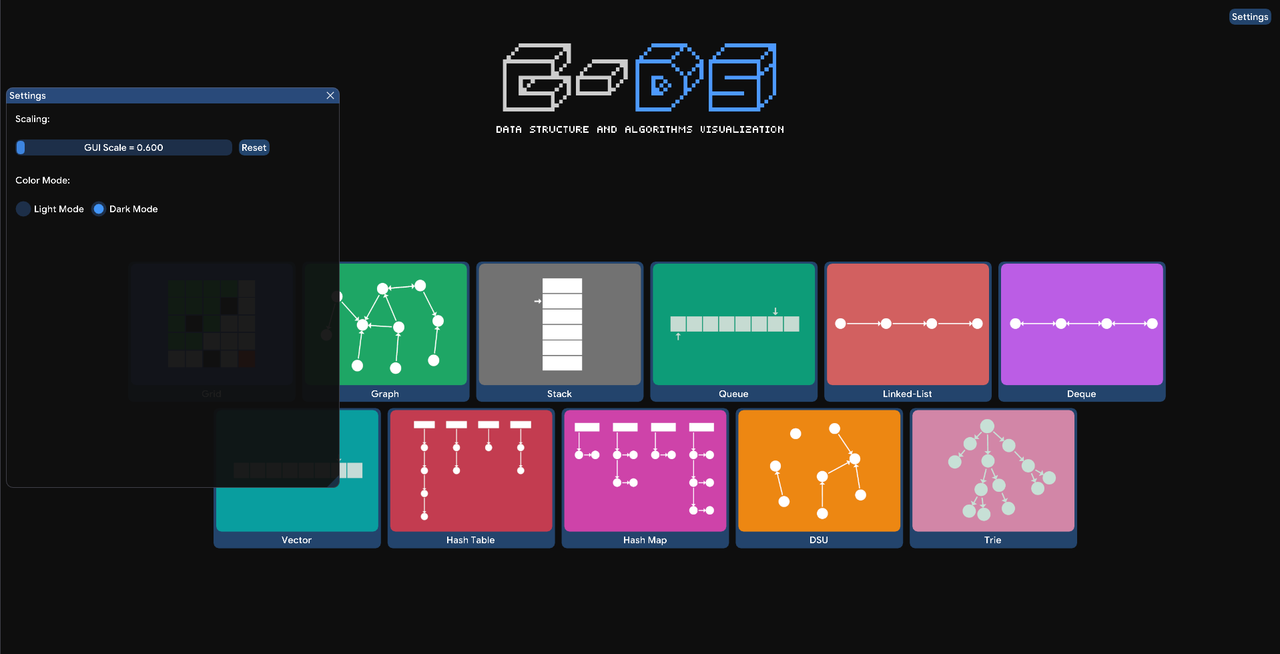
GUI scale adjuster to resize the visualization interface.
-
Light and dark mode themes for comfortable viewing.
-
Customize grid width and height.
-
Set start and end positions on the grid.
-
Add or remove obstacles to create different pathfinding scenarios.
-
Visualize traversal algorithms such as DFS, BFS, Dijkstra’s, and A*.
-
Enable or disable diagonal movement in traversals.
-
Camera follow mode to track the current exploration point.
-
Adjustable camera speed for better control of the visualization flow.
grid.showcase.mp4
-
Move nodes freely to customize the graph layout.
-
Move camera to navigate the graph smoothly.
-
View adjacent nodes to understand connectivity.
-
Set starting and ending nodes for algorithm visualization.
-
Generate random graphs, weighted or unweighted, directed or undirected.
-
Import and visualize pre-existing graphs by input.
-
Visualize algorithms including DFS, BFS, Dijkstra’s, and Minimum Spanning Tree (Kruskal’s Algorithm).
Dijkstra.showcase.mp4
Understand foundational data structures through interactive visualizations of:
-
Stack: Visualize LIFO operations like push and pop.
-
Queue: Explore FIFO operations with enqueue and dequeue.
-
Linked List: See how nodes are connected and manipulated.
-
Deque: Double-ended queue operations from both ends.
-
Vector (Dynamic Array): Dynamic resizing and element access.
Linked-List.showcase.mp4
-
Hashtable: Understand key-value storage with hash functions.
-
Hashmap: Explore an implementation of associative arrays.
-
Disjoint Set Union (DSU): Visualize union and find operations used in connectivity problems.
-
Trie (Prefix Tree): See how tries handle fast prefix searches and autocomplete.
advanced-ds.showcase.mp4

To run the program locally, follow these steps:
-
Clone the repository
-
This project uses imGUI for its interface, so ensure you have the appropriate dependencies or build environment set up (e.g., C++ compiler with imGUI integration).
-
Compile and run
App.cpp