Real-time 3D Gaussian splatting in a React Native view, rendered natively on Metal and Vulkan.
Point SplatKitView at an .spz file on disk, give it a collider, and walk through the scene.




Experimental alpha. The API changes before 1.0, and every release so far is a prerelease published under the
nextdist-tag. Verified on physical devices only: an iPhone 17 Pro and a Xiaomi Mi 9 (Adreno 640).
- Why
- Requirements
- Installation
- Preparing a world
- Quick start
- Loading a world
- Navigation
- Quality and performance
- API reference
- Error codes
- Troubleshooting
- Example app
- Related
- Native, not a port. Metal on iOS and Vulkan on Android, behind one Fabric component. No WebGL, no WebView, no JS renderer.
- No bytes cross the bridge. The view reads the world from an absolute local path and never receives splat data from JavaScript.
- It scales down. Hierarchical LOD and residency streaming with budgets you set, so a 6M splat capture runs on a phone from 2019.
- It tells you what it did. Every quality request is validated natively and reported back through
onCapabilitiesandonPolicyEvent, with diagnostics for each fallback. Nothing degrades silently. - Walking is real collision. Load a collider mesh and the camera becomes a character that stands on floors, is blocked by walls and climbs steps.
- The UI is yours. The SDK draws no joystick, no HUD and no buttons. It exposes commands and events; you build the controls.
| Minimum | |
|---|---|
| React Native | 0.87 or newer (peer dependency >=0.87.0 <0.89.0; only 0.87.1 is validated) |
| React | ^19.2.3 |
| Architecture | New Architecture (Fabric). SplatKitView has no legacy bridge fallback. |
| iOS | 17.0+, Apple GPU family 7 (A14/M1 or newer), Xcode with CocoaPods |
| Android | API 29+, Vulkan 1.1, arm64-v8a only |
| Node | ^22.13.0, ^24.3.0 or >=26.0.0 |
React Native 0.87 is the minimum. The adapter is Fabric-only and relies on the 0.87 template's iOS 26 scene lifecycle, and only 0.87.1 is validated; older releases fail to resolve the peer dependency or to build.
Run it on a physical device.
The renderer's shaders use SIMD prefix reductions, which the iOS Simulator does not implement, so it reports Metal is unavailable on this device and loads nothing.
Emulators are not a supported target on either platform.
npm install @splatkit/react-native@next
cd ios && pod install
The @next tag is required while the package is in alpha.
iOS.
The podspec vendors SplatKitCore.xcframework, which is fetched and checksum-verified when the package is packed, so there is nothing to build.
iOS 26 terminates apps that skip the UIScene lifecycle, so a React Native 0.87 template app needs a scene delegate; the example app has one.
Android.
The module autolinks through the app's com.facebook.react Gradle plugin, which also runs Fabric Codegen, and pulls io.github.xget7:splatkit-android from Maven Central.
Set minSdkVersion = 29 and reactNativeArchitectures=arm64-v8a in the host app.
The view reads .spz and .lodsplat files, never .ply, so a scene is prepared on your computer before it reaches the phone.
- World Labs Marble exports are ready as they are: the SPZ is the world and the collider GLB makes it walkable.
- Any Gaussian splat PLY, from SuperSplat, Polycam or a 3DGS training run, goes through
scripts/prepare-world.shin the SplatKit repository:
git clone https://github.com/Xget7/splatkit && cd splatkit
scripts/prepare-world.sh ~/scene.ply out/ --collider
It needs CMake 3.22 or newer and a C++17 compiler; Xcode's is enough.
The first run builds the conversion tools, and every run ends by printing which file goes in world.filePath and which in collider.filePath.
| Flag | Writes | Use it for |
|---|---|---|
| none | out/scene.spz |
Every scene; this is the world. |
--collider |
out/scene.collider.glb |
Walking. It assumes a space to walk through, not a lone object. |
--lod |
out/scene.lodsplat, which becomes the world |
Scenes of several million splats: the level-of-detail tree is built here instead of on the phone at load time. |
--sh N |
Keeping spherical harmonics up to degree N, 0 to 3. Each degree dropped makes smaller files and uses less GPU memory. |
On an iPhone 17 Pro, the example app was killed for memory while loading a 12M-splat SPZ at SH2; the same scene prepared with --lod --sh 1 loaded in about 3 seconds.
A .lodsplat is uncompressed, so it is many times the SPZ: 1.25 GB against 214 MB for that scene.
The script's header and the splat-core tools cover the remaining options.
import {useMemo, useState} from 'react';
import {StyleSheet} from 'react-native';
import {
  QualityPreset,
  SplatKitBuilder,
  SplatKitView,
  conservativeCapabilities,
  nativeCapabilitiesFromEvent,
  toNativeViewProps,
} from '@splatkit/react-native';

export function Scene({worldPath}: {worldPath: string}) {
  // An engine reports its real limits through onCapabilities, and those arrive only once it
  // exists. Build the first request against conservativeCapabilities, the narrowest limits
  // every shipped adapter accepts, then rebuild when the real ones arrive.
  const [capabilities, setCapabilities] = useState(conservativeCapabilities);

  const configuration = useMemo(
    () =>
      new SplatKitBuilder()
        .withWorld({requestId: 'lobby', filePath: worldPath, maxShDegree: 3})
        .withPreset(QualityPreset.balanced)
        .build(capabilities),
    [worldPath, capabilities],
  );

  return (
    <SplatKitView
      style={StyleSheet.absoluteFill}
      {...toNativeViewProps(configuration)}
      onCapabilities={event =>
        setCapabilities(nativeCapabilitiesFromEvent(event.nativeEvent))
      }
    />
  );
}
That renders the world and lets one finger drag to look around. Walking needs a collider, which Navigation covers.
Do not ask for limits above conservativeCapabilities before the first onCapabilities arrives.
A request an adapter rejects is refused before any engine exists, so no capabilities event ever follows and the view has no way to tell you what it wanted instead.
filePath must be an absolute, readable local path, never a URL, a require() asset or a content URI.
Supported formats are .spz and .lodsplat; Preparing a world turns a PLY into them.
world is a transaction, not a setting.
Native reloads when requestId changes and ignores every other edit to the object, so changing a load-time budget means changing the id too.
Worlds are not bundled with the app.
Push one into the app's sandbox and point filePath at it.
# Android, into the app's external files directory
adb push world.spz /sdcard/Android/data/<your.application.id>/files/world.spz

# iOS, into the app's Documents directory on a connected device
xcrun devicectl device copy to --device <device-id> --domain-type appDataContainer \
  --domain-identifier <your.bundle.id> --source world.spz --destination Documents/world.spz
Restart the app after copying a new world.
The SDK ships no navigation UI.
SplatKitView handles a one-finger drag to look; every other control is yours to draw.
- Load a collider mesh through the
colliderprop,{requestId, filePath}, pointing at an absolute path to a collider GLB. - Show your controls when
onColliderEventreportsColliderPhase.ready.ColliderPhase.failedcarrieserrorCodeandmessage. - Shape the walker with the
characterprop,{eyeHeight, bodyRadius, stepHeight}in meters, applied immediately and to any collider loaded later. - Drive the camera with
SplatKitCommands.
Commands go straight to the native view and bypass React's render and commit cycle, so a stick can steer at touch rate without a re-render per frame.
import {useCallback, useRef, useState} from 'react';
import {PanResponder, View} from 'react-native';
import {ColliderPhase, SplatKitCommands, SplatKitView} from '@splatkit/react-native';

const WALK_SPEED = 1.4; // meters per second at full deflection
const RADIUS = 62;
const clamp = (value: number) => Math.max(-1, Math.min(1, value));

export function WalkableScene(props: {worldPath: string; colliderPath: string}) {
  const view = useRef<React.ComponentRef<typeof SplatKitView>>(null);
  const [walking, setWalking] = useState(false);

  const stick = useRef(
    PanResponder.create({
      onStartShouldSetPanResponder: () => true,
      onPanResponderMove: (_event, gesture) => {
        const target = view.current;
        if (!target) return;
        SplatKitCommands.setWalkVelocity(
          target,
          clamp(-gesture.dy / RADIUS) * WALK_SPEED,
          clamp(gesture.dx / RADIUS) * WALK_SPEED,
        );
      },
      onPanResponderRelease: () => {
        const target = view.current;
        if (target) SplatKitCommands.setWalkVelocity(target, 0, 0);
      },
    }),
  ).current;

  const onColliderEvent = useCallback(
    (event: {nativeEvent: {phase: ColliderPhase}}) =>
      setWalking(event.nativeEvent.phase === ColliderPhase.ready),
    [],
  );

  return (
    <>
      <SplatKitView
        ref={view}
        world={{requestId: 'world', filePath: props.worldPath}}
        collider={{requestId: 'floor', filePath: props.colliderPath}}
        character={{eyeHeight: 1.5, bodyRadius: 0.35, stepHeight: 0.35}}
        onColliderEvent={onColliderEvent}
      />
      {walking && <View {...stick.panHandlers} style={{width: RADIUS * 2, height: RADIUS * 2}} />}
    </>
  );
}
An empty collider.requestId releases walk mode and returns the camera to free look.
camera is an immutable transaction; use a new positive revision for each change.
toNativeCameraProp validates the public discriminated request and produces Fabric's flat transport.
import {CameraMode, SplatKitView, toNativeCameraProp} from '@splatkit/react-native';

const camera = toNativeCameraProp({
  revision: 1,
  mode: CameraMode.orbit,
  anchor: {x: 0, y: 1, z: 0},
  radius: 4,
  azimuth: 0,
  elevation: 0.2,
  orbitRadiansPerSecond: 0.2,
});

<SplatKitView world={world} camera={camera}
  onCameraEvent={({nativeEvent}) => console.log(nativeEvent)} />;
Distances are metres; angles are radians; the continuous rate is signed radians per second, with zero stopping rotation.
Native validates atomically and reports applied or rejected, the revision, and the effective state, including clamped elevation.
An invalid request preserves the current camera and the last accepted request.
A request waits for world preparation and is reapplied when the engine is replaced.
Repeating the current revision or omitting the prop does not reset the camera.
Commands can move it until a new revision arrives; manual navigation cancels automatic rotation.
Use {revision: 2, mode: CameraMode.firstPerson} to leave orbit at the current pose.
A collider controls whether first person walks or flies.
onCameraEvent is an application-time snapshot; use onCameraPose for throttled observation.
See the contracts for the exact request and event types.
Reanimated is optional and belongs to the host app; the SDK does not import it. Install compatible Reanimated and Worklets versions and configure the Worklets Babel plugin. Wrap the host component so an animated ref can dispatch Fabric commands on the UI thread.
import Animated, {dispatchCommand, useAnimatedRef, useFrameCallback} from 'react-native-reanimated';
import {SplatKitView} from '@splatkit/react-native';

const AnimatedSplatKitView = Animated.createAnimatedComponent(SplatKitView);

function CameraPath({world}) {
  const ref = useAnimatedRef<React.ComponentRef<typeof SplatKitView>>();
  const frames = useFrameCallback(({timeSinceFirstFrame}) => {
    const seconds = timeSinceFirstFrame / 1000;
    dispatchCommand(ref, 'setCameraPose', [Math.sin(seconds), 2, Math.cos(seconds), seconds, 0]);
  }, false);
  return <AnimatedSplatKitView ref={ref} world={world}
    onWorldEvent={({nativeEvent}) => frames.setActive(nativeEvent.phase === 'frameReady')}
    onTouchStart={() => frames.setActive(false)} />;
}
Keep every trajectory helper worklet-compatible and stop the callback on world replacement or unmount.
setCameraPose still obeys first-person collider constraints; use a collider-free world for an unconstrained flythrough.
See the complete example and its trajectory.
The UI-thread dispatch API is documented by Reanimated.
SplatKitBuilder resolves what you ask for against what the host and the adapter allow, and returns a SplatKitConfiguration carrying world, render and performance (requested, effective, diagnostics).
import {
  QualityPreset,
  SplatKitBuilder,
  toNativePolicyProp,
  toNativeViewProps,
} from '@splatkit/react-native';

const configuration = new SplatKitBuilder()
  .withWorld({requestId: 'lobby-1', filePath: '/absolute/path/lobby.spz', maxShDegree: 3})
  .withPreset(QualityPreset.high)
  .withPerformance({lodBudgetSplats: 2_500_000})
  .build(capabilities);

// <SplatKitView {...toNativeViewProps(configuration)} policy={toNativePolicyProp(configuration, revision)} />withWorld()takes world identity, file path and the load-time maximum SH degree.withRender()takespaused.withPreset(preset)replaces the policy with one of the presets below.withPerformance(options)overrides fields on top of the current preset and marks the policymanual.build(capabilities)clamps budgets to the limits, capsshDegreeat the world'smaxShDegree, and records every fallback inperformance.diagnostics. Malformed numbers, invalid enums and unknown options throw.
Every preset rasterizes in hardware, with frustum culling and early termination on.
| Preset | Render scale | SH | LOD budget | Residency | Tile | LOD error px | Alpha | Sub-pixel | Hi-Z | Sort |
|---|---|---|---|---|---|---|---|---|---|---|
highEnd |
1.25 | 3 | 4,000,000 | 4,000,000 | 16 | 0.75 | 1/255 | 0.35 | Yes | 32 |
high |
1.0 | 3 | 3,000,000 | 3,000,000 | 16 | 1.0 | 1/255 | 0.5 | Yes | 32 |
balanced |
0.85 | 2 | 2,000,000 | 2,000,000 | 16 | 1.25 | 1/255 | 0.65 | No | 16 |
performance |
0.65 | 1 | 1,000,000 | 1,000,000 | 8 | 2.0 | 2/255 | 1.0 | No | 16 |
Lower lodErrorPixels sharpens the far field, which is where a captured room looks soft, and costs fill rate.
withPerformance({raster: RasterStrategy.hybrid}) opts into experimental screen-tile compositing, which helps only where many large translucent splats overlap one pixel and costs more on sparse scenes.
Only the iOS adapter builds hybrid today, and computeTile is not implemented anywhere.
| Knob | Set through | Effect |
|---|---|---|
lodCapacitySplats |
withPerformance({lodBudgetSplats}) |
LOD tree budget. 0 disables tree building. Load-time. |
residencyCapacitySplats |
withPerformance({residencyCapacitySplats}) |
Resident streaming splats, not a memory guarantee. Load-time. |
maxShDegree |
withWorld() |
Load-time cap on stored spherical-harmonics degree. |
shDegree |
withPerformance({shDegree}) |
Draw-time SH degree, 0 to 3, clamped to maxShDegree. |
renderScale |
withPerformance({renderScale}) |
Render resolution scale, [0.1, 2]. |
The first two are read while the engine builds the world, so raising one takes a new requestId and a reload.
Everything else updates in place.
classifyPolicyChange(previous, next) tells you which case you are in before you commit to it.
policy carries the live renderer policy under a revision.
Native revalidates the whole policy and never trusts JavaScript state, so give every change a new positive revision; 0 or less means no policy.
Native reapplies the current revision to each new engine, and a world reload creates one, so expect onPolicyEvent again after a reload.
onCapabilities fires once per engine, before that engine's first policy event, and reports the limits, the GPU features and exactly which policy fields the adapter applies.
onPolicyEvent reports PolicyPhase.applied, PolicyPhase.warning (a field fell back, message says why) or PolicyPhase.rejected (the previous policy stayed in effect), and always carries the effective values.
Extends the standard ViewProps.
| Prop | Type | Default | Description |
|---|---|---|---|
world |
WorldRequest |
- | Load transaction: requestId, absolute filePath, maxShDegree, lodCapacitySplats, residencyCapacitySplats. Omit to render nothing. |
collider |
ColliderRequest |
- | {requestId, filePath}. An empty requestId releases walk mode. |
character |
Character |
- | {eyeHeight, bodyRadius, stepHeight} in meters. |
policy |
NativeRenderPolicy |
- | The requested renderer policy, under a revision. |
paused |
boolean |
false |
Freezes rendering. |
renderScale |
number |
1 |
Render resolution scale. |
shDegree |
number (0-3) |
3 |
Draw-time spherical-harmonics degree. |
linearBlending |
boolean |
false |
Blends in linear light instead of the encoded space training used. |
cullMarginDegrees |
number |
10 |
Angular culling margin for the CPU fallback; the GPU path uses projected bounds. |
motionEnabled |
boolean |
false |
Drives the camera from the gyroscope. Ignored where the sensor is missing. |
touchLookEnabled |
boolean |
true |
Whether a one-finger drag turns the camera. |
lookSensitivity |
number |
0.004 |
Radians per point dragged. |
camera |
toNativeCameraProp(request) |
absent | Revisioned configuration, applied after world preparation. |
cameraPoseInterval |
number |
0 |
Seconds between onCameraPose events. 0 never sends one. |
| Event | Payload |
|---|---|
onWorldEvent |
{requestId, phase: WorldPhase, loadedSplats, errorCode, message}. errorCode and message are set only on failed. |
onColliderEvent |
{requestId, phase: ColliderPhase, errorCode, message}. |
onStats |
{requestId, loadedSplats, drawnSplats, frameMillis, gpuMillis, sortMillis} with a *TimingAvailable flag beside each timing. Throttled to 2 Hz. |
onCameraEvent |
Application result and effective camera state, tagged with the requested revision. |
onCameraPose |
{x, y, z, yaw, pitch} in the world's frame, throttled to cameraPoseInterval and sent only when the pose changed. |
onFocusResult |
{requestId, hit} for each focus command. A miss keeps the previous anchor. |
onPolicyEvent |
{revision, phase: PolicyPhase, errorCode, message} plus every effective policy field. |
onCapabilities |
The adapter's limits, GPU feature support and applied policy fields. Once per engine. |
A *TimingAvailable flag of false means its paired value is not a measurement; pass both through optionalTimingMillis() to get number | null.
Each takes the view ref first and returns nothing.
| Command | Signature | Notes |
|---|---|---|
setWalkVelocity |
(ref, forward, right) |
Meters per second, held until called again. Forward is where the camera looks. Needs walk mode ready. |
look |
(ref, deltaYaw, deltaPitch) |
Radians. Pitch is clamped, and this is ignored while the gyroscope drives the view. |
setCameraPose |
(ref, x, y, z, yaw, pitch) |
Teleports. While walking, the camera settles onto the floor under the new point. |
lookAt |
(ref, x, y, z, targetX, targetY, targetZ, upX, upY, upZ) |
Points the camera from a world-space position at a target. |
setAnchor |
(ref, x, y, z) |
Sets a world-space orbit center from the current camera position. |
orbit |
(ref, deltaAzimuth, deltaElevation) |
Turns around the anchor in radians. |
dolly |
(ref, deltaRadius) |
Changes orbit radius in meters; positive moves away. |
focus |
(ref, requestId, x, y) |
Picks an anchor at view coordinates in [0, 1] against a loaded collider and reports onFocusResult. |
animateOrbit |
(ref, degrees, degreesPerSecond, easeInOut) |
Starts a finite turn around the anchor. |
Loading a world sets a default anchor from its bounds; setAnchor or a successful focus replaces it.
Orbit takes temporary control of the camera from walk mode; walking input resumes it.
The view returns no command values, so use onFocusResult to distinguish a focus hit from a miss.
Every enumerated value is a frozen object with a matching type, so there are no bare strings to misspell.
| Export | Members |
|---|---|
QualityPreset |
highEnd, high, balanced, performance |
qualityPresets |
every preset in order, for rendering a picker |
WorldPhase |
uploaded, frameReady, failed |
ColliderPhase |
ready, failed |
CameraMode |
firstPerson, orbit |
CameraPhase |
applied, rejected |
PolicyPhase |
applied, warning, rejected |
RasterStrategy |
hardware, computeTile, hybrid |
PerformanceMode |
auto, manual |
PolicyChangeKind |
none, nativePropUpdate, worldReload, unavailable |
conservativeCapabilities |
the narrowest limits every shipped adapter accepts, for the first request |
| Export | Purpose |
|---|---|
SplatKitBuilder |
withWorld(), withRender(), withPerformance(), withPreset(), build(capabilities). |
toNativeViewProps(configuration) |
The world, paused, renderScale and shDegree props. |
toNativePolicyProp(configuration, revision) |
The policy prop for a positive revision. |
nativeCapabilitiesFromEvent(event) |
An onCapabilities payload as a DeviceCapabilities snapshot for build(). |
classifyPolicyChange(previous, next) |
Whether a change needs nothing, a prop update, a world reload, or is unavailable. |
optionalTimingMillis(available, value) |
value, or null when unavailable. Zero is a valid measurement. |
validateWorldRequest(request, limits), validateColliderRequest(request), validateCharacter(character) and validateRenderOptions(options) throw on structural violations.
None of them touch the filesystem or the GPU.
PerformanceDiagnostic explains every fallback build() made:
code |
Meaning |
|---|---|
limit-clamped |
Clamped to a host or native limit. |
native-option-fallback |
The adapter does not apply this field; it fell back to the native default. |
native-support-unknown |
Capabilities have not arrived, so support is unknown. |
capability-fallback-unavailable |
The requested raster strategy is unsupported; hardware is the candidate. |
fabric-option-unavailable |
The option has no Fabric prop. targetFps only, which is a request and never enables dynamic quality. |
Both adapters share these, so a host branches on errorCode without checking the platform.
| Code | Reported on | Meaning |
|---|---|---|
INVALID_REQUEST |
onWorldEvent, onColliderEvent |
The request failed structural validation before native tried to load it. |
WORLD_LOAD_FAILED |
onWorldEvent |
The world file could not be decoded or loaded. |
GPU_UNAVAILABLE |
onWorldEvent |
The GPU backend could not be initialized. |
COLLIDER_LOAD_FAILED |
onColliderEvent |
The collider GLB could not be loaded. |
INVALID_CAMERA |
onCameraEvent |
The camera request failed validation; the effective camera is unchanged. |
INVALID_POLICY |
onPolicyEvent |
The policy failed validation. |
POLICY_PREPARATION_FAILED |
onPolicyEvent |
The policy was valid but native could not prepare it; the previous one stays. |
The view is blank.
Check that world is set and that onWorldEvent fires at all; a view with no world renders nothing.
Prefer a physical device: emulators often lack full Vulkan 1.1, which reports GPU_UNAVAILABLE.
The world fails to load.
filePath must be absolute, local and readable.
Confirm the file is really at that path in the sandbox, and read message for the loader's reason.
Nothing renders and the log mentions Fabric or Codegen.
SplatKitView is Fabric-only.
Confirm the New Architecture is enabled and that a full rebuild picked up SplatKitSpec.
The scene is sharp up close and soft further out.
That is the LOD error threshold.
Lower lodErrorPixels below the preset's value, and watch onStats for the fill-rate cost.
The HUD shows no frame rate.
A timing whose *TimingAvailable flag is false was not measured, which is not the same as zero.
The Vulkan backend reports submitted frames rather than presented ones, and neither backend measures GPU time without timestamp queries.
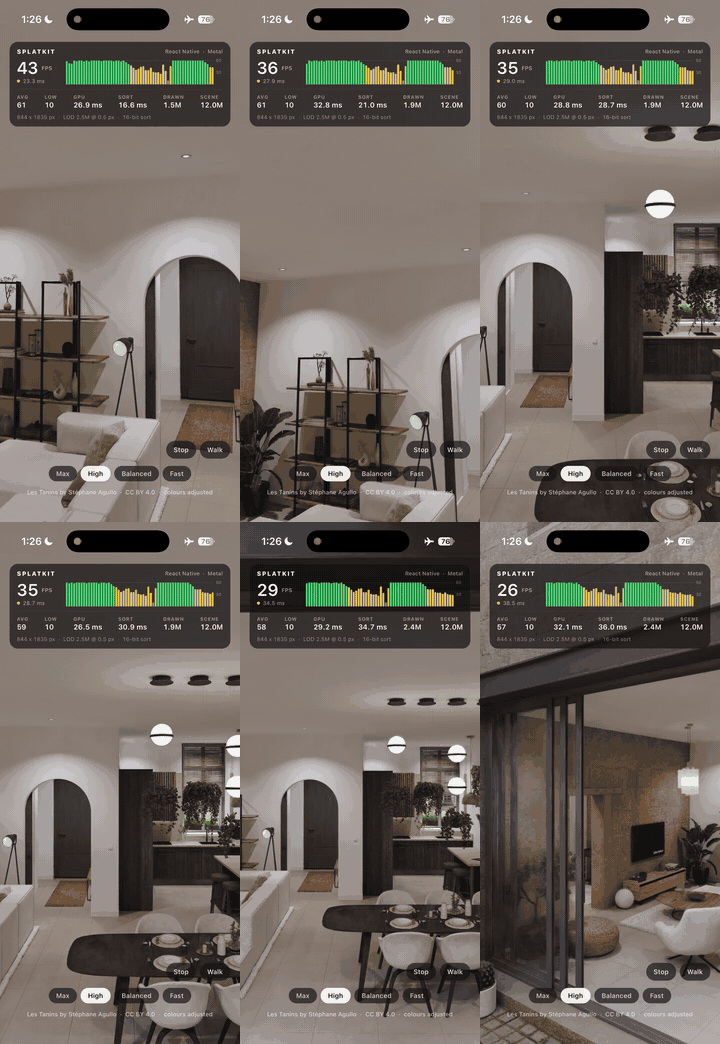
apps/react-native is a React Native 0.87.1 app from the community template that installs this package, draws a thumb stick and a stats and quality HUD, and walks a 6M splat capture.
Its README lists every change a fresh template needs.
- splatkit, the Vulkan and Metal SDKs and the shared C++ engine.
- splatkit-ios, the Metal SDK.
This package is generated from a monorepo; see CONTRIBUTING.md.