

Automatically replace plain Windows game and application shortcut icons with high-quality artwork.



If you keep a folder of game and application shortcuts on Windows, they can end up with plain, mismatched icons. Game Icons Studio scans your shortcuts, helps find suitable artwork, builds clean Windows icons, and applies them — turning a messy folder into a tidy icon shelf.
It runs locally on your PC. The interface opens in your web browser, but it is not a hosted website — it is a local tool served from your own computer.
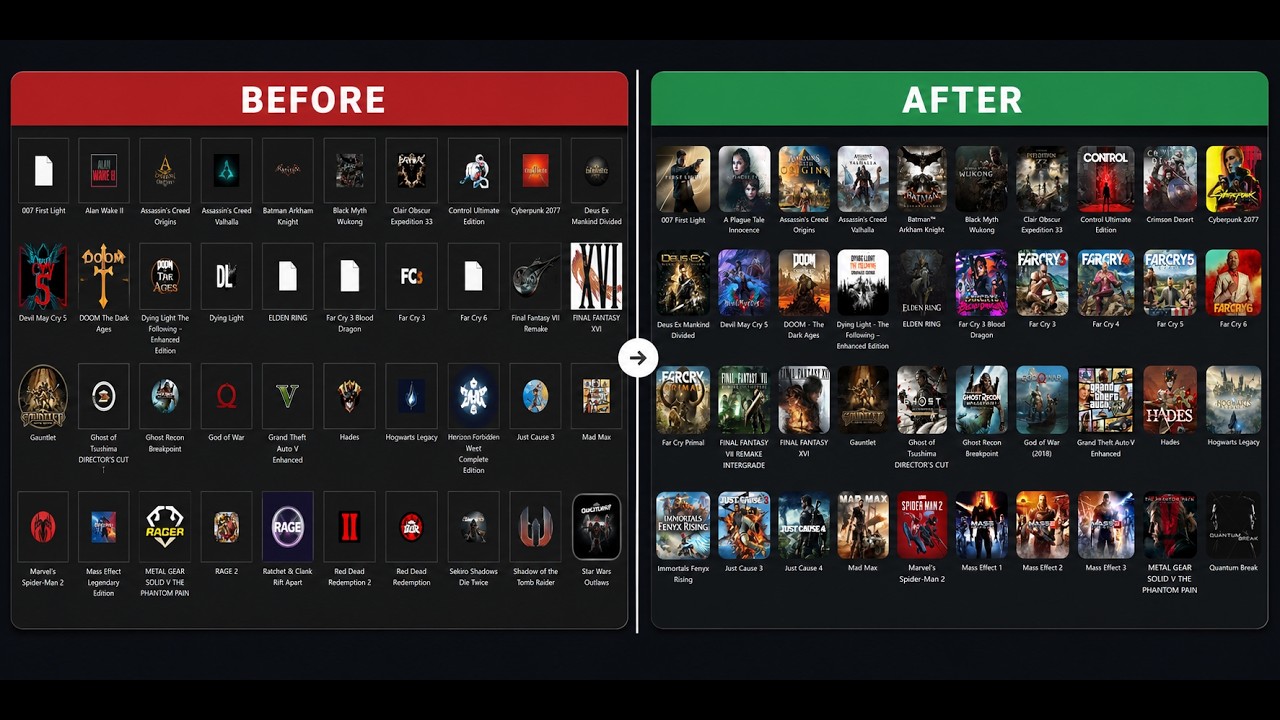

- 🎮 Game artwork matching — finds candidate game artwork through SteamGridDB and lets you review results before applying.
- 🧩 Program & app icons — search brand/software icon candidates and discover images for application shortcuts.
- 🔎 Image search shortcuts — open Google Images or Yandex Images for additional options.
- 🖼️ Use your own artwork — select an image from disk, drag and drop it, paste it with Ctrl+V, or load it from an image URL.
- ✨ High-quality Windows icons — convert artwork into multi-size
.icofiles. - 📁 Folder icons — customize folder icons through Windows
desktop.ini. - ↩️ Restore points — save supported shortcut/folder icon states before applying changes and restore them later.
- 🗂️ Quick re-apply and history — revisit previous work and quickly re-apply supported changes.
- 🧰 Icon-cache repair — help refresh blank or stale icons displayed by Windows.
- 🎨 Multiple themes — Aurora Glass is the default theme, with other themes available.
These release notes are an addition to the original introduction above. The logo, demo, before-and-after image, and original page structure are retained.
v6.37 — Real-time operation progress
- Replaces the fake timer-driven apply progress bar with a live stream of progress events from the actual Windows icon pipeline.
- Shows the true completed/total artwork downloads (for example, 57 / 59 · 96%) and the last item being processed.
- Shows real per-phase progress for downloads, icon building, restore-point creation, shortcut updates, and Windows Explorer refresh.
- Uses a streamed, flushed response so the browser can update while the operation is still running.
- Reports safety-backup failures accurately and keeps the interface from claiming success when the update was stopped.
v6.36 — Faster cover previews
- Replaces eager-loading every cover with a prioritized, progressive thumbnail queue.
- Loads the selected cover and nearby visible previews first, with at most four cover requests managed by the UI at once.
- Defers off-screen thumbnails until they approach the visible area.
- Cancels queued and active preview work when leaving the cover picker, so old thumbnails do not compete with the next screen.
v6.35 — Release packaging and automation
- Added a manually triggered GitHub Actions workflow to create release packages.
- Builds a full ZIP for new users and an overlay-upgrade ZIP for existing installations.
- Adds a SHA-256 checksum manifest and release validation checks.
- Added optional, duplicate-safe replies to feature requests #1 and #2. Automatic replies are disabled unless explicitly requested in the workflow.
- Release archives exclude API keys, user settings, caches, generated icons, downloaded artwork, logs, history, and restore-point backups.
v6.34 — Program-icon search improvements
- Adds executable metadata such as product name, company, and file description to help form search queries.
- Adds structured brand/software icon candidates through Iconify.
- Improves candidate relevance scoring and uses more conservative automatic-match confidence.
- Adds conversion of supported SVG candidates to PNG for the existing Windows icon pipeline.
v6.33 — Broader image discovery
- Adds complementary Google Images and Yandex Images searches for program icons.
- Combines multiple candidate queries and ranks available results using relevance hints, square ratio, and resolution.
- Keeps manual search, local-image selection, drag-and-drop, and clipboard paste available as alternatives.
Search-engine results are best-effort and may change or be restricted. Review artwork before applying it.
v6.30–v6.32 — Restore, custom artwork, and interface fixes
- Adds local image selection, drag-and-drop, clipboard paste, and image URL input.
- Adds restore points with configurable retention for supported icon changes.
- Expands folder icon customization and target selection.
- Fixes readability of the restore-point retention dropdown across themes.
- Sets Aurora Glass as the default theme for fresh browser profiles.
See the complete CHANGELOG-v6.37.md and download the current version from GitHub Releases.
- Windows 10 or 11
- PowerShell 7+ recommended — get it here
- A free SteamGridDB API key for SteamGridDB game matching
Local image selection and available embedded executable-icon fallbacks can work without the SteamGridDB key.
- Download the latest release (the ZIP file).
- Right-click the ZIP → Properties → check Unblock if shown → OK, then extract it.
- Open the folder and double-click
Game Icons Studio.bat. - Follow the setup prompts and configure your free SteamGridDB API key if you want game matching.
- Choose your shortcuts or folder mode, review the suggested icons, make any corrections, and apply the changes.
💡 New here? Look for the in-app “What is GIS?” tour if it is available in your build.
For an existing installation, download the Upgrade ZIP from the latest release and extract it directly over your current program folder. The upgrade package is designed to preserve your existing settings and runtime data.
Game Icons Studio is open source, so you can inspect the code.
- For normal shortcuts, it changes the shortcut icon rather than the installed application itself.
- For file types that cannot have their Explorer icon changed directly, it can create a companion
(Custom Icon).lnkshortcut; the original file is not modified. - Folder icon customization uses Windows folder icon configuration files. Check the target before applying changes.
- Restore points can help revert supported changes when a saved restore point exists.
- The local interface uses internet access for the artwork/search providers when those features are used. Review results before applying them.
Only download release ZIPs from this repository.
Does this work with Steam, Epic Games, GOG, and other launchers?
It works with Windows shortcuts (.lnk) from any launcher. The artwork available depends on the shortcut details and the sources that can be reached.
Does it change my actual games or installed programs?
For normal shortcuts, it changes the shortcut's icon. For file types that do not support custom icons directly, it can create a companion shortcut. Folder icon customization changes the folder's icon configuration.
Do I have to pay for a SteamGridDB API key?
No. SteamGridDB provides free API keys; the app can guide you through configuration.
Why does it open in my browser?
The browser is the interface for a local application served from your own PC through localhost. It is not a hosted web app.
Why did the automatic program-icon search pick a bad image?
Automatic discovery depends on metadata and accessible search results; it can return incorrect candidates. Review the preview, try a manual Google/Yandex search, or select your own image when results are not suitable.
Issues and suggestions are welcome — open an issue. If you'd like to contribute code, feel free to open a pull request.
Released under the MIT License. Free to use, modify, and share.
- Artwork and game data from the SteamGridDB community.
- Program and brand icon candidates may use Iconify.
- This independent project is not affiliated with or endorsed by SteamGridDB, Valve, Google, Yandex, Iconify, or any game publisher.
If you find Game Icons Studio useful, consider starring ⭐ the repository. Thank you for supporting the project!