
The web management workspace for ZSvirt.
A unified interface for compute, storage, networking, reliability, data protection, operations, and platform administration.


English · 简体中文
ZSvirt UI is the web management workspace for ZSvirt. It brings compute, storage, networking, reliability, data protection, operations, and platform administration into one interface.
This repository is a TypeScript monorepo built around a Module Federation host, domain-focused React applications, shared UI packages, and a NestJS backend for frontend (BFF). Domain applications can be developed independently while sharing a common design system, runtime, configuration, and API layer.
Availability of individual features depends on the connected ZSvirt environment, installed edition, and permissions of the signed-in account.
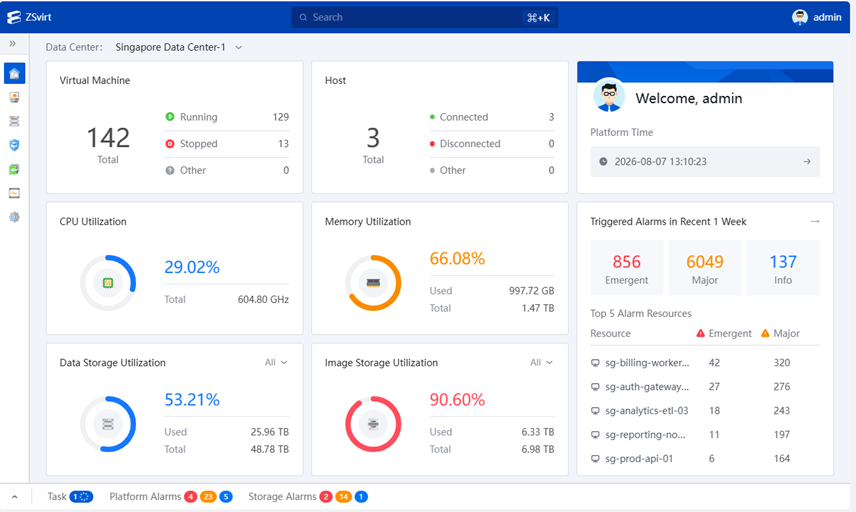
📊 Dashboard — unified operations overview
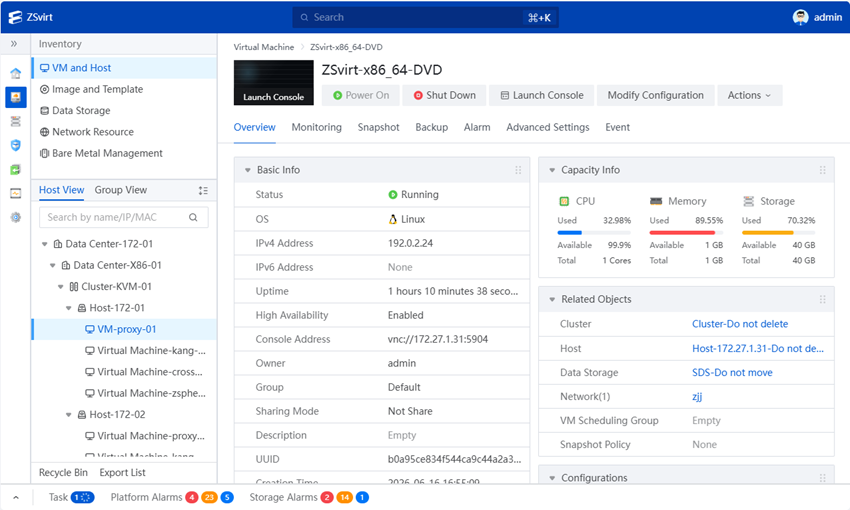
🗂️ Inventory — centralized infrastructure management
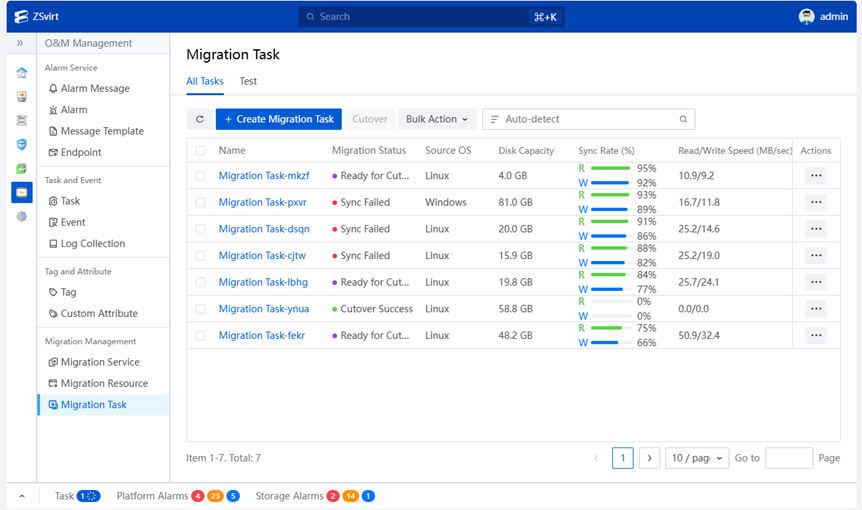
🔄 Migration management — workload migration
| Unified resource management | Reliability and data protection | Operations and administration |
|---|---|---|
| Manage hosts, virtual machines, images, templates, storage, networks, and bare-metal resources. | Operate reliability, snapshot, backup, migration, and recovery workflows. | Use monitoring, alarms, automation, identity, access control, security, settings, and licensing from one shell. |
Frontend
- React 18.3.1 and TypeScript 5.9.3
- React Router 7.18.0 and React Intl 6.7.0
- Rsbuild 2.0.0, Rspack 2.0.0, and Module Federation 2.8.1
Workspace and quality
- pnpm 11.9.0 and Nx 22.7.7
- Oxlint 1.56.0 and Oxfmt 0.41.0
BFF
- NestJS 11.1.28 and Fastify 5.11.2
- Apollo Client 3.11.8, Apollo Server 5.5.1, and GraphQL 16.11.0
- Sequelize 6.37.8 and TypeScript 5.8.2
.
├── zsphere/
│   ├── apps/       # Core Shell and domain micro-frontends
│   ├── bff/        # NestJS GraphQL backend-for-frontend and local mock server
│   └── shared/     # Shared UI, runtime, configuration, types, and platform modules
├── packages/       # Reusable design, auth, form, i18n, icon, and utility libraries
├── ci/             # Dependency security and license audit scripts
├── security/       # Dependency audit exceptions and license inventory
├── patches/        # pnpm dependency patches
├── vendor/         # Vendored compatibility dependencies and their notices
├── .github/        # GitHub Actions workflows
├── package.json    # Workspace scripts and root package metadata
└── pnpm-workspace.yaml  # Workspace definitions and shared dependency catalog
- Node.js 22.13 or later.
- pnpm 11.9.0, as pinned by the root
packageManagersetting. - macOS or Linux. The workspace start commands use a POSIX shell.
git clone https://github.com/ZSvirt/zsvirt-ui.git
cd zsvirt-ui
corepack enable
corepack prepare pnpm@11.9.0 --activate
pnpm install --frozen-lockfile
pnpm start
The root start command builds shared libraries, enables local mock mode, and starts the Core Shell, domain applications, and BFF. Mock mode uses SQLite plus in-memory cache and pub/sub implementations, so it does not require Redis, MySQL, an internal network, or a ZSvirt management service.
Open the following endpoints after the applications report that they are ready:
- Web UI: http://localhost:3000
- GraphQL: http://localhost:3100/graphql
The first start takes longer because the workspace libraries are built before the development servers are launched.
Mock mode bypasses real authentication and returns generated data. Use it only for local development and product evaluation. Do not expose it to an untrusted network.
pnpm start          # build shared libraries and start the complete mock workspace
pnpm start:apps     # start UI applications only
pnpm start:bff      # start the mock BFF only

pnpm build          # build all buildable projects
pnpm build:apps     # build UI applications
pnpm build:bff      # build the BFF
pnpm build:libs     # build shared libraries

pnpm format:check
pnpm lint:ox
pnpm lint:all
pnpm security:audit:cve
pnpm security:audit:licenses
Use pnpm show:projects to list Nx projects and pnpm graph to inspect their
relationships.
If local ports conflict, use ZSV_PORT_OFFSET to add a uniform offset to all UI
development ports and ZSV_BFF_PORT to select the BFF port:
ZSV_PORT_OFFSET=1000 ZSV_BFF_PORT=4100 pnpm startIn this example, the Web UI is available at http://localhost:4000 and GraphQL at http://localhost:4100/graphql.
No environment file is required for local mock mode. The BFF variable reference
is available in zsphere/bff/.env.example; do not copy it unchanged into a
public or production environment.
For development against services you are authorized to use, create an untracked
zsphere/bff/.env. Non-mock mode is selected whenever ZSV_MOCK is unset or is
not 1 and requires a management service, MySQL, and Redis:
NODE_ENV=production
HOST=127.0.0.1
ZSV_BFF_PORT=3100

ZS_MN_SERVER=https://management-service.example.invalid:<management-port>
ZS_MYSQL_HOST=database.example.invalid
ZS_MYSQL_PORT=<database-port>
ZS_MYSQL_USERNAME=<database-user>
ZS_MYSQL_PASSWORD=<database-password>

ZS_REDIS_HOST=cache.example.invalid
ZS_REDIS_PORT=<cache-port>
# ZS_REDIS_PASSWORD=<cache-password>
Never commit .env files, service addresses, credentials, tokens, customer
data, private certificates, or production configuration.
Contributions are welcome. See CONTRIBUTING.md for the development and review workflow, follow our Code of Conduct, and read GOVERNANCE.md for project roles and decision-making.
Do not report vulnerabilities through a public issue. Follow SECURITY.md to disclose them privately.
This project is licensed under the GNU General Public License v3.0 only
(GPL-3.0-only). See LICENSE. Third-party components and additional
obligations are documented in THIRD_PARTY_NOTICES.md
and security/direct-dependency-licenses.md.
One workspace for building and operating the ZSvirt web management experience.