Version: 1.0.0-beta
Created by: Mohammed Zahid Imtiyaz Wadiwale
Purpose: Educational — Understanding Enterprise-Grade Remote Administration & Access Tools
AonicRAT is a fully functional, Java-based Remote Administration Tool (RAT) built from scratch for educational and demonstration purposes only.
The goal of this project is to teach students, developers, and security researchers how enterprise-grade Remote Server Administration Tools (RSATs) and Remote Access Tools (RATs) work under the hood — tools like:
| Tool | What it does |
|---|---|
| TeamViewer / AnyDesk | Remote desktop, file transfer, remote shell |
| DameWare / ManageEngine | Enterprise IT remote endpoint administration |
| Cobalt Strike / Metasploit | Professional penetration testing C2 frameworks |
| PDQ Deploy / Ansible | Remote startup management, command execution |
| Wireshark + remote agents | Remote packet capture and network inspection |
By studying AonicRAT you will understand the core technical concepts behind:
- Client-server architecture for remote control
- Reverse TCP connection model (agent calls back to controller)
- Persistent socket-based communication
- Remote file system operations over a network
- Live interactive shell/terminal streaming
- Real-time screen capture and remote desktop viewing
- Cross-platform agent generation (Windows, Linux, macOS)
- Remote network packet capture and hosts file editing
- Remote process management and system information gathering
- Remote clipboard access and keylogging
- Remote power controls and startup entry management
- Remote message box / alert delivery
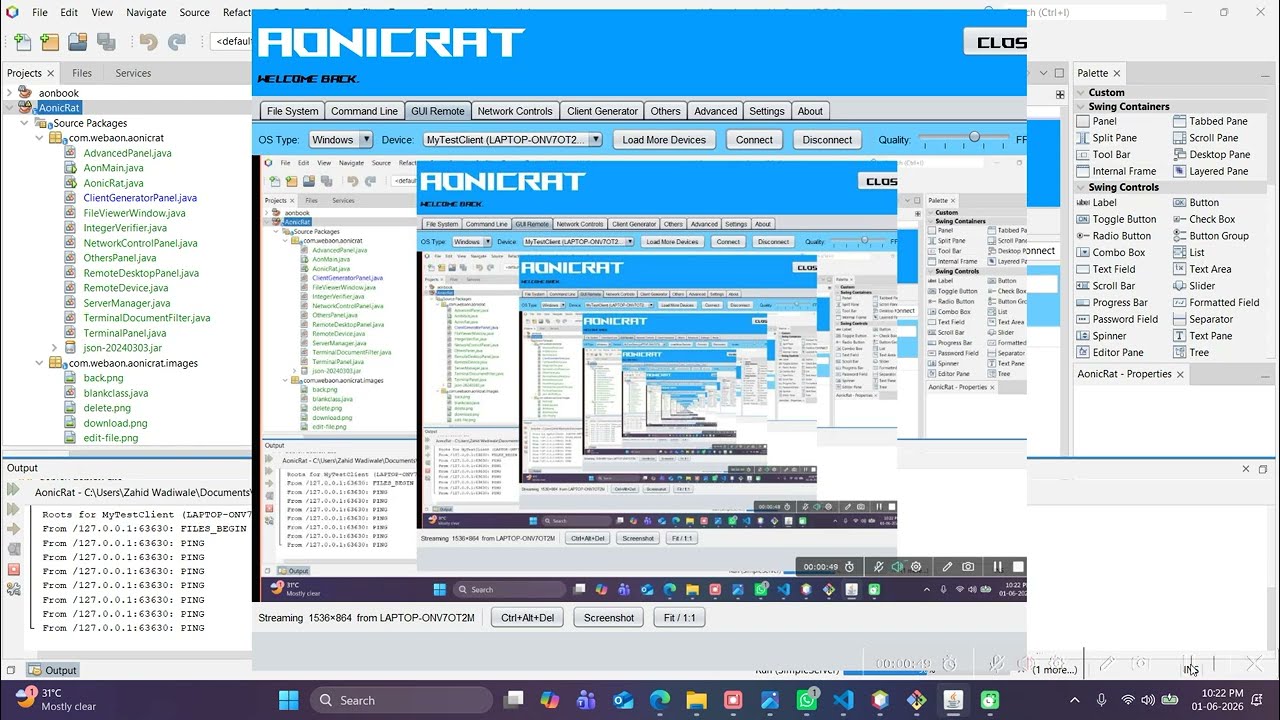
Both the Controller and the Agent run on any major operating system. There are no platform restrictions on either side.
| Component | Windows | Linux | macOS |
|---|---|---|---|
| Controller (AonicRat) | ✅ | ✅ | ✅ |
| Agent (SimpleServer) | ✅ | ✅ | ✅ |
This means:
- A Windows operator can control a Linux or macOS target — and vice versa
- A Linux operator can control a Windows machine
- A macOS operator can control a Windows or Linux machine
- Any combination works — the protocol is platform-agnostic over TCP
Both components are written in pure Java, so they run on any OS with a compatible JVM (Java 11+ for the agent, Java 18+ for the controller) — no native dependencies, no OS-specific installers required.
AonicRAT is split into two components:
AonicRat/
├── src/                  ← Controller (the operator's dashboard)
└── SimpleServer/         ← Agent (deployed on the target machine)
| Component | Role |
|---|---|
| Controller | The operator's GUI dashboard. Manages connected devices, sends commands, receives data. Runs on Windows, Linux, or macOS. |
| Agent (SimpleServer) | Runs on the target machine. Connects back to the controller, executes commands, streams results. Runs on Windows, Linux, or macOS. |
[ Agent / SimpleServer ]  ──connect──▶  [ Controller / AonicRat ]
   Windows / Linux / macOS                 Windows / Linux / macOS
      (initiates connection)                  (listens on a port)
The agent uses a reverse TCP connection — it calls back to the controller's IP and port on startup. This is the same model used by Metasploit Meterpreter, Cobalt Strike Beacon, and enterprise MDM agents. It works through NAT and firewalls because outbound connections are rarely blocked.


A full remote file manager that lets the operator browse and manage the file system of any connected device.
Capabilities:
- Browse the complete remote file system — drives, folders, files
- Navigate directories by double-clicking folders; use
..to go up one level - Back and Forward navigation buttons (like a file explorer)
- View file names, sizes, types, and last-modified timestamps in a sortable table
- Upload files from the operator machine to the remote device
- Download files from the remote device to the operator machine with a progress bar
- Delete files and folders remotely
- Rename files and folders remotely
- Zip files/folders on the remote device
- Extract ZIP archives on the remote device
- View text-based files directly in the controller (opens a built-in viewer)
- Edit text-based files remotely and save changes back
What you learn: How tools like TeamViewer File Transfer, WinSCP, and enterprise MDM file managers implement remote file operations over a persistent socket. File metadata (size, type, modified date) is transferred alongside file listings, exactly like enterprise FTP/SFTP clients.
A fully interactive persistent remote shell — the remote machine's terminal streamed live to the operator.
Capabilities:
- Opens a persistent interactive shell on the remote device (
cmd.exeon Windows,bash/shon Linux/macOS) - Streams real-time output character-by-character back to the controller
- Fully interactive — run any command, execute scripts, navigate directories, launch programs
- Session-based — the shell process stays alive across multiple commands (not one-shot execution)
- Color-coded terminal output with a dark console theme
- Device selector to switch between connected devices
What you learn: How SSH, Telnet, and C2 framework shells (Cobalt Strike interactive shell, Metasploit Meterpreter shell) maintain a persistent interactive session over a TCP socket. The difference between one-shot command execution and a persistent PTY-like session.
A remote desktop viewer that captures and streams the remote machine's screen to the operator in real time.
Capabilities:
- Captures the remote machine's screen and streams frames to the controller
- Live display of the remote desktop inside the controller window
- Ctrl+Alt+Del — sends the secure attention sequence to the remote machine
- Screenshot — captures and saves the current remote screen as an image
- FPS control — adjust the frame rate of the screen stream
- Quality controls for bandwidth/quality tradeoff
- "Not connected" state with clear status indication
What you learn: How VNC (Virtual Network Computing), Microsoft RDP (Remote Desktop Protocol), TeamViewer, and AnyDesk implement screen capture, image compression, and frame streaming. The tradeoff between FPS, image quality, and network bandwidth.
The Network Controls tab has three sub-tabs covering different aspects of remote network inspection and management.
A remote packet sniffer that captures live network traffic on the target device.
Capabilities:
- Capture live network packets on the remote machine
- Filter by protocol (All, IP, TCP, UDP, etc.)
- Displays packet details in a table: No., Time, Source, Src Port, Destination, Dst Port, Protocol, Length, Info
- Clear captured packets
- Start and stop capture sessions
Note: Requires admin/root privileges on the remote device. On Windows, uses raw socket capture; on Linux, uses
/dev/inputlevel capture (requires root).
What you learn: How tools like Wireshark with remote capture, tcpdump, and enterprise SIEM network agents capture and stream raw network packets from remote endpoints to a central analysis console.
A remote editor for the target machine's hosts file — the system-level DNS override table.
Capabilities:
- View all current entries in the remote machine's
hostsfile (IP Address, Hostname, Comment) - Add new hostname-to-IP mappings remotely
- Delete existing entries remotely
- Save to Remote — write changes back to the remote hosts file
- Quick Redirect — rapidly redirect a hostname to a specified IP (e.g., redirect to
127.0.0.1)
What you learn: How enterprise network management tools, DNS filtering appliances, and parental control software manipulate the system hosts file remotely to override DNS resolution. The hosts file takes priority over DNS — a fundamental concept in network administration and security testing.
Displays a complete inventory of all network interfaces on the remote machine.
Capabilities:
- Lists all network interfaces with: Interface name, IPv4 address, IPv6 address, MAC address, MTU, and Status (Up/Down)
- Refresh to update the interface list on demand
What you learn: How enterprise asset management tools, vulnerability scanners, and network monitoring platforms enumerate remote network interfaces — essential for network topology mapping and identifying active adapters.
Generates platform-specific agent executables from the SimpleServer JAR — the core of understanding how enterprise deployment and C2 frameworks package and deploy agents.
Capabilities:
- Target Platform selection: Windows (
.exe), Linux (self-extracting binary script), macOS (.app.zipbundle) - App Info customisation: Set the agent's app name, version, company name, and description (used for Windows PE metadata)
- Server Connection: Configure the controller's Host/IP and Port that the agent will call back to — injected into
aon.propertiesinside the JAR at build time - Source JAR: Select the SimpleServer fat JAR as the base agent
- Icon: Optionally embed a custom icon (
.icofor Windows,.icnsfor macOS) - Output Folder: Choose where the generated executables are saved
- Windows
.exe: Uses Launch4j (auto-downloaded from SourceForge) to wrap the JAR into a native Windows executable with full version info, PE metadata, and icon - Linux binary: Creates a self-extracting shell script with the JAR base64-encoded inside — no tools required on the build machine
- macOS
.app: Creates a proper macOS application bundle (Contents/MacOS/,Info.plist, optional.icnsicon) and zips it - Build Log: Real-time log showing each generation step and output file sizes
- Progress bar: Visual indicator of the generation process
What you learn: How
msfvenom(Metasploit), Cobalt Strike's artifact kit, and enterprise MDM deployment tools generate and configure platform-specific agent executables. How PE metadata, app bundles, and self-extracting scripts work. How server configuration (IP/port) is embedded into an agent at generation time.
The Others tab exposes additional remote system information and control capabilities across four sub-tabs.
Retrieves and displays comprehensive system information from the remote device.
Capabilities:
- Displays key system properties in a Name/Value table
- OS name, version, architecture
- CPU information
- Total/available RAM
- Username and hostname
- Java runtime version on the remote machine
- System uptime and other environment details
What you learn: How enterprise asset management tools (ManageEngine, SCCM) and penetration testing frameworks perform system fingerprinting/enumeration on remote hosts.
A remote task manager showing all running processes on the target device.
Capabilities:
- Lists all running processes: PID, Process Name, Memory usage
- Kill Process — terminate any selected process remotely
- Real-time process list from the remote machine
What you learn: How remote administration tools like Process Hacker (remote mode), Sysinternals PsKill, and C2 frameworks enumerate and terminate processes on remote endpoints — a core technique in both IT administration and security testing.
Remote clipboard access — read and write the clipboard of the target device.
Capabilities:
- Get Clipboard — retrieves the current clipboard content from the remote machine and displays it
- Set Clipboard — pushes custom text to the remote machine's clipboard
What you learn: How remote access tools implement clipboard synchronisation (like TeamViewer's clipboard sync feature) and how clipboard access is used in both legitimate remote support and security research.
A remote keylogger that captures keystrokes on the target machine.
Capabilities:
- Start — begins capturing keystrokes on the remote machine
- Stop — stops keystroke capture
- Clear — clears the captured keylog output
- Idle status indicator
Platform implementation notes (shown in the UI):
- Windows: Uses
GetAsyncKeyStateWin32 API - Linux: Uses
/dev/input/eventN(requires root) - macOS: Uses the Accessibility API (requires root/accessibility permissions)
What you learn: How keyloggers are implemented across different operating systems at the API level. This is a critical concept in security research — understanding how keyloggers work is essential to defending against them (endpoint detection, API hooking detection, input protection).
The Advanced tab provides power-level remote control capabilities split across three sub-tabs.
Remote power management — control the power state of the target device.
Capabilities:
- Shutdown — remotely shuts down the target machine
- Restart — remotely restarts the target machine
- Sleep — puts the target machine into sleep/suspend mode
- Lock Screen — locks the target machine's screen (requires re-authentication)
- Log Off — logs off the current user session
Platform commands used (shown in UI):
- Windows:
shutdown /s /t 0,shutdown /r,rundll32 powrprof.dll,SetSuspendState,rundll32 user32.dll,LockWorkStation,shutdown /l - Linux:
shutdown,reboot,systemctl suspend,loginctl lock-session - macOS:
osascriptwith System Events
What you learn: How enterprise IT management platforms (ManageEngine, SCCM, PDQ Deploy) and remote admin tools implement remote power management. Understanding which OS APIs and shell commands control power states.
View and manage programs that automatically start on the remote device.
Capabilities:
- Lists all startup entries with: Name, Command, Type (Registry/Folder/etc.)
- Add Entry — add a new startup entry to the remote machine
- Remove Entry — delete a startup entry from the remote machine
Platform implementation:
- Windows: Registry keys (
HKCU\Software\Microsoft\Windows\CurrentVersion\Run,HKLM\...) and Startup folder - Linux:
~/.config/autostart, crontab@reboot - macOS: LaunchAgents (
~/Library/LaunchAgents/)
What you learn: How malware achieves persistence (a critical concept in malware analysis), and how enterprise IT tools audit and manage auto-start programs across a fleet of devices. Startup management is a fundamental topic in both system administration and endpoint security.
Send a pop-up message box / alert dialog to the remote device's screen.
Capabilities:
- Title — set the message box title (e.g., "Alert", "Notice", "System Warning")
- Message — compose the message body text
- Type — choose the dialog type: Information, Warning, Error, Question
- Send Message Box to Remote Device — delivers the dialog instantly to the remote machine's screen
What you learn: How enterprise IT helpdesk tools and system administrators broadcast on-screen notifications to remote machines (used in scheduled maintenance alerts, security warnings, and IT communications). Also demonstrates how remote UI interaction works at the OS dialog level.
Controller server configuration.
Capabilities:
- Set Port Number — configure which port the controller listens on for incoming agent connections (default: 5555)
- Start Server — start the controller's listening server to accept agent connections
- Stop Server — stop the server and disconnect all agents
What you learn: How C2 (Command and Control) servers and enterprise management servers bind to ports, accept incoming agent connections, and manage their lifecycle — the foundation of any client-server remote administration architecture.
Project information, credits, license, and legal disclaimer.
| Component | OS Support | Java Requirement |
|---|---|---|
| Controller (AonicRat) | Windows, Linux, macOS | Java 18 or higher |
| Agent (SimpleServer) | Windows, Linux, macOS | Java 11 or higher |
| Build tool | Any | Apache Maven 3.x |
| IDE (optional) | Any | Apache NetBeans 15+ |
Both components are pure Java — no native code, no OS-specific installers. Any machine with a compatible JVM can run either component.
cd AonicRat
mvn clean package
java -jar target/AonicRat-1.0.0-beta.jarcd AonicRat/SimpleServer
mvn clean packageAgent JAR will be at SimpleServer/target/SimpleServer-1.0.0-beta.jar.
- Launch the controller
- Go to Settings tab → set port → click Start Server
- Go to Client Generator tab
- Set your controller's IP and port
- Select target platform
- Click Generate
- Deploy the generated file to the target machine and run it
- The agent will appear in the device list in all tabs
AonicRat/
├── src/main/java/com/webaon/aonicrat/
│   ├── AonMain.java                ← Main controller window & all tab wiring
│   ├── ServerManager.java          ← Handles all agent connections & protocol
│   ├── ClientGeneratorPanel.java   ← Agent builder (Windows/Linux/macOS)
│   ├── RemoteDesktopPanel.java     ← Remote desktop screen viewer
│   ├── NetworkControlPanel.java    ← Packet capture, hosts editor, interfaces
│   ├── TerminalPanel.java          ← Interactive terminal UI
│   ├── AdvancedPanel.java          ← Power, startup, message box controls
│   ├── OthersPanel.java            ← System info, process manager, clipboard, keylogger
│   ├── RemoteDevice.java           ← Connected device model
│   ├── FileViewerWindow.java       ← Remote file content viewer/editor
│   └── images/                     ← UI toolbar icons
├── SimpleServer/                   ← Agent source code
├── pom.xml                         ← Maven build (fat JAR, all deps bundled)
├── README.md
└── LICENSE
This tool is strictly for educational and demonstration purposes.
- Only use this tool on systems you own or have explicit written permission to test.
- Unauthorized use against systems you do not own is illegal under the Computer Fraud and Abuse Act (CFAA), the UK Computer Misuse Act (CMA), and equivalent laws worldwide.
- The author holds zero responsibility for any misuse of this software.
- This is a proof of concept built to aid learning — not a production attack tool.
See LICENSE for full terms.
You are free to study, modify, and build upon this software, but you must give full credit to the original creator in any derivative work, fork, or publication.
Original Creator: Mohammed Zahid Imtiyaz Wadiwale
Any derivative work, fork, redistribution, or publication based on this project must clearly and visibly credit the original author.
This software is provided "as is", without warranty of any kind.
It is a proof-of-concept built purely for educational use.
No misuse is permitted under any circumstances.