SafwatX - Network Management App
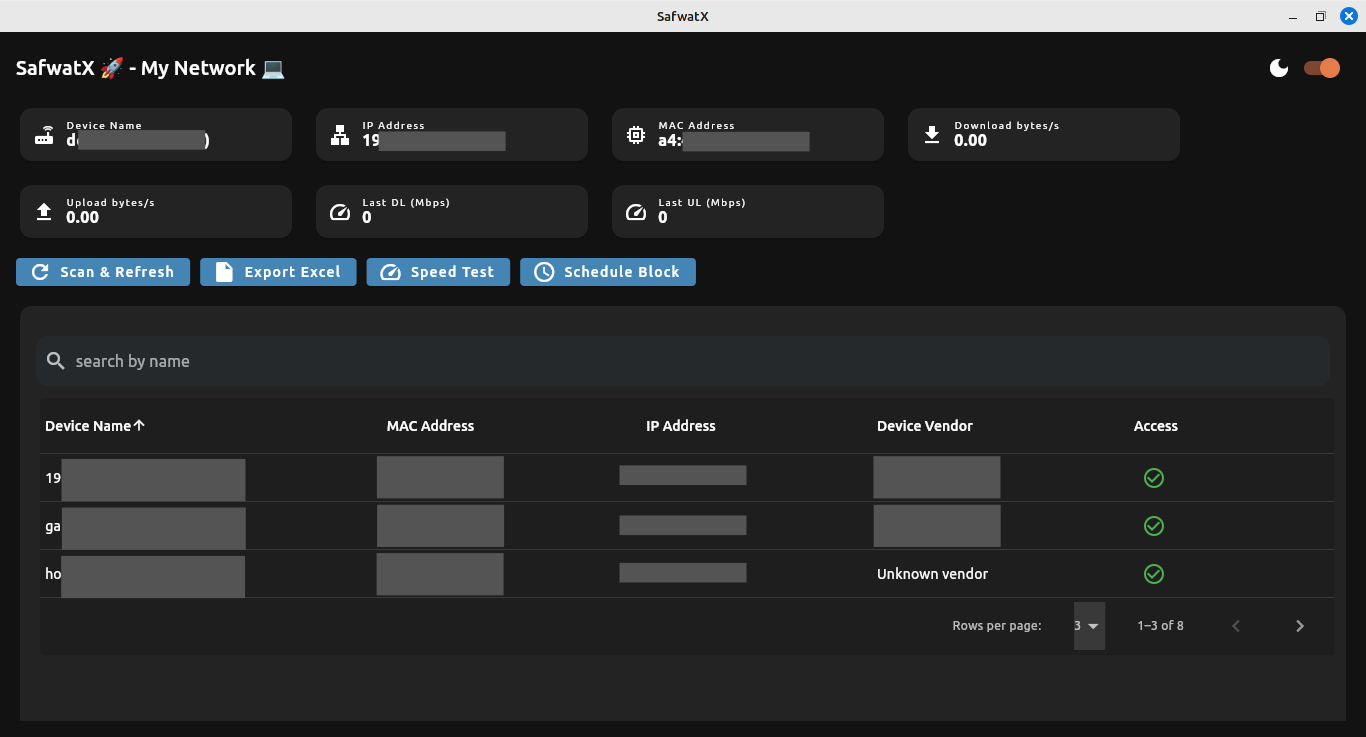
SafwatX is a robust, cross-platform Flutter application designed for network management and monitoring. It enables users to scan network devices, monitor bandwidth, block/unblock devices using ARP spoofing, and export data for analysis.
-
Network Device Scanning: Discover devices with details like IP, MAC, hostname, vendor and blocking status.
-
Bandwidth Monitoring: Track download and upload speeds.
-
Device Blocking/Unblocking: Restrict network access for specific devices.
-
Speed Testing: Measure network performance with integrated speed tests (windows upload speed test not implemented ).
-
Data Export: Export device lists to Excel for reporting.
-
Cross-Platform Support: Windows and Linux.
- Flutter: Install Flutter.
- Git: To clone the repository.
- Platform-Specific Requirements:
- Windows:
- WinPcap/Npcap for packet capture. Download winpcap.
- Admin privileges for ARP spoofing (in developing run editor with Admin privileges ).
- .exe file
- Linux:
- CLI tools:
arp-scan,arpspoof,ebtables,iptables,speedtest-cli,dig,arping. libpcapfor packet capture.- Root privileges for network operations (the linux file in project root already ask for password when run in debug and release).
- .deb file
- CLI tools:
- Windows:
- Dependencies: Listed in
pubspec.yaml(e.g.,provider,excel,path_provider).
-
Clone the Repository:
git clone https://github.com/ZiadSafwat/safwatx.git cd safwatx -
Install Flutter Dependencies:
flutter pub get
-
Set Up Platform-Specific Tools:
- Windows:
- Install winpcap if not already present.
- Linux:
- Install required tools:
sudo apt update
sudo apt install arp-scan dsniff ebtables iptables dnsutils python3-speedtest-cli libpcap-dev
- Ensure
arpspoofandarping(fromdsniff) are accessible in the system PATH. - No asset setup is needed, as Linux uses system-installed tools.
- Install required tools:
- Windows:
-
Run the App:
- Windows (run editor with admin privileges):
flutter run
- Linux (the app will ask for root privileges):
- if you want to package app to debian run this :
flutter_distributor release --name=SafwatX --jobs=release-SafwatX-linux-deb
- i have modified the linux\runner\main.cc file to ask for root in debug and release app version:
   //old code
   //#include "my_application.h"
   //
   //int main(int argc, char** argv) {
   //  g_autoptr(MyApplication) app = my_application_new();
   //  return g_application_run(G_APPLICATION(app), argc, argv);
   //}
   // new code
   #include "my_application.h"
   #include <unistd.h>
   #include <stdlib.h>
   #include <sstream>
   #include <iostream>

   int main(int argc, char** argv) {
     if (getuid() != 0) {
       std::cerr << "Not running as root. Attempting to relaunch with pkexec...\n";

       // Rebuild command with GUI env variables
       std::stringstream command;
       command << "pkexec env DISPLAY=$DISPLAY XAUTHORITY=$XAUTHORITY \"" << argv[0] << "\"";
       for (int i = 1; i < argc; ++i) {
         command << " \"" << argv[i] << "\"";
       }

       return system(command.str().c_str());
     }

     g_autoptr(MyApplication) app = my_application_new();
     return g_application_run(G_APPLICATION(app), argc, argv);
   }
- Windows (run editor with admin privileges):
-
Launch the App:
- On Windows,
WinArpSpoof.exestarts automatically to enable network operations. - On Linux, the app uses system CLI tools (
arp-scan,arpspoof, etc.). - The dashboard displays connected devices, bandwidth metrics, and control options.
- On Windows,
-
Scan Network:
- Click "Scan Network" to list devices with IP, MAC, hostname, and blocking status.
- Your device is marked as "(your Device)" in the list.
-
Monitor Bandwidth:
- View real-time download and upload speeds per sec, updated every 3 seconds.
- Windows uses
wmic; Linux uses/proc/net/dev.
-
Block/Unblock Devices:
- Select a device and toggle block/unblock.
- Windows uses
WinArpSpoof.exe block/unblock. - Linux uses
arpspoof,ebtables, andiptables.
-
Run Speed Test:
- Initiate a speed test to measure download and upload speeds (Mbps).
- Linux uses
speedtest-cli; Windows usesWinArpSpoof.exe speedtest(windows upload speed test not implemented ).
-
Export Data:
- Export the device list to
table_data.xlsxfor analysis.
- Export the device list to
- CLI Tool:
WinArpSpoof.exe(GitHub). - Key Operations:
- Scanning:
WinArpSpoof.exe scanto list devices (IP, MAC, hostname, vendor). - Blocking:
WinArpSpoof.exe block <IP>withstartfor ARP spoofing. - Unblocking:
WinArpSpoof.exe unblock <IP>. - Bandwidth: Uses
wmicto queryWin32_PerfFormattedData_Tcpip_NetworkInterfaceforBytesReceivedPersecandBytesSentPersec. - Speed Test:
WinArpSpoof.exe speedtestfor network performance (windows upload speed test not implemented ).
- Scanning:
- Dependencies:
- Winpcap for packet capture.
- Admin privileges.
- Setup:
- Place
WinArpSpoof.exeinassets/. - Run with admin privileges:
flutter run
- Place
- Notes:
- The app automatically starts
WinArpSpoof.exeon launch. - Cleanup ensures
WinArpSpoof.exestops on app exit.
- The app automatically starts
-
CLI Tools:
arp-scan: Network scanning.arpspoof: ARP spoofing for blocking.ebtables/iptables: MAC and IP-based firewall rules.speedtest-cli: Speed testing.dig: Hostname resolution.arping: ARP table restoration.ip: Interface and IP management.
-
Key Operations:
- Scanning:
arp-scan --interface=<iface> --localnetto list devices. - Blocking:
arpspoof -i <iface> -t <IP> <gateway>withebtablesandiptablesto drop packets. - Unblocking: Stops
arpspoofand removesebtables/iptablesrules, then usesarpingto restore ARP tables. - Bandwidth: Reads
/proc/net/devfor bytes received and sent, with a 1-second delta. - Speed Test:
speedtest-cli --jsonfor download/upload speeds in Mbps.
- Scanning:
-
Dependencies:
libpcap,arp-scan,dsniff,ebtables,iptables,dnsutils,speedtest-cli.- Root privileges.
-
Setup:
- Install dependencies:
sudo apt update
sudo apt install arp-scan dsniff ebtables iptables dnsutils python3-speedtest-cli libpcap-dev
- Run with root privileges (the app is configured to ask for root privileges)
- Install dependencies:
-
Notes:
- No asset files are needed; all tools are system-installed.
- Cleanup stops
arpspoofand unblocks all devices on app exit.
safwatx/
├── assets/
│   └── WinArpSpoof.exe          # Windows CLI tool
├── lib/
│   ├── models/
│   │   └── device_model.dart    # Device data model
│   ├── providers/
│   │   └── network_provider.dart # State management
│   ├── screens/
│   │   └── Dashboard/           # UI components
│   └── services/
│       ├── services.dart        # NetworkManager interface
│       ├── linux_network_manager.dart # Linux implementation
│       └── windows_network_manager.dart # Windows implementation
└── pubspec.yaml                 # Dependencies and assets
- WinArpSpoof.exe Fails to Start:
- Verify it’s in
assets/and listed inpubspec.yaml. - Run with admin privileges.
- Ensure winpcap is installed.
- Test manually:
WinArpSpoof.exe start
- Verify it’s in
- Bandwidth Shows 0.0:
- Generate network traffic (e.g., stream a video).
- Check
wmicoutput:wmic path Win32_PerfFormattedData_Tcpip_NetworkInterface get BytesReceivedPersec,BytesSentPersec
- Scanning Fails:
- Ensure
arp-scanis installed and accessible (sudo arp-scan --localnet). - Run with root privileges.
- Ensure
- Blocking Fails:
- Verify
arpspoof,ebtables, andiptablesare installed. - Check for conflicting firewall rules:
sudo iptables -L -v -n
sudo ebtables -L
- Verify
- Bandwidth Shows 0.0:
- Confirm the correct interface (e.g.,
eth0):cat /proc/net/dev
- Generate traffic (e.g., download a file).
- Confirm the correct interface (e.g.,
ARP spoofing is a Man-in-the-Middle attack and is considered illegal or unauthorized on networks you don't own or manage. Always use this code only in educational labs or networks where you have explicit permission.
This project is licensed under the MIT License. See LICENSE for details.
- Maintainer: Ziad Safwat Elaraby (ziadsafwataraby@gmail.com)
- Repository: github.com/ZiadSafwat/SafwatX
- Windows CLI Tool: Website
Built with 💙 using Flutter and open-source tools.