A modern, lightweight JavaScript library for creating beautiful web-based presentations with multiple input formats (HTML, Markdown, JSON).


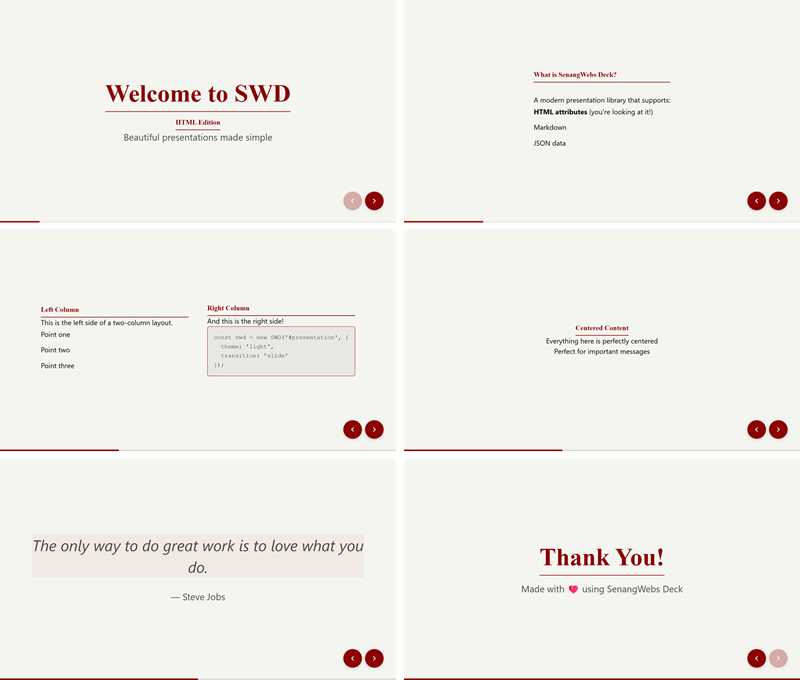
- Multiple Input Formats: Create slides using HTML attributes, Markdown, or JSON
- 10+ Built-in Layouts: Cover, two-column, center, quote, image layouts, and more
- 7 Beautiful Themes: Light, dark, gradient, minimal, corporate, creative, and academic
- Smooth Transitions: Slide, fade, zoom, flip animations
- Keyboard & Touch Navigation: Full keyboard shortcuts and swipe gestures
- Export Options: Export to PDF, HTML, or JSON
- Responsive Design: Works on desktop, tablet, and mobile
- Accessibility: WCAG 2.1 compliant with full keyboard navigation
npm install senangwebs-deck<link
rel="stylesheet"
href="https://cdn.jsdelivr.net/npm/senangwebs-deck/dist/swd.css"
/>
<script src="https://cdn.jsdelivr.net/npm/senangwebs-deck/dist/swd.js"></script><!DOCTYPE html>
<html>
<head>
<link
rel="stylesheet"
href="https://cdn.jsdelivr.net/npm/senangwebs-deck/dist/swd.css"
/>
</head>
<body>
<div id="presentation">
<div
data-swd-page
data-swd-layout="cover"
data-swd-background="gradient-blue"
>
<h1>Welcome to SWD</h1>
<p>Beautiful presentations made easy</p>
</div>
<div data-swd-page data-swd-layout="default">
<h2>Getting Started</h2>
<p>Create amazing slides with minimal effort.</p>
</div>
</div>
<script src="https://cdn.jsdelivr.net/npm/senangwebs-deck/dist/swd.js"></script>
<script>
const deck = new SWD('#presentation', {
theme: 'light',
transition: 'slide',
});
</script>
</body>
</html><div id="presentation" data-swd-source="markdown"></div>
<script>
const deck = new SWD('#presentation', {
source: 'markdown',
markdownUrl: './slides.md',
theme: 'light',
});
</script>slides.md:
<!-- slide: cover -->
<!-- background: gradient-blue -->

# Welcome to SWD

Beautiful presentations made easy

---

<!-- slide: default -->

## Getting Started

Create amazing slides with minimal effort.const slides = {
slides: [
{
layout: 'cover',
title: 'Welcome to SWD',
subtitle: 'Beautiful presentations made easy',
background: 'gradient-blue',
},
{
layout: 'default',
title: 'Getting Started',
content: 'Create amazing slides with minimal effort.',
},
],
};
const deck = new SWD('#presentation', {
source: 'json',
data: slides,
});Initialize slide configurations directly on the presentation container element using standard HTML attributes:
| HTML Data Attribute | Config Option | Description & Options |
|---|---|---|
data-swd-theme |
theme |
light, dark, gradient, minimal, corporate, creative, academic |
data-swd-transition |
transition |
slide, fade, zoom, flip, none |
data-swd-transition-speed |
transitionSpeed |
fast (300ms), normal (500ms), slow (800ms), or speed in ms |
data-swd-keyboard |
keyboard |
true or false to toggle keyboard shortcuts |
data-swd-controls |
controls |
true or false to toggle navigation UI controls |
data-swd-progress |
progress |
true or false to toggle progress bar UI |
data-swd-loop |
loop |
true or false to loop from last to first slide |
data-swd-autoplay |
autoplay |
true or false to auto-play presentation |
data-swd-autoplay-delay |
autoplayDelay |
Delay between slides in milliseconds (default: 3000) |
data-swd-source |
source |
Source format: html, markdown, or json |
data-swd-markdown-url |
markdownUrl |
Path to external markdown slides file |
data-swd-json-url |
jsonUrl |
Path to external JSON slides file |
Example:
<div
  data-swd-id="presentation"
  data-swd-theme="dark"
  data-swd-transition="zoom"
  data-swd-transition-speed="slow"
  data-swd-controls="true"
  data-swd-progress="true"
>
  <!-- slides go here -->
</div>cover- Full-screen title slidedefault- Single column contentcenter- Centered contenttwo-cols- Split left/right columnsthree-cols- Three equal columnssection- Section dividerquote- Large quote displayimage-right- Content left, image rightimage-left- Image left, content rightfull-image- Full-screen image with overlay
light- Clean, bright themedark- Dark modegradient- Colorful gradientsminimal- Ultra-minimalcorporate- Professional businesscreative- Bold and artisticacademic- Traditional scholarly
→/↓/Space/PageDown- Next slide (or next fragment)←/↑/PageUp- Previous slide (or previous fragment)Home- First slideEnd- Last slideF/f- Toggle fullscreenO/o- Toggle overview modeP/p- Pause/resume auto-slideEsc- Exit fullscreen or overview mode
Contributions are welcome! Please feel free to submit a Pull Request.
MIT License - see the LICENSE file for details.