A powerful, data-driven 360° virtual tour system built on A-Frame WebVR. Create immersive virtual tours with a visual editor, or integrate the lightweight viewer library into your own projects.





| viewer | editor |
|---|---|
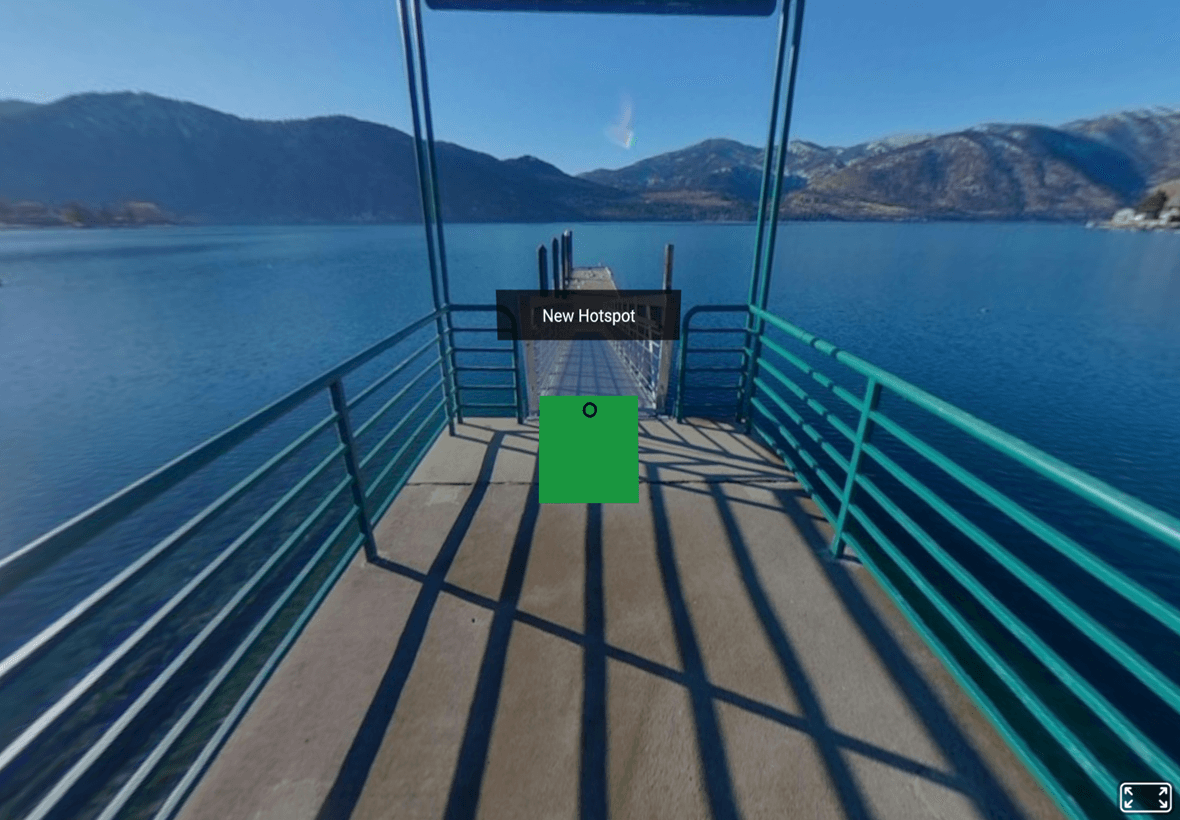 |
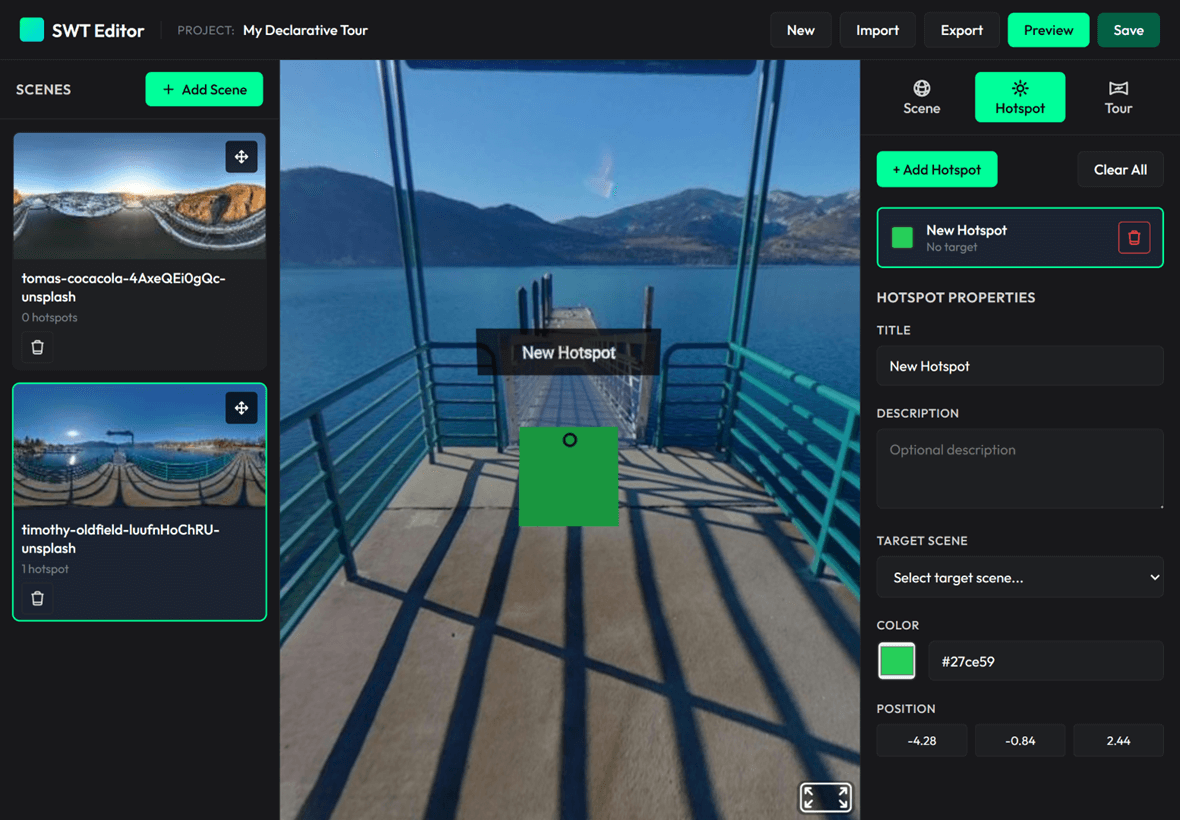 |
- Features
- Quick Start
- Custom Editor Integration
- Building from Source
- API Documentation
- Editor Features
- Browser Compatibility
- Documentation
- Contributing
- License
- Visual Editor - No-code tour builder with click-to-place hotspot interface
- Viewer Library - Lightweight (12KB minified) JavaScript library for embedding tours
- Standalone Viewer - Self-contained HTML viewer with drag-and-drop JSON support
- Mobile & VR Ready - Full touch, mouse, and VR headset support
- Customizable Hotspots - Custom colors, scales, and tooltip text
- Multiple Export Formats - JSON configuration or standalone HTML files
- Two Integration Modes - Declarative (HTML attributes) or Programmatic (JavaScript API)
- Modular Architecture - Six-controller editor pattern with clear separation of concerns
- Event System - React to scene loads, hotspot clicks, and navigation events
- Data-Driven - Pure JSON configuration, no internal state management
- Built with Rollup - Modern ES6+ modules with sourcemaps for debugging
-
Start Local Server:
npm install
npm run dev
-
Open Editor: Navigate to
http://localhost:8080/examples/editor.html -
Create Your Tour:
- Click "Add Scene" and upload 360° panorama images (JPG/PNG)
- Click "Add Hotspot" then click on the preview to place navigation points
- Configure hotspot properties: color, scale, tooltip text, target scene
- See changes instantly in the live A-Frame preview
-
Export Your Tour:
- JSON Export → Portable config file for library integration
- Viewer Export → Self-contained HTML file (no dependencies needed)
-
Test Standalone Viewer: Open
http://localhost:8080/examples/viewer.htmland drag-and-drop your exported JSON
Minimal Example (see examples/example-simple.html):
<!DOCTYPE html>
<html>
  <head>
    <script src="https://unpkg.com/senangwebs-tour@latest/dist/swt.min.js"></script>
  </head>
  <body>
    <a-scene id="tour-scene">
      <a-camera><a-cursor></a-cursor></a-camera>
    </a-scene>

    <script>
      const config = {
        initialScene: "room1",
        scenes: {
          room1: {
            name: "Living Room",
            panorama: "path/to/panorama1.jpg",
            hotspots: [
              {
                position: { x: 5, y: 0, z: -5 },
                action: { type: "navigateTo", target: "room2" },
                appearance: { color: "#FF6B6B", scale: 1.5 },
                tooltip: { text: "Go to Kitchen" },
              },
            ],
          },
          room2: {
            name: "Kitchen",
            panorama: "path/to/panorama2.jpg",
            hotspots: [
              {
                position: { x: -5, y: 0, z: 5 },
                action: { type: "navigateTo", target: "room1" },
                appearance: { color: "#4ECDC4", scale: 1.5 },
                tooltip: { text: "Back to Living Room" },
              },
            ],
          },
        },
      };

      const scene = document.querySelector("#tour-scene");
      scene.addEventListener("loaded", () => {
        const tour = new SWT.Tour(scene, config);
        tour.addEventListener("scene-loaded", (e) => {
          console.log("Now viewing:", e.detail.sceneName);
        });
        tour.start();
      });
    </script>
  </body>
</html>Build your own tour editor using the swt-editor.js bundle. Two initialization modes are supported:
Zero JavaScript - perfect for quick prototypes:
<!DOCTYPE html>
<html>
  <head>
    <script src="https://unpkg.com/senangwebs-tour@latest/dist/swt.js"></script>
    <script src="https://unpkg.com/senangwebs-tour@latest/dist/swt-editor.js"></script>
    <link
      rel="stylesheet"
      href="https://unpkg.com/senangwebs-tour@latest/dist/swt-editor.css"
    />
  </head>
  <body>
    <!-- Auto-initializes on page load -->
    <div
      data-swt-editor
      data-swt-auto-init="true"
      data-swt-project-name="My Virtual Tour"
    >
      <div data-swt-scene-list></div>
      <div data-swt-preview-area></div>
      <div data-swt-properties-panel></div>
    </div>
  </body>
</html>
Supported HTML Attributes:
| Attribute | Description | Default |
|---|---|---|
data-swt-editor |
Marks the editor container (required) | - |
data-swt-auto-init |
Auto-initialize on DOMContentLoaded | false |
data-swt-project-name |
Initial project name | "Untitled Tour" |
data-swt-auto-save |
Enable LocalStorage auto-save | false |
data-swt-auto-save-interval |
Auto-save interval (milliseconds) | 30000 |
data-swt-scene-list |
Scene list panel container | - |
data-swt-preview-area |
A-Frame preview container | - |
data-swt-properties-panel |
Hotspot properties panel | - |
Example: examples/editor-declarative.html
Full control - for custom workflows and advanced integrations:
<!DOCTYPE html>
<html>
  <head>
    <script src="https://unpkg.com/senangwebs-tour@latest/dist/swt.js"></script>
    <script src="https://unpkg.com/senangwebs-tour@latest/dist/swt-editor.js"></script>
    <link
      rel="stylesheet"
      href="https://unpkg.com/senangwebs-tour@latest/dist/swt-editor.css"
    />
  </head>
  <body>
    <div id="editor-container">
      <div id="scenes"></div>
      <div id="preview"></div>
      <div id="properties"></div>
    </div>

    <script>
      // Create editor instance with custom config
      const editor = new TourEditor({
        projectName: "My Custom Tour",
        autoSave: true,
        autoSaveInterval: 30000,
      });

      // Initialize with DOM elements
      editor.init({
        sceneListElement: document.getElementById("scenes"),
        previewElement: document.getElementById("preview"),
        propertiesElement: document.getElementById("properties"),
      });

      // Access editor programmatically
      editor.addEventListener("scene-added", (scene) => {
        console.log("New scene:", scene.name);
      });

      // Export tour configuration
      const config = editor.exportJSON();
    </script>
  </body>
</html>
Available Classes (all attached to window after loading swt-editor.js):
TourEditor- Main coordinator, orchestrates all managersSceneManagerEditor- Scene CRUD operationsHotspotEditor- Hotspot placement and editingPreviewController- A-Frame preview renderingUIController- DOM rendering and updatesProjectStorageManager- LocalStorage persistenceExportManager- JSON and HTML export
Examples:
examples/editor-declarative.html- Declarative HTML-only modeexamples/editor.html- Full-featured programmatic editor
# Install dependencies
npm install

# Build all bundles (viewer + editor)
npm run build

# Development mode (watch for changes)
npm run devnew SWT.Tour(aframeSceneElement, tourConfiguration);Parameters:
aframeSceneElement(HTMLElement) - A-Frame<a-scene>DOM elementtourConfiguration(Object) - Tour config (see structure below)
Returns: Tour instance
Both the editor and viewer use the same data format. Scenes are stored as an array:
{
  initialScene: "scene-id",       // Required: Starting scene ID
  cursor: ".custom-cursor",        // Optional: Cursor selector or false to disable
  scenes: [                        // Required: Array of scenes
    {
      id: "scene-id",              // Required: Scene identifier
      name: "Scene Name",          // Required: Display name
      panorama: "url-or-dataurl",  // Required: Image URL or base64
      thumbnail: "url",            // Optional: Thumbnail for editor
      startingPosition: {          // Optional: Initial camera orientation
        pitch: 0.1,                // Vertical angle (radians)
        yaw: 1.5                   // Horizontal angle (radians)
      },
      hotspots: [                  // Optional: Array of hotspots
        {
          id: "hotspot-1",         // Optional: Auto-generated if omitted
          position: {              // Required: 3D coordinates
            x: 10,
            y: 1.5,
            z: -3
          },
          action: {                // Required: Hotspot action
            type: "navigateTo",    // Required: Action type
            target: "scene-id-2"   // Required: Target scene ID
          },
          appearance: {            // Optional: Visual customization
            color: "#00ff00",      // Default: "#00ff00"
            scale: "1 1 1",        // Default: "1 1 1"
            icon: "arrow"          // Optional: Icon name or URL
          },
          tooltip: {               // Optional: Hover/focus text
            text: "Click here",    // Tooltip title
            description: "Details" // Optional: Extended description
          },
          cameraOrientation: {     // Optional: Camera direction when created
            pitch: -0.02,          // Vertical angle (radians)
            yaw: 2.06              // Horizontal angle (radians)
          }
        }
      ]
    }
  ]
}
Important Notes:
scenesis an array (not an object)- The library also accepts
scenesas an object keyed by ID for backward compatibility - Hotspot
positionis in 3D space (typically on 10-unit sphere surface)
Initialize and start the tour. Loads the initial scene and sets up event listeners.
Returns: void
Example:
const tour = new SWT.Tour(sceneElement, config);
tour.start();Navigate to a specific scene by ID.
Parameters:
sceneId(String) - Target scene ID (must exist inscenesobject)
Returns: void
Example:
tour.navigateTo("bedroom"); // Loads scene with id "bedroom"Get the ID of the currently active scene.
Returns: String - Current scene ID
Example:
const currentScene = tour.getCurrentSceneId();
console.log("Viewing:", currentScene); // "living-room"Clean up and remove the tour. Removes all hotspots, event listeners, and resets scene.
Returns: void
Example:
tour.destroy(); // Cleanup before removing from DOMListen to tour events. Custom event system (not DOM events).
Parameters:
eventName(String) - Event name (see Events section)callback(Function) - Handler function receiving event object
Returns: void
Example:
tour.addEventListener("scene-loaded", (event) => {
  console.log("Scene:", event.detail.sceneName);
});All events include a detail object with event-specific data.
Fired when tour.start() is called.
Detail:
{
  config: Object; // Full tour configuration
}Fired before a scene begins loading.
Detail:
{
  sceneId: String; // ID of scene being loaded
}Fired after a scene is fully loaded and rendered.
Detail:
{
  sceneId: String,   // ID of loaded scene
  sceneName: String  // Display name of scene
}Fired when a hotspot is clicked/activated.
Detail:
{
  hotspotId: String,     // Hotspot ID
  sceneId: String,       // Current scene ID
  action: Object         // Hotspot action object { type, target }
}const scene = document.querySelector("#vr-scene");
const tour = new SWT.Tour(scene, {
initialScene: "room1",
scenes: {
room1: {
name: "Living Room",
panorama: "360-living-room.jpg",
hotspots: [
{
position: { x: 5, y: 0, z: -5 },
action: { type: "navigateTo", target: "room2" },
appearance: { color: "#FF6B6B" },
tooltip: { text: "Kitchen" },
},
],
},
room2: {
name: "Kitchen",
panorama: "360-kitchen.jpg",
hotspots: [],
},
},
});
// Listen to events
tour.addEventListener("tour-started", (e) => {
console.log("Tour configuration:", e.detail.config);
});
tour.addEventListener("scene-loading", (e) => {
console.log("Loading scene:", e.detail.sceneId);
// Show loading indicator
});
tour.addEventListener("scene-loaded", (e) => {
console.log("Loaded:", e.detail.sceneName);
// Hide loading indicator
});
tour.addEventListener("hotspot-activated", (e) => {
console.log("Hotspot clicked:", e.detail.hotspotId);
console.log("Navigating to:", e.detail.action.target);
});
// Start the tour
tour.start();
// Programmatic navigation
setTimeout(() => {
tour.navigateTo("room2");
}, 5000);
// Cleanup
// tour.destroy();- Click-to-Place Hotspots - Raycast-based placement on panorama sphere
- Real-Time Preview - Instant A-Frame rendering as you edit
- Scene Management - Add, remove, reorder scenes with thumbnails
- Camera Control - Auto-point camera to selected hotspot with animation
- Position Validation - Hotspots clamped to 10-unit sphere radius
- 3D Position - Click-to-place or manual X/Y/Z coordinate input
- Navigation Target - Link to any scene in the tour
- Visual Customization - Color picker and scale slider
- Tooltips - Custom hover text for each hotspot
- LocalStorage Persistence - Auto-save projects (configurable interval)
- Import/Export - Load and save tour JSON configurations
- Data URLs - Panoramas embedded as base64 (no external files needed)
- Thumbnail Generation - Auto-generated scene previews (100x50px)
-
JSON Export - Portable configuration file for library integration
- Converts editor's
imageUrlto library'spanoramaformat - Compatible with
SWT.Tourviewer library - Use in custom integrations or standalone viewer
- Converts editor's
-
Viewer Export - Self-contained HTML file
- Embeds minified
swt.min.jslibrary - Includes full tour JSON configuration
- No external dependencies - works offline
- Drag-and-drop ready for distribution
- Embeds minified
- ES6 Module Architecture - Six-controller pattern with clear separation
- Sourcemaps - Debug original ES6 source in browser DevTools
- Two Init Modes - Declarative (HTML) or Programmatic (JS API)
- Comprehensive Event System - 30+ events including unified
changeevent for any modification - Load/Export API -
generateJSON()andloadJSON()for round-trip data management - Global Access - All classes attached to
windowfor console debugging
| Browser | Version | Notes |
|---|---|---|
| Chrome | 90+ | Recommended - best performance |
| Firefox | 88+ | Full support |
| Safari | 14+ | WebGL support required |
| Edge | 90+ | Chromium-based |
| Mobile Safari | iOS 14+ | Touch and gyroscope support |
| Chrome Mobile | Android 90+ | Touch and gyroscope support |
Requirements:
- WebGL 1.0 or higher
- ES6 module support (for editor)
- LocalStorage (for editor persistence)
VR Headsets:
- Oculus Quest 1/2/3
- Meta Quest Pro
- HTC Vive
- Valve Index
- Any WebXR-compatible headset
- EDITOR.md - Complete guide to building custom editors
- .github/copilot-instructions.md - AI agent development instructions
- examples/ - Live code examples and demos
Contributions are welcome! Here's how you can help:
- Report Bugs - Open an issue with reproduction steps
- Suggest Features - Share your ideas in GitHub Issues
- Submit PRs - Fork, create a feature branch, and submit a pull request
- Improve Docs - Help make documentation clearer and more comprehensive
MIT License - see LICENSE.md for details.