An easy to interface and configure as well as lightweight ROS 2 vehicle dynamics simulator focused on realistic actuator dynamics and kinematics. Simulates vehicle motion with configurable delay, filtering, and acceleration/velocity limits to accurately represent real world vehicle behavior, with all parameters easily observable on real-world robots.
The main intended use case is as development tool for trajectory following controllers, such as those (RPP, MPPI etc.) part of the Nav2 stack, both in manual development and in automated testing pipelines.
The video below shows an example with the Nav2 MPPI controller. The robot on the right has close to ideal actuators, and drives well, while the one on the left has more realistic actuation limits:
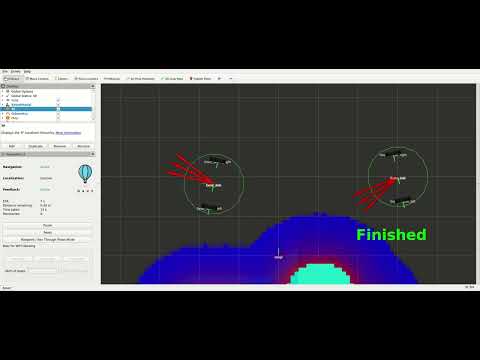
Small differences show up quickly when executing delicate maneuvers like a 180° turn. Right, a differential drive robot with close to ideal actuation, left, the same robot but with considerable actuator limitations. The left robot overshoots its goal several times as a result of the actuator tracking the control signal slower than the controller requires.
Key README contents:
For a bit more introduction, feel free to read my blog post.
- Single-yaml config file: One ROS param file with doubles and bools to configure the vehicle. No URDF or other additional files required.
- Three vehicle models: Bicycle (includes Ackermann), differential drive and omnidirectional. Many variations possible (see Configuration).
- Realistic actuator dynamics: Dead time delays, first order filtering, velocity/acceleration limits.
- Realistic localization noise: Odometry drift and map pose measurement noise for realistic sensor and fusio modelling, including the intermediate odom frame.
- Nav2 integration: Full compatibility with Nav2 navigation stack (publishes all the required topics + example setup provided).
- High frequency simulation: 1000 Hz internal simulation (publish rate configurable separately).
- RViz visualization: Real time 3D vehicle visualization with joint states (URDF generated exclusively from ROS parameters).
- Flexible clock modes:
Can follow wall clock, external simulation time (
/clocktopic) or act as time source.
Note: This simulator focuses on vehicle kinematics and dynamics (motion, actuators, localization). It does not simulate collisions, terrain, sensors (lidar, cameras), or other environmental aspects typically found in full physics simulators like Gazebo.
- Docker and Docker Compose
- Git
# Clone repository
git clone https://github.com/abaeyens/vehicle_dynamics_sim.git
cd vehicle_dynamics_sim
git submodule update --init --recursive

# Set up environment and build Docker image
./create_dot_env
docker compose build --pull

# Start container
docker compose run --rm --name sim app bash

# Inside container: build ROS 2 workspace
colcon build
source install/setup.bash

# Run simulator (default: bicycle model)
ros2 run vehicle_dynamics_sim sim_node
In another terminal:
# Enter running container
docker exec -it sim bash

# Send velocity commands
ros2 run vehicle_dynamics_sim publish_some_velocities
If desired, run unit and integration tests and print the results:
colcon test --packages-select vehicle_dynamics_sim
xunit-viewer -r build/vehicle_dynamics_sim/test_results -c
All tests run sequentially, allowing supervision of the vehicle movements in RViz and PlotJuggler. See also src/vehicle_dynamics_sim/test/README.md.
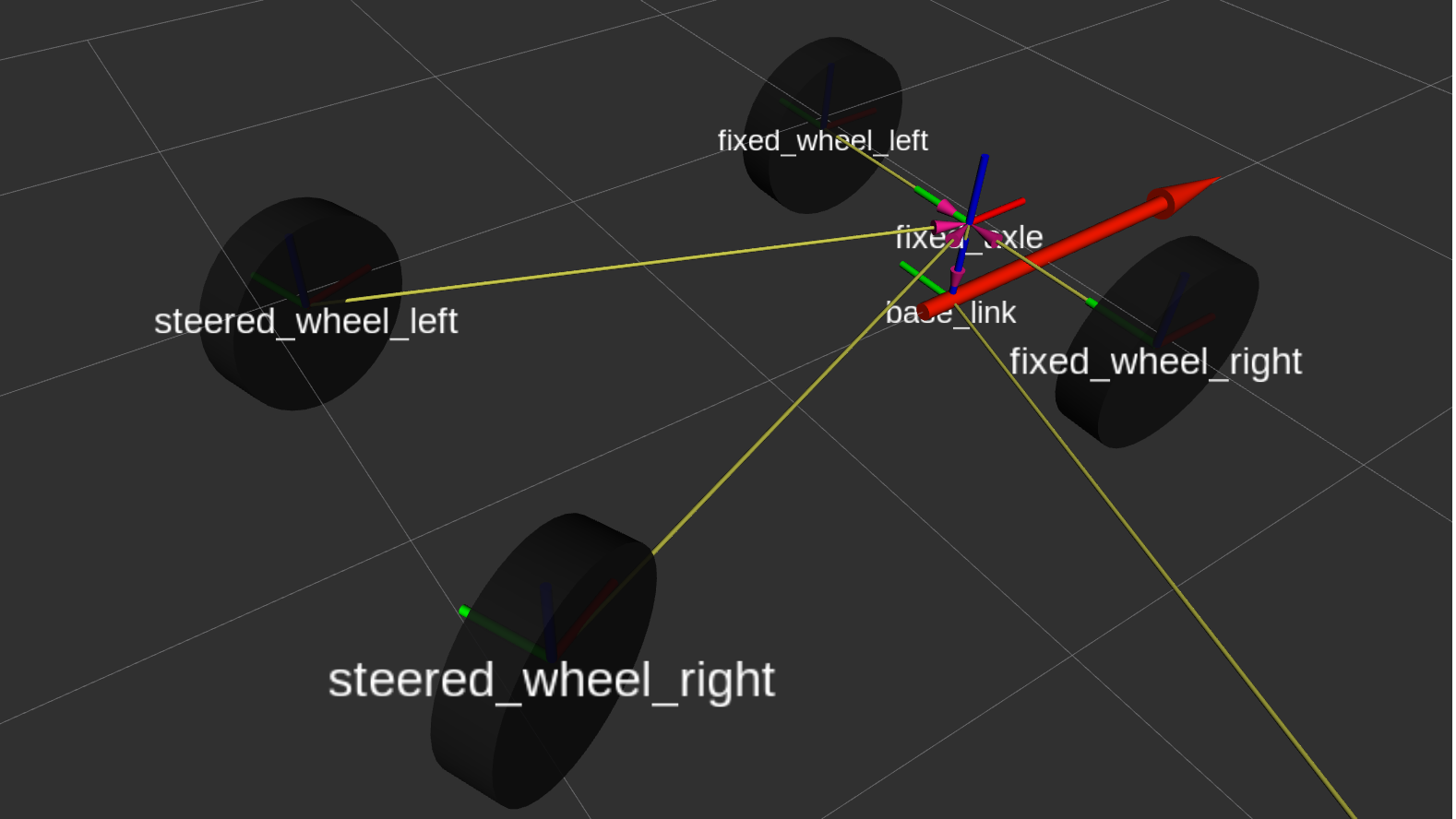
View the vehicle in 3D with coordinate frames and motion:
# In another terminal in the container
rviz2 -d layout.rviz
The RViz layout shows:
- Vehicle model with realistic Ackermann steering geometry (depends on the configured model)
- TF tree (map → odom → base_link)
- Odometry path visualization
Analyze vehicle dynamics data in real-time:
# In another terminal in the container
ros2 run plotjuggler plotjuggler --layout plotjuggler_layout.xml
Monitors:
- Commanded vs actual velocities
- Steering angles
- Position and heading over time
- Actuator responses
# Bicycle (includes Ackermann steering) - default
ros2 run vehicle_dynamics_sim sim_node

# Differential drive
ros2 run vehicle_dynamics_sim sim_node --ros-args \
  -p model:=differential

# Custom parameters from file
ros2 run vehicle_dynamics_sim sim_node --ros-args \
--params-file src/vehicle_dynamics_sim/params/all_vehicles.yaml# Using command line
ros2 topic pub twist_reference geometry_msgs/msg/Twist \
"{linear: {x: 1.0}, angular: {z: 0.5}}" -r 10
# Using the provided script
ros2 run vehicle_dynamics_sim publish_some_velocitiesLaunch the full Nav2 navigation stack with the simulator:
# Terminal 1: Start simulator
ros2 run vehicle_dynamics_sim sim_node \
  --remap twist_reference:=cmd_vel_nav
  --ros-args -p model:=differential \

# Terminal 2: Launch Nav2
ros2 launch nav2_example navigation.launch.py

# Terminal 3: Publish map for Nav2
ros2 launch nav2_example serve_map.launch.xml

# Terminal 4: Visualize in RViz
rviz2 -d layout.rviz
Then use RViz's "2D Nav Goal" tool to send navigation goals.
flowchart TB
    Input["twist_reference<br/>(input, for example from Nav2)"] --> BP

    ClockIn["/clock<br/>(optional)"]

    subgraph SimNode["SimNode"]
        direction TB

        subgraph Vehicle["Vehicle Model"]
            direction TB

            BP["Behavior Preprocessing<br/>(depends on vehicle type)"]

            subgraph Actuators["Actuators (depends on vehicle type)"]
                direction LR
                subgraph Drive["Drive Actuator"]
                    direction TB
                    D1["1. Dead time delay"]
                    D2["2. Velocity saturation"]
                    D3["3. Low pass filter"]
                    D4["4. Acceleration limit"]
                    D1-->D2-->D3-->D4
                end

                subgraph Steer["Steering Actuator"]
                    direction TB
                    S1["1. Dead time delay"]
                    S2["2. Position saturation"]
                    S3["3. Low pass filter"]
                    S4["4. Velocity limit"]
                    S1-->S2-->S3-->S4
                end

            end
            BP --> Drive
            BP --> Steer

            Kin["Kinematic Model<br/>(Bicycle/Differential/Omni)"]

            Drive --> Kin
            Steer --> Kin
        end

        Loc["Localization (optional)<br/>• Odometry drift<br/>• Measurement noise"]
        Kin --> Loc
    end

    ClockIn ----> SimNode

    ClockOut["/clock<br/>(optional)"]
    TF["/tf, /tf_static"]
    RD["/robot_description"]
    JS["/joint_states"]
    Odom["odom"]
    TA["twist_actual"]

    SimNode ----> ClockOut
    Kin ----> TA
    Loc --> TF
    Loc --> Odom
    Vehicle ----> RD
    Vehicle ----> JS

    RSP["Robot State Publisher"]

    RD --> RSP
    JS --> RSP
    RSP --> TF

    SimNode ~~~ RSP

    style SimNode fill:#e1f5ff
    style Vehicle fill:#fff4e1
    style BP fill:#d9ffd9
    style Drive fill:#ffe1e1
    style Steer fill:#ffe1e1
    style D1 fill:#d955d9
    style D2 fill:#d955d9
    style D3 fill:#d955d9
    style D4 fill:#d955d9
    style S1 fill:#d955d9
    style S2 fill:#d955d9
    style S3 fill:#d955d9
    style S4 fill:#d955d9
    style Kin fill:#d9ffd9
    style Loc fill:#f5e1ff
    style RSP fill:#fff0b3
The current dynamics puts the inertia in the actuator objects; for some vehicles, like the omnidirectional one, this is not ideal. Likely we'll therefore deviate from that in the future.
Main ROS 2 node that orchestrates the simulation.
Responsibilities:
- Time management (simulation clock or following external clock)
- Command input handling (twist messages)
- Vehicle state propagation
- Output publishing (TF, odometry, joint states, URDF)
- Localization simulation coordination
Key Topics:
-
Subscribed:
twist_reference(geometry_msgs/Twist) - Velocity commandstwist_stamped_reference(geometry_msgs/TwistStamped) - Timestamped velocity commands
Note: Both stamped and non-stamped are provided because Nav2 switched from non-stamped to stamped in ROS 2 Kilted, and we want to support both. Adjust the remap in sim.launch.xml as required.
-
Published:
/tf(tf2_msgs/TFMessage) - Transform tree/tf_static(tf2_msgs/TFMessage) - Static transforms/joint_states(sensor_msgs/JointState) - Joint positions for visualization/robot_description(std_msgs/String) - URDF modeltwist_actual(geometry_msgs/TwistStamped) - Actual velocity after dynamicsodom(nav_msgs/Odometry) - Odometry messages (pose + actual velocity)clock(builtin_interfaces/Time) - Optional simulation time
- Manages pose (position, heading)
- Publishes twist and joint states
- Provides robot description (URDF)
Implements Ackermann steering geometry for car-like vehicles.
Kinematics:
v_angular = v_forward * tan(steering_angle) / wheelbase
Key Parameters:
wheel_base: Distance between front and rear axles [m]drive_on_steered_wheel: Front wheel drive (true) or rear wheel drive (false)track_steered: Wheel spacing steered axle [m]vis_track_fixed: (visualization only) Wheel spacing fixed axle [m]vis_tire_diameter: (visualization only) Wheel diameter [m]
Use cases: Cars, Ackermann robots, outdoor autonomous vehicles
Implements differential drive kinematics with two independently driven wheels.
Kinematics:
v_forward = (v_left + v_right) / 2
v_angular = (v_right - v_left) / track
Key Parameters:
track: Distance between left and right wheels [m]vis_tire_diameter: (visualization only) Wheel diameter [m]
Behavior: Prioritizes rotation by scaling linear velocity if needed to respect actuator limits.
Use cases: Indoor mobile robots (e.g. Turtlebot), wheelchairs, tank drive platforms
Dynamic sequence:
- Dead time delay
- Velocity saturation (±max_velocity)
- First order low pass filter (time_constant)
- Acceleration limiting (±max_acceleration)
Parameters:
dead_time: Transport delay [s]time_constant: Filter time constant [s]max_velocity: Velocity limit [m/s]max_acceleration: Acceleration limit [m/s²]
The figure below shows these parameters visually
(except for max_velocity):
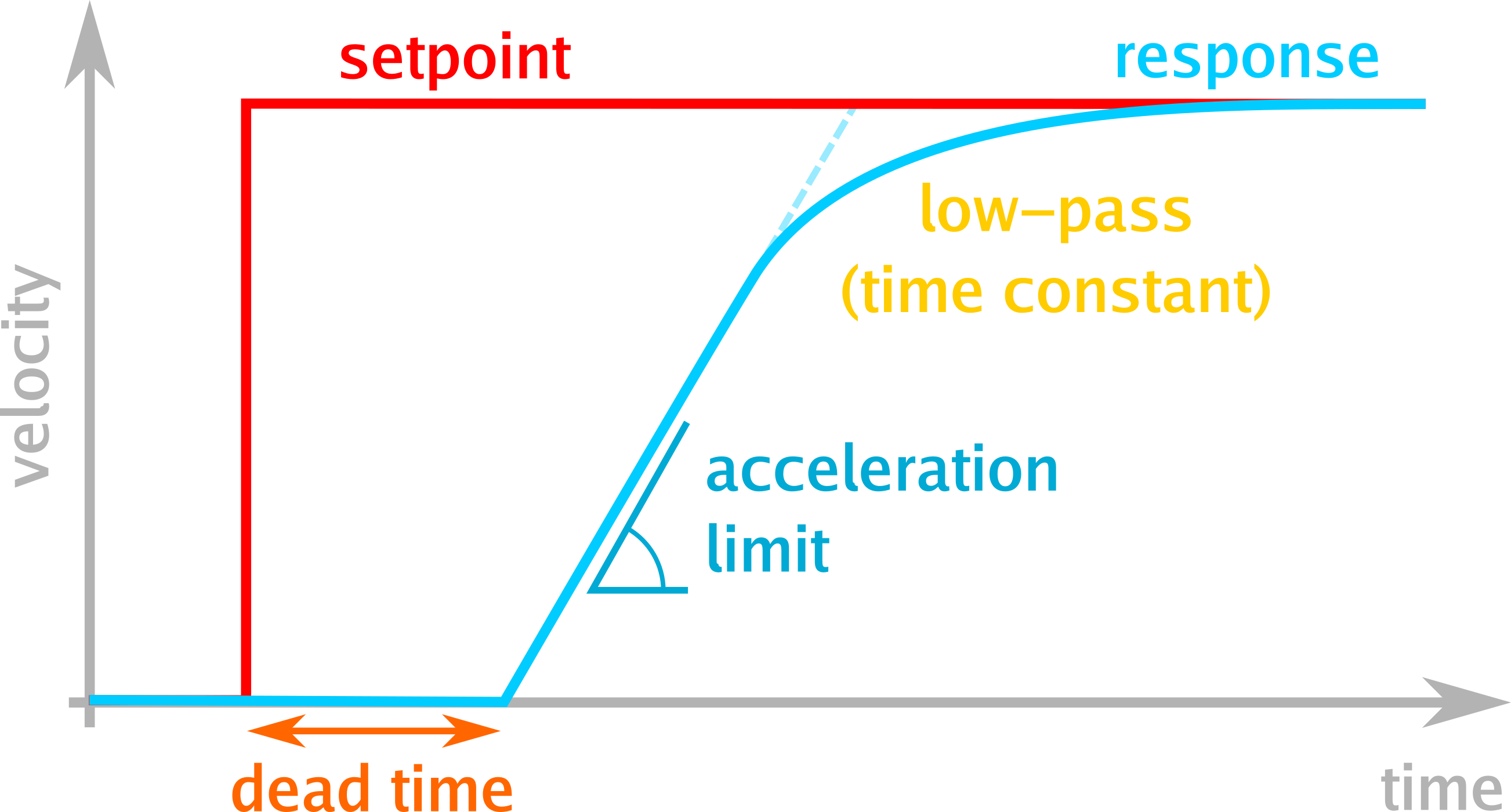
DriveActuator response (cyan) for a step reference (red),
showing the effect of three of the key parameters
(dead time, acceleration limits and the low pass effect).
Dynamic sequence:
- Dead time delay
- Position saturation (±max_position)
- First order low pass filter with angle wrapping
- Angular velocity limiting
Parameters:
dead_time: Transport delay [s]time_constant: Filter time constant [s]max_position: Steering angle limit [rad] (0 = unlimited)max_velocity: Angular velocity limit [rad/s]
Simulates delays from:
- Hydraulic systems
- Network latency
- Signal processing chains
Used in both DriveActuator and SteeringActuator.
Simulates realistic localization with two error sources:
1. Odometry Drift (Random Walk)
- Accumulates with distance traveled
- Represents wheel slip, encoder errors, IMU drift
- Parameters:
odom_walk_velocity_translation,odom_walk_velocity_rotation[m²/m, rad²/m]
2. Map Measurement Noise (Sampling)
- Time-correlated noise
- Represents GPS, SLAM, vision-based localization
- Parameters:
map_sample_noise_translation,map_sample_noise_rotation[m²/s, rad²/s]
Output:
- Smooth but drifting odometry (odom → base_link)
- Noisy but bounded map corrections (map → odom)
Note: All noise parameters are variances (σ²), not standard deviations.
Programmatic URDF generation for vehicle visualization.
Features:
- Dynamic robot description based on parameters
- Ackermann steering joints for bicycle vehicles
- Cylindrical wheels with correct orientation
- Compatible with robot_state_publisher and RViz
Please see extending_the_simulator.md.
Complete parameter documentation. See src/vehicle_dynamics_sim/params/all_vehicles.yaml for example values.
Note: Parameters prefixed with
vis_only affect visualization.
Parameters at sim_node namespace level:
| Parameter | Type | Default | Description |
|---|---|---|---|
step_rate |
double | 1000.0 | Internal simulation frequency [Hz] |
pub_rate |
double | 50.0 | Output publishing frequency [Hz] |
twist_reference_max_oldness |
double | 1.0 | Max age of commands before zeroing them out [s] |
be_reference_clock |
bool | false | Publish clock messages (sim time source) |
simulate_localization |
bool | false | Enable localization error simulation |
model |
string | "bicycle" | Vehicle type ("bicycle", "differential", "omni") |
| Parameter | Type | Description |
|---|---|---|
base_link_offset |
double | Distance from the fixed_axle to the base_link frame, measured along positive x [m] |
| Parameter | Type | Description |
|---|---|---|
wheel_base |
double | Front-to-rear axle distance [m] |
drive_on_steered_wheel |
bool | if false, drive on fixed axle, if true drive on the steered wheel(s) |
reverse |
bool | if false, the steered axle is in front of the fixed axle, if true the steered axle is behind the fixed axle |
vis_track_fixed |
double | Rear wheel spacing [m] (0 = single wheel) |
vis_track_steered |
double | Front wheel spacing [m] (0 = single wheel) |
vis_tire_diameter |
double | Wheel diameter for visualization [m] |
| Parameter | Type | Description |
|---|---|---|
track |
double | Left-to-right wheel distance [m] |
vis_tire_diameter |
double | Wheel diameter, for visualization [m] |
Common structure for drive_actuator and steering_actuator:
| Parameter | Type | Description |
|---|---|---|
dead_time |
double | Transport delay [s] |
time_constant |
double | Low pass filter time constant [s] |
max_velocity |
double | Velocity limit [m/s] or [rad/s] |
max_acceleration |
double | Acceleration limit [m/s²] (drive only) |
max_position |
double | Position limit [rad] (steering only, 0=unlimited) |
| Parameter | Type | Description |
|---|---|---|
odom_walk_velocity_translation |
double | Drift random walk velocity - translational [m²/m] |
odom_walk_velocity_rotation |
double | Drift random walk velocity - rotational [rad²/m] |
map_sample_noise_translation |
double | Map -> base_link localization noise density - translational [m²/s] |
map_sample_noise_rotation |
double | Map -> base_link localization noise density - rotational [rad²/s] |
Note: All noise parameters are variances (σ²), not standard deviations.
Example: odom_walk_velocity_translation: 0.0025 means σ = 0.05 m per meter traveled.
The simulator supports three mutually exclusive clock modes. Overview (more detailed description after the table):
| Behavior | use_sim_time |
be_reference_clock |
|---|---|---|
| 1. Real time | Behaves close to a real hardware system | false |
| 2. Follow External Clock | true | false |
| 3. Reference clock | false | true |
1. Real Time
- Uses system wall-clock time
- Behaves the closest to a real hardware system.
2. Following External Clock
- Simulator reads time from
/clocktopic - Synchronizes with other simulation tools (Gazebo, etc.)
- Must set
be_reference_clock: false
3. Reference Clock
- Simulator publishes
/clocktopic - Other nodes must set
use_sim_time: true
Note: See also all_vehicles.yaml for a list of (almost all) parameters.
sim_node:
  ros__parameters:
    model: bicycle
    model_params:
      bicycle:
        wheel_base: 2.7  # Typical car wheelbase
        drive_on_steered_wheel: false  # Rear-wheel drive
        vis_track_steered: 1.5
        vis_track_fixed: 1.5
        drive_actuator:
          max_velocity: 15.0  # ~54 km/h
          max_acceleration: 3.0
        steering_actuator:
max_position: 0.61 # ~35 degreessim_node:
ros__parameters:
model: bicycle
model_params:
bicycle:
wheel_base: 2.0
reverse: true # steered wheel behind fixed axle
drive_on_steered_wheel: true
vis_track_fixed: 1.1
vis_track_steered: 0.0 # single rear wheel
drive_actuator:
max_velocity: 5.0 # 18 km/h
max_acceleration: 3.0
steering_actuator:
max_position: 0.0 # can turn all aroundsim_node:
ros__parameters:
model: differential
model_params:
differential:
track: 0.5 # Compact robot
drive_actuators:
max_velocity: 0.8
max_acceleration: 1.0
dead_time: 0.05 # Fast responsesim_node:
ros__parameters:
simulate_localization: false # No localization errorsVehicle doesn't move:
- Check twist commands are being published
- Check topic mapping (use
rqt_graphto visualize node connections) - Verify
twist_reference_max_oldnessisn't too short - Check actuator velocity limits aren't too restrictive
Erratic motion:
- Check
dead_timeisn't too large - Verify
max_accelerationis reasonable - Look for command saturation in PlotJuggler
TF errors:
- Ensure robot_state_publisher node is running
- Check joint names match between URDF and joint_states
- Verify clock settings (
use_sim_timeconsistency across all nodes)
Nav2 integration issues:
- Confirm odom frame is being published
- Check
base_link_offsetaccounts for Nav2's expectations - Verify cmd_vel topic remapping if needed
Performance issues:
step_rate: 1000 Hz provides good accuracy. Not worth reducing due to high simulator efficiency (CPU usage is negligible)pub_rate: 50 Hz is sufficient for Nav2 and visualization. Adjust to match your real platform.
- ROS 2 Jazzy or later
- Eigen3 - Linear algebra
- fmt - String formatting
- robot_state_publisher - TF tree publishing
Note: Because the
robot_state_publisherversion distributed with Kilted and earlier does not yet support receiving the robot description over a topic, we backported that node from rolling to Jazzy and included it as a submodule in this repo. When building, this backported package automatically overlays the system install one.
All header files in src/vehicle_dynamics_sim/include/vehicle_dynamics_sim/ contain comprehensive docstrings with:
- Physical interpretation
- Mathematical models
- Units and coordinate frames
- Usage examples
- SimNode (
sim.hpp) - Main simulation node - Vehicle (
vehicles.hpp) - Base vehicle class - BicycleVehicle (
vehicles.hpp) - Ackermann steering implementation - DifferentialVehicle (
vehicles.hpp) - Tank steering implementation - DriveActuator (
vehicles.hpp) - Velocity actuator model - SteeringActuator (
vehicles.hpp) - Position actuator model - DeadTimeDelay (
vehicles.hpp) - Time delay model - Localization (
localization.hpp) - Localization simulator
- URDF generation (
urdf.hpp) - Programmatic robot description - Conversions (
conversions.hpp) - Pose/transform utilities - Parameter helpers (
declare_and_get_parameter.hpp) - ROS 2 parameter loading
- Support running faster than real time.
Contributions welcome! Please create an issue where we can discuss how to integrate your ideas most effectively.
Also always welcome: bug reports.