A Multi-Tenant Project & Team Management SaaS Backend
Stack: Python · FastAPI · PostgreSQL · Stripe
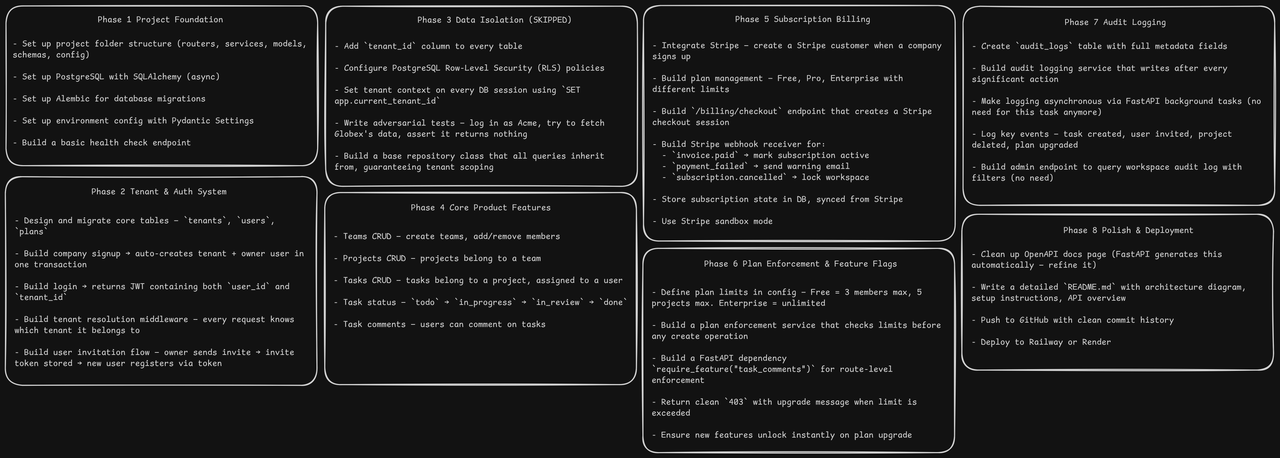
A backend API where companies sign up, get their own private workspace, and inside it they manage their teams, projects, and tasks — think a simplified Jira or Asana.
There are two levels:
- Level 1 — The Company (Tenant): Signs up, pays a monthly subscription, owns the workspace
- Level 2 — The Users: The company's employees, invited by the admin, use the workspace
Each company is completely isolated from every other company. That isolation is called multi-tenancy.
At the end of the day a company fully relies on Oryn's infrastructure to secure their data and the company also gets their share, they can work with their employees in peace, create teams, create projects within teams and assign tasks to employees without any data leakage.
| Tool | Purpose |
|---|---|
| FastAPI | Web framework |
| SQLAlchemy (async) | ORM |
| Alembic | Database migrations |
| PostgreSQL | Main database + Row-Level Security |
| Stripe | Subscription billing |
| Pydantic | Validation & settings |
| PyJWT | Auth tokens |
| Docker | Local development environment |
| Railway / Render | Deployment |
app/
├── api/
│   ├── routes/        # all endpoint handlers
│   └── dependencies.py
├── core/
│   ├── config.py      # environment variables
│   └── security.py    # password hashing
│   └── jwt.py         # jwt encoding & decoding
│   └── limiter.py     # Rate limiting Config file
├── database/
│   ├── migrations/    # contains all the migration history
│   ├── session.py     # async SQLAlchemy setup
│   ├── seed.py        # plan seeder
│   └── seed_stripe.py # Stripe product seeder
├── models/            # SQLAlchemy table definitions
├── schemas/           # Pydantic request/response shapes
├── services/          # business logic
├── static/            # has the interface of the API
└── main.py
To run this project, you will need to add the following environment variables to your .env file
DATABASE_URL= # Supports Postgres only
SECRET_KEY=
ALGORITHM=HS256
BACKEND_URL=http://127.0.0.1:8000/ # only for development, may change for production
STRIPE_SECRET_KEY=
STRIPE_WEBHOOK_SECRET=
STRIPE_PRO_PRICE_ID=
STRIPE_ENTERPRISE_PRICE_ID=
- Python 3.14+
- Pipenv
- make sure to have your
.envwith the needed keys and values
git clone https://github.com/abde1khaliq/oryn

# Go to project directory
cd oryn

# Setup the virtual environment
pipenv install
pipenv shell

# Migrate the database
alembic upgrade head

# Seed The Database with the plans & Then seed your stripe products
python -m app.database.seed_db_plans
python -m app.database.seed_stripe

# Run the server
uvicorn app.main:app --reload- Install Docker
- Clone the repository
- make sure to have your
.envwith the needed keys and values
git clone https://github.com/abde1khaliq/oryn
cd oryn
Build & run the backend image with a descriptive tag:
# Build and run the container
docker build -t oryn .
docker run -d --name oryn -p 8000:8000 --env-file .env oryn

# Run migrations
docker exec -it oryn alembic upgrade head

# Seed plans
docker exec -it oryn python -m app.database.seed_db_plans

# Seed Stripe products
docker exec -it oryn python -m app.database.seed_stripe
Install the Stripe CLI then run:
stripe login
stripe listen --forward-to localhost:8000/billing/webhook
Copy the whsec_... secret it prints and set it as STRIPE_WEBHOOK_SECRET in your .env.
| Group | Endpoints |
|---|---|
| Auth | Register, Login |
| Profile | Get profile, Get workspace, Update profile |
| Invitations | Create invite link, Validate token, Accept invite |
| Teams | Full CRUD + member management |
| Projects | Full CRUD scoped under teams |
| Tasks | Full CRUD + status flow scoped under projects |
| Comments | Full CRUD scoped under tasks |
| Billing | Checkout, Subscription status, Stripe webhook |
Full interactive docs available at /docs once the server is running.
Interactive documentation is available once the server is running:
- Swagger UI:
http://127.0.0.1:8000/docs - ReDoc:
http://127.0.0.1:8000/redoc
Portions of this documentation were generated using AI.