PowerGSLB is a DNS-based Global Server Load Balancing (GSLB) solution built as a PowerDNS Authoritative Server Remote Backend. It continuously health-checks the endpoints behind your DNS records and returns only the live ones, honoring weighted priorities, client-IP / subnet persistence, DNS views (CIDR and GeoIP), and fallback rules.
- Main features
- Architecture
- Quick start with the published Docker image
- Persisting data
- Upgrading
- Building the Docker image
- Manual setup
- Configuration
- Database
- Web administration interface
- Record selection
- Health checks
- API
- Tests
- License
- Written in Python 3.12
- Built as PowerDNS Authoritative Server Remote Backend
- Modular and multithreaded architecture
- Systemd status and watchdog support
- Quick installation and setup
- All-in-one Docker image
- DNS GSLB configuration stored in a MySQL / MariaDB database
- Master-Slave DNS GSLB using native MySQL / MariaDB replication
- Multi-Master DNS GSLB using native MySQL / MariaDB Galera Cluster
- Web-based administration interface using w2ui
- JSON HTTP API for DNS queries and CRUD administration
- HTTPS support for the web server
- Record selection:
- DNS GSLB views (CIDR and GeoIP)
- Weighted (priority) records
- Fallback if all the checks fail
- Per-record client IP / subnet persistence
- Extendable health checks:
- Arbitrary command execution
- ICMP ping
- HTTP request
- TCP connect
- TLS connect
PowerGSLB runs a fixed set of cooperating service threads under a systemd-aware supervisor:
- Monitor - periodically reads the health-check configuration from the database, runs one check thread per monitored record, and maintains the in-memory set of records that are currently down. Rise / fall counters debounce flapping endpoints.
- DNS interface (default
127.0.0.1:8080, plain HTTP) - implements the PowerDNS Remote Backend protocol. PowerDNS forwards each query here; PowerGSLB filters the candidate records by query type, health status, view, weight, persistence, and fallback rules, and returns a JSON DNS response. - Admin interface (default
0.0.0.0:443, HTTPS) - the web management UI and its CRUD API. Authenticates via HTTP Basic Auth against the database (crypt(3) SHA-512 hashes, verified in constant time).
The two HTTP surfaces are served by separate handler classes on separate ports, so the admin API is never reachable on
the DNS port and vice versa. The supervisor integrates with systemd (READY=1, watchdog, STOPPING=1) and shuts the
threads down cooperatively on SIGTERM / SIGINT.
Click to expand the class diagram
The diagram below maps the application classes and their relationships. Standard-library and third-party base classes
are marked <<stdlib>> / <<builtin>>; the two helper modules that hold free functions are shown as <<module>>
pseudo-classes.
classDiagram
    direction TB

    %% ===== Entry point =====
    class PowerGSLB {
        +main()$ None
    }

    %% ===== system =====
    class Config {
        -dict _data
        +get(section, option, default) Any
        +items(section) dict
    }
    class _Section {
        -Config _config
        -str _section
        +get(option, default) Any
        +pop(option, default) Any
    }
    class SystemService {
        +Sequence~ServiceThread~ service_threads
        +float sleep_interval
        +float shutdown_timeout
        +start() None
        +systemd_notify(status, unset)$ None
        +watchdog_interval(default)$ float
    }
    class ServiceThread {
        <<Protocol>>
        +str name
        +start() None
        +is_alive() bool
        +shutdown(timeout) None
    }
    class password {
        <<module>>
        +hash_password(password)$ str
        +verify_password(password, stored)$ bool
    }
    class GeoIPReader {
        +frozenset~str~ CONTINENT_CODES$
        +frozenset~str~ COUNTRY_CODES$
        -Reader _reader
        +parse_geo_token(token)$ tuple | None
        +lookup(ip) tuple
        +close() None
    }

    %% ===== monitor =====
    class AbstractThread {
        <<abstract>>
        +float sleep_interval
        +run() None
        +shutdown(timeout) None
        +task()* None
    }
    class MonitorManager {
        -dict~int,CheckThread~ _threads
        -StatusRegistry _status_registry
        +build_check(check)$ Check
        +task() None
        +shutdown(timeout) None
    }
    class StatusRegistry {
        -set~int~ _status
        +add(id) None
        +remove(id) None
        +is_down(id) bool
        +get_writer(id) StatusWriter
        +retain(valid_ids) set
    }
    class StatusWriter {
        -StatusRegistry _registry
        +int content_id
        +set_down() None
        +set_up() None
        +is_down() bool
    }
    class CheckThread {
        +Check check
        +StatusWriter status_writer
        +content_id() int
        +task() None
    }

    %% ===== monitor/check =====
    class Check {
        <<abstract dataclass>>
        -dict _registry$
        +str name$
        +bool skip$
        +int interval
        +int timeout
        +int fall
        +int rise
        +create(spec)$ Check
        +configure(options)$ None
        +execute()* bool
    }
    class NoCheck {
        +name = "none"
        +skip = True
        +execute() bool
    }
    class IcmpCheck {
        +name = "icmp"
        +bool privileged$
        +str ip
        +execute() bool
    }
    class TcpCheck {
        +name = "tcp"
        +str ip
        +int port
        +execute() bool
    }
    class TlsCheck {
        +name = "tls"
        +str ip
        +int port
        +bool tls_verify
        +str host
        +execute() bool
    }
    class HttpCheck {
        +name = "http"
        +str url
        +str method
        +str expected_status
        +str body_match
        +bool tls_verify
        +str host
        +execute() bool
    }
    class ExecCheck {
        +name = "exec"
        +list~str~ args
        +int expected_code
        +str output_match
        +bool redirect_error
        +execute() bool
    }

    %% ===== server/http =====
    class HTTPServerManager {
        +str address
        +int port
        +bool ssl
        +str root
        +float keep_alive_timeout
        -type~HTTPRequestHandler~ _handler
        +run() None
        +shutdown(timeout) None
    }
    class _ThreadingHTTPServer {
    }
    class HTTPRequestHandler {
        <<abstract>>
        +str route$
        +Database database
        +StatusRegistry status_registry
        +bytes body
        +handle() None
        +do_GET() None
        +do_HEAD() None
        +do_POST() None
        +_handle_route()* None
    }
    class PowerDNSRequestHandler {
        +route = "dns"
        +content() str
    }
    class AdminRequestHandler {
        +route = "admin"
        -dict _commands$
        -set _data_tables$
        -dict _search_functions$
        +content() str
    }
    class queryparser {
        <<module>>
        +parse_query(query_string)$ dict
    }
    class QueryParserError {
        <<Exception>>
    }

    %% ===== database =====
    class MySQLDatabase {
        +Error
        +join_operation(op)$ str
        -_select(op, params) list
        -_modify(op, params) int
        -_execute_transaction(stmts) int
        +__enter__() Self
        +__exit__() None
    }
    class PowerDNSDatabaseMixIn {
        <<abstract>>
        +gslb_checks() list
        +gslb_domains(include_disabled) list
        +gslb_records(qname, qtype) list
    }
    class W2UIDatabaseMixIn {
        <<abstract>>
        +str password_mask$
        +check_user(user, password) list
        +get_*(recid) list
        +save_*(...) int
        +delete_*(ids) int
    }

    %% ===== stdlib bases =====
    class Thread { <<stdlib>> }
    class SimpleHTTPRequestHandler { <<stdlib>> }
    class HTTPServer { <<stdlib>> }
    class ThreadingMixIn { <<stdlib>> }
    class MySQLConnection { <<stdlib>> }
    class dict { <<builtin>> }

    %% ===== Inheritance =====
    dict <|-- _Section
    Thread <|-- AbstractThread
    AbstractThread <|-- MonitorManager
    AbstractThread <|-- CheckThread
    Check <|-- NoCheck
    Check <|-- IcmpCheck
    Check <|-- TcpCheck
    Check <|-- TlsCheck
    Check <|-- HttpCheck
    Check <|-- ExecCheck
    Thread <|-- HTTPServerManager
    ThreadingMixIn <|-- _ThreadingHTTPServer
    HTTPServer <|-- _ThreadingHTTPServer
    SimpleHTTPRequestHandler <|-- HTTPRequestHandler
    HTTPRequestHandler <|-- PowerDNSRequestHandler
    HTTPRequestHandler <|-- AdminRequestHandler
    PowerDNSDatabaseMixIn <|-- MySQLDatabase
    W2UIDatabaseMixIn <|-- MySQLDatabase
    MySQLConnection <|-- MySQLDatabase
    ServiceThread <|.. MonitorManager : satisfies
    ServiceThread <|.. HTTPServerManager : satisfies

    %% ===== Associations / composition =====
    PowerGSLB ..> Config : creates
    PowerGSLB ..> StatusRegistry : creates
    PowerGSLB ..> GeoIPReader : creates
    PowerGSLB ..> MonitorManager : creates
    PowerGSLB ..> HTTPServerManager : creates
    PowerGSLB ..> SystemService : creates
    Config ..> _Section : builds
    SystemService o--> "*" ServiceThread : supervises
    MonitorManager o--> "*" CheckThread : manages
    MonitorManager --> StatusRegistry
    MonitorManager ..> Check : create
    CheckThread --> Check
    CheckThread --> StatusWriter
    StatusRegistry ..> StatusWriter : creates
    StatusWriter --> StatusRegistry
    HTTPServerManager o--> _ThreadingHTTPServer : owns
    HTTPServerManager --> StatusRegistry
    HTTPServerManager --> GeoIPReader
    HTTPServerManager ..> HTTPRequestHandler : instantiates per request
    HTTPRequestHandler --> MySQLDatabase : per-connection
    HTTPRequestHandler --> StatusRegistry
    HTTPRequestHandler --> GeoIPReader
    AdminRequestHandler ..> MonitorManager : build_check (validate)
    AdminRequestHandler ..> queryparser : parse_query
    queryparser ..> QueryParserError : raises
    W2UIDatabaseMixIn ..> password : hash / verify
The fastest way to try PowerGSLB is the all-in-one image, which bundles PowerGSLB, PowerDNS Authoritative Server, MariaDB, and systemd on a single RHEL UBI 10 base.
The run below is volume-less and disposable: each docker run starts from a clean, freshly-initialized database, and
removing the container discards everything. That is the right mode for a demo and tests. For any data that must outlive
the container, see Persisting data below.
docker pull docker.io/acudovs/powergslb:2.1.2

docker run -it --privileged \
    --name powergslb --hostname powergslb \
    --tmpfs /run --tmpfs /tmp \
    docker.io/acudovs/powergslb:2.1.2
Find the container IP address and use it to reach the services:
CONTAINER_IP=$(docker inspect -f '{{range .NetworkSettings.Networks}}{{.IPAddress}}{{end}}' powergslb)Smoke-test DNS once the container is up:
dig @${CONTAINER_IP} example.com SOA
dig @${CONTAINER_IP} example.com A
dig @${CONTAINER_IP} example.com AAAA
dig @${CONTAINER_IP} example.com ANY
Then open the admin interface at https://${CONTAINER_IP}/admin/. Each container generates its own self-signed
certificate on first start, so the browser shows a security warning; proceed past it to reach the UI.
- Default username:
admin - Default password:
admin
Change the default password after first login. Edit the admin user in the admin UI under the "Users" section.
Manage and stop the container:
docker exec -it powergslb bash
docker stop powergslb
To reach the services on the host instead of the container IP, publish the ports with
-p 53:53/tcp -p 53:53/udp -p 443:443/tcp. Note that these may conflict with a DNS resolver or HTTPS service already
listening on the host, so connecting to the container IP is usually simpler.
The image ships an empty datadir and initializes the database on first start, so without a volume every run begins from
scratch. Any deployment whose data must outlive the container must mount a named volume at /var/lib/mysql:
docker volume create powergslb-db

docker run -it --privileged \
    --name powergslb --hostname powergslb \
    --tmpfs /run --tmpfs /tmp \
    -v powergslb-db:/var/lib/mysql \
    docker.io/acudovs/powergslb:2.1.2
First boot initializes the database inside the volume; later runs detect the existing data and reuse it untouched. A
bind mount (-v "$PWD/db:/var/lib/mysql") or a Kubernetes PVC works the same way.
Upgrading between PowerGSLB versions is a container swap; the volume is the only state carried across. Stop and remove the old container, pull (or rebuild) the new image, and run it with the same named volume:
docker stop powergslb && docker rm powergslb
docker pull docker.io/acudovs/powergslb:"$NEW_VERSION"

docker run -it --privileged \
    --name powergslb --hostname powergslb \
    --tmpfs /run --tmpfs /tmp \
    -v powergslb-db:/var/lib/mysql \
docker.io/acudovs/powergslb:"$NEW_VERSION"Build the image from a checkout of the repository instead of pulling it:
VERSION=$(PYTHONPATH=src python3 -c "from powergslb.version import VERSION; print(VERSION)")

docker build -f docker/Dockerfile --force-rm --no-cache -t powergslb:"$VERSION" .

docker run -it --privileged --name powergslb --hostname powergslb \
    --tmpfs /run --tmpfs /tmp \
powergslb:"$VERSION"The Docker image is the recommended way to run PowerGSLB. To install the Python package directly - for development, or to integrate with an existing PowerDNS and MariaDB - build a wheel and install it into a virtual environment.
Create a virtual environment (activation is required each time before use):
python3 -m venv --copies --system-site-packages --upgrade-deps .venv
source .venv/bin/activate
Install the build requirements and build the wheel:
pip install -r requirements-build.txt
pip wheel --wheel-dir dist --no-build-isolation --no-deps --verbose .
Install the built wheel:
pip install --force-reinstall --upgrade dist/powergslb-*-py3-none-any.whlRun the service against a configuration file (-c / --config is required):
powergslb -c /etc/powergslb/powergslb.tomlThe service also needs a MariaDB database with the schema and seed data loaded (database/scheme.sql and
database/data.sql), and a PowerDNS Remote Backend pointed at the DNS interface. See the files under docker/rootfs/
for reference configuration (powergslb.toml and pdns.conf.powergslb).
PowerGSLB is configured from a single TOML file, passed with -c / --config. The default file ships at
docker/rootfs/etc/powergslb/powergslb.toml and is deployed to
/etc/powergslb/powergslb.toml in the Docker image. Values are natively typed: ports and timeouts are integers, ssl
is a boolean, and the rest are strings.
| section | purpose | key options |
|---|---|---|
[database] |
MySQL / MariaDB connection | database, user, password, host, port, unix_socket |
[logging] |
Python logging | format, level |
[monitor] |
health-check engine | update_interval (seconds), icmp_privileged (bool) |
[server] |
DNS interface (Remote Backend) | address, port, keep_alive_timeout |
[admin] |
admin interface (web UI + API) | address, port, ssl, cert, key, ciphers, root |
[geoip] |
geo routing for views | database (path to a GeoIP database) |
The [database] is passed straight to mysql.connector as connect kwargs. When unix_socket is set it takes
precedence over host / port.
The [admin] certificate is self-signed, generated once on first container start (the powergslb-certgen oneshot
unit writes /etc/powergslb/powergslb.pem only if it is missing) so each deployment gets its own unique cert. Replace
cert with your own PEM for production - cert may bundle the private key, or point key at a separate key file.
Both [server] and [admin] accept keep_alive_timeout, the HTTP keep-alive idle timeout in seconds.
The [geoip] section database is the path to a MaxMind DB (MMDB) file. The Docker image bundles the
DB-IP IP-to-Country Lite at
/usr/share/powergslb/dbip-country-lite.mmdb; point database at a
MaxMind GeoLite2 / GeoIP2 file to swap it.
Every option can be overridden by an environment variable named POWERGSLB_<SECTION>_<OPTION> (uppercased), coerced to
the configured value's type. This is how the Docker image is tuned without editing the file. Examples across sections:
POWERGSLB_DATABASE_HOST=192.168.1.20                  # connect to a remote database
POWERGSLB_DATABASE_PORT=3306
POWERGSLB_DATABASE_UNIX_SOCKET=                       # empty: use host/port over TCP instead of the socket
POWERGSLB_LOGGING_LEVEL=INFO
POWERGSLB_SERVER_ADDRESS=0.0.0.0                      # expose the DNS backend beyond loopback
POWERGSLB_ADMIN_PORT=8443
POWERGSLB_GEOIP_DATABASE=/data/GeoLite2-Country.mmdb  # use a MaxMind file instead of the bundled DB-IP Lite
The [monitor] section tunes the health-check engine as a whole - update_interval is how often it re-reads the
monitor configuration from the database, and icmp_privileged selects the raw vs. datagram ICMP socket:
POWERGSLB_MONITOR_UPDATE_INTERVAL=2       # pick up monitor changes faster (handy for testing)
POWERGSLB_MONITOR_ICMP_PRIVILEGED=false   # use an unprivileged ICMP datagram socket
Individual health checks are not part of this file: each monitor is a row of JSON in the database, edited in the admin UI. See Health checks for the per-check parameters.
The DNS GSLB configuration lives in a MySQL 8 / MariaDB 10.5+ database. The schema uses a two-level model: an rrset
is one (domain, name, type) and owns its ttl and persistence; a record is one answer inside it (content plus
the monitor, view, weight, disabled and fallback flags). Record names are stored relative to the zone (@ for
the apex, otherwise the labels left of the domain), so in the admin grid the Domain column is authoritative and Name
is relative.
DNS invariants (CNAME exclusivity, SOA cardinality, rrset garbage collection) are enforced in the database itself via CHECK constraints and triggers, so both the web UI and handwritten SQL are covered.
The schema, seed data, entity-relationship diagram, table reference, and the rationale behind the design are documented in database/README.md.
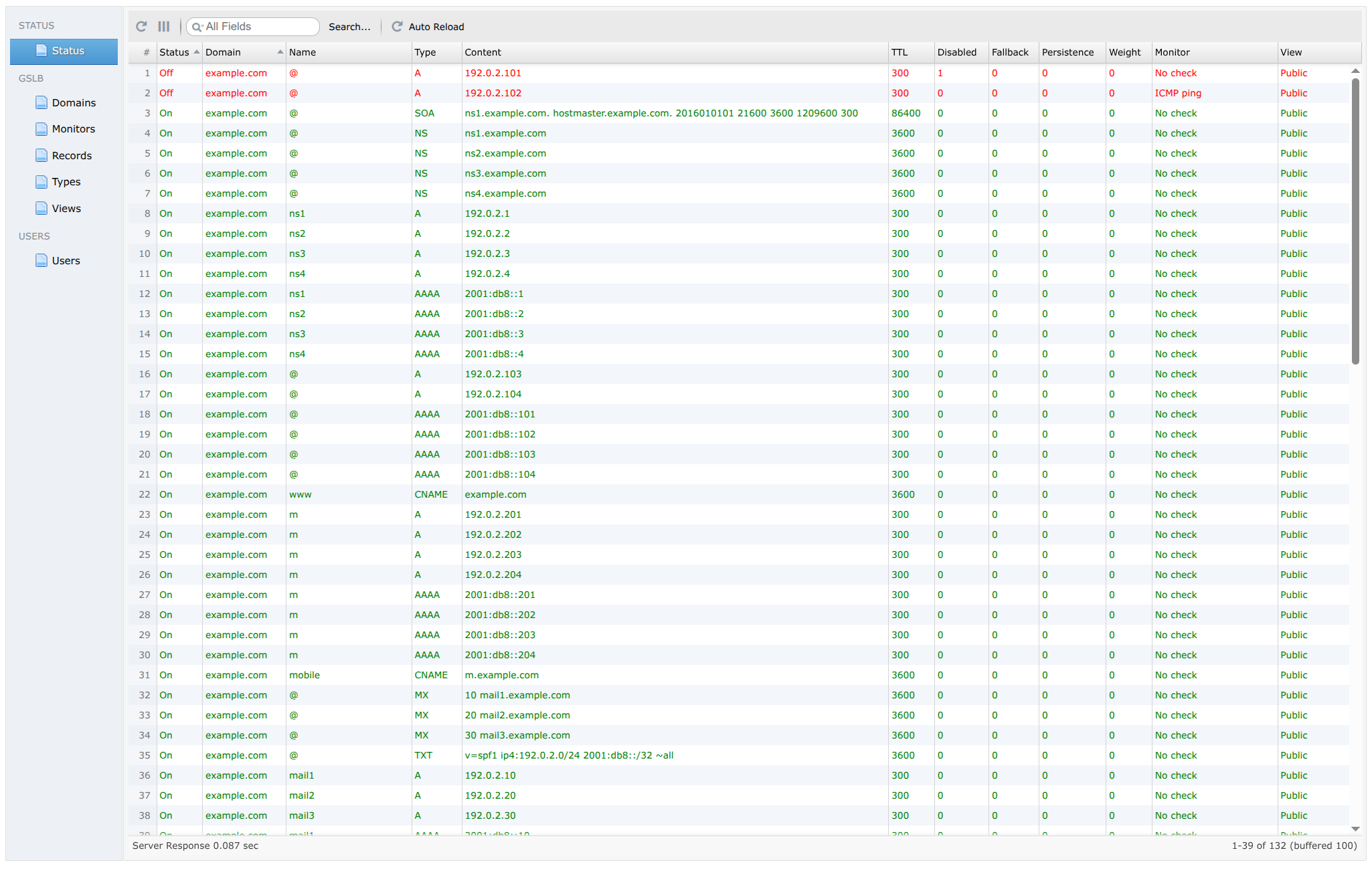
Status
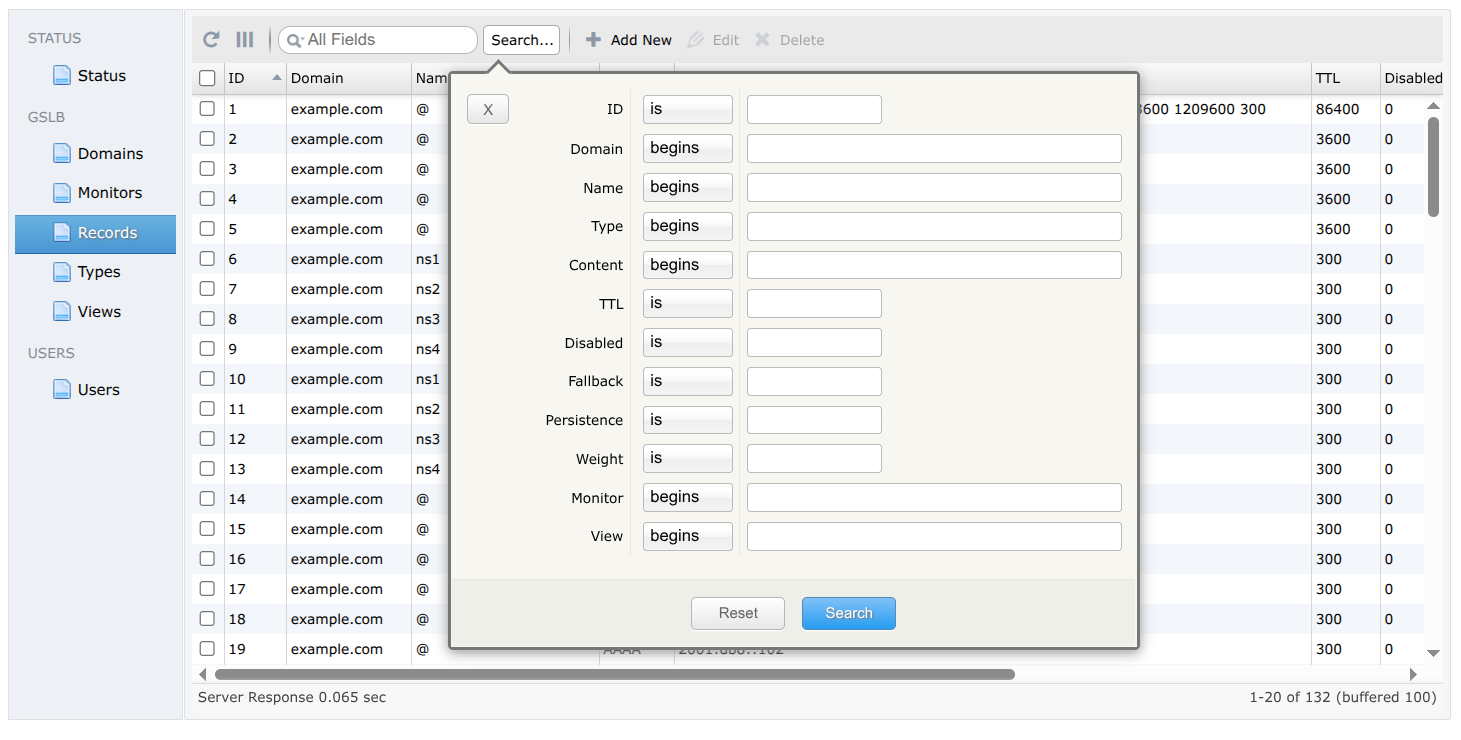
Advanced search
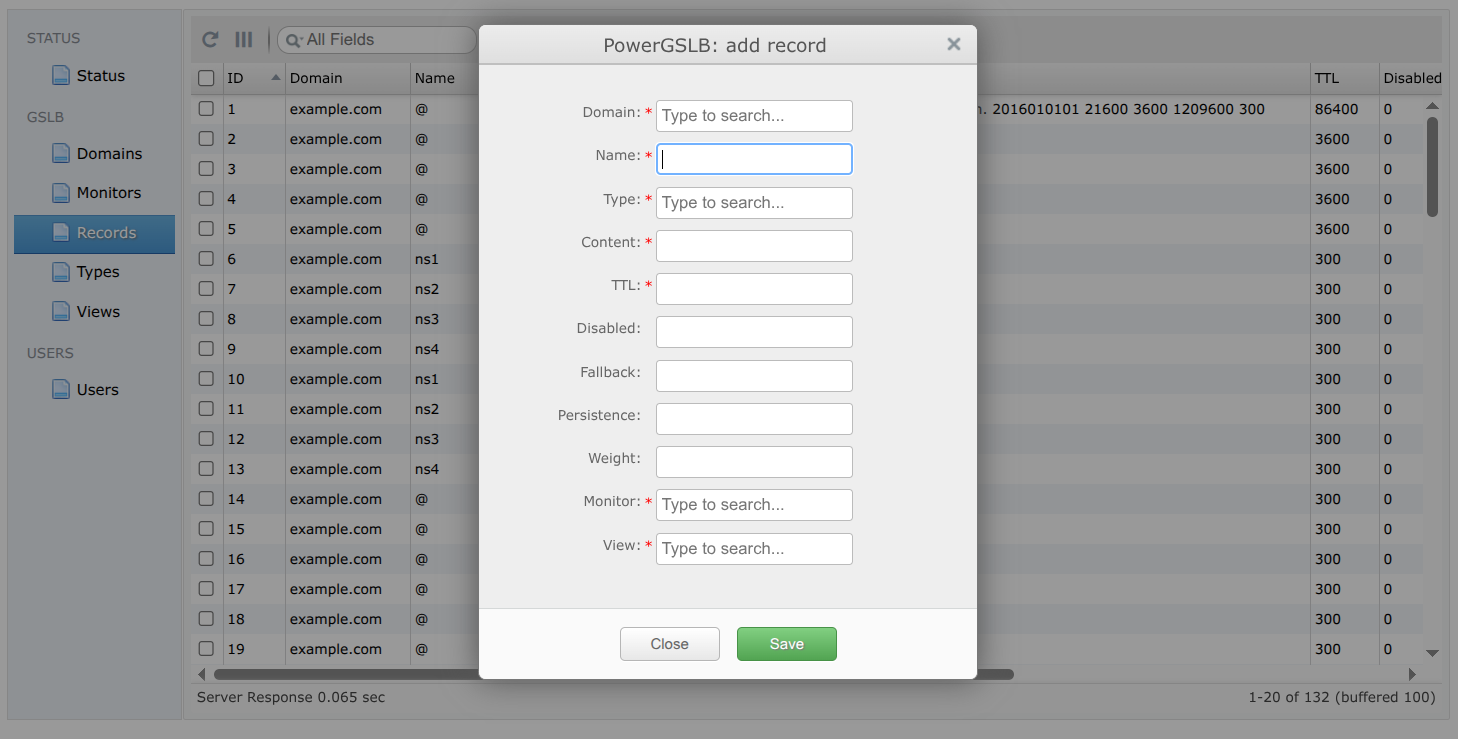
Add new record
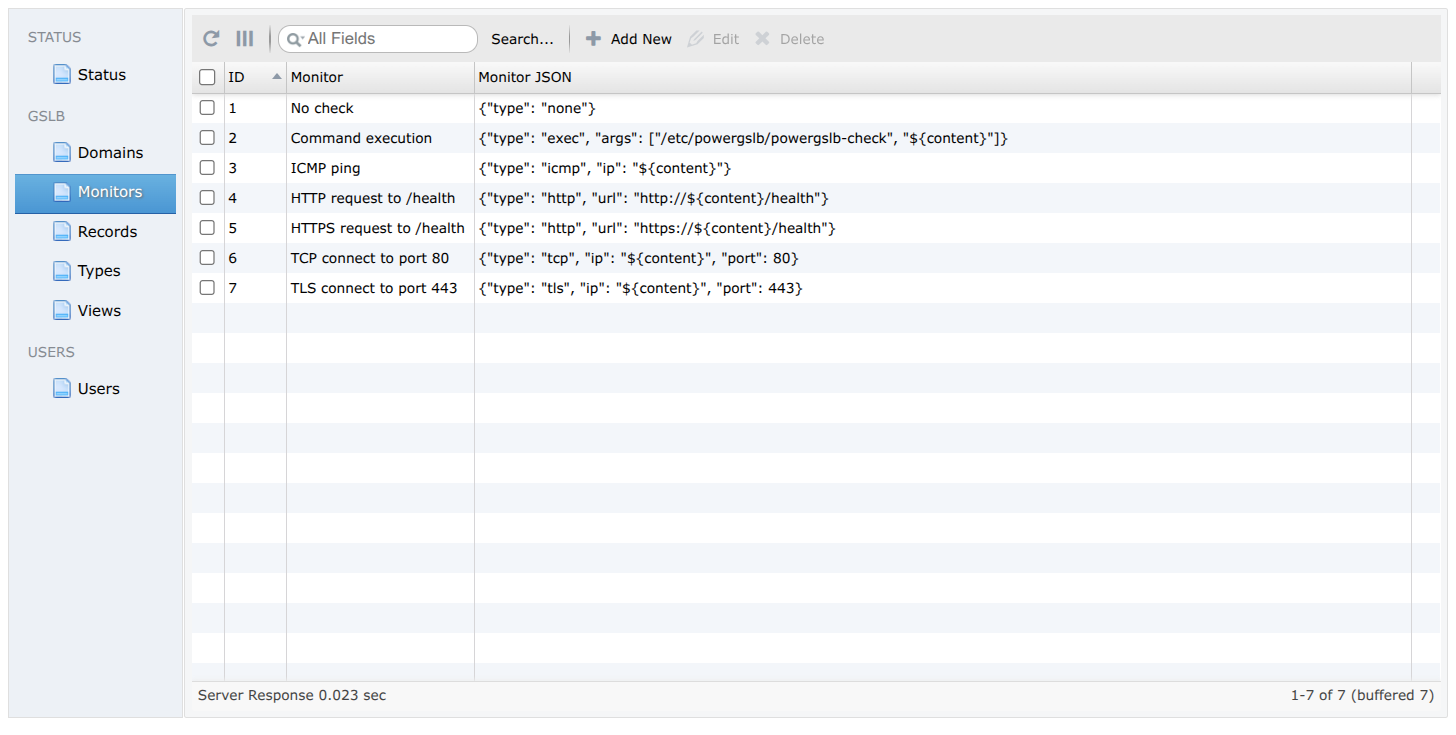
Monitors
Views
For each query PowerGSLB starts from every enabled record at the requested (name, type) and narrows the set with
record-level controls before answering, applied in order: view, then health, then weight, then persistence, with
fallback as a safety net. The client IP used for view and persistence is read from the X-Remotebackend-Real-Remote
header PowerDNS sends (the real resolver address), not the PowerDNS host.
A view maps clients to records, so one name can resolve differently per client. Each view holds a space-separated
rule, and a record references exactly one view; a record is a candidate only when the client matches the rule. The
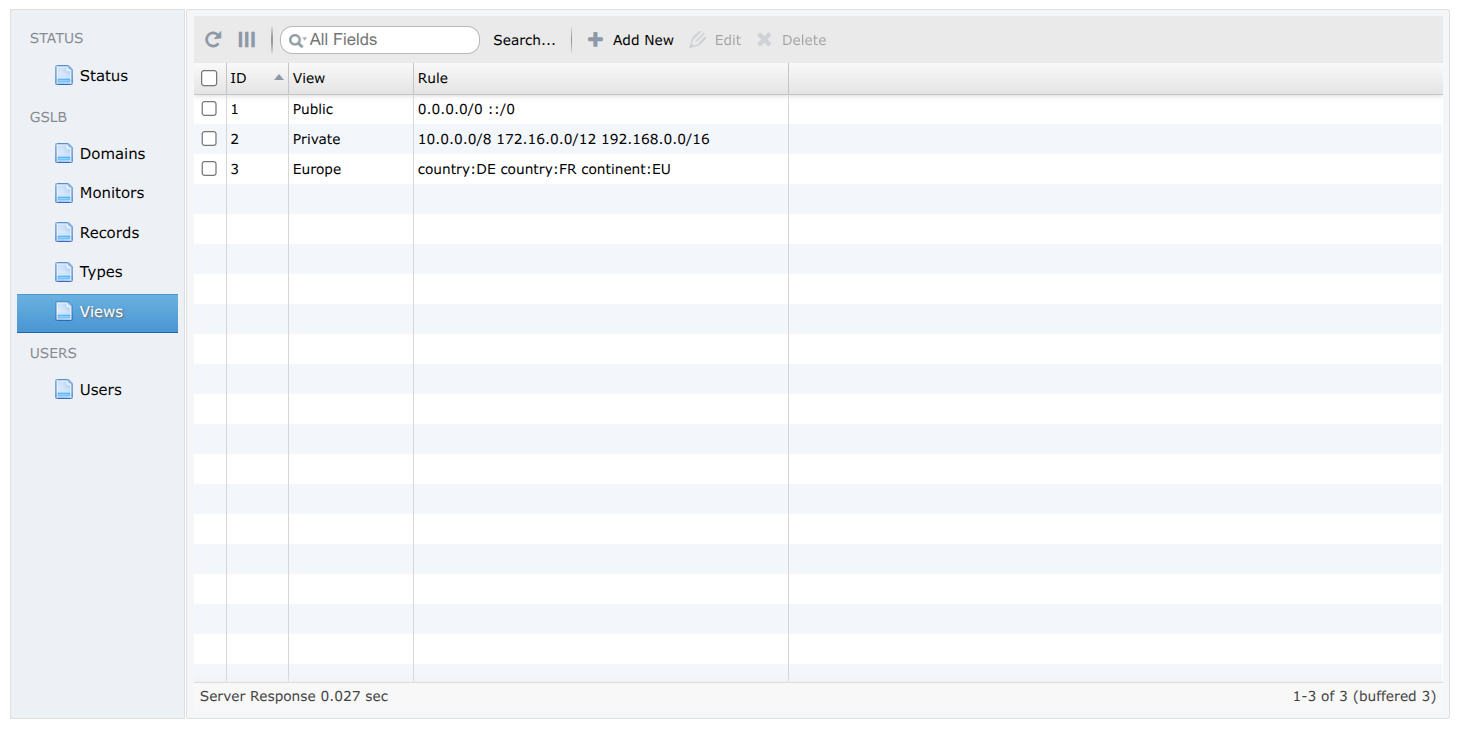
seed data ships a Public view (0.0.0.0/0 ::/0, matching every client), a Private view (the RFC 1918 ranges),
and a geo Europe view (country:DE country:FR continent:EU).
A rule is a space-separated list or CIDR and geo tokens - the client matches when it satisfies any one of them:
- CIDR (IPv4 or IPv6):
10.0.0.0/8,2001:db8::/32- matches when the client IP falls inside the range. country:<ISO>- a two-letter ISO 3166-1 alpha-2 country code, e.g.country:DE.continent:<CODE>- a two-letter continent code (AF,AN,AS,EU,NA,OC,SA), e.g.continent:EU.
Geo tokens are case-insensitive and may be mixed freely with CIDRs, e.g. 10.0.0.0/8 country:DE continent:EU. The
client's country and continent are resolved from the [geoip] database for each query. When no
database is loaded the geo tokens never match and CIDR behavior is unchanged.
Among the in-view, live records, only the highest-weight group is answered; equal-weight records all serve and load-share, while lower-weight records stay on standby. Giving a record a lower weight turns it into a backup that is used only once every higher-weight record at that name is down.
This enables a blue-green deployment: run the new servers alongside the old ones at a lower weight, then raise their weight above the current group to cut all traffic over at once. The old servers fall to standby but keep serving, so rolling back is just lowering the weight again.
The fallback flag is additive, not backup-only. A healthy fallback record competes in the normal (highest-weight
live) group like any other. Only when no record at the name is live are the fallback-flagged records answered
regardless of their own health, so the name still resolves during a full outage instead of going empty. To use a
fallback record as a true backup, give it a lower weight than the primaries. Liveness is decided by the
health checks below.
Best practice: set the fallback flag on the monitored records (or at least some of them). Then, if all checks
fail at once, PowerGSLB answers with the flagged records rather than an empty response, so the name keeps resolving and
clients reach a possibly recovering endpoint instead of a guaranteed failure.
Persistence pins a client to a stable answer without server-side state. The rrset's persistence value is a number of
bits: the client IP (as a whole integer) is shifted right by that many bits and taken modulo the records count, so
every client in the same subnet deterministically gets the same record. 0 returns the answer set unchanged; a value
at or above the address width collapses all clients onto a single record.
The bit count is the host part to discard, so it pins clients per subnet: the address width minus the prefix you want
to group by. For IPv4 (32 bits), 8 pins each /24 and 16 pins each /16; for IPv6 (128 bits), 64 pins each
/64. Example: with persistence = 8, clients 192.0.2.10 and 192.0.2.200 share the 192.0.2.0/24 subnet and
always get the same record, while 198.51.100.10 may get a different one.
A record can be administratively disabled in the admin UI. A disabled record is excluded from every DNS answer regardless of health, view, or weight - handy for draining an endpoint for maintenance without deleting its configuration.
Health checks are configured in the "Monitors" sidebar section in JSON format.
Supported check types:
| type | description |
|---|---|
| none | no check (always healthy) |
| exec | arbitrary command execution |
| icmp | ICMP ping |
| http | HTTP request |
| tcp | TCP connect |
| tls | TLS connect |
Parameters shared by all check types. Only type is required; the timing parameters are optional and fall back to
their defaults, so a monitor JSON may omit them.
| parameter | description | default |
|---|---|---|
| type | check type | |
| interval | seconds between checks | 3 |
| timeout | per-run check timeout in seconds | 1 |
| fall | number of failed checks to disable record | 3 |
| rise | number of successful checks to enable record | 5 |
The none type takes no parameters ({"type": "none"}); it is the "No check" monitor and is never run.
The token ${content} in any string value is replaced with the record's content (typically its IP address), so one
monitor can serve many records. Every other character - including %, $, { and } - is treated literally and
needs no escaping.
A check does not have to target the record's own content. Because the target is whatever you put in the monitor JSON,
you can omit ${content} and hard-code any IP, URL, or command, so a record's liveness is gated on a separate endpoint
or a script. This is useful when a record should serve only while some dependency is reachable - an origin behind a CDN
record, an upstream gateway, a database, or any external API:
{"type": "http", "url": "https://origin.example.com/health"}| parameter | description | default |
|---|---|---|
| type | exec | |
| args | command to execute and arguments | |
| expected_code | exit code that counts as healthy | 0 |
| output_match | regex against the first 64 KiB of output; "" skips the scan |
"" |
| redirect_error | merge the command's stderr into stdout so output_match sees both |
true |
Example:
{"type": "exec", "args": ["/etc/powergslb/powergslb-check", "${content}"]}The whole run is bounded by timeout; on timeout the process is killed and the check fails. Only the first 64 KiB of
output is kept for output_match; any excess is drained so a chatty command can still exit.
| parameter | description |
|---|---|
| type | icmp |
| ip | endpoint IP address |
Example:
{"type": "icmp", "ip": "${content}"}ICMP checks open a raw ICMP socket and therefore need CAP_NET_RAW or root. The shipped container satisfies this:
the service runs as root and powergslb.service keeps CAP_NET_RAW in CapabilityBoundingSet. To run unprivileged,
set icmp_privileged = false in the [monitor] config section: this uses an ICMP datagram socket, but only works when
the service's GID is inside the kernel net.ipv4.ping_group_range range:
sysctl -w net.ipv4.ping_group_range="0 2147483647"| parameter | description | default |
|---|---|---|
| type | http | |
| url | endpoint URL | |
| method | request method, GET or HEAD |
GET |
| expected_status | comma-separated codes and inclusive ranges, e.g. "101,200-204,300-308" |
"200-399" |
| body_match | regex against the first 64 KiB of body; GET only; "" skips the scan |
"" |
| tls_verify | verify the server TLS certificate | true |
| host | override the HTTP Host header; TCP destination unchanged; "" off |
"" |
Redirects are never followed: a 3xx is evaluated on its own status (accepted by the default success range).
Example:
{"type": "http", "url": "http://${content}/health"}Example with optional parameters - require an exact 200 carrying "ok" in the body, over self-signed HTTPS, and
override two timing defaults:
{
  "type": "http",
  "url": "https://${content}/health",
  "method": "GET",
  "expected_status": "200",
  "body_match": "\"status\":\\s*\"ok\"",
  "tls_verify": false,
  "host": "health.example.com",
  "interval": 5,
  "fall": 2
}| parameter | description |
|---|---|
| type | tcp |
| ip | endpoint IP address |
| port | endpoint port number |
Example:
{"type": "tcp", "ip": "${content}", "port": 80}The check opens a TCP connection to ip:port and passes as soon as the handshake completes; it sends no data and
reads no response. Connection setup is bounded by timeout; a refused connection or a timeout fails the check.
| parameter | description | default |
|---|---|---|
| type | tls | |
| ip | endpoint IP address | |
| port | endpoint port number | |
| tls_verify | verify the server TLS certificate | true |
| host | SNI server name and verified certificate name; "" falls back to ip |
"" |
Example:
{"type": "tls", "ip": "${content}", "port": 443}The check opens a TCP connection to ip:port and completes the TLS handshake. Connection setup and the handshake are
bounded by timeout. With tls_verify (the default true), an untrusted chain, an expired certificate, or a
hostname mismatch fails the check; set tls_verify to false to require only that the handshake completes. Unlike
tcp, which stops at the TCP handshake, tls confirms the endpoint actually serves TLS - use it for non-HTTP TLS
services (SMTPS, IMAPS, LDAPS, etc.) that the http check cannot handle.
With tls_verify (used by the http and tls checks), each check validates the endpoint chain against the image's
system trust store. To check endpoints served by a private or internal CA, add that CA so the checks trust it:
- Copy the CA certificate (PEM or DER, named
.crtor.pem) intodocker/rootfs/etc/pki/ca-trust/source/anchors/. - Rebuild the image.
The build runs update-ca-trust, folding the certificate into the system trust store that OpenSSL and Python's ssl
read, so tls_verify succeeds.
PowerGSLB exposes two HTTP interfaces, both returning JSON:
-
DNS backend - the PowerDNS Remote Backend protocol, read-only, plain HTTP (default
127.0.0.1:8080). It binds loopback by default, so reach it from inside the container or setPOWERGSLB_SERVER_ADDRESS=0.0.0.0to expose it.GET /dns/lookup/<qname>./<qtype>returns the filtered answers andGET /dns/getAllDomainsreturns the zone list. -
Admin API - the w2ui CRUD endpoint at
POST /admin/w2uiover HTTPS (default:443), behind HTTP Basic Auth. Parameters are form-encoded (also accepted on the GET query string); records are addressed bycmdand adatatable, andmonitorandvieware matched by name, not id.The same commands apply to every table -
datais one ofdomains,monitors,views,records,types,users,status:get-records- list a table; supportssearch,sort, andlimit/offsetpaging.get-record(recid=<id>) - fetch one row by id.get-items(field=<column>) - list the distinct values of one column.save-record(recid=0to insert,recid=<id>to update) - write one row fromrecord[...]fields.delete-records(selected[0]=<id>) - delete rows by id.
An update re-sends the whole row, so editing one field (a record's weight, say) is a read-modify-write:
get-record, change the field,save-recordwith the unchanged fields preserved.
# DNS backend (inside the container; loopback by default)
curl 'http://127.0.0.1:8080/dns/lookup/example.com./A'
curl 'http://127.0.0.1:8080/dns/getAllDomains'

# Admin API: list records (-k accepts the self-signed certificate)
curl -sk -u admin:admin https://powergslb/admin/w2ui -d cmd=get-records -d data=records

# Admin API: fetch one record by id (the id is the recid field from get-records)
curl -sk -u admin:admin https://powergslb/admin/w2ui -d cmd=get-record -d data=records -d recid=133

# Admin API: create an A record (omitted fields - disabled, fallback, weight, persistence - default to 0)
curl -sk -u admin:admin https://powergslb/admin/w2ui \
    -d cmd=save-record -d data=records -d recid=0 \
    -d 'record[domain]=example.com' \
    -d 'record[name]=app' \
    -d 'record[name_type]=A' \
    -d 'record[ttl]=60' \
    -d 'record[content]=192.0.2.10' \
    -d 'record[monitor]=No check' \
    -d 'record[view]=Public'

# Admin API: change a record's weight (recid=133 updates in place; re-send the row's other fields unchanged)
curl -sk -u admin:admin https://powergslb/admin/w2ui \
    -d cmd=save-record -d data=records -d recid=133 \
    -d 'record[domain]=example.com' \
    -d 'record[name]=app' \
    -d 'record[name_type]=A' \
    -d 'record[ttl]=60' \
    -d 'record[content]=192.0.2.10' \
    -d 'record[monitor]=No check' \
    -d 'record[view]=Public' \
    -d 'record[weight]=10'

# Admin API: delete a record by id
curl -sk -u admin:admin https://powergslb/admin/w2ui -d cmd=delete-records -d data=records -d 'selected[0]=133'

# Admin API: list / add domains
curl -sk -u admin:admin https://powergslb/admin/w2ui -d cmd=get-records -d data=domains
curl -sk -u admin:admin https://powergslb/admin/w2ui \
    -d cmd=save-record -d data=domains -d recid=0 \
    -d 'record[domain]=example.net'

# Admin API: list monitors / add a TCP check (monitor_json is the check definition; ${content} expands to the record)
curl -sk -u admin:admin https://powergslb/admin/w2ui -d cmd=get-records -d data=monitors
curl -sk -u admin:admin https://powergslb/admin/w2ui \
    -d cmd=save-record -d data=monitors -d recid=0 \
    -d 'record[monitor]=TCP 443' \
    -d 'record[monitor_json]={"type": "tcp", "ip": "${content}", "port": 443}'

# Admin API: list views / add a view (rule is a space-separated list or CIDR and geo tokens)
curl -sk -u admin:admin https://powergslb/admin/w2ui -d cmd=get-records -d data=views
curl -sk -u admin:admin https://powergslb/admin/w2ui \
    -d cmd=save-record -d data=views -d recid=0 \
    -d 'record[view]=Internal' \
    -d 'record[rule]=10.0.0.0/8 192.168.0.0/16'

# Admin API: add a geo view
curl -sk -u admin:admin https://powergslb/admin/w2ui \
    -d cmd=save-record -d data=views -d recid=0 \
    -d 'record[view]=Europe' \
    -d 'record[rule]=country:DE country:FR continent:EU'
The values here need no URL-encoding (none contain &, +, %, or =), so plain -d is enough; reach for
--data-urlencode if a field ever carries one of those characters.
The integration suite ships ready-made DNSClient and W2UIClient wrappers in
tests/integration/conftest.py; reuse them as a reference client. A minimal
requests-based equivalent:
import requests

# DNS backend (loopback by default)
requests.get("http://127.0.0.1:8080/dns/lookup/example.com./A", timeout=10).json()

# Admin API
ADMIN = "https://powergslb/admin/w2ui"
AUTH = ("admin", "admin")

def w2ui(cmd, data, **params):
    params.update(cmd=cmd, data=data)
    # verify=False: the demo image ships a self-signed certificate
    return requests.get(ADMIN, params=params, auth=AUTH, verify=False, timeout=15).json()

def save(data, recid, fields):
    return w2ui("save-record", data, recid=recid, **{f"record[{k}]": v for k, v in fields.items()})

# Records: list, create, delete
records = w2ui("get-records", "records")["records"]
save("records", 0, {"domain": "example.com", "name": "app", "name_type": "A", "ttl": 60,
                    "content": "192.0.2.10", "monitor": "No check", "view": "Public"})
w2ui("delete-records", "records", **{"selected[0]": 133})

# Change a record's weight: read-modify-write (an update re-sends the whole row)
record = w2ui("get-record", "records", recid=133)["record"]
record["weight"] = 10
save("records", record["recid"], record)

# Domains
save("domains", 0, {"domain": "example.net"})

# Monitors: monitor_json is the check definition; ${content} expands to the record content
save("monitors", 0, {"monitor": "TCP 443", "monitor_json": '{"type": "tcp", "ip": "${content}", "port": 443}'})

# Views: rule is a space-separated list or CIDR and geo tokens
save("views", 0, {"view": "Internal", "rule": "10.0.0.0/8 192.168.0.0/16"})
save("views", 0, {"view": "Europe", "rule": "country:DE country:FR continent:EU"})The repository ships with three checks:
- Linting -
pylintandmypyoversrcandtests. - Unit tests - in-process tests under
tests/unit/, run under coverage; no container required. - Integration tests - black-box tests under
tests/integration/against a freshly built Docker container.
See tests/README.md for the layout, the exact commands, and how to point the suite at a non-default host or database.
PowerGSLB is released under the MIT License. See LICENSE for details.
The Docker image bundles the IP Geolocation by DB-IP database, licensed under CC BY 4.0.