AgeRate's implementation for webhook validation in javascript (can be applied to any language)
In this article we walk through a basic implementation for node.js how to validate shopify webhooks.

Any budding startup that has a physical (or digital) product that needs to be shipped off cannot ignore the relevance Shopify’s e-commerce platform .
If you are a tech savvy company that uses Shopify and would like to automate your backend services, you can leverage Shopify’s webhook integration to get notified about key business events such as when a user: adds an item to cart, makes a transaction, cancels an order, and many more events that can be found here.
To setup a webhook you must register your REST endpoint in your Shopify store’s admin settings.
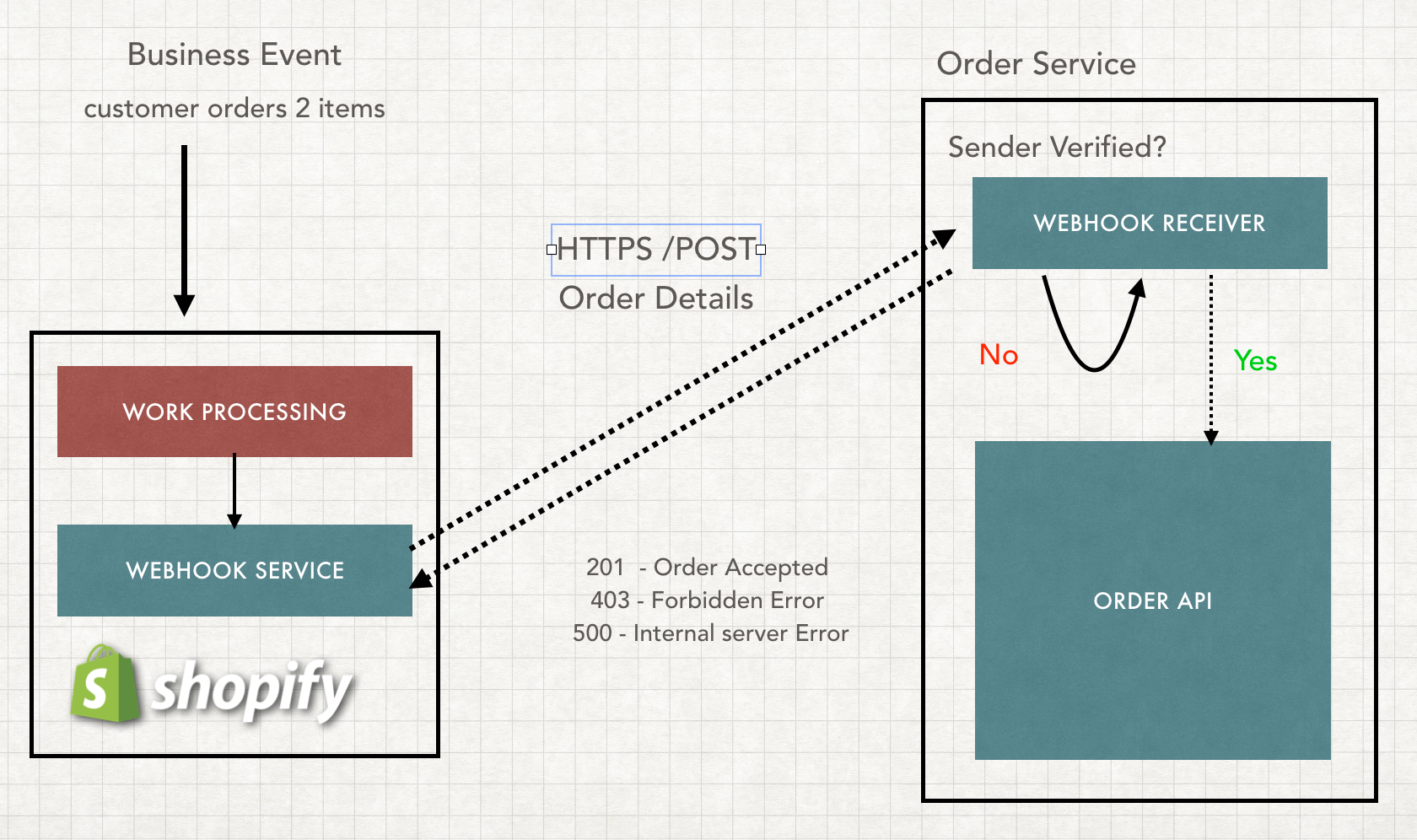
Webhook’s are based of ‘Push Architecture’ which means the server that broadcasts the webhook must be aware of the receiving clients. When new data is available the server pushes data (aka makes a /POST request in this case) to the client that exposes an http endpoint.
This is different from traditional **‘Pull style architecture’ **which is reversed. The client would normally poll and ‘pull’ data from the server for new information. The server will respond with either stale or updated data.
The Push style is nice because you don’t have to worry about constantly requesting a resource. However it brings a new set of trade offs.
With Push style: your receiving client exposes an open http endpoint instead of performing the request. This means that if the endpoint is public, anyone can push a payload to this endpoint. This could be a disaster if this endpoint is not secured, as it could kickoff fraudelent transaction that could be difficult to reverse.
If the payload isn’t valid, a bad actor can continually ‘push’ garbage requests to this endpoint and force your backend systems to service these requests instead of genuine business transaction from real customers.
So how do we validate if webhook is legit? Well it depends on the implementation details of how the webhook is setup. Typically with 3rd party services such as Shopify, they will send the webhook with a signature in the request header.
X-Shopify-Hmac-Sha256
You can verify the signature to check if the request truly came from Shopify by generating a hash from taking the rawBody of the payload and combining it with your Shopify Secret API key provided to you upon registering to the webhook service and the sha256 algorithm. If the generated hash matches the signature from the X-Shopify-Hmac-Sha256 request header then you can be assured that the request is legitimate .
Below is a generic webhook validator implementation that can be configured to validate most 3rd party service webhooks (Stripe, Slack, Square etc). In the options parameter you would pass in the name of the algorithm (ex. ‘sha256’), the encoding method (ex. ‘utf8’) and the name of the name hmacHeader (ex. ‘X-Shopify-Hmac-Sha256’)
const crypto = require('crypto');
const safeCompare = require('safe-compare');
const ValidateWebhook = async (request, secret, options) => {
    console.debug(`validating incoming webhook.`);
const { algorithm, encoding, hmacHeader } = options;
const hmacHeaderValue = request.get(hmacHeader);
const body = request.rawBody;
const generatedHash = crypto
        .createHmac(algorithm, secret)
        .update(body, encoding)
        .digest('base64');
if (!safeCompare(generatedHash, hmacHeaderValue)) {
        const ip = request.ip;
        const userAgent = request.get('User-Agent');
        throw new Error(`generated hash !== match hmac header, ${ip} : ${userAgent}`);
    }
}
export default ValidateWebhook;
Cloud Function as webhook endpoints
You can use a cloud function to be your validator endpoint. Your backend service and webhook validator can now work and scale independently from each other.
Let's say you started the new baby clothing line KOMOBEBI ❤. On Christmas Shopify sales go through the roof due to a solid good instagram campaign that causes a sudden rush of 30,000 sales → 30,000 webhook requests to start hitting your system.
By separating the validator in a cloud function from your core architecture, the webhook requests can be load balanced between these scalable cloud functions. The cloud functions can either forward the valid request to your backend directly or use a queue to act as a buffer to stabilize traffic.
As much as we would like to believe that these 3rd party webhooks cannot be at fault. There is a possibility that the same webhook can be sent out twice or more. It is important to design Idempotent interfaces to handle the same business event hitting your backend system (resulting 5 duplicate orders for the same order). Implement some form of check by using uuid from the webhook and cache somewhere to check if this request has been ‘serviced’ before.
Retry logic and DLQ for transactional events
As stated above, webhooks requests can fail. It is important to promptly send an error response back to the webhook service (4xx or 5xx). The third party service usually has an SLA (service level agreement) to retry later using a non-linear retry strategy (ex. try again in 5 seconds, 1 min, 30 mins, 2 hrs).
If the request fails to many times, the service will eventually give up and stop sending the same request again. This could be problematic on business events that are transactional in nature such as a payment.
If a webhook has failed over a certain threshold, you should set up a retry-queue and a dead letter queue. I will write an article eventually on how to implement this retry strategy in a future article.
Hopefully you found this helpful and until next time!

AgeRate is a Biotech Startup in Hamilton Ontario that focuses on creating innovative next generation epigenetic tests. If you want to read more engineering, product design and R&D articles feel free to follow us!
If you are interested in our product launch in this summer then subscribe for exclusive access to pre-order prices (and to stay in-the-know on what we’re doing)