Perancangan container dalam ubuntu server menggunakan linux container atau lxc. Container adalah metode virtualisasi tingkat sistem operasi untuk menjalankan beberapa sistem operasi yang terisolasi satu sama lain dalam satu perangkat atau satu host. Dalam hal ini adalah ubuntu server memiliki beberapa ubuntu server sebagai container didalamnya dan dapat menciptakan lingkungan development maupun production dalam satu perangkat tanpa mengganggu satu sama lain.
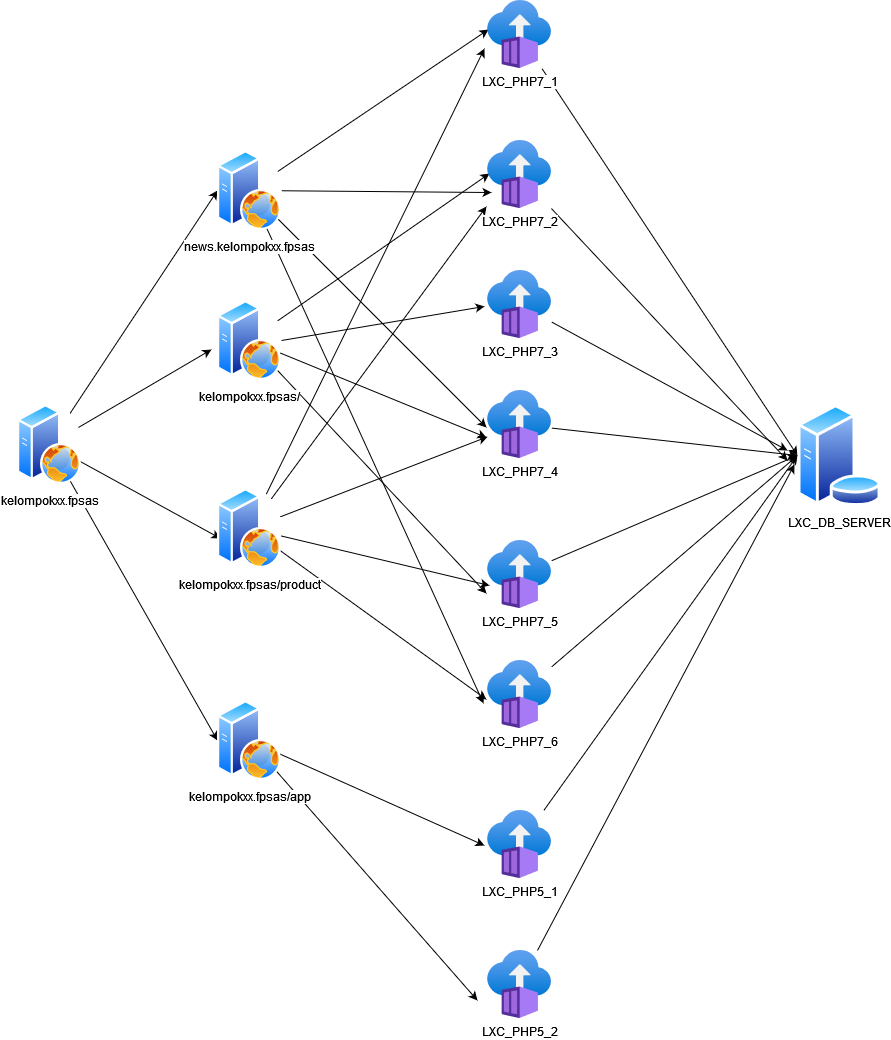
- VM Ubuntu 20.04 (menggunakan metode bridge network, dan static ip)
- Nginx
- 6 instance LXC ubuntu 20.04 PHP 7.4
- 1 instance LXC debian 10 mariadb server
- Semua instalasi menggunakan Ansible
- kelompok13.fpsas/ menggunakan laravel 8
- news.kelompok13.fpsas menggunakan wordpress terbaru
- kelompok13.fpsas/product menggunakan YII 2.0
- kelompok13.fpsas/app menggunakan Code Igniter 3





- Deploy all laravels' hosts
- Laravel's Roles
- Install requirement items, add Repository, and clone the laravel's git
- Delete the files' apt chache
- Install php7 package requirements
- Ignore yes to skip the error from lxc's installed yet package
- Add php repository and add key for php packages
- Add php repository
- Install nginx requirements
- Clone the laravel's git
- Setup the server file
- Copy nginx files template
- Create the symlink
- Copy laravel's file config
- Install composer for laravel
- Generate the key
- Change the permission
- Copy database file
- Write up the host in hosts file
- Nginx's config file
- Database file
- The handlers
- Run laravel's ansible
- The result
| No | Var Name | Value | Explain |
|---|---|---|---|
| 1 | git_url | https://github.com/laravel/laravel | The laravel git |
| 2 | destdir | /var/www/html/laravel | Destination directory for installation |
| 3 | domain | ansible host | Get current lxc's object |
| 4 | conf_name_nginx | app-laravel8.conf | File name |


- Deploy all Codeigniters' hosts
- Codeigniter's Roles
- Install requirement items, add Repository, and clone the Codeigniters's git
- Delete the files' apt chache
- Install php7 package requirements
- Ignore yes to skip the error from lxc's installed yet package
- Add php repository and add key for php packages
- Install nginx requirements
- Clone the ci's git
- Copy nginx files template
- Copy database template
- Setup the server file
- Delete another nginx config
- Create a symlink
- Write up the host in hosts file
- Nginx's config file
- Database file
- The handlers
- Run ci's ansible
- The result
| No | Var Name | Value | Explain |
|---|---|---|---|
| 1 | git_url | https://github.com/aldonesia/sas-ci | The ci git |
| 2 | destdir | /var/www/html/ci | Destination directory for installation |
| 3 | domain | ansible host | Get current lxc's object |
| 4 | conf_name_nginx | ci3_app.conf | File name |


- Deploy all Wordpress' hosts
- Wordpress's Roles
- Install requirement items, add Repository, and clone the Wordpress's git
- Delete the files' apt chache
- Install php7 package requirements
- Ignore yes to skip the error from lxc's installed yet package
- Add php repository
- Add key for php packages
- Add php 7 repository
- Install nginx requirements
- Setup the server file
- Clone the wp's git
- Copy nginx files template
- Create the symlink
- Copy wordpress's file config
- Write up the host in hosts file
- Nginx's config file
- wordpress's file config
- The handlers
- DNS's Roles
- 3.0.10.in-addr.arpa template
- kelompok13.fpsas template
- named.conf.local template
- named.conf.options template
- resolv.conf template
- Run Wordpress and dns's ansible
- The result
| No | Var Name | Value | Explain |
|---|---|---|---|
| 1 | git_url | https://github.com/WordPress/WordPress | The wordpress git |
| 2 | destdir | /var/www/html/wordress | Destination directory for installation |
| 3 | domain | ansible host | Get current lxc's object |
| 4 | conf_name_nginx | app-wp5.9.conf | File name |


| No | Var Name | Value | Explain |
|---|---|---|---|
| 1 | full_ip_host | Full Ip | Get current lxc's ip |
| 2 | ip_host | Ip | Split ip into list |
| 3 | zone_name | ip_host[2] + ip_host[1] + ip_host[0] + in-addr | Set name file |
| 4 | last_byte | ip_host[3] | File name |
| 4 | name_dns | news | Set dns name |


- Deploy all Yii2' hosts
- Yii2's Roles
- Install requirement items and add Repository
- Delete the files' apt chache
- Install php7 package requirements
- Ignore yes to skip the error from lxc's installed yet package
- Add php repository
- Add key and php repository
- Install nginx requirements
- Setup the server file
- Create a yii project
- Copy nginx files template
- Copy database file
- Create the symlink
- Change the permission
- Nginx's config file
- yii's file config
- The handlers
- Run yii's ansible
- The result
| No | Var Name | Value | Explain |
|---|---|---|---|
| 1 | destdir | /var/www/html/ | Destination directory for installation |
| 2 | domain | ansible host | Get current lxc's object |
| 3 | conf_name_nginx | app-yii2.conf | File name |


- Deploy Mariadb' hosts
- Database's Roles
- Install requirement items and setup the db's environment
- Create the databases
- Database file config
- Run mariadb's ansible
- The result
| No | Var Name | Value | Explain |
|---|---|---|---|
| 1 | username | agi | username |
| 2 | password | password user | password to root access |
| 3 | domain | lxc_mariadb.dev | servername |


