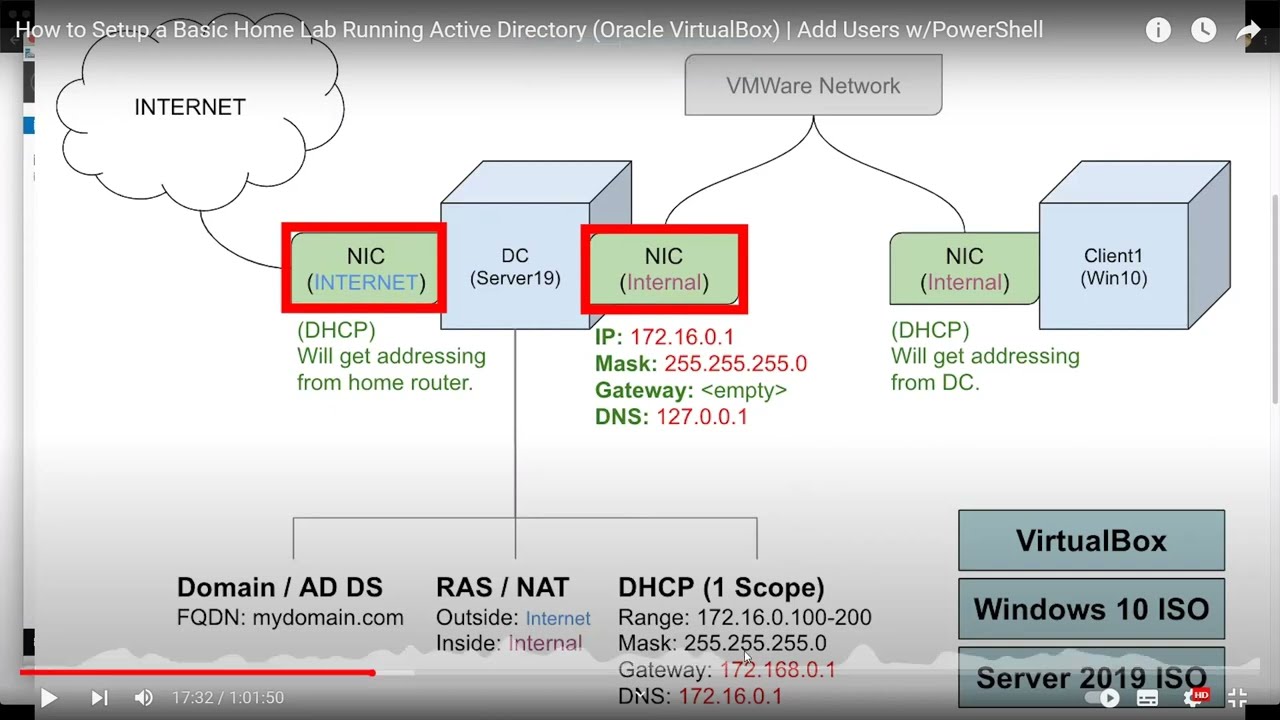
This project showcases my skills in setting up an Active Directory (AD) home lab using Windows Server 2019 and VirtualBox. Additionally, it features a PowerShell script for bulk user creation in AD, creating 1000 users for testing and demonstration purposes.
- PowerShell
- Active Directory
- VirtualBox
- Windows 10
- Windows Server 2019
-
VirtualBox Setup
- Install and configure VirtualBox on your host machine.
- Create virtual machines for Windows Server 2019 and Windows 10 with specified settings.
-
Windows Server 2019 Configuration
- Set up Active Directory on the domain controller (Windows Server 2019). Refer to [insert link to your Active Directory setup guide].
- Promote the server to a domain controller with a specified domain name and DNS installation.
-
DHCP Server Configuration
- Open the Server Manager on the domain controller.
- Select "Manage" and click on "Add Roles and Features."
- Choose "DHCP Server" in the role installation wizard.
- Complete the DHCP server installation process, ensuring to configure the DHCP scope with relevant details (IP range, subnet mask, gateway, and DNS server).
-
Windows 10 Configuration
- On the Windows 10 virtual machine, open the Network and Sharing Center.
- Set the network location to "Work network" to enable DHCP.
- Confirm the assignment of a dynamic IP address from the DHCP server.
-
Verification
- Verify the successful connection by checking the IP configuration on the Windows 10 machine. The IP should be within the DHCP scope defined on the domain controller.