Docs
NOTE: This documentation applies to the branch next. It contains a lot of changes to the master branch.
The mideaas project consists of three subprojects
-
mideaas-app- The most high level project, IDE customization. -
mideaas-ide- Generic IDE, used bymideaas-app -
mideaas-editor- The collaborative code editor used bymideaas-ide.
Some of the more important classes of mideaas-app and mideaas-ide are shown in the image
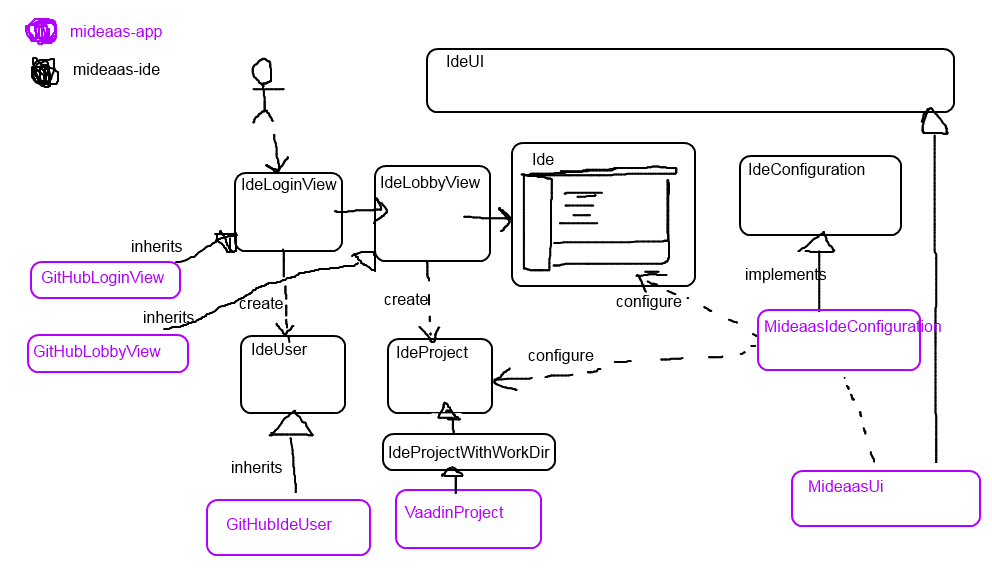
The IdeUI class in mideaas-ide can be extended to create custom IDE environments. The MideaasUI in mideaas-app is one such environment. The IdeUI class receives an IdeConfiguration object that can be used to configure the IDE. For example, to define custom IdeLoginView, IdeLobbyView, customize projects to have certain error checkers and so on.
Class MultiUserEditor implements a collaborative code editor with the help of the AceEditor addon. Used by mideaas-ide. The mideaas-app should not need to know (much) about this.
Some of the more important classes and interfaces in org.vaadin.mideaas.ide:
The IDE. A Vaadin component for editing IdeProject.
The Vaadin UI class for IDEs. Implements navigation using Vaadin Navigator.
The configuration object passed to IdeUI for configuring the Ide and related things.
Has an ideCreated method that can customize a newly created Ide.
The project edited in Ide. Can be extened to create different kinds of projects.
All the projects are created by IdeConfiguration.createProject
Project contents at a specific point in time can be get with getSnapshot().
The projects are not stored persistently anywhere.
It's the responsibility of somebody else to store the project contents (to disk or to a Git repository or whatever) if that's needed. Similarly it's somebody elses responsibility to read project contents (from disk or from a Git repository or whatever) when creating a project. (The opening of project is done in IdeLobbyView).
The user in the Ide. Can be extended, for example GitHubIdeUser.
Vaadin View for logging in. Must call IdeUI.logIn(IdeUser) to move forward after a successful login.
Vaadin View for selecting a project. Shown after the user has logged in. Must call IdeUI.startProject("name", mapOfFileContents) to create and open a project for editing.
TODO: startProject parameters?
Some of the more important classes and interfaces in org.vaadin.mideaas.app:
The UI class for MIDEaaS projects.
The configuration object for MIDEaaS, passed to IdeUI.
A project containing Vaadin-specific things.
Has a (temporary) build dir. Can be written to disk with writeToDisk().
-
org.vaadin.mideaas.app.git- Git stuff org.vaadin.mideaas.app.guards-
org.vaadin.mideaas.app.java- Java-compilation stuff -
org.vaadin.mideaas.app.maven- Maven building stuff -
org.vaadin.mideaas.app.test- Testing integration